Our Top Picks
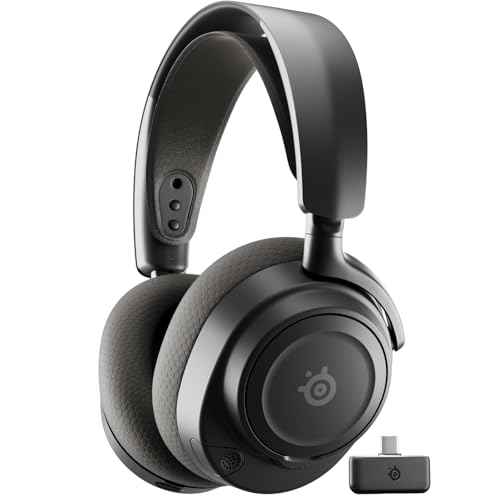 SteelSeries Arctis Nova 7 Wireless Gen 2 GamingInformation Not Available3.41 x 6.6 x 7.58 inches0.72 poundsCheck on Amazon
 Razer Barracuda X Wireless Gaming & Mobile HeadsetStandard3.32 x 6.4 x 7.34 inches0.6 poundsCheck on Amazon
 Turtle Beach Stealth 700 Wireless Multiplatform Gaming HeadsetStandard7.87 x 6.81 x 3.7 inches0.9 poundsCheck on Amazon
Choosing between a 2.4GHz dongle and Bluetooth is not really a choice about wireless in general. It is a choice about what happens in the half second after you press fire, take a call, or switch from a console to a phone. The dongle path is built around one gaming device and a dedicated link. Bluetooth is built around moving easily between the devices you already own.
This guide is for PC and console players deciding which link should be primary, for households sharing one headset across several machines, and for anyone who wants game audio and phone audio at the same time. Every pick below was selected from its Amazon product title and listing details, with the connection type stated plainly for each model.
Quick Picks
As an Amazon Associate we earn from qualifying purchases
| Product | Best for | Key spec from title |
|---|---|---|
| HyperX Cloud III Wireless | A single PC or PlayStation setup on a dedicated dongle | 2.4GHz Wireless, up to 120-hour Battery, 53mm Angled Drivers |
| SteelSeries Arctis Nova 7 Wireless Gen 2 | Mixing game audio with phone audio at the same time | Mix 2.4GHz/Bluetooth, 50+ HR Play, Neodymium Drivers |
| Razer Barracuda X | Switching between a gaming device and a phone during the day | 2.4GHz Wireless + Bluetooth, 40mm Drivers, 50 Hr Battery |
| Turtle Beach Stealth 700 Gen 3 | Two gaming systems kept ready without moving a transmitter | 60mm Drivers, Bluetooth, 80-Hr Battery, Dual Transmitters |
How to Choose
Latency and what the dongle actually changes
A 2.4GHz gaming dongle creates a dedicated wireless link between the headset and one host device, and that link is designed around game audio rather than general device pairing. Bluetooth, by contrast, has to work across phones, laptops, tablets, and consoles that each handle audio slightly differently, so the delay between action and sound can vary more from device to device. For fast shooters, rhythm games, and voice chat that must stay in step with what you see, the dongle is the safer primary connection. For story games, video, and casual play, many players will never notice the difference, which is why the right answer depends on your games first.
Console and PC compatibility comes before features
A headset can only use Bluetooth on a console if that console supports Bluetooth audio in the way the headset expects, and many gaming systems route wireless headsets through a USB transmitter instead. That is why the platform list in an Amazon title matters more than a generic wireless label. Check whether your exact PlayStation, Xbox, Switch, or PC setup is named, and whether the dongle is USB-C, USB-A, or both, because a compact handheld port and a desktop rear port create different problems. A dual-mode headset solves travel and phone use neatly, yet it still needs the correct dongle path for the machine you game on most.
Battery life changes with the connection you use
Battery claims are not interchangeable across connection modes, and a headset that lasts a long time on one link may run for a different span on the other. One model in this guide separates the two figures in its own title, listing a shorter run on 2.4GHz and a longer run on Bluetooth, which shows why you should read the number beside the mode you will actually use. Fast charging also matters in practice: a short top-up before a session can matter more than a huge headline figure you rarely reach. Match the claim to your routine, whether that is nightly charging or weekly charging.
Simultaneous connections are different from switching
Switching and mixing sound similar in product names, but they describe different evenings. A switching headset holds two kinds of connection and moves between them, so your phone replaces the game feed when you change mode. A simultaneous headset keeps both feeds live, letting a call, chat app, or music from a phone sit alongside game audio from the dongle. If you regularly take calls mid-session or use a phone chat app while playing on console, simultaneous audio is worth prioritising. If you simply move between desk and sofa, fast switching is enough, and you do not need to pay attention to mixing controls you will never touch.
The 4 Best Options
HyperX Cloud III Wireless

This is the clearest example of the dongle-first approach in the group. Its Amazon title leads with 2.4GHz wireless for PC, PS5, and PS4, pairs that link with a long battery claim, and leaves Bluetooth out of the proposition entirely. Choose it when one gaming machine dominates your routine and you would rather have a dedicated connection, a detachable microphone for desk chat, and memory foam comfort than phone pairing. It also suits players who dislike mode buttons and settings menus, because there is essentially one wireless job here, and the headset is built to do that job without asking you to manage two radios.
Specs
- Connection: 2.4GHz Wireless
- Compatibility from title: PC, PS5, PS4
- Battery life from title: up to 120-hour Battery
- Drivers: 53mm Angled Drivers
- Audio feature from title: DTS Spatial Audio
- Design features from title: Memory Foam, Durable Frame, 10mm Microphone
Best for: Players with one main PC or PlayStation setup who want the dongle as the only wireless link.
Watch out for: There is no Bluetooth in the title, so phone and tablet use will need a different solution.
SteelSeries Arctis Nova 7 Wireless Gen 2
The Nova 7 Gen 2 is the pick for readers who refuse to choose between the two links because their sessions already involve both. Its title states Mix 2.4GHz/Bluetooth, and the listing describes hearing game audio through the USB-C dongle while music or calls arrive from a phone at the same time. That makes it a strong fit for PC, PlayStation, and Switch players who keep a phone nearby for chat or media. The real-time app control named in the title also suits players who like adjusting audio from a phone instead of pausing a game to open desktop software.
Specs
- Connection: 2.4GHz via USB-C dongle plus Bluetooth, usable simultaneously
- Compatibility from title: PC, PS5, PS4, Switch 1/2, Mobile
- Battery life from title: 50+ HR Play
- Drivers: Neodymium Drivers
- Included in listing: Compact USB-C Wireless Dongle, USB-C to USB-A Adapter, USB-A to USB-C Charging Cable
- Bluetooth version from listing: 5
Best for: Players who want game audio and phone audio live together, not one after the other.
Watch out for: Confirm the dongle and adapter fit your ports, especially on a handheld or a crowded console setup.
Razer Barracuda X
The Barracuda X represents the switching version of dual wireless. Its title combines 2.4GHz wireless and Bluetooth across PC, PlayStation, Switch 2, Android, and iOS, and the listing describes SmartSwitch dual wireless for moving between a high-speed 2.4GHz connection and Bluetooth mode. That suits commuters and students who game at a desk, then take the same lightweight headset out with a phone. The detachable microphone helps that double life, since it can stay home when the headset is only carrying music or calls. Pick it for movement between devices in sequence, rather than for hearing two feeds blended together.
Specs
- Connection: 2.4GHz Wireless + Bluetooth, with SmartSwitch Dual Wireless from the listing
- Compatibility from title: PC, PlayStation, Switch 2, Android, iOS
- Battery life from title: 50 Hr Battery
- Drivers: 40mm Drivers
- Microphone from title: Detachable Mic
- Bluetooth version from listing: 5.2
- Weight detail from listing: 250g Ergonomic Design
Best for: One headset shared between a gaming setup and a phone, used on one device at a time.
Watch out for: Switching is not the same as simultaneous mixing, so check which behaviour you actually need.
Turtle Beach Stealth 700 Gen 3
The Stealth 700 Gen 3 tackles a different frustration: moving one transmitter between two gaming systems. This PlayStation and PC version ships with dual transmitters in the listing, so each machine can keep its own USB connection ready, while simultaneous Bluetooth connects a phone alongside the game feed. Its title highlights large drivers, an AI noise-cancelling microphone, and a long battery claim. Consider it if your headset lives between a console in the lounge and a PC at a desk, and unplugging hardware every evening is the reason you keep defaulting to an old wired set instead of using wireless properly.
Specs
- Connection: Simultaneous 2.4GHz Wireless and Bluetooth 5.2 from the listing
- Compatibility from title: PS5, PS4, PC, Mobile
- Battery life from title: 80-Hr Battery
- Drivers: 60mm Drivers
- Microphone from title: AI Noise-Cancelling Mic
- Included in listing: 2 CrossPlay USB Wireless Transmitters, Charging Cable (USB-A to USB-C)
Best for: Households with a PlayStation and a PC both in regular use, plus a phone connected alongside.
Watch out for: This listing is the PlayStation and PC version named in its title, so Xbox players must check for the correct version for their console.
Which One Fits Your Situation
You play competitive games on one PC or PlayStation
Start with the HyperX Cloud III Wireless. A single dedicated 2.4GHz link removes the mode decisions that add nothing to a fixed desk or console setup, and its long battery claim suits players who forget charging cables for days. You give up Bluetooth phone pairing, but if every session happens on the same machine, that trade is honest and simple.
You keep a phone beside you while you play
Choose the SteelSeries Arctis Nova 7 Wireless Gen 2 when calls, messages, or music need to reach you without muting the game. Its simultaneous connection is the point, not a bonus. The Turtle Beach Stealth 700 Gen 3 is the alternative when that same habit happens across both a PlayStation and a PC, thanks to its two transmitters.
You move between campus, work, and home gaming
The Razer Barracuda X fits a day split across places. Use the dongle where you game, switch to Bluetooth for the phone when you leave, and remove the microphone when a gaming boom would look out of place. Its lighter design supports that portable role. It will not blend two feeds at once, but for sequential use across a busy day, blending is unnecessary weight in the feature list.
Two gaming systems share one headset
Pick the Turtle Beach Stealth 700 Gen 3 and leave one transmitter in each system. That small convenience changes behaviour: the headset is ready where you sit down, instead of waiting in whichever room held the last session. Add the phone over Bluetooth when needed. Households that argue over a shared headset will understand immediately why dual transmitters matter more than another audio preset.
Common Mistakes
- Assuming Bluetooth in a title means Bluetooth works on every console you own, without checking the named platforms in the listing.
- Comparing a battery figure for Bluetooth against a battery figure for 2.4GHz as if both numbers described the same connection mode.
- Buying a switching headset when you wanted simultaneous audio, or paying for mixing controls when you only ever use one device at a time.
- Forgetting where the dongle will live, then losing the small USB-C transmitter that the entire gaming connection depends on.
- Charging with an unrelated cable after the supplied one is lost and continuing to use a headset whose battery area feels unusually warm or looks swollen; stop using it and follow the manufacturer guidance instead.
Frequently Asked Questions
Is 2.4GHz always better than Bluetooth for gaming?
For game audio on a supported PC or console, a dedicated 2.4GHz dongle is usually the more predictable primary link, because it is built for that one connection. Bluetooth remains better for phones, tablets, and moving around. The best choice is therefore not a universal winner, but the link that matches the device and the pace of the games you play most often.
Can I use a Bluetooth headset with a PlayStation or Xbox?
Only when the console and the headset support the same Bluetooth audio route, which is not guaranteed by the word wireless. Many headsets in this category reach a console through a USB dongle instead. Read the platform names in the Amazon title for the exact version listed, because a PlayStation version and an Xbox version are not interchangeable purchases.
What does simultaneous 2.4GHz and Bluetooth actually let me hear?
It lets two sources stay audible together. Game sound arrives through the dongle while a phone supplies a call, a chat app, or music over Bluetooth, and you balance the two instead of switching away from the game. Models described as switching do something else: they move you from one source to the other, which is fine for sequential use but not for mixed audio.
Do I need Bluetooth if my headset already has a dongle?
Not necessarily. If you play on one machine, rarely connect a phone, and charge the headset at the same desk, a dongle-only model covers your routine with fewer modes to manage. Bluetooth earns its place when the headset travels, pairs with a phone daily, or needs to carry calls and media away from the gaming setup. Buy the second radio for a real habit, not for a spec sheet.
FAQ
Is 2.4GHz always better than Bluetooth for gaming?
Can I use a Bluetooth headset with a PlayStation or Xbox?
What does simultaneous 2.4GHz and Bluetooth actually let me hear?
Do I need Bluetooth if my headset already has a dongle?
More from Amazon
Programs that pair well with the guide above. Offers and eligibility are set by Amazon and may change.
Free shipping on eligible items, Prime Video and more. Eligible new members can start with a free trial.
Start a Prime free trialAd-free music streaming. Eligible new subscribers can start with a free trial.
Try Music Unlimited freeA Prime membership for ages 18-24 with a trial period. Eligibility is set by Amazon.
See Prime for Young AdultsAudiobooks and podcasts to listen to on the go. Eligible new members can start with a free trial.
Try Audible freeAs an Amazon Associate we earn from qualifying purchases.