Key takeaways
- A specification-based PXN 2113PRO review covering Windows compatibility, programmable controls, suction-cup mounting, vibration and expansion unknowns.
This review analyzes published product information. We have not performed careful comparison of this unit.
As an Amazon Associate, we earn from qualifying purchases.
A Windows flight stick, not a universal simulator controller
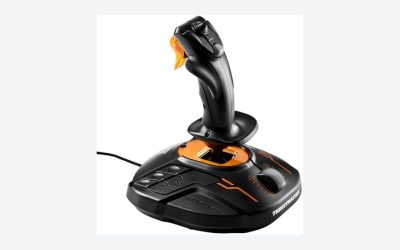
The PXN 2113PRO combines a flight joystick, throttle control and programmable inputs in a USB controller intended for Windows PCs. Its buying case is straightforward: it offers several flight-control functions without requiring a separately listed throttle unit. The important caveats are equally clear: console support is excluded, mounting relies on suction cups, and vibration should not be confused with force feedback.
This review is based on the supplied retailer specifications and setup information, not careful comparison. Those details establish the controller’s advertised functions, but they do not establish sensor accuracy, long-term durability or how well its controls suit a particular aircraft. Treat the 2113PRO as a candidate for a Windows desktop setup, with game-specific mapping and physical mounting checked before committing.
The listed hardware at a glance
| Specification | PXN 2113PRO listing details |
|---|---|
| Connection and platform | USB; Windows 7, 8, 10 and 11 PCs |
| Primary controls | Four-axis control, throttle control and rapid-fire trigger |
| Additional inputs | Eight-way hat switch and 12 programmable buttons |
| Customization | Software adjustments, keyboard mapping, testing and calibration |
| Feedback | Vibration with an underside switch; force feedback explicitly unsupported |
| Desk mounting | Four underside suction cups, intended for a smooth surface |
| Listed size | 18.5 × 18.5 × 22.5 cm |
| Listed weight | Approximately 1.10 lb |
Compatibility requires more than a USB port
The listing limits support to Windows 7, 8, 10 and 11. It explicitly excludes Apple devices, PlayStation consoles, Xbox One and Nintendo Switch. That makes the 2113PRO unsuitable as a shared PC-and-console flight controller. A USB connection alone is not evidence that an otherwise unsupported platform will recognize or use it correctly.
PXN’s listing names Microsoft Flight Simulator, X Plane 10, War Thunder and several other games as compatible examples. It separately excludes Minecraft, Asphalt 8 and Ace Combat 7. These are seller compatibility statements rather than independent verification, and the named games should not be treated as a guarantee for every release, mode or software update. In particular, the evidence does not identify which Microsoft Flight Simulator edition its instructions address.
The Microsoft Flight Simulator walkthrough describes selecting a generic USB joystick and assigning inputs manually. That suggests buyers should budget setup time rather than expect a fully tailored aircraft profile. The listing also advises starting the PC before connecting the stick if recognition is a problem. Before buying, check whether your intended simulator can map the functions you need through a generic joystick interface.
Useful controls, with important axis details missing
The advertised combination of four axes, an eight-way hat and 12 programmable buttons provides multiple ways to distribute aircraft commands. A hat could be assigned to views, while buttons could handle frequently used functions, subject to the simulator’s binding options. Keyboard mapping is also advertised, giving another potential route for commands that are not exposed as straightforward joystick assignments.
However, the supplied specifications do not identify each axis or explain whether the grip twists for rudder control. Four-axis wording is not enough to infer a particular rudder mechanism. Anyone expecting coordinated yaw control from the stick itself should verify that detail rather than assume it. Sensor technology, travel ranges and throttle construction are also unspecified.
The listing promotes one-handed operation, but that claim does not establish that every aircraft function can be managed comfortably from the controller. The throttle control may reduce the immediate need for a separate throttle device; it does not establish equivalence to a dedicated multi-lever setup. Buyers flying aircraft with more involved engine controls should first list their required bindings and decide which can remain on the keyboard.
Suction mounting makes the desk part of the decision
Four suction cups provide the advertised attachment method, and the seller specifically associates their use with a smooth tabletop. The practical implication is that surface choice matters. Do not assume the same attachment on a textured desk, desk mat or an unfinished surface, and do not interpret the seller’s stability language as a tested resistance to vigorous inputs.
The listed dimensions help with space planning, but leave clearance for your hand and access to the surrounding controls rather than allocating only the controller’s stated footprint. No clamp, bolt-hole pattern or cockpit mounting specification is documented in the supplied evidence. For a permanent simulator rig, confirm an attachment solution before treating this as a drop-in mounted component.
Vibration is an extra effect, not force feedback
The 2113PRO advertises vibration and has an underside switch for enabling it. The listing recommends setting driver vibration strength to at least 50% and warns that very low settings may be difficult to feel. Those instructions describe configuration, not measured feedback strength or confirmed behavior across games.
More importantly, force feedback is explicitly unsupported. Buyers seeking simulated aerodynamic loading or changing control resistance should not choose this stick on the strength of its vibration claim. Whether a particular game produces useful vibration remains something to verify separately.
Expansion planning and verdict
The seller says basic play does not require a driver installation, while its optional driver supports testing, calibration and settings. That distinction matters: basic recognition and customized operation are different expectations. The published listing information does not document accessory ports, supported pedal pairings or a dedicated expansion ecosystem. If you anticipate adding pedals or a separate throttle, confirm their coexistence in your simulator instead of assuming direct integration with this joystick.
The PXN 2113PRO is worth considering for a Windows user who wants throttle control, a hat and programmable buttons in a desktop flight controller and accepts manual mapping. Its clearest reasons to pass are an unsupported platform, a need for force feedback or an unverified mounting or rudder requirement. If your search actually concerns arcade fighting-game controllers rather than flight sticks, our fight stick guide covers that separate category.
Sources: PXN 2113PRO retailer listing and supplied specifications.
Check the exact product and current offer on Amazon