Our Top Picks
A fast PC can be undone by a slow drive, and a Gen4 NVMe M.2 SSD is the cheapest way to make sure that does not happen. PCIe 4.0 x4 doubles the bandwidth of the older Gen3 interface, and it is mature enough that capable drives are no longer rare. Yet the phrase “high performance” invites confusion. A drive that peaks at 7,000 MB/s on a spec sheet may behave very differently during a long copy from one that peaks at 5,000 MB/s, and the physical size of the module decides whether it fits your board at all.
This guide is for builders and upgraders choosing a Gen4 M.2 drive for a gaming rig, a workstation, a console expansion slot or a compact PC. It reviews five drives using only the facts in their listings: capacity, interface, form factor, quoted speeds and whether the unit is retail or OEM. Spec-sheet speeds are the ceiling and not a promise, so read each section as a way to match a drive to a use case, and confirm that the module length suits your board before you buy.
Quick Picks

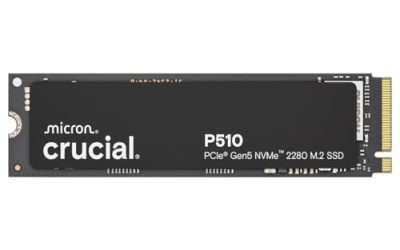
Kingston NV3 1TB M.2 2280 NVMe SSD | PCIe 4.0 Gen 4x4 | Up to 6000 MB/s | SNV3S/1000G
One of the consumer electronics options compared in this guide.
View on Amazon
WD_Black SN7100 1TB NVMe SSD - Gen4 PCIe, M.2 2280, Up to 7,250 MB/s Read Speed, Up to 6,900 MB/s Write Speed, Next Gen TLC 3D NAND, for Laptops, Handheld Gaming Devices - WDS100T4X0E
One of the consumer electronics options compared in this guide.
View on Amazon
BIWIN Black Opal NV7400 2TB SSD Gen4x4, Read Speed up to 7450MB/s, NVMe M.2 2280 PCIe 4.0 Internal PC Solid State Drive for Laptop/Desktop/PS5
One of the consumer electronics options compared in this guide.
View on Amazon
WD Green SN3000 2TB NVMe SSD, M.2 2280 PCIe Gen4 x4, M-Key (OEM New) | Up to 5000MB/s, Fast Boot, Reliable High Performance, Internal Solid State Drive for Laptop, Desktop, Gaming PC, WDS200T461E
One of the consumer electronics options compared in this guide.
View on Amazon
WD PC SN740 256GB NVMe SSD, M.2 2242 PCIe Gen4 x4, M-Key (OEM New) | Up to 4000MB/s, 3D TLC NAND, Low Power High Performance, Fast Boot, Internal Solid State Drive for Laptop, Mini PC & Notebook
One of the consumer electronics options compared in this guide.
View on Amazon| Product | Best for | Key spec taken from the title |
|---|---|---|
| Kingston NV3 1TB | Simple, mainstream Gen4 upgrade | 1TB, M.2 2280, PCIe 4.0 x4, up to 6000 MB/s |
| WD_Black SN7100 1TB | Fast all-round performance | 1TB, Gen4, M.2 2280, up to 7,250 MB/s read, 6,900 MB/s write |
| BIWIN Black Opal NV7400 2TB | Large capacity with high read speed | 2TB, Gen4x4, up to 7450MB/s read, M.2 2280 |
| WD Green SN3000 2TB | Big, everyday storage | 2TB, M.2 2280, PCIe Gen4 x4, up to 5000MB/s, OEM |
| Samsung PM9C1b 1TB | Compact builds needing a short module | 1TB, M.2 2242, PCIe Gen4 x4, up to 7000MB/s read, OEM |
The 5 Best Options
Five listings from the original shortlist were not reviewed. The Kingston NV3 2TB and the WD_Black SN7100 4TB are capacity variants of drives already covered, and three 256GB OEM drives (a WD SN740, a Samsung PM9B1 and a Micron 2550) are too small and, in two cases, too slow for a high-performance desktop. The five below range from mainstream to premium speed.
Kingston NV3 1TB
The NV3 is the plain-spoken member of the group. The title lists 1TB, an M.2 2280 NVMe drive, PCIe 4.0 Gen 4×4 and speeds of up to 6000 MB/s, along with the part number SNV3S/1000G. That is a compact way of saying it is a standard-size Gen4 drive aimed at buyers who want a noticeable step up from SATA or Gen3 without paying for the fastest class. For a typical gaming PC, where game loading is shaped by the whole system and not just raw sequential speed, a drive in this class is a sensible fit.
- The standard 2280 length fits nearly every desktop M.2 slot.
- Gen4 x4 interface gives plenty of headroom for gaming and general use, and the drive remains useful if the board is changed later.
- The part number in the title makes it easy to verify compatibility and warranty details.
- The quoted 6000 MB/s peak is lower than the faster drives in the group.
- The title does not describe the memory type or cache design, so sustained write behavior is an open question.
It is easy to underestimate how far a drive of this class goes. Game installs, operating system updates and day-to-day file handling all feel quick on any competent Gen4 module, and the 1TB size is enough for the operating system, a handful of current titles and a working folder. A buyer who is replacing a SATA drive will notice a bigger change from the interface than from any difference between the five drives here. If you plan to add a second drive later, this one is a good first module because the standard length keeps your options open on almost any board.
Who should skip it: content creators who move very large files daily and want the highest sustained speed. How it compares with the next pick: it gives up some peak speed and writing speed to the SN7100, but it asks for a smaller commitment.
WD_Black SN7100 1TB
The SN7100 is the performance-minded 1TB drive here. The title lists Gen4 PCIe, an M.2 2280 form factor, up to 7,250 MB/s read, up to 6,900 MB/s write and Next Gen TLC 3D NAND, with a note that it suits laptops and similar devices. Having both a high read figure and a high write figure listed is useful, because many budget drives publish only the read number and leave the write number vague. For a high-performance PC that loads large game worlds and copies project files, those two numbers together give a clearer picture of what to expect.
- Both read and write speeds are stated, and both sit near the top of what Gen4 allows.
- The 2280 size fits standard desktop slots and many laptops.
- The WD_Black name signals a gaming-focused line.
- At 1TB, capacity is modest for a library of large modern games.
- The speed advantage over mainstream drives matters mainly in heavy transfers, not everyday use.
This is the drive for someone who has read the spec sheets and wants numbers that line up. A read figure of 7,250 MB/s sits close to the practical ceiling for a PCIe 4.0 x4 link, and the 6,900 MB/s write figure means large installs and project copies should not stall as soon as the first burst ends. The mention of Next Gen TLC 3D NAND tells you the flash type, which is more information than many listings give. Because the title also points to laptop use, the drive is a reasonable pick if you move it between a desktop and a notebook over the years.
Who should skip it: buyers who need two terabytes or more for the same outlay, and anyone who rarely moves large files. How it compares with the next pick: it has a lower capacity than the BIWIN, but a wider set of confirmed speeds.
BIWIN Black Opal NV7400 2TB
The Black Opal NV7400 brings capacity and speed together. The title lists 2TB, Gen4x4, read speeds up to 7450MB/s, an NVMe M.2 2280 module and PCIe 4.0, and suggests use in a laptop, a desktop or a PS5. That compatibility line is useful for anyone who wants one drive that can move between machines, though you should confirm the console’s own requirements before relying on it. A 2TB drive with a read figure near the Gen4 ceiling is a strong all-round choice for a library-heavy gaming rig.
- 2TB of capacity gives room for a large game library plus projects.
- A quoted read speed of 7450MB/s is the highest of the five.
- The listing names desktop, laptop and PS5 use, which broadens the possible uses.
- The title gives no write speed, so sustained copying performance is unknown.
- BIWIN is a less familiar name than Kingston or WD, so check warranty terms carefully.
Capacity is the quiet advantage here. A 2TB drive can hold the operating system, a large game library and a few active projects without constant uninstalling, and it avoids the shuffle of juggling external storage. The cross-device wording is the other draw: a drive that can serve a desktop today and a different machine later keeps its value if you rebuild. Do remember, too, that a high headline read speed says nothing about how the drive behaves once its fast cache is full, so look for the write behavior in independent descriptions if sustained copying is your main use.
Who should skip it: buyers who want to see a quoted write speed or prefer a well-known brand. How it compares with the next pick: it is faster on paper than the WD Green SN3000 and has the same capacity.
WD Green SN3000 2TB
The SN3000 is the capacity-first, everyday drive. The title lists 2TB, an M.2 2280 module, PCIe Gen4 x4, M-Key, an OEM New condition and speeds up to 5000MB/s, with emphasis on fast boot and reliable performance. The speed is the lowest of the five, but the combination of 2TB and a Gen4 interface makes it a pragmatic upgrade for an older system with a slow hard drive or a SATA SSD. The OEM label means it is sold without retail packaging, so read the warranty terms before you buy.
- 2TB of capacity gives plenty of space for games, media and documents.
- A Gen4 interface keeps the drive current even though peak speed is moderate.
- The title leans on fast boot and dependable everyday storage rather than record speeds.
- Up to 5000MB/s is below the leading drives, so heavy transfers will take longer.
- OEM packaging can mean different warranty handling than a retail kit.
If your current machine boots from a hard disk or an aging SATA drive, this is the kind of module that makes the whole computer feel new again, even though its ceiling is lower than the leaders. Applications open faster, updates finish sooner and the system stops pausing when you launch several programs at once. The M-Key label confirms the connector type used by NVMe drives. Treat the OEM marking as a prompt to read the seller policy, because replacement and return terms can differ from those of a retail package.
Who should skip it: players and creators who want maximum speed from a high-performance PC. How it compares with the next pick: it offers twice the capacity of the Samsung PM9C1b but a lower speed ceiling and a different physical size.
Samsung PM9C1b 1TB (M.2 2242)
The PM9C1b is the specialist. The title lists 1024GB (1TB), an NVMe M.2 2242 module, PCIe Gen4 x4, M-Key, OEM New, up to 7000MB/s read, and a focus on fast boot and reliable storage. The 2242 length is the key detail: it is shorter than the common 2280, and it suits compact laptops, handheld devices and some small-form-factor builds that have a short slot. A short drive will not reach a standard desktop slot unless the board offers a 2242 mounting position, so confirm that before ordering.
- A 7000MB/s read figure puts it near the top of the Gen4 range.
- The short 2242 size suits compact devices with limited space.
- The Samsung name on the listing gives buyers a recognizable brand to look up for support questions.
- The 2242 length will not fit every desktop board without a mounting position for it.
- OEM packaging may carry different warranty terms than a retail drive.
For the right device this is an excellent match, and for the wrong one it is a drive that simply cannot be mounted. Handheld gaming computers, thin laptops and some mini PCs use the short size, and a replacement drive of the same length is often the only way to expand storage. Desktop builders should look at their board manual and see whether a 2242 position is shown, because many boards list only 2280. A 1TB size with a 7000MB/s read figure is attractive for a compact build where every millimeter counts.
Who should skip it: anyone with a standard desktop board that has only a 2280 mounting position. It is the most specialized pick, and the right one only when the short size is a requirement.
Why Buy a Gen4 NVMe Drive
A Gen4 NVMe drive is a good investment for specific kinds of builders and is less critical for others.
Gamers upgrading from SATA or a hard drive
If your current game drive is a hard disk or a SATA SSD, a Gen4 NVMe module is a clear step up in loading, patching and installing. The jump from SATA to NVMe is much larger than the jump from Gen3 to Gen4, so a mainstream Gen4 drive such as the Kingston NV3 captures most of the benefit. Gamers also benefit from the way modern engines stream assets from storage, which rewards a drive that responds quickly under many small requests as well as one that posts a big sequential number.
Creators and engineers moving large files
Video editors, photographers and developers who copy large project folders daily gain from higher sequential speeds and from drives that state write performance. The WD_Black SN7100 and the BIWIN NV7400 are the most appealing on paper for that use. Photographers who import thousands of raw files after a shoot and developers who build large projects repeatedly will feel the time savings add up over a working week.
Compact and portable builders
Small-form-factor and handheld builds sometimes need shorter modules. The 2242 size of the Samsung PM9C1b exists for these cases, though you must make sure the device supports it. A buyer replacing a small drive in a mini PC should also check that the new module is not taller than the original, because there is often little clearance under the cover. These buyers should also think about heat, since a small enclosure has little airflow and a fast drive can warm quickly under a long write.
How to Choose a Gen4 NVMe SSD
Interface and real-world speed
PCIe 4.0 x4 allows roughly 7,000 to 8,000 MB/s of transfer in theory. Drives that list 7,000 MB/s or more are using most of that, while drives at 5,000 to 6,000 MB/s are mainstream Gen4. Peak speed matters in large sequential copies and matters little in loading a game or booting Windows, where latency and random access dominate. A useful rule is to treat any figure above about 6,500 MB/s as top-tier Gen4 and to stop comparing beyond that, because the remaining differences rarely show up in daily use.
Capacity
One terabyte is the practical minimum for a gaming desktop in 2026, since modern games run to many gigabytes each. Two terabytes is the comfortable choice for a primary drive that holds the operating system and a library. Larger capacities also tend to write faster, because more flash chips work in parallel. If you are choosing between a fast 1TB drive and a slightly slower 2TB drive, the larger one often serves a gaming library better, because a full drive slows down and forces you to uninstall games.
Form factor and length
M.2 2280 is the standard desktop size, 80mm long. The M.2 2242 size is 42mm and appears in compact devices. Check which lengths your board’s slot and standoff accept, and look at the key type, since M-Key is the one used by NVMe drives. Also check whether the slot is wired to the processor or to the chipset, because a chipset slot can share bandwidth with other devices when they are busy.
Controller, cache and sustained writes
A drive’s controller and flash design decide how it behaves during a long write. Many drives use a fast cache that fills up, after which speed falls. Titles rarely state this, so look for listings that quote write speeds and that name the flash type, such as TLC 3D NAND. If you copy huge files often, favor drives with stated write performance. Cache behavior is the reason two drives with similar read figures can feel different when you copy a game library or export a large video.
Heat and cooling
Fast Gen4 drives can warm up under sustained load and slow down to protect themselves. Many boards ship with M.2 heatsinks, so use them. In a compact case with little airflow, a drive with a lower peak speed can be the smarter choice. Plan airflow so that the drive is not trapped beneath a hot graphics card.
Warranty, OEM vs retail, and where budget drives cut corners
OEM drives, marked in several titles here, usually come without retail packaging and may have different support channels. Read the warranty terms and the endurance figure if stated. Budget drives often cut corners by omitting a cache, using slower flash or quoting only read speed, so a listing that gives both read and write numbers is easier to trust. Ignore headline speeds without capacity attached, because small drives are often slower than their larger siblings. Also ignore marketing phrases such as high performance or fast boot when they appear without any number behind them, and give more weight to listings that name the interface, the form factor and both transfer speeds. The listing for a drive is the only evidence you have before it arrives, so a title that hides its write figure or its length deserves a question to the seller before you order.
Gen4 vs Gen3 vs Gen5: Which Interface Fits
Buyers of a high-performance PC usually weigh the generations of PCIe before they pick a drive.
| Factor | Gen3 NVMe | Gen4 NVMe | Gen5 NVMe |
|---|---|---|---|
| Typical peak speed class | Up to about 3,500 MB/s | 5,000 to 7,450 MB/s in this group | Well above Gen4 |
| Heat output | Low | Moderate | High, often needs a heatsink |
| Board support | Nearly universal | Common on recent boards | Limited to newer boards |
| Best for | Older systems | Most gaming and workstation builds | Heavy professional transfers |
Why Gen4 is the practical sweet spot
Gen4 drives deliver most of the usable speed of a modern system without the heat and cost of the newest generation. For loading games, booting and general work, the difference between a good Gen4 drive and a Gen5 drive is small, and Gen4 is supported on a wide range of boards. The newest generation also tends to need a larger heatsink and a board that supports it, which raises the total cost of the upgrade well beyond the drive itself.
When Gen3 or Gen5 makes sense
A Gen3 slot on an older board will run a Gen4 drive at the slower speed, which still beats SATA. Gen5 matters mainly to professionals moving enormous files all day on a board that supports it. Most buyers are better served by spending the difference on capacity. A practical test is to ask what job the drive will do every day: if the answer is loading games and launching applications, Gen4 already saturates what those tasks can use, and a bigger drive improves the experience more than a faster interface would. Gen3 only makes sense when the board cannot take anything newer. Think about the whole path of your data too: a fast drive still depends on the speed of the source, the network and the software doing the copying.
Setup, Compatibility and Upgrade Tips
What to check before buying
Confirm that your board has a free M.2 slot with PCIe Gen4 x4 wiring, and check the supported lengths. Some slots share lanes with SATA ports and may disable one when occupied. Look at whether the slot sits under a graphics card, where heat can build up, and whether the board includes a heatsink. Read the manual to learn which slot is wired to the processor, since that one usually gets the full Gen4 link.
What to upgrade first
Move the operating system and your most-played games to the new drive first, and keep older drives for storage. Clone the existing drive or run a clean install, then update the board firmware. A clean install is usually the tidier route when you are moving from an old hard disk, because it avoids carrying over years of leftover files and drivers. If you have a spare slot, adding a second drive is often cheaper than replacing the first. Keep your old drive as a backup target until you are sure the new installation is stable, and back up important files before cloning anything.
Common compatibility traps
A drive on a Gen3-only slot will work but at a lower speed. A 2242 drive needs a matching mounting position. Console expansion slots, including the PS5 slot referenced in the BIWIN listing, have their own requirements for heatsinks and size, so read the console’s guidance first. Also remember that an OEM drive may not include mounting hardware, so keep the screw or latch that came with your board. After installation, open the disk management screen and confirm the drive is detected at the expected capacity and link speed.
Which One Fits Your Situation
You want a no-fuss upgrade from SATA
The Kingston NV3 1TB is a simple, mainstream Gen4 step up with the standard 2280 size.
You move big files and want stated write speeds
The WD_Black SN7100 1TB lists both read and write speeds near the top of Gen4, making it the clearest performance pick.
You need lots of space for games and projects
The BIWIN Black Opal NV7400 2TB combines a high read figure with 2TB of space, while the WD Green SN3000 2TB offers the same capacity at a lower speed.
You have a compact device with a short slot
The Samsung PM9C1b 1TB in the 2242 size is the only drive here designed for that case.
Common Mistakes
- Buying a 2242 drive for a standard 2280-only slot.
- Choosing by peak read speed alone and ignoring write performance.
- Skipping the motherboard heatsink and letting the drive overheat.
- Overlooking that an OEM drive may carry different warranty handling.
- Filling a slot that shares lanes with SATA ports and losing a drive bay.
- Paying for Gen5 when a Gen4 drive would feel the same in everyday use.
Related guides
- How Much Does It Cost To Run A Gaming Pc Per Month
- Motherboard Fan Headers And Rgb Headers Explained
- Keyboard And Mouse Combos For Budget Builds
Frequently Asked Questions
Is a Gen4 NVMe SSD worth it over Gen3?
For most gamers and workstation users, yes, if the board supports it and the extra outlay is small. The gain is most visible in large file transfers and less visible in everyday loading. If the cost gap to a Gen3 drive is small, Gen4 is the better long-term pick because it will stay useful across a future board change.
Do I need a heatsink for a Gen4 drive?
It is wise to use one, especially for faster drives under long writes. Many motherboards include heatsinks, and using them helps the drive avoid slowing down.
What does OEM mean on a drive listing?
It means the drive is sold without retail packaging, and support may be handled through the seller instead of the maker. Read the seller’s warranty terms before buying, and keep your proof of purchase.
Will a Gen4 drive work in a Gen3 slot?
Yes, it will work but at the slower Gen3 speed. The drive will still be faster than a SATA SSD in that slot.
Can I use these drives in a PS5?
The BIWIN listing mentions PS5 use, but the console has strict requirements for speed, size and cooling. Check the console’s own guidance before you buy a drive for it.
How much capacity do I need?
One terabyte is the working minimum for a gaming PC, and two terabytes is more comfortable. Choose more if you keep a large game library or edit video. A drive that is nearly full performs worse, so leave some free space.
Final Words
A high-performance PC deserves a drive that matches it, but the best Gen4 NVMe SSD is the one that fits your slot, your files and your budget. The WD_Black SN7100 and BIWIN NV7400 are the speed leaders on paper, the Kingston NV3 is the simple mainstream choice, the WD Green SN3000 offers the most space for everyday use, and the Samsung PM9C1b serves compact builds. Check the length, the warranty and the cooling, and the rest will follow. If you are unsure between two drives, choose the one with the larger capacity and the clearer listing, since a roomy drive that tells you what it is will serve a fast PC for years.