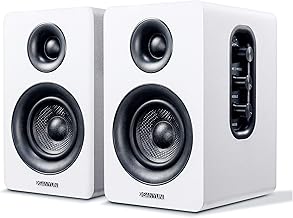
Our Top Picks
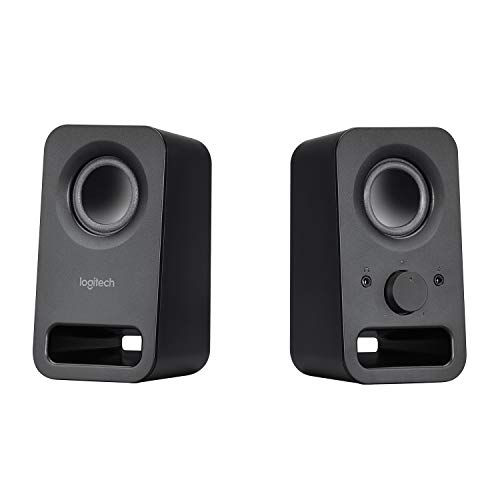 Logitech Multimedia Speakers Z150 with Stereo Sound forOne size7.87 x 3.54 x 6.34 inches1.3 poundsCheck on Amazon
The best computer speakers under $30 are the Creative Pebble 2.0 for compact USB-powered stereo, the FUNLOGY 14W model for a tilted, volume-dial design, and the Logitech S150 as the simplest basic option. Each is compared from listing specifications: power source, wattage, connection type and controls.
At this ceiling you are buying a small pair of 2.0 stereo speakers, a clear step up from laptop or monitor speakers but not a full desk audio system. Home office, small-space and gaming use are covered in the buying section and the FAQ below.
Quick Comparison
| Model | Key specs per listing | Best for |
|---|---|---|
| Creative Pebble 2.0 | USB-powered 2.0 stereo, compact, minimal design | Small desks, neutral look |
| FUNLOGY 14W Stereo | 14W, USB powered, 30° tilt, volume dial | Desktop, laptop, monitor and console use |
| Logitech S150 | USB speakers with digital sound | Basic office audio |
| Logitech Z150 | Stereo multimedia speakers for multiple devices | Sharing between PC and phone |
| Redragon GS510 | 2.0 stereo, 4 LED modes, enhanced bass, USB powered, volume control | Gaming desks |
| LENRUE G11 | Touch lights, USB-C or USB powered, AUX input | USB-C laptops |
We compared these from listing specifications rather than using them. The listings are short: some give wattage, others only a connection type, and none quote frequency response. That is why this guide focuses on power, connectors and controls instead of sound-quality claims you cannot verify from a product page.
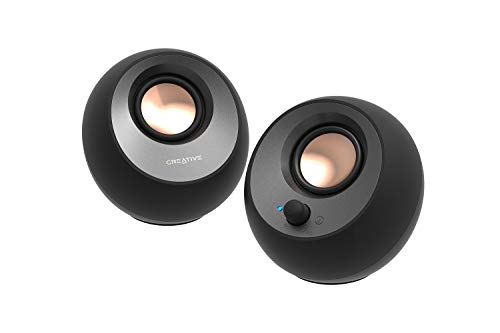
Creative Pebble 2.0
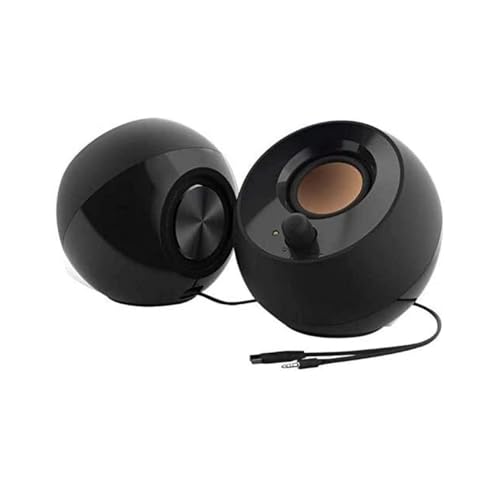
Creative Pebble 2.0, USB Desktop Stereo Speakers for PC/Laptop, Black | USB-Powered, 2.0 Speaker, Compact, Stereo, PC Speakers, Laptop Speakers, Minimal Design, Desktop Audio, Black
Chosen because it specifies USB Desktop Stereo Speakers for PC/Laptop and Black.
View on AmazonSpec line: 2.0 USB desktop stereo speakers for PC and laptop, USB-powered, compact, minimal design.
The Pebble is the most recognisable name in this price band, and its listing is simple: a pair of small stereo speakers powered over USB. That means one cable to a computer, no power brick and an easy fit on a crowded desk. The minimal design looks at home next to a monitor. The trade-off is that the listing gives no wattage, no Bluetooth and no tone controls, so these are plain wired speakers for a PC or laptop. They suit someone who wants a clean upgrade over built-in audio and nothing more.
- Pro: USB-powered, single cable
- Pro: compact, minimal design
- Pro: works with PC and laptop
- Con: no wattage listed
- Con: no Bluetooth or tone controls listed
FUNLOGY 14W Stereo PC Speakers

FUNLOGY Speaker - 14W Stereo PC Speakers, USB Powered, Compact Size with 30° Tilt Design, Volume Dial Control, for Desktop, Laptop, Monitor, Gaming Consoles, Black
Chosen because it specifies 14W Stereo PC Speakers and USB Powered.
View on AmazonSpec line: 14W stereo, USB powered, compact size, 30° tilt design, volume dial, for desktop, laptop, monitor and gaming consoles.
FUNLOGY gives you the most useful details of the group: a 14W rating, a volume dial on the speaker and a 30-degree tilt that aims the sound toward your ears instead of the wall. The listing mentions gaming consoles as well as PCs, which is rare at this budget. It is a lesser-known brand, so check the return policy and warranty on the listing. Also note that 14W is a peak or total figure in many listings, so do not compare it directly with the RMS figures other makers quote.
- Pro: 14W rating listed
- Pro: tilted design and volume dial
- Pro: compatible with consoles, per the listing
- Con: lesser-known brand
- Con: wattage type not specified
Logitech S150
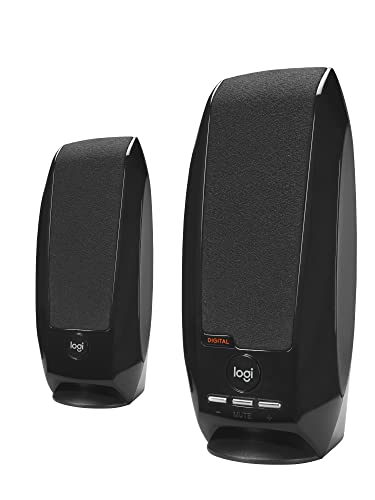
Logitech S150 USB Speakers with Digital Sound
Picked as a relevant option in this category.
View on AmazonSpec line: USB speakers with digital sound.
Logitech’s S150 is the most basic speaker of the group, and its listing is equally brief: USB speakers with digital sound. The USB connection carries both power and audio, which simplifies setup. Expect plain, office-focused performance rather than strong bass. It suits a home office where you want clear voices on calls and background music, and it will be easy to replace if it fails. Beyond that, wattage, size and controls are not in the listing text, so check the maker page.
- Pro: USB connection for power and audio
- Pro: trusted brand
- Pro: simple setup
- Con: wattage and size not listed
- Con: no lighting or tone options
Logitech Z150
Logitech Multimedia Speakers Z150 with Stereo Sound for Multiple Devices, Black
Chosen because it specifies Black.
View on AmazonSpec line: Multimedia speakers with stereo sound for multiple devices.
The Z150’s selling point is the phrase in its title: stereo sound for multiple devices. That points to a setup where you plug in a PC, a phone or a tablet, which is handy if you want one pair of speakers for more than a computer. The listing does not state its connection types, power source or wattage, so verify the plug type and power supply on the maker page before you buy. It is a sensible second Logitech option if the S150 does not fit your connection needs.
- Pro: made for multiple devices
- Pro: stereo sound
- Pro: familiar brand
- Con: connections and power not listed
- Con: no wattage stated
Redragon GS510
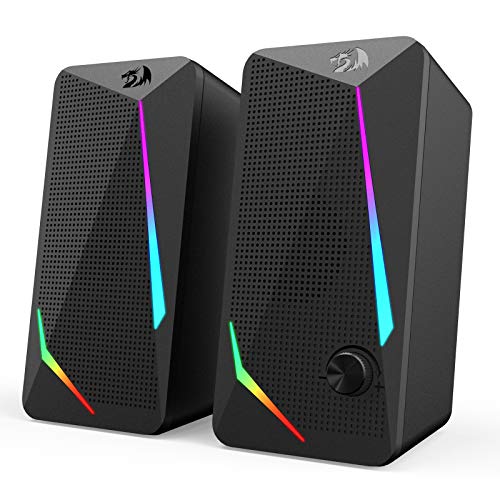
Redragon GS510 RGB Wired Desktop Speakers, 2.0 Channel Stereo Sound, Black | 4 Colorful LED Backlight Modes, Enhanced Bass, Easy-Access Volume Control, Plug & Play USB Powered PC Gaming Speaker
Chosen because it specifies 2.0 Channel Stereo Sound and Black.
View on AmazonSpec line: RGB wired desktop speakers, 2.0 channel stereo, 4 LED backlight modes, enhanced bass, easy-access volume control, USB powered.
The GS510 is the gamer-styled option, with four lighting modes, a bass emphasis and a volume control placed where you can reach it. It is USB powered and plug and play, so setup is easy. The lighting is the main point of difference, and it will suit a desk with RGB peripherals. The listing does not give wattage or frequency range, and heavy bass tuning in this class often sacrifices clarity for dialogue, so listen before deciding if you mostly watch videos or take calls.
- Pro: 4 LED backlight modes
- Pro: enhanced bass and easy volume control
- Pro: USB powered, plug and play
- Con: wattage not listed
- Con: lighting adds nothing to sound
LENRUE G11

LENRUE G11 Computer Speakers for Desktop, Touch Lights PC Speakers with Surge Clear Sound, USB C/USB Powered, AUX Audio for Computer Desktop PC Laptop Desk
Chosen because it specifies Touch Lights PC Speakers with Surge Clear Sound and USB C/USB Powered.
View on AmazonSpec line: Computer speakers for desktop, touch lights, USB-C or USB powered, AUX audio for desktop PC and laptop.
The LENRUE G11 stands out for its USB-C power option alongside USB, which suits modern laptops that have dropped older ports. It adds an AUX audio input and touch-controlled lighting. It is another lesser-known brand with a short listing: no wattage, no dimensions and no Bluetooth is listed. Choose it if a USB-C connection matters to you and you want lighting that you control with a touch rather than a button.
- Pro: USB-C or USB power
- Pro: AUX input listed
- Pro: touch-controlled lights
- Con: lesser-known brand
- Con: wattage and size not listed
How to Choose Under $30
Start with the connection
Match the speaker’s power and audio connections to your computer. USB power is the most convenient for a laptop, while an AUX input is needed for a phone or older device. If your laptop has only USB-C, confirm you have an adapter or choose the LENRUE.
Computer speakers for home office
For calls and background music, pick clear and small over loud and bassy. Speakers with a front volume dial or a tilt are easier to adjust through the day. Avoid lighting you cannot switch off, since it can distract on a video call.
Computer speakers for small spaces
Measure the gap beside your monitor. The Pebble and the FUNLOGY are listed as compact, while the other listings do not give dimensions. Small speakers sound best placed at ear height, a few feet from the listener, on a stable surface.
Computer speakers for gaming
For gaming, a volume control within reach and some bass emphasis help, which is why the GS510 and FUNLOGY are the natural fits. Keep in mind that a headset gives better positional audio, and these speakers only provide stereo.
Set realistic expectations on sound
Speakers at this ceiling do not fill a room. They are better than a laptop’s built-in speakers for voices and casual music, but deep bass and loud, clear volume are beyond their reach.
Power, volume and noise
USB-powered speakers draw their power from the computer, which keeps the desk tidy but limits maximum volume. At this ceiling that is fine for a desk, since you sit an arm’s length away. A common annoyance is electrical hiss or hum at low volume, which depends on the unit and on your computer’s ports. If you hear it, try a different USB port or a short extension cable before returning the speakers.
Placement matters more than price
Where you put small speakers changes the sound more than the difference between two models in this group. Keep them at ear height, angled toward you, and away from walls and stacked monitors. Leaving a few centimetres of space behind them reduces boomy bass, and a desk mat underneath cuts vibration. The tilt on the FUNLOGY does part of this for you.
When to move up from this ceiling
If you listen to music for hours, watch films at your desk or want real bass, speakers with a separate power supply, a larger driver and tone controls are worth considering, and they cost more than this guide covers. The picks here are for people who want better than built-in audio with minimal fuss, and that is the right goal for this ceiling.
Compare the full product before you buy
Because the listings are sparse, open each maker page and look for the dimensions, cable length and whether the speakers include a headphone jack. Cable length matters on desks where the computer sits on the floor, and a front headphone jack saves you from reaching behind the monitor.
A quick match guide
Pick the Pebble 2.0 or S150 for a clean, quiet office desk. Pick the FUNLOGY if you also connect a console or want the tilt and dial. Pick the GS510 if you like lighting and bass. Pick the LENRUE if USB-C power is your priority. Pick the Z150 if you want to share one pair of speakers between a computer and other devices. In each case, read the connector line on the maker page first, since a mismatch there is the one thing that makes a pair of speakers unusable.
Frequently Asked Questions
Do USB speakers need a power adapter?
Those listed as USB powered draw power from a USB port. The listing for the Z150 does not state its power source, so check the maker page.
Are budget computer speakers better than laptop speakers?
Usually yes for volume and stereo separation, though not for deep bass. The difference is most obvious with music and video.
Can I connect these to a console?
Only the FUNLOGY listing mentions gaming consoles. For others, check the connection types and confirm that your console has a compatible output.
Do I need Bluetooth?
None of these listings mention Bluetooth, so they are wired. If you want wireless, you would need to look at a different category of speaker.
Is RGB lighting worth it?
It only matters for looks. If you want lighting, check that it can be turned off, because it can distract during work or calls.
Last updated: November 2026
FAQ
Do USB speakers need a power adapter?
Are budget computer speakers better than laptop speakers?
Can I connect these to a console?
Do I need Bluetooth?
Is RGB lighting worth it?
More from Amazon
Programs that pair well with the guide above. Offers and eligibility are set by Amazon and may change.
Free shipping on eligible items, Prime Video and more. Eligible new members can start with a free trial.
Start a Prime free trialAd-free music streaming. Eligible new subscribers can start with a free trial.
Try Music Unlimited freeA Prime membership for ages 18-24 with a trial period. Eligibility is set by Amazon.
See Prime for Young AdultsAudiobooks and podcasts to listen to on the go. Eligible new members can start with a free trial.
Try Audible freeAs an Amazon Associate we earn from qualifying purchases.