Our Top Picks
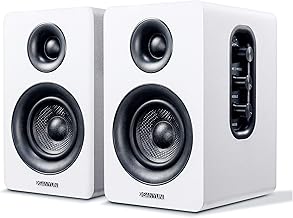
The best desktop speakers under $50 are the Creative Pebble V3 for USB-C and Bluetooth in a compact pair, the BESTISAN active bookshelf speakers for the biggest sound on the list, and the Redragon GS814 for Bluetooth with 20W. The picks are compared from listing specifications: power rating, connection options, controls and design.
This ceiling lets you move beyond a basic USB pair into Bluetooth models, soundbars and small bookshelf speakers. Home office, small-space and gaming use are folded into the buying section and the FAQ below.
Quick Comparison
| Model | Key specs per listing | Best for |
|---|---|---|
| Creative Pebble V3 | 2.0 USB-C, Bluetooth 5.0, 8W RMS, USB-A adapter | Compact desk pairs with wireless |
| BESTISAN Active Bookshelf | 50W, Bluetooth, 3″ woofer, 1″ silk dome tweeter, RCA, bass and treble controls, headphone port | Fuller sound, TV and turntable use |
| Redragon GS814 | 20W, Bluetooth and AUX, 4 RGB effects, touch controls, USB powered | Gaming desks |
| Redragon GS560 Soundbar | 2.0 RGB soundbar, audio-synced lighting, touch control, volume knob, USB powered | Under-monitor placement |
| Dell AC511M Soundbar | Stereo soundbar | Matching Dell monitors |
| Creative Pebble V2 | 2.0 USB-powered desktop stereo speakers, compact | Simple wired desk setup |
These models were compared from listing specifications and we did not use them. Power numbers deserve caution: the Creative listing states RMS, which is continuous power, while other listings give a bare wattage that may be a peak or combined figure. Compare like with like, and treat the BESTISAN’s 50W and the Redragon’s 20W as marketing figures until you check the maker page for the rating method.
Creative Pebble V3
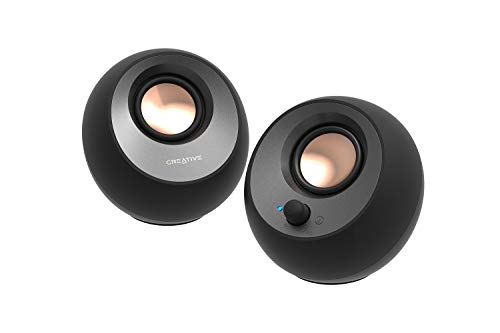
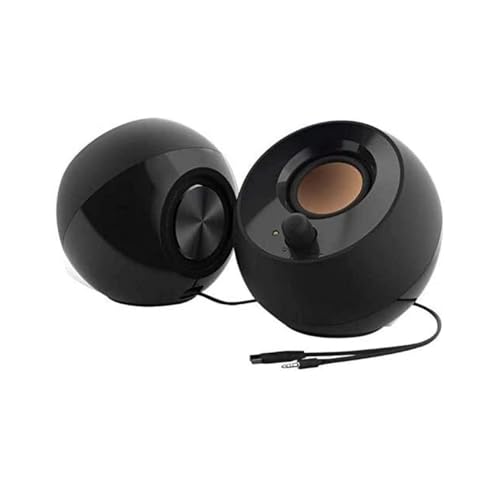
Creative Pebble V3, 2.0 USB-C Desktop Speakers, Bluetooth 5.0, Black | Bluetooth 5.0, USB-C, 2.0 Speaker, Clear Dialog, 8W RMS, USB-A Adapter, Desktop Speakers, Stereo, Black
Chosen because it specifies 2.0 USB-C Desktop Speakers and Bluetooth 5.0.
View on AmazonSpec line: 2.0 USB-C desktop speakers, Bluetooth 5.0, 8W RMS, clear dialog, USB-A adapter included, stereo.
The V3 modernises the Pebble formula with USB-C power, Bluetooth 5.0 and a clear dialog feature aimed at voices. The 8W RMS rating is stated honestly and is enough for a desk, and the USB-A adapter means it works with older computers too. It keeps the compact, minimal design that suits small desks. Bass is limited because the drivers are small, and the listing does not give tone controls beyond the clear dialog mode. It is the best all-round pick for office and casual use, mainly because it has the cleanest feature set.
- Pro: USB-C and Bluetooth 5.0
- Pro: 8W RMS stated
- Pro: USB-A adapter included
- Con: small drivers limit bass
- Con: no separate tone controls listed
BESTISAN Active Bookshelf Speakers

BESTISAN Active Bookshelf Speakers, 50W BT Home Speakers, 3’’ Woofer, 1’’ Silk Dome Tweeter PC Speakers, RCA Speakers for Desktop/Turntable/TV, Bass & Treble Adjustable, Headphone Port for Gaming
Chosen because it specifies 50W BT Home Speakers and 3’’ Woofer.
View on AmazonSpec line: 50W Bluetooth active bookshelf speakers, 3-inch woofer, 1-inch silk dome tweeter, RCA input for desktop, turntable or TV, adjustable bass and treble, headphone port.
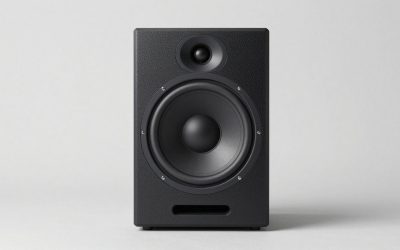
These are the largest speakers in the list and the only true bookshelf design, with a separate woofer and tweeter in each cabinet. The RCA inputs open the door to turntables, TVs and consoles, and bass and treble controls let you tune the sound to the room. The headphone port is handy for late sessions. The trade-off is space: a pair of bookshelf speakers needs more desk room and a power outlet. The brand is also less established, and the 50W figure is not defined in the listing, so check the maker page.
- Pro: separate woofer and tweeter
- Pro: RCA input plus Bluetooth
- Pro: bass and treble adjustment
- Con: takes more space than a USB pair
- Con: wattage rating not defined
Redragon GS814 Stereo Desktop Speakers

Redragon GS814 Stereo Desktop Speaker, BT & AUX Dual Connectivity, 20W | 2.0 Stereo Enhanced Auido Quality, 4 RGB Lighting Effects, Touch Controls, Plug & Play USB Powered Computer Speaker
Chosen because it specifies BT & AUX Dual Connectivity and 20W.
View on AmazonSpec line: 20W stereo desktop speaker, Bluetooth and AUX dual connectivity, 4 RGB lighting effects, touch controls, USB powered.
The GS814 is built for gaming desks: 20W, four RGB lighting effects and touch controls on the body. Bluetooth and AUX give two ways to connect, so you can pair a phone or plug a PC directly. It is USB powered, which keeps wiring simple. Touch controls look neat but can be less precise than a physical knob, and lighting adds nothing to sound. The listing does not break the 20W into RMS and peak, so it is hard to compare with the Creative.
- Pro: Bluetooth and AUX
- Pro: 20W rating and USB power
- Pro: RGB effects for gaming desks
- Con: touch controls can be fiddly
- Con: wattage type unspecified
Redragon GS560 RGB Desktop Soundbar

Redragon GS560 RGB Desktop Soundbar, Dynamic Lighting Bar with Audio Sync | 2.0 Stereo Enhanced Auido Quality, Touch-Control Backlit, Volume Knob, Plug & Play USB Powered Computer Speaker
Chosen because it specifies Dynamic Lighting Bar with Audio Sync and 2.0 Stereo Enhanced Auido Quality.
View on AmazonSpec line: RGB desktop soundbar, 2.0 stereo, dynamic lighting bar with audio sync, touch-control backlit, volume knob, USB powered.
A soundbar design sits under a monitor and keeps the desktop clear, which is useful if your desk is narrow. The GS560 adds a lighting bar that syncs with audio and a volume knob, which is easier to use than touch controls alone. The listing mentions neither Bluetooth nor a wattage, so it is a wired option. Soundbars this small also place both channels close together, which narrows the stereo image compared with separate speakers.
- Pro: soundbar design saves desk space
- Pro: volume knob and touch controls
- Pro: audio-synced lighting
- Con: no Bluetooth or wattage listed
- Con: narrow stereo image
Dell AC511M Stereo Soundbar

Spec line: Dell Stereo SoundBar, AC511M.
The Dell listing is only a model name, so it says very little. Soundbars of this kind are often designed to clip onto matching monitors, but the listing does not confirm that. It will suit a clean office desk where the monitor and the bar match. Wattage, connection type and controls are not in the listing text, and compatibility with non-Dell monitors is not stated. Check the maker page for the mount design and the exact monitor models before ordering, because this is the pick most likely to be a poor fit for an unrelated screen.
- Pro: office-friendly soundbar form
- Pro: soundbar saves desk space
- Pro: minimal, office-friendly look
- Con: very little detail in the listing
- Con: compatibility with other monitors not stated
Creative Pebble V2
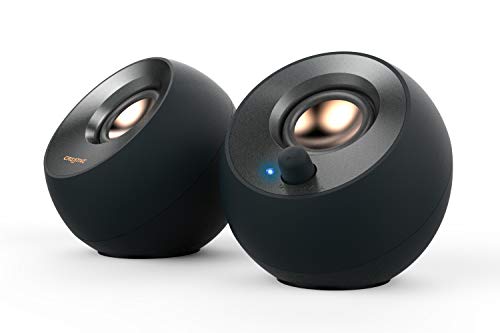
Creative Pebble V2, 2.0 USB Desktop Stereo Speakers for PC/Laptop, Black | 2.0 desktop speakers, USB-Powered, Compact, Stereo, Desktop Speakers, PC Audio, Minimal Design, Laptop Speakers, Black
Chosen because it specifies 2.0 USB Desktop Stereo Speakers for PC/Laptop and Black.
View on AmazonSpec line: 2.0 USB desktop stereo speakers for PC and laptop, USB-powered, compact, minimal design.
The Pebble V2 is the simpler sibling of the V3: wired, USB powered and compact. It has no Bluetooth or USB-C, which is the point if you just want a stable pair of speakers for a PC. The minimal design suits small desks and makes it a sensible fallback if the V3 is out of stock. Wattage is not given in the listing, so assume basic desk-volume output and look at the maker page for the numbers.
- Pro: simple, wired USB setup
- Pro: compact, minimal design
- Pro: trusted desktop speaker line
- Con: no Bluetooth listed
- Con: wattage not listed
How to Choose Under $50
Decide on wired or Bluetooth
Wired USB or AUX connections are the most reliable and have no delay. Bluetooth is convenient for a phone but can lag behind video. If you also play games or watch videos, prefer a wired connection and use Bluetooth for music.
Desktop speakers for home office
For calls, a front volume knob, a headphone port and clear dialog help most. A soundbar or compact pair keeps the desk tidy. Skip lighting you cannot switch off during meetings.
Desktop speakers for small spaces
Measure the desk before you buy. A pair of bookshelf speakers needs separate space on each side of the monitor, while soundbars sit underneath. Pebble models are the most compact separate pairs in this list.
Desktop speakers for gaming
Gaming desks benefit from a quick-access volume control and a headphone port. The Redragon models and the BESTISAN offer those, but remember they provide stereo only, not the directional cues of a headset.
Look at power and input types together
A speaker with more watts can play louder, but the input types matter too. RCA inputs connect to a TV or turntable, AUX to a phone or older PC, and USB-C to a modern laptop. Pick the input you actually have.
Room and desk acoustics
Small speakers sound best at ear height and a little toed in toward the listener. Pushing them against a wall boosts bass but muddies voices, and stacking them on a monitor riser can help or hurt depending on the surface. If the bass is booming, pull the speakers forward a few centimetres before reaching for the tone controls.
Cable length and placement
Wired speakers often have a short connecting cable between the two units, and the USB or AUX lead may be shorter than you expect. Measure the distance from your computer to where each speaker will sit. Bookshelf speakers need power and signal cables on both sides, which can make a neat desk harder to keep.
Volume, distortion and headroom
Small drivers distort when pushed to maximum volume. A higher power rating gives you more headroom, so you can listen at a moderate level without strain. For desk listening, the difference between 8W RMS and a bookshelf pair is about comfort at moderate volume, not about filling a large room.
Warranty and brand support
Creative, Dell and Redragon are established names with published support pages. BESTISAN is less familiar, so read the return terms on the listing page. Speakers fail more often at the cable and the volume control than at the drivers, so check how easy it is to get a replacement unit.
A quick match guide
Choose the Pebble V3 for a modern all-round pair with USB-C and Bluetooth. Choose the BESTISAN when you want separate woofers and tweeters and inputs for a TV or turntable. Choose the GS814 for a gaming desk with wireless and AUX. Choose a soundbar, the GS560 or the Dell, if the desk is narrow. Choose the Pebble V2 when you want a simple wired pair and nothing else. Whatever you pick, confirm the connection and power requirements on the maker page first, because those two lines decide whether the speakers work with your computer at all.
Frequently Asked Questions
Are Bluetooth desktop speakers good for gaming?
They can add delay, so a wired connection is better for games and video. Use Bluetooth for music and casual listening.
What does RMS mean?
RMS is continuous power output. It is a more honest figure than peak wattage, which appears in some listings for marketing.
Do I need a power outlet for these speakers?
The BESTISAN is an active bookshelf design that needs mains power. The USB-powered models draw power from the computer or a USB adapter.
Can I connect a turntable or TV?
Only the BESTISAN lists RCA inputs for that purpose. Check the input names on the maker page, and note that turntables may need a preamp.
Is a soundbar better than separate speakers?
It saves space but narrows the stereo image. Separate speakers give better stereo separation if you have the desk room.
Last updated: November 2026
FAQ
Are Bluetooth desktop speakers good for gaming?
What does RMS mean?
Do I need a power outlet for these speakers?
Can I connect a turntable or TV?
Is a soundbar better than separate speakers?
More from Amazon
Programs that pair well with the guide above. Offers and eligibility are set by Amazon and may change.
Free shipping on eligible items, Prime Video and more. Eligible new members can start with a free trial.
Start a Prime free trialAd-free music streaming. Eligible new subscribers can start with a free trial.
Try Music Unlimited freeA Prime membership for ages 18-24 with a trial period. Eligibility is set by Amazon.
See Prime for Young AdultsAudiobooks and podcasts to listen to on the go. Eligible new members can start with a free trial.
Try Audible freeAs an Amazon Associate we earn from qualifying purchases.