Our Top Picks
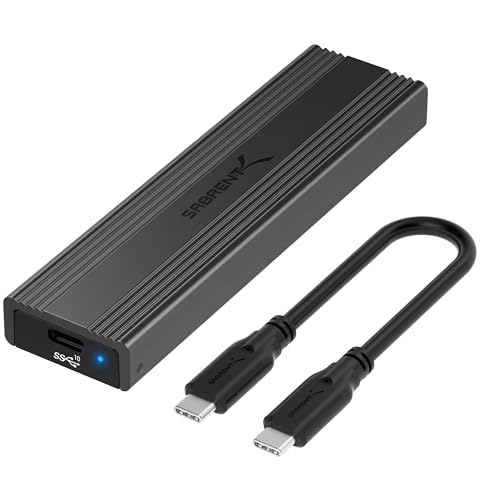 SABRENT Tool-Free NVMe & SATA M.2 SSD Enclosure10Gbps NVMe + SATA4.59 x 1.24 x 0.5 inches0.2 poundsCheck on Amazon
 ASUS ROG Strix Arion Aluminum Alloy M.2 NVMeBlack|up to 10Gbps7.1 x 3.8 x 1.6 inches0.2 poundsCheck on Amazon


Upgrading a gaming PC or laptop usually leaves a good M.2 SSD behind, and an external enclosure turns that spare drive into fast portable storage. The same case helps when cloning a boot drive before a swap, or carrying a game library between machines. Because the drive inside does the real work, the choice comes down to three labelled details: the interface speed on the box, the protocols it accepts, and the lengths it can hold.
This guide compares five enclosures covering the main buying paths. One reaches a maker-labelled 40Gbps over USB4 and Thunderbolt, while the other four sit in the widely supported 10Gbps USB class. Some accept both NVMe and M.2 SATA drives, others are NVMe only, and assembly ranges from tool-free shells to a screwed build. Every speed figure below is the maker’s labelled interface ceiling, not a measured result, because the SSD, port, cable and heat all play a part.
As an Amazon Associate, we earn from qualifying purchases.
Quick Picks
- ACASIS TBU405 Pro — fastest labelled interface here at 40Gbps, with a built-in cooling fan.
- Sabrent EC-SNVE — dual-protocol NVMe and SATA support in a tool-free shell.
- UGREEN M.2 NVMe Enclosure — tool-free 10Gbps NVMe case with USB-C and USB-A cables included.
- ASUS ROG Strix Arion — screwdriver-free aluminium design with Aura Sync lighting.
- SSK SHE-C325 Pro — screwed aluminium build with screwdriver, thermal pads and two cables included.
How to Choose
Start with the interface ceiling
The headline number is the ceiling of the USB connection, exactly as the maker labels it. A 10Gbps USB 3.2 Gen 2 case cannot move data faster than that link allows, no matter how quick the SSD inside may be. A 40Gbps model only reaches its labelled ceiling on a USB4 or Thunderbolt port; on an ordinary USB port it falls back to that port’s slower rate. Match the case to the best port you own, and remember a slower cable holds the whole chain back.
Match the drive protocol
M.2 is a physical shape, not a guarantee of compatibility. Drives in this format speak one of two protocols: NVMe over PCIe, or the older SATA protocol. Some enclosures accept both, useful when rescuing a drive from an older laptop, while NVMe-only models refuse a SATA module entirely. Check the protocol on your drive’s label, and confirm the keying: most of these cases accept M key and B+M key drives, and none accept mSATA.
Check the drive length
M.2 drives come in lengths identified by numbers such as 2230, 2242, 2260 and 2280: the first two digits are the width in millimetres, the rest the length. The short 2230 size appears in handheld consoles and compact laptops, while 2280 is the common desktop size. An enclosure only holds the lengths its maker lists, so a case that skips 2230 leaves handheld owners without a fit.
Decide on tool-free or screwed assembly
Tool-free enclosures use sliding covers, clips or rubber mounts so a drive swaps in seconds. Screwed designs take a minute longer to open but hold the shell firmly, and usually include the screwdriver. Neither approach changes transfer speed; the difference is convenience versus a fixed, set-and-forget build.
Think about heat during long transfers
Moving a full game library keeps a drive busy for a long stretch, generating heat inside a small metal shell. Aluminium bodies form part of the cooling path, thermal pads bridge the gap between drive and case, and one model here adds a built-in fan. A warm enclosure may slow during long transfers, so cooling matters if you move hundreds of gigabytes at a time.
ACASIS TBU405 Pro 40Gbps M.2 NVMe SSD Enclosure
The TBU405 Pro is the speed-focused option here, built around a maker-labelled 40Gbps interface for USB4 and Thunderbolt hosts. ACASIS states that it uses an Intel JHL7440 chip and lists compatibility with USB4, USB 3.2, USB 3.1, USB 3.0 and USB 2.0, so it still works on ordinary ports at lower ceilings. The maker publishes test figures of up to 2805 MB/s read and 2734 MB/s write from its own testing with a Samsung 980 EVO Plus on a MacBook; those are labelled results for that setup, and your own drive and computer set your ceiling.
A built-in cooling fan sets this model apart from the passive cases below, paired with heat dissipation holes in the aluminium shell. Installation is tool-free, and the case accepts M.2 NVMe drives in 2280, 2260, 2242 and 2230 lengths, M key or B+M key, with capacity support labelled up to 8TB. It is NVMe only, so an M.2 SATA drive will not work in it.
Specs
| Item | Detail |
|---|---|
| Model | TBU405 Pro |
| Labelled interface | Up to 40Gbps (USB4/Thunderbolt); USB 3.2/3.1/3.0/2.0 compatible |
| Drive support | M.2 NVMe, M key and B+M key |
| Drive sizes | 2230, 2242, 2260, 2280 |
| Labelled capacity support | Up to 8TB |
| Assembly | Tool-free |
| Cooling | Built-in fan, aluminium shell |
Sabrent EC-SNVE Tool-Free M.2 SSD Enclosure
The EC-SNVE is the flexible rescue tool of the group, because Sabrent labels it for both M.2 NVMe and M.2 SATA drives. That dual-protocol support matters when a spare drive comes out of an older machine and its protocol is uncertain. The connection is USB 3.2 Type-C at a labelled 10Gbps ceiling, and the clamshell body opens without tools: a button releases the cover, the drive drops in, and a lever or rubber nub holds it in place.
Sabrent’s Amazon listing names 2242, 2260 and 2280 drive lengths, so owners of short 2230 drives should check the current listing before ordering. The shell is slim aluminium with an internal thermal pad, and a USB-C to USB-C cable is included.
Specs
| Item | Detail |
|---|---|
| Model | EC-SNVE |
| Labelled interface | USB 3.2 Type-C, up to 10Gbps |
| Drive support | M.2 NVMe and M.2 SATA |
| Drive sizes | 2242, 2260, 2280, per the maker’s listing |
| Assembly | Tool-free clamshell, button release |
| Cooling | Aluminium shell, internal thermal pad |
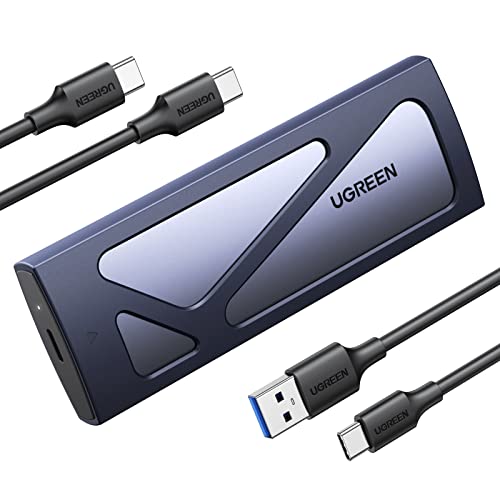
UGREEN M.2 NVMe Enclosure
UGREEN’s enclosure, model 90541, is a straightforward tool-free case for NVMe drives. The maker labels the USB-C connection as USB 3.2 Gen 2 with a 10Gbps ceiling, and lists support for UASP, TRIM and S.M.A.R.T. It accepts M key and B+M key NVMe drives in all four common lengths, with capacity support labelled up to 8TB.
Two details make it easy to live with: both cable types are included, so it connects to older and newer machines without an adapter hunt, and the aluminium shell works as a heatsink. The firm limit is protocol: UGREEN states plainly that this model does not support SATA NGFF drives or mSATA. If your spare drive is NVMe and your ports mix USB-A and USB-C, this is the tidy default.
Specs
| Item | Detail |
|---|---|
| Model | 90541 |
| Labelled interface | USB 3.2 Gen 2, up to 10Gbps |
| Drive support | M.2 NVMe PCIe, M key and B+M key; no SATA |
| Drive sizes | 2230, 2242, 2260, 2280 |
| Labelled capacity support | Up to 8TB |
| Assembly | Tool-free |
| Included cables | USB-C to USB-C, USB-A to USB-C |
ASUS ROG Strix Arion
The ROG Strix Arion is the gaming-styled entry here, an aluminium alloy enclosure from ASUS with Aura Sync lighting, a protective bumper and an R-hook. Its USB-C connection is labelled USB 3.2 Gen 2×1 at up to 10Gbps, and it supports M.2 PCIe NVMe drives in 2230, 2242, 2260 and 2280 sizes, M key or B+M key. ASUS describes the design as screwdriver-free: a pin ejector opens the case, the drive seats without screws, and thermal pads are included.
Both cable types come in the box, and the enclosure weighs 98 grams per the product information. Like the UGREEN above, it is NVMe only. It suits gamers who want the enclosure to match a lit desk setup without giving up the 10Gbps ceiling or the full range of drive lengths.
Specs
| Item | Detail |
|---|---|
| Model | ROG Strix Arion ESD-S1C |
| Labelled interface | USB-C 3.2 Gen 2×1, up to 10Gbps |
| Drive support | M.2 PCIe NVMe, M key and B+M key |
| Drive sizes | 2230, 2242, 2260, 2280 |
| Assembly | Screwdriver-free, pin ejector |
| Cooling | Aluminium alloy case, thermal pads included |
| Weight | 98 g, per the product information |
SSK SHE-C325 Pro M.2 NVMe SATA SSD Enclosure
The SHE-C325 Pro takes the traditional route: an aluminium shell that opens with screws, with screwdriver, screws, washer and thermal pads all included. SSK labels it with the RTL9210B controller and dual-protocol support, so it reads M.2 NVMe drives at up to the 10Gbps USB 3.2 Gen 2 ceiling and M.2 SATA drives at up to 6Gbps. It supports UASP, TRIM and S.M.A.R.T, with a copper strip alongside the thermal pad to conduct heat into the shell.
Drive support covers M key and B+M key modules in 2242, 2260 and 2280 lengths, with capacity support labelled up to 4TB. The trade-off against the tool-free models is a slower drive swap, balanced by a firmly closed case. If your spare drive might be SATA and you prefer a screwed shell, this is the natural pick.
Specs
| Item | Detail |
|---|---|
| Model | SHE-C325 Pro |
| Labelled interface | USB 3.2 Gen 2, up to 10Gbps NVMe, 6Gbps SATA |
| Drive support | M.2 NVMe and M.2 SATA, M key and B+M key |
| Drive sizes | 2242, 2260, 2280 |
| Labelled capacity support | Up to 4TB |
| Assembly | Screwed; screwdriver included |
| Included cables | USB-C to USB-C, USB-A to USB-C |
Products at a Glance
| Product | Labelled interface | Protocols | Sizes | Assembly |
|---|---|---|---|---|
| ACASIS TBU405 Pro | 40Gbps (USB4/Thunderbolt) | NVMe | 2230–2280 | Tool-free |
| Sabrent EC-SNVE | 10Gbps | NVMe, SATA | 2242–2280 | Tool-free |
| UGREEN M.2 NVMe Enclosure | 10Gbps | NVMe | 2230–2280 | Tool-free |
| ASUS ROG Strix Arion | 10Gbps | NVMe | 2230–2280 | Screwdriver-free |
| SSK SHE-C325 Pro | 10Gbps | NVMe, SATA | 2242–2280 | Screwed |
FAQ
Can I play PC games directly from an SSD in one of these enclosures?
On a PC, an enclosed drive appears as ordinary USB storage, so games can be installed on it and launched from it like any external drive. How smoothly that runs depends on the interface ceiling and the drive inside. Consoles apply their own rules to USB storage, so check your console’s documentation first.
Why does a 40Gbps enclosure need a USB4 or Thunderbolt port?
The 40Gbps figure is the ceiling of the connection standards the enclosure is built for, as labelled by its maker. A USB4 or Thunderbolt port can carry that rate, while a regular USB 3.2 port tops out lower, and the enclosure runs at whatever rate the port offers. The drive and cable must also support the faster standard for the ceiling to be reachable.
Will my M.2 SATA drive work in an NVMe-only enclosure?
No. NVMe and SATA are different protocols even though the drives share the M.2 shape, and an NVMe-only enclosure cannot read a SATA module at all. If your spare drive is SATA, choose a dual-protocol model such as the Sabrent EC-SNVE or the SSK SHE-C325 Pro, and check the keying and length too.
Is an SSD included with any of these enclosures?
No. All five products here are empty enclosures, and each maker’s listing states that the SSD is not included. You supply your own M.2 drive, check its protocol and length against the labelled support, and format a brand-new drive before first use so the computer can detect it.
Conclusion
The right enclosure is the one whose labelled specifications match your drive and your fastest port. Choose the ACASIS TBU405 Pro if your computer offers USB4 or Thunderbolt and you move large libraries often. Pick the Sabrent EC-SNVE or the SSK SHE-C325 Pro when the spare drive might be SATA as well as NVMe, deciding between them on tool-free convenience versus a screwed shell. The UGREEN is the simple NVMe default, while the ASUS ROG Strix Arion adds lighting and a bumper. Confirm the protocol, length and port first, and a drawer-bound drive becomes useful gaming storage again.
FAQ
Can I play PC games directly from an SSD in one of these enclosures?
Why does a 40Gbps enclosure need a USB4 or Thunderbolt port?
Will my M.2 SATA drive work in an NVMe-only enclosure?
Is an SSD included with any of these enclosures?
More from Amazon
Programs that pair well with the guide above. Offers and eligibility are set by Amazon and may change.
Free shipping on eligible items, Prime Video and more. Eligible new members can start with a free trial.
Start a Prime free trialAd-free music streaming. Eligible new subscribers can start with a free trial.
Try Music Unlimited freeA Prime membership for ages 18-24 with a trial period. Eligibility is set by Amazon.
See Prime for Young AdultsAudiobooks and podcasts to listen to on the go. Eligible new members can start with a free trial.
Try Audible freeAs an Amazon Associate we earn from qualifying purchases.