Storage is the one upgrade almost every PC gamer eventually needs twice: once when the boot drive fills up, and again when modern game installs balloon past 150GB apiece. The frustrating part is that the sub-$100 shelf is crowded with drives that look identical on paper — same M.2 2280 form factor, same PCIe 4.0 label, same headline sequential speeds — while delivering wildly different results once you’re actually loading textures, shader caches, and save states. Sequential read numbers sell drives; sustained write performance and random 4K reads are what you feel.
This guide focuses strictly on drives that realistically land under $100 in 2026, with an emphasis on cost-per-gigabyte and real-world gaming behavior rather than benchmark bragging rights. We’ve included budget workhorses that punch above their price, plus a couple of premium options worth knowing about if you catch them on sale or need a smaller capacity. Every pick below is a PCIe 4.0 or 5.0 M.2 2280 drive that will drop into any modern desktop motherboard or, in most cases, a compatible handheld or console expansion slot.
Our top picks
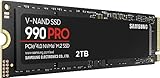
 Samsung SSD 990 PRO 2TB
- Consider this a cheat code
- Gen4 steps up with faster transfer speeds and…
- The speed you need for any occasion
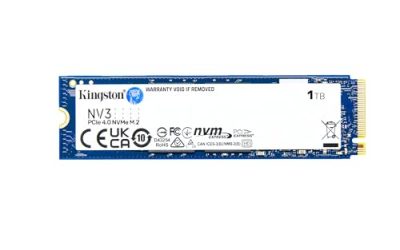
 Kingston NV3 1TB M.2 2280 NVMe SSD
- Latest SATA 3 Controller
- Interface: SATA III 6Gb/s
- Static and Dynamic Wear Leveling, Bad Block Management,…
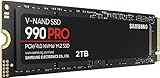
 Samsung SSD 990 PRO 1TB
- Get random read/write speeds that are 40%/55% faster…
- Use less power and get more performance
- Samsung's own nickel-coated controller delivers effective thermal control
| Product | Key specs | |
|---|---|---|
| Samsung SSD 990 PRO 2TB | Consider this a cheat code Gen4 steps up with faster transfer speeds and… The speed you need for any occasion | Check price |
| Kingston NV3 1TB M.2 2280 NVMe SSD | Latest SATA 3 Controller Interface: SATA III 6Gb/s Static and Dynamic Wear Leveling, Bad Block Management,… | Check price |
| Samsung SSD 990 PRO 1TB | Get random read/write speeds that are 40%/55% faster… Use less power and get more performance Samsung's own nickel-coated controller delivers effective thermal control | Check price |
 Samsung SSD 9100 PRO 2TB Samsung SSD 9100 PRO 2TB | BREAKTHROUGH PCIe 5.0 PERFORMANCE: Supercharge your workflow and… EVERY TASK, TURBOCHARGED: Speed past productivity limits THINK FAST, CREATE FASTER: With random read/write speeds… | Check price |
 SANDISK 500GB Optimus 5100 NVMe SSD SANDISK 500GB Optimus 5100 NVMe SSD | SPEED UP PROJECTS CREATE AND STORE MORE IT GOES WHERE YOU GO | Check price |
| Samsung SSD 9100 PRO 1TB | BREAKTHROUGH PCIe 5.0 PERFORMANCE: Supercharge your workflow and… EVERY TASK, TURBOCHARGED: Speed past productivity limits THINK FAST, CREATE FASTER: With random read/write speeds… | Check price |
 WD_Black SN7100 1TB NVMe SSD WD_Black SN7100 1TB NVMe SSD | This product has been replaced by our latest… OCTANE GAMING BUILT | Check price |
 WD_Black SN7100 2TB NVMe SSD WD_Black SN7100 2TB NVMe SSD | This product has been replaced by our latest… OCTANE GAMING BUILT | Check price |
As an Amazon Associate we earn from qualifying purchases at no extra cost to you.
⚡ Save on Your Next PC — Amazon Prime
Prime members get fast free shipping on the systems above, plus early access to Prime Day & Black Friday PC deals. New members get a 30-day free trial.
Watch: Best SSD Under $100 — Video Review
How to Choose SSD Under $100
- Capacity over raw speed: At this budget, a 1TB drive at 6,000 MB/s beats a 500GB drive at 7,400 MB/s for almost every gamer. Modern titles routinely exceed 100GB, and a drive kept above 80% full loses performance to reduced SLC caching. Prioritize gigabytes first.
- DRAM cache vs. HMB: Budget drives often skip onboard DRAM and use Host Memory Buffer instead, borrowing system RAM. For gaming loads this is largely fine, but if you plan heavy file transfers, video editing, or sustained writes, a DRAM-equipped drive holds its speed far longer under pressure.
- Check your PCIe generation: A PCIe 5.0 drive works in a 4.0 slot but runs at 4.0 speeds — you’re paying for headroom you can’t use. Conversely, PCIe 4.0 drives are the sweet spot right now, since DirectStorage gains flatten out well before 7,000 MB/s in real games.
- Endurance and warranty: Look at TBW (terabytes written) ratings alongside the warranty period. A five-year warranty with 600TBW or higher on a 1TB drive signals decent NAND quality; anything dramatically lower suggests aggressive cost-cutting on the flash.
- Thermals and heatsinks: Bare M.2 drives are cheaper and fit under motherboard heatspreaders or in laptops and handhelds. Pre-installed heatsinks add cost and can block GPU clearance or PS5 bay fitment — buy bare unless you know you need one.
The Best Picks Reviewed
Kingston NV3 1TB
The value benchmark for budget gaming storage — 1TB of PCIe 4.0 capacity at up to 6,000 MB/s for a price that regularly sits comfortably below the $100 line. It’s a DRAM-less design leaning on HMB, so sustained large-file writes will taper, but for game libraries and general use it’s an excellent cost-per-gigabyte play.
SanDisk Optimus 5100 500GB
A tidy PCIe 4.0 x4 option hitting up to 6,600 MB/s reads, which makes it a smart secondary drive or a cheap upgrade for a laptop or handheld where 500GB is enough for a rotating three or four games. At this capacity the price ceiling is generous, so it’s one of the few sub-$100 drives where you’re not compromising on controller quality.
Samsung 990 PRO 1TB
Samsung’s flagship PCIe 4.0 drive delivers up to 7,450 MB/s with genuine DRAM cache and class-leading random read performance — the metric that actually shortens level loads. The 1TB model is the one to watch during sales events, where it periodically dips under $100 and becomes the best drive on this list by a wide margin.
Samsung 990 PRO 2TB
The 2TB version is the enthusiast pick and will sit above $100 outside of aggressive promotions, but it’s included here because the per-gigabyte math is compelling if you can stretch. Same 7,450 MB/s ceiling, same excellent sustained write behavior, with enough room for a full library plus a capture folder.
Samsung 9100 PRO 1TB
A PCIe 5.0 drive rated up to 14,700 MB/s — genuinely future-proof, and worth considering if you’re building on a Gen 5-capable board today and want to buy once. Realistically it sits above budget, and current games won’t come close to saturating it, so treat this as an aspirational upgrade rather than a value pick.
Frequently Asked Questions
Is 1TB enough for gaming in 2026?
For most people, yes — 1TB comfortably holds a boot install of Windows plus six to ten large modern titles. If you play multiple 150GB+ open-world games simultaneously or record gameplay footage, plan on 2TB or a secondary drive.
Do I need PCIe 5.0 for gaming?
Not yet. Game load times are bottlenecked by decompression and asset streaming long before the drive’s sequential ceiling matters, and testing consistently shows minimal real-world difference between good PCIe 4.0 and PCIe 5.0 drives. Save the money and buy capacity instead.
Will these SSDs work in a PlayStation 5?
PCIe 4.0 M.2 2280 drives rated above 5,500 MB/s meet Sony’s requirements, which covers most picks here. You will need a heatsink — either a model with one pre-installed or an aftermarket one that fits within the console’s bay clearance.
Does a DRAM-less SSD hurt gaming performance?
Barely, in practice. HMB drives like the Kingston NV3 handle typical gaming read patterns well; the difference shows up in long sustained writes, such as transferring a 200GB library between drives, where speeds drop once the SLC cache fills.
Final Thoughts
For the majority of gamers shopping under $100, the Kingston NV3 1TB is the straightforward answer — it hits the capacity sweet spot at a price that leaves budget for other components. Keep an eye on the Samsung 990 PRO 1TB during sale periods, where it becomes the outright performance winner in this bracket, and consider the SanDisk Optimus 5100 500GB if you need a compact, well-built secondary drive for a laptop or handheld.