
Our Top Picks
 RK ROYAL KLUDGE M65 Wireless Gaming Keyboard withcream switch12.66 x 5.1 x 1.74 inches1.7 poundsCheck on Amazon
The only structural difference that matters between a 60 percent and a 65 percent keyboard is the right-hand side: a 65 percent board adds dedicated arrow keys and a short column of navigation keys, while a 60 percent board hides all of them behind a function layer. For most gamers who use arrows even occasionally, 65 percent is the safer pick; for pure WASD shooter players who want the smallest board, 60 percent is enough.
Side-by-Side Comparison
| Feature | 60 percent | 65 percent |
|---|---|---|
| Typical key count | about 61 | about 67 to 68 |
| Arrow keys | Fn layer only | Dedicated, bottom right |
| Delete, Page Up, Page Down | Fn layer only | Usually dedicated in a small column |
| Function row (F1 to F12) | Fn layer | Fn layer |
| Number pad | None | None |
| Width | Slightly narrower | Slightly wider (extra column) |
| Keycap compatibility | Standard 60 percent sets fit widely | Most sets fit, but right-side bottom row differs |
Key counts come from layout guides and vary a little by manufacturer, so treat them as typical rather than fixed. Corsair’s layout guide describes the 65 percent size as providing arrow keys plus Delete, Page Up and Page Down, sitting between the concentrated functionality of 75 percent and the minimalism of 60 percent. It describes the 60 percent layout as alphanumeric keys and modifiers only, with no arrows, number pad or function row.

Aula WIN60 HE - 60% Mechanical Gaming Keyboard Wired, Magnetic Switch Hot Swappable, Adjustable Actuation Rapid Trigger Mode, 8000 Hz Polling Rate, RGB Small Keyboard 60 Percent Compact Design for PC
Chosen because it specifies 60% Mechanical Gaming Keyboard Wired and Magnetic Switch Hot Swappable.
View on Amazon
GEODMAER 65% Gaming Keyboard, Wired Backlit Mini Keyboard, Ultra-Compact Anti-Ghosting No-Conflict 68 Keys Membrane Gaming Wired Keyboard for PC Laptop Windows Gamer
Chosen because it specifies Wired Backlit Mini Keyboard.
View on AmazonRK ROYAL KLUDGE M65 Wireless Gaming Keyboard with Knob, Cream Switch, Black | 60% RGB Hot Swappable Mechanical Keyboard 2.4G/Bluetooth/USB-C, Gasket Mount, Battery Display, PBT Keycaps, Win/Mac/PC Gaming
Chosen because it specifies Cream Switch and Black.
View on Amazon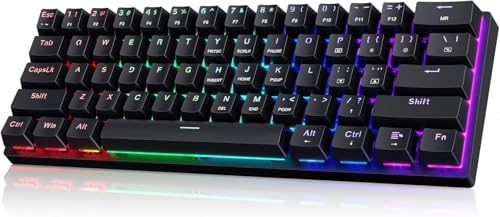
60% Wired Mechanical Gaming Keyboard with Blue Switches, LED Backlit | 61 Keys Ultra-Compact Mini Portable Office Keyboard for PC/Mac/Xbox, 18 LED Backlight, Easy to Carry On Trip, Black
Chosen because it specifies LED Backlit and 18 LED Backlight.
View on AmazonWhat You Gain With the Extra Column
The right-hand column on a 65 percent board is small, but it changes daily use more than the key count suggests.
- Arrow keys without a combo. Navigating text, scrolling lists, panning a map in a strategy game or driving a menu is a single press instead of holding Fn.
- Delete and page keys in reach. Useful when you also use the board for browsing, editing or chat during sessions.
- Less to learn. A 60 percent board asks you to memorise which Fn combos do what, and the defaults can differ between brands.
What a 65 percent layout still lacks is the F-row. Both layouts need a function layer for F1 through F12 and the media keys. If you bind actions to F-keys, a 75 percent board, which keeps a dedicated function row, is the layout that solves that problem rather than 65 percent.
What You Gain With 60 Percent
A 60 percent board is the smaller of the two, and reviewers who compare layouts usually mention the same advantages.
- Slightly more mouse room. The board is narrower because it has no extra column. Corsair calls 60 percent the best option for competitive FPS games because of the space it frees. The difference between 60 and 65 percent is small, though, compared with the gap between either of them and a full-size board.
- Cleaner standard keycap fit. The 60 percent layout is the most widely supported by aftermarket keycap sets and cases, since its bottom row follows a common pattern.
- More portable. It slips into a bag more easily and sits well on a cramped desk.
Which Is Better for Gaming?
Neither layout changes switch response, polling rate or latency; those come from the switches and the board’s electronics. The decision is purely about ergonomics and which keys you need to press directly.
| Situation | Better choice | Reason |
|---|---|---|
| Tactical or arena shooters, WASD plus a few binds | 60 percent | Smallest board, widest mouse area |
| Shooters plus regular desktop use | 65 percent | Arrows and Delete without Fn |
| RTS, city builders, sims using arrow panning | 65 percent | Direct arrows for camera movement |
| Rhythm games or games using the Fn row heavily | Check 75 percent | Neither 60 nor 65 has a function row |
| Travel or a very small desk | 60 percent | Narrowest, lightest option |
| First compact board | 65 percent | Gentler learning curve |
Compatibility and Layout Details to Check Before Buying
- Bottom-row layout. Many 65 percent boards squeeze the arrow cluster next to a short right Shift and two or three modifier keys. Some makers drop a right Ctrl or Alt to make room. Look at the product photos to be sure the keys you want exist.
- Keycap sets. A set labelled for 60 percent usually covers the main block, but the right-side keys of a 65 percent board may need extra pieces. Read the kit contents against the board’s layout drawing.
- ANSI or ISO. Both sizes come in either standard. An ISO board has a taller Enter key and a shorter left Shift, which affects keycap choice. Match the keycap set to the standard.
- Software and firmware. Remapping the Fn layer depends on the model. Some boards use a downloaded utility, some use a web configurator and some use onboard key combinations. The maker’s manual is the reliable source for the exact steps.
- Wireless features. If you want Bluetooth or 2.4 GHz wireless, battery space and size can vary between the two layouts and between brands, so compare the specific models rather than the layout alone.
Common Mistakes
- Buying 60 percent and then missing arrows within a week. If you ever navigate text, menus or maps with arrows, the dedicated keys are worth the extra width.
- Assuming 65 percent includes a function row. It does not; it still relies on Fn for F1 to F12.
- Judging mouse room only by the layout name. Board bezels, case size and wrist rests vary, so the actual width of the model matters more than the percentage label.
- Choosing by switch type and ignoring layout. Layout and switch feel are separate decisions; pick the layout first, then the switches.
Alternatives
- 75 percent: adds the full function row to a 65 percent style cluster. A good compromise for people who bind F-keys.
- Tenkeyless: keeps the full navigation block and function row without the number pad. Corsair describes it as sitting well between full size and 60 percent.
- 40 percent or ortholinear boards: go further than 60 percent and rely heavily on layers. These suit enthusiasts rather than first-time buyers.
A Practical Way to Decide
Write down the keys you press in a typical week of play and work. If arrows, Delete or Page Up appear on that list even a few times, a 65 percent board saves you from repeated Fn combinations. If your list is only the main block, 60 percent costs you nothing and saves a little width. Remember that you can also remap many compact boards, so a missing key is sometimes solvable in software.
Frequently Asked Questions
Is 65 percent better than 60 percent for gaming?
It depends on whether you use arrow keys. A 65 percent board adds them as physical keys with a small navigation column, while 60 percent saves a bit more space. For pure shooter use the difference is minor, and for general use the arrows are usually worth keeping.
Does a 65 percent keyboard have function keys?
Not as a dedicated row. F1 to F12 are accessed by holding the Fn key and pressing a number-row key, just as on a 60 percent board. If you want physical function keys, look at 75 percent or tenkeyless layouts.
How much more desk space does a 65 percent board need?
Only a little, because the extra column adds a modest amount of width. Compare the exact dimensions in each product’s specifications rather than relying on the percentage label.
Can I use 60 percent keycaps on a 65 percent board?
Partly. The main alphanumeric block is generally compatible, but the right-side modifiers and arrow cluster may need additional keys or different sizes. Check the keycap set contents against the board’s layout.
Which layout is easier for a beginner?
Most layout guides suggest 65 percent for someone new to compact boards, since arrows and Delete are available without a layer. A 60 percent board takes more adjustment because every navigation action goes through Fn.
FAQ
Which Is Better for Gaming?
Is 65 percent better than 60 percent for gaming?
Does a 65 percent keyboard have function keys?
How much more desk space does a 65 percent board need?
Can I use 60 percent keycaps on a 65 percent board?
Which layout is easier for a beginner?
More from Amazon
Programs that pair well with the guide above. Offers and eligibility are set by Amazon and may change.
Free shipping on eligible items, Prime Video and more. Eligible new members can start with a free trial.
Start a Prime free trialAd-free music streaming. Eligible new subscribers can start with a free trial.
Try Music Unlimited freeA Prime membership for ages 18-24 with a trial period. Eligibility is set by Amazon.
See Prime for Young AdultsAudiobooks and podcasts to listen to on the go. Eligible new members can start with a free trial.
Try Audible freeAs an Amazon Associate we earn from qualifying purchases.



