
Our Top Picks
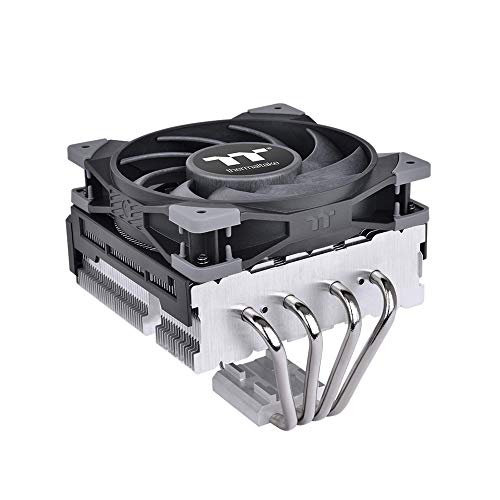 Thermaltake TOUGHAIR 110 140W TDP Top Flow CPUAMD/Intel5.42 x 4.87 x 4.49 inches1 poundsCheck on Amazon
 Intel XEON 12 CORE Processor E5-2650V4 2.2GHZ 30MB9.06 x 7.09 x 0.79 inches0.11 poundsCheck on Amazon
The short answer: a 105W TDP lets an AMD Ryzen CPU draw more power and run faster in heavy multi-core work, while a 65W TDP runs cooler, quieter and cheaper to cool; in games the difference is usually small. Reviewers also stress that TDP is a cooling class, not the number of watts the chip actually pulls.
What TDP Actually Means
TDP stands for thermal design power. On AMD desktop chips it is a rating used to size coolers, and the real limit on power is called PPT (Package Power Tracking). Tech writers describe AMD’s rule of thumb as PPT of about 1.35 times the TDP. That makes a 65W part a 88W PPT chip, and a 105W part a 142W PPT chip. So a “65W” processor can draw noticeably more than 65 watts under a full load. Intel uses different terms (base and maximum turbo power), so the numbers are not directly comparable between brands.

Intel Xeon E5-2660 V3 10 Core Processor 2.60Ghz 25MB Smart Cache 9.6 GT/S QPI FCLGA2011-3 TDP 105W SR1XR (Renewed)
Picked as a relevant option in this category.
View on AmazonThermaltake TOUGHAIR 110 140W TDP Top Flow CPU Cooler, Intel/AMD Universal Socket (LGA 1700/1200), 120mm 2000RPM High Static Pressure PWM Fan with High Performance Copper Heat Pipes CL-P073-AL12BL-A
Chosen because it specifies Intel/AMD Universal Socket (LGA 1700/1200).
View on Amazon
ONWEBAYK CPU Processor R 9 3900X R9 3900X 3.8 GHz Twelve-Core 24-Thread CPU Processor 7NM TDP 105W Socket AM4
Picked as a relevant option in this category.
View on AmazonIntel XEON 12 CORE Processor E5-2650V4 2.2GHZ 30MB Smart Cache 9.6 GT/S QPI TDP 105W
Picked as a relevant option in this category.
View on AmazonComparison Table
| Item | 65W TDP mode | 105W TDP mode |
|---|---|---|
| Typical PPT limit | 88 W | 142 W |
| Cooler needed | Good air cooler or small liquid cooler | Larger air cooler or 240 mm liquid cooler is safer |
| Multi-core work | Baseline | Higher; one reported user result showed about 13 percent in Cinebench R23 |
| Gaming | Close to the 105W mode | Small gain, if any, in most games |
| Noise and heat | Lower | Higher |
| Needs BIOS support | Default | Optional on some Ryzen 9000 boards |
The Ryzen 9000 Example
The Ryzen 7 9700X and Ryzen 5 9600X launched with a 65W TDP. Later, some motherboard makers, including MSI, added an option in BIOS updates to run them in a 105W mode. Tom’s Hardware reported on the MSI option and a user result of about 13 percent better multi-core performance. Another outlet, igor’sLAB, also covered the update. Reviews such as the one from Pokde went as far as titling their conclusion in favor of the higher setting.
One source reports that the 105W mode raises other limits as well, such as current limits, and that package temperatures climb noticeably on a single-tower air cooler. That was one reviewer’s figure, so treat any specific temperature as approximate and dependent on the cooler, case and room.
Gaming Impact
Games rarely load every core to the limit, so power stays below the 65W-class ceiling most of the time. As a result, moving to 105W changes frame rates very little in most titles. Where it can matter is in tasks that load all cores, such as rendering, compiling code, or streaming while gaming. If your main use is gaming, the cooler and quieter mode is often the more sensible choice.
Cooling and Power Supply
- Cooler: match the cooler’s rated capacity to the higher mode if you enable it. A cooler rated for 65W-class chips may run hot.
- Motherboard: the voltage regulators handle the extra current, and entry boards can run warm.
- Power supply: the CPU’s extra draw is modest compared with a graphics card, so a normal gaming PSU is generally fine.
- Case airflow: good intake and exhaust matter more at higher power.
How to Change the Setting Safely
- Update the BIOS only if your motherboard maker lists support for the option; follow the maker’s instructions and do not power off during an update.
- Look for a TDP or power-limit menu. The menu name varies by maker, so consult your motherboard manual.
- Change one setting at a time and watch temperatures with a monitoring tool.
- Return to defaults if you see instability or throttling.
Note that changing power limits is a form of tuning. It can cause instability and may affect warranty coverage on some boards, so keep changes conservative.
Which Should You Choose
| If you | Pick |
|---|---|
| Play games only, use a basic air cooler | 65W |
| Want quiet operation in a small case | 65W |
| Render, compile or stream on the same PC | 105W with a stronger cooler |
| Care about efficiency and lower power use | 65W |
Common Mistakes
- Treating TDP as exact power draw.
- Comparing AMD and Intel TDP numbers as if they were the same measure.
- Enabling a higher power mode with a weak cooler.
- Expecting large gaming gains from higher power limits.
Intel and AMD Use Different Words
Intel’s recent desktop chips list processor base power and maximum turbo power, and the second figure is closer to what a boosting chip can draw. AMD’s TDP is a cooler rating, with PPT as the real ceiling. This is why a comparison between a “65W” AMD chip and a “65W” Intel chip says little about relative power use. Read the maker’s spec page for the exact limits, and look at independent power measurements when you size a cooler.
Efficiency Versus Peak Speed
Chips lose efficiency as they approach their limits. The last stretch of clock speed costs a lot of extra power for a modest gain, so a lower power limit often delivers most of the performance for much less heat. This is the reason some reviewers see the 65W mode as the efficient choice and the 105W mode as the choice when you want every bit of multi-core speed. Neither is wrong, since the right pick depends on your cooling, noise tolerance and workload.
Symptoms and Fixes Quick Reference
| Symptom | Likely cause | What to try |
|---|---|---|
| High temperatures after raising TDP | Cooler too small for the new limit | Return to 65W or upgrade the cooler |
| Fan noise rising under load | Higher power draw forcing fans up | Adjust fan curves in BIOS |
| No BIOS option for 105W | Older BIOS or no maker support | Read the motherboard maker’s BIOS notes |
| Crashes after a power change | Instability from tuning | Load default settings |
Never open a power supply or force components; if problems continue after defaults, contact the motherboard or CPU maker’s support.
Power Supply and Electricity Notes
The difference between the two modes is a few dozen watts at the CPU under a full multi-core load, which is small next to a modern graphics card. Idle and light gaming use are far lower than either figure, because chips only draw their limit when every core is busy. For a typical gaming session, the electricity difference between modes is minor, so the choice mostly comes down to heat and noise.
Who Benefits From Each Mode
People building small, quiet systems tend to prefer the lower mode, since less heat means slower fans. People running long renders, game streaming with software encoding, or code builds see a more visible gain from the higher mode. Players who mix both can set one profile in BIOS for everyday use and switch when needed, if the board supports saved profiles. Keep notes of each change so you can undo it easily.
Frequently Asked Questions
Does 105W TDP mean the CPU uses 105 watts?
No. It is a cooling class. The socket power limit (PPT) on AMD is often about 1.35 times higher, so a 105W-class part can pull around 142 watts under full load.
Is 105W mode safe for a Ryzen 7 9700X?
It is an option offered by motherboard makers inside their BIOS, so it is within what the board supports. Use a suitable cooler and follow the manual.
Will 105W improve my FPS?
Usually very little. The gain shows mostly in all-core workloads.
Do I need a bigger cooler for 105W?
Often yes. Reported temperatures rise at the higher limit, so a stronger air or liquid cooler is safer.
Can I go back to 65W?
Yes. Reset the setting in BIOS or load default settings.
FAQ
Does 105W TDP mean the CPU uses 105 watts?
Is 105W mode safe for a Ryzen 7 9700X?
Will 105W improve my FPS?
Do I need a bigger cooler for 105W?
Can I go back to 65W?
More from Amazon
Programs that pair well with the guide above. Offers and eligibility are set by Amazon and may change.
Free shipping on eligible items, Prime Video and more. Eligible new members can start with a free trial.
Start a Prime free trialAd-free music streaming. Eligible new subscribers can start with a free trial.
Try Music Unlimited freeA Prime membership for ages 18-24 with a trial period. Eligibility is set by Amazon.
See Prime for Young AdultsAudiobooks and podcasts to listen to on the go. Eligible new members can start with a free trial.
Try Audible freeAs an Amazon Associate we earn from qualifying purchases.



