Key takeaways
- Buy a PS5 if you want PlayStation-exclusive games, the DualSense controller and its adaptive triggers, or a library your friends already use.
Buy a PS5 if you want PlayStation-exclusive games, the DualSense controller and its adaptive triggers, or a library your friends already use. Buy an Xbox Series X if you want a subscription-driven library through Game Pass, strong backward compatibility and the Xbox ecosystem that also links to a Windows PC.
Both consoles play modern big-budget games at high quality, so the deciding factors are the exclusives, services, controllers and where your friends play. This guide breaks down each area without chasing specification debates that rarely change your daily experience.
Start With the Games You Want
Look at the specific titles that made you consider a new console. Multiplatform games from most publishers appear on both systems, so the real separation comes from first-party releases. PlayStation Studios makes story-heavy single-player games that stay on PlayStation, though some later reach PC. Xbox Game Studios publishes titles that launch on Xbox and PC, and many arrive in Game Pass at release.
If one platform has the exclusive you cannot imagine skipping, that decides it. If your wish list is mostly shared titles, move on to the other factors below.
Head-to-Head Comparison
| Area | PS5 | Xbox Series X |
|---|---|---|
| Exclusives | Narrative single-player first-party games | First-party games that also release on PC |
| Subscription | PlayStation Plus tiers with a catalog | Game Pass, with new releases in some tiers |
| Controller | DualSense with haptics and adaptive triggers | Familiar layout, uses standard batteries or rechargeable pack |
| Backward compatibility | Plays PS4 games and many PS5 titles | Wide support for earlier Xbox generations |
| Disc drive | Disc and digital versions | Series X includes a disc drive |
| Quick resume | Resume features vary by game | Switch between several games quickly |
| Social | Large online community | Strong cross-play and PC integration |
Practical Factors That Matter Day to Day
Controller and Feel
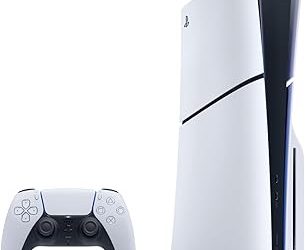
The PS5’s DualSense is known for haptic feedback and adaptive triggers, which add texture to supported games. The Xbox controller offers a familiar shape, and some players prefer its grip and the option to use replaceable batteries. Try both in a store if you can, since comfort is personal.
Subscription Value
Game Pass is the main reason many people choose Xbox, because it gives access to a rotating library for a monthly fee. PlayStation’s subscription also offers a catalog, but its first-party releases arrive differently. Think about how many games you buy each year. A heavy player who tries many titles may like a subscription, while a player who buys one or two games a year may prefer to own them.
Your Friends and Family
Multiplayer is better when your friends are on the same system. Ask your regular group which console they use, because cross-play does not cover every game and chat features differ between platforms.
Your Existing Library
If you already own digital or disc games on one platform, think about whether they carry forward. Backward compatibility is strong on both consoles, but the details differ. Check each game you care about before assuming it transfers.
Storage, Upgrades and Ongoing Costs
Modern games take up large amounts of space, so storage planning matters more than most first-time buyers expect. Both consoles ship with a fast internal drive that fills quickly if you keep several big titles installed. Each platform supports expansion, but the options and rules differ. The Xbox uses a proprietary expansion card format for the fastest play of newer titles, while the PlayStation accepts a compatible internal drive that you install yourself. Read the maker’s guidance before buying any expansion, because a mismatched drive can limit what you can run from it.
Think about the total cost over a few years rather than the price on the box. Add a second controller for local play, a charging dock, an online subscription if you want multiplayer, and the cost of games. A subscription spreads spending out, while owning games front-loads it but gives you something to keep. Neither approach is wrong, so choose the one that fits your habits.
Finally, look at how you will watch media. Both consoles stream popular video services and support 4K playback, though the disc drive and remote options vary. If the console doubles as the household’s media player, check that your preferred apps are supported and that the interface feels comfortable to you.
What About Performance?
Both consoles target high-resolution, high-frame-rate play, and the differences are small in most games. A developer’s optimization often matters more than the hardware label. Pick your console based on games and features rather than chasing a few percentage points of difference. If you own a 4K TV with a high refresh rate and HDR, either console can take advantage of it.
In 2026 both platforms are mature, with large libraries and plenty of accessories, so a decision made on the games you want will serve you well.
Who Each Console Fits Best
Some patterns show up repeatedly when players choose between the two. Looking at your own habits can make the decision feel less like a coin flip.
The Story-Driven Solo Player
If you mostly play cinematic single-player adventures and finish a handful of big games per year, the PS5 is the natural fit. The first-party catalog leans toward polished narratives, and the controller’s feedback adds to immersion in supported titles. Owning your games on disc also lets you lend or resell them later.
The Variety Seeker
If you like to sample many genres without committing to each purchase, the Xbox with a subscription can make financial sense. A rotating catalog lets you try an unfamiliar game on a whim. The trade-off is that titles can leave the service, so finish what you start or keep a purchase in mind for favorites.
The Multiplayer Regular
If you play online nightly with the same group, the platform they use outweighs every other factor. Friends lists, party chat and shared progress all live inside one ecosystem. Switching later means rebuilding that social circle and possibly repurchasing games.
The Gamer Who Also Uses a PC
If you split time between a console and a Windows gaming PC, Xbox’s overlap with the PC platform means progress, purchases and some accessories can follow you. PlayStation fans with a PC can still enjoy many ports, but the integration is less direct.
None of these profiles is a rule. They are starting points for thinking about where you will spend most of your hours over the next several years.
Before You Buy Checklist
- List the three games that make you want a console and see where they run.
- Ask your friends which platform they use.
- Decide whether you prefer a subscription or owning games.
- Check your TV’s resolution and refresh rate support.
- Choose between disc and digital, if the model offers both.
- Plan for extra storage and a second controller.
Common Mistakes When Choosing
- Choosing based on a single performance headline instead of the games you will play.
- Buying before checking which console your friends use.
- Assuming a subscription includes every new release at launch.
- Ignoring storage until the first large download fills the drive.
Spend a few minutes on these points and the decision usually becomes clear.
Related guides
- Gaming Headset Noise Isolation Vs Active Noise Cancellation
- Does Gaming Headset Noise Cancellation Work On Microphone
- Trackir Vs Vr Vs Webcam Head Tracking For Flight Sims
Frequently Asked Questions
Which console is more powerful?
Both are in the same performance class. Differences exist on paper, but real game results depend more on the developer’s work than on small hardware gaps.
Can I play my old games on either console?
Both offer backward compatibility, with different coverage. Check the maker’s compatibility lists for specific titles before you buy.
Do I need a subscription?
Offline single-player play generally does not require one. Online multiplayer and some extras usually do, so budget for it if you play online.
Which is better for a PC gamer?
Xbox’s tie to Windows and the shared release of many first-party games can appeal to PC players. PlayStation is attractive when you want its exclusives or a different kind of controller.
FAQ
What About Performance?
Which console is more powerful?
Can I play my old games on either console?
Do I need a subscription?
Which is better for a PC gamer?
More from Amazon
Programs that pair well with the guide above. Offers and eligibility are set by Amazon and may change.
Free shipping on eligible items, Prime Video and more. Eligible new members can start with a free trial.
Start a Prime free trialAd-free music streaming. Eligible new subscribers can start with a free trial.
Try Music Unlimited freeA Prime membership for ages 18-24 with a trial period. Eligibility is set by Amazon.
See Prime for Young AdultsAudiobooks and podcasts to listen to on the go. Eligible new members can start with a free trial.
Try Audible freeAs an Amazon Associate we earn from qualifying purchases.