Our Top Picks



A toy laptop gives a young child a screen and keyboard of their own, sized for small hands and filled with letters, numbers, music and pretend messages instead of apps and accounts. The best models match the child’s stage: chunky shape buttons and a light-up screen for babies, simple app-style buttons for one-year-olds, then proper keyboards, pretend email and quiz-style activities for preschoolers.
Every pick below comes from VTech or LeapFrog, the two brands that dominate this category, and each works fully offline on ordinary AA batteries — no accounts, no downloads, nothing to connect to the internet. The five models run in age order, from a first laptop for babies of six months to a personalised preschool laptop for children up to six years old.
As an Amazon Associate, we earn from qualifying purchases.
Quick Picks
- Best for babies: VTech Brilliant Baby Laptop — nine chunky shape buttons, a light-up screen and three modes for ages 6 to 36 months.
- Best for one-year-olds: VTech Toddler Tech Laptop — five app buttons, a mirror screen with light-up emojis and chunky sliders.
- Best for two-year-olds: LeapFrog My Own Leaptop, Green — four learning modes, 26 animal animations and pretend email with Scout and Violet.
- Best touchscreen pick: LeapFrog 2-in-1 LeapTop Touch, Green — a screen that flips between laptop and tablet, with ten modes of play.
- Best for preschoolers: VTech Tote and Go Laptop, Orange — 20 activities, a full keyboard and personalisation with the child’s name, age and avatar.
How to Choose
Match the laptop to the child’s age first. The age band on the box matters more here than in most toy categories. Baby laptops for the 6 to 36 month range use big buttons, bright lights and short sounds, because babies play by pressing and watching what happens. From around age two, children start following simple prompts, so laptops add modes, animations and pretend messages. Preschool models add a full keyboard, spelling and maths activities, and personalisation. A laptop bought for the wrong stage either bores an older child or overwhelms a younger one.
Decide between buttons, keys and a touchscreen. The simplest models have a few large buttons shaped like animals, shapes or phone-style apps, suiting babies and young toddlers. A step up adds a chunky keyboard with letter keys, so children can find and press the letter they hear. Touchscreen models add tapping and swiping, and the 2-in-1 design in this guide flips between a keyboard layout and a flat tablet layout.
Look at what the laptop teaches. Most models cover letters and phonics, numbers and counting, shapes, colours, animals and music, but the mix differs. Some lean towards songs and melodies for younger babies, while preschool models add vocabulary, maths, logic games and spelling. Pretend email is worth having from age two upwards, because imitating grown-up communication is a large part of the fun.
Check batteries and portability. All five picks run on AA batteries and include a set for demonstration, so the laptop works straight out of the box; keep spares at home because demo sets are not meant to last. Every model here folds closed to protect the screen and keys, and a carry handle helps if the laptop travels.
VTech Brilliant Baby Laptop
The Brilliant Baby Laptop is built for the youngest laptop users, from six months old. It opens and closes like a real laptop, and opening the lid switches it on. Inside, nine brightly coloured shape buttons sit in front of a light-up screen, and a movable mouse gives small hands something extra to push. A chunky carrying handle makes it easy to move from lap to floor and back again.
Three play modes keep the content simple and varied: Animal mode introduces animals and sounds, Shape mode teaches shapes, and Music mode plays songs and melodies. Across the modes there are more than 115 songs, melodies, sounds and phrases, which is a lot of variety for a first laptop. This is the pick for a baby who loves pressing buttons and watching lights respond.
Specs
| Detail | Value |
|---|---|
| Brand | VTech |
| Model | 80-191200 |
| Age range | 6–36 months |
| Batteries | 2 AA (included) |
| Play modes | 3 (Animals, Shapes, Music) |
| Buttons | 9 shape buttons |
| Content | 115+ songs, melodies, sounds and phrases |
| Dimensions | 2.2 x 11.1 x 12.48 in |
See the VTech Brilliant Baby Laptop on Amazon
VTech Toddler Tech Laptop
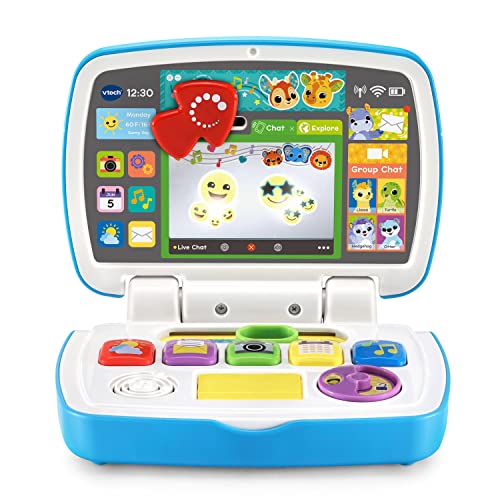
The Toddler Tech Laptop copies the look of the phones and tablets toddlers see adults use. Five colourful app buttons run along it, covering weather, email, camera, calendar and music, so pressing one feels like opening an app. The screen is a mirror with light-up emojis behind it, so babies see a face — often their own — while the emojis light up in response to play.
Around the app buttons there are plenty of fiddle features: a sliding arrow cursor, a spinning disc, a slider and a home button. The content stays at the cause-and-effect level that suits 12 to 36 month olds. It is light at just under a pound, and the compact body suits small laps. Choose this one for a one-year-old who reaches for phones and remotes and needs a screen of their own.
Specs
| Detail | Value |
|---|---|
| Brand | VTech |
| Model | 80-524700 |
| Age range | 12–36 months |
| Batteries | 3 AA (demo set included) |
| App buttons | 5 (weather, email, camera, calendar, music) |
| Screen | Mirror screen with light-up emojis |
| Dimensions | 1.8 x 7 x 10 in |
| Weight | 0.99 lb |
See the VTech Toddler Tech Laptop on Amazon
LeapFrog My Own Leaptop, Green
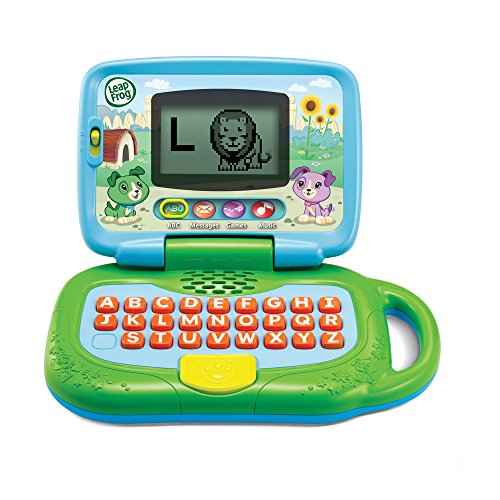
My Own Leaptop is LeapFrog’s long-running first laptop for ages two to four, shaped like a proper little computer with a screen, a keyboard and a carry handle. Four learning modes cover the basics: ABCs works on letters, Messages holds pretend emails, Games adds simple challenges, and Music plays songs. The screen shows 26 animal animations, a visual reward for pressing the letter keys.
The pretend email feature is the heart of this one. Children exchange make-believe messages with the puppy characters Scout and Violet, making it a role-play toy as well as a learning one. Sixteen songs and melodies are built in, and the included batteries mean it runs straight from the box. It is the natural step up when a child outgrows button-only baby laptops.
Specs
| Detail | Value |
|---|---|
| Brand | LeapFrog |
| Model | 80-19150E |
| Age range | 24 months–4 years |
| Batteries | 3 AA (included) |
| Learning modes | 4 (ABCs, Messages, Games, Music) |
| Animations | 26 animal animations |
| Music | 16 songs and melodies |
| In the box | Leaptop, Quick Start Guide |
See the LeapFrog My Own Leaptop on Amazon
LeapFrog 2-in-1 LeapTop Touch, Green
The LeapTop Touch is the only pick here with a touchscreen, and the only one that changes shape. Used one way it is a laptop with a keyboard and a touch screen above it; flip the screen over and it becomes a flat tablet for tapping games. That two-in-one design suits children aged two to five who copy adults switching between devices, and the tablet mode makes it feel new again months later.
Ten modes of play cover letters, numbers, vocabulary and animals, with music and pretend messaging alongside. The touchscreen responds directly to little fingers, bridging button-based baby laptops and keyboard-driven preschool models. Pick this one if your child is drawn to touchscreens and you want a keyboard as well as a tablet mode in a single toy.
Specs
| Detail | Value |
|---|---|
| Brand | LeapFrog |
| Model | 80-600900 |
| Age range | 24 months–5 years |
| Batteries | 3 AA (demo set included) |
| Play modes | 10 modes of play |
| Screen | Touchscreen |
| Design | 2-in-1 flip screen (laptop and tablet) |
See the LeapFrog 2-in-1 LeapTop Touch on Amazon
VTech Tote and Go Laptop, Orange
The Tote and Go Laptop is the most grown-up model in this guide, aimed at ages three to six. A penguin character hosts 20 learning activities grouped under six category buttons: Letters and Words, Numbers and Shapes, Animals and Food, Logic and Games, Music Time, and a personal All About Me section. The activities teach more than 60 words, and 30 melodies are built in for music breaks.
Personalisation is what sets it apart. Parents can add the child’s name, age, a chosen avatar and a favourite food, and the laptop uses those details in its greetings and games, with a personalised opening tune. The full QWERTY keyboard and attached mouse mirror a real computer layout, so children practise finding letters in the places they will later type. It folds shut with a handle for carrying between home, car and classroom. Choose it for a preschooler who wants a laptop that feels made just for them.
Specs
| Detail | Value |
|---|---|
| Brand | VTech |
| Model | 80-155400 |
| Age range | 36 months–6 years |
| Batteries | 2 AA (demo set included) |
| Activities | 20 across 6 categories |
| Vocabulary | 60+ words |
| Melodies | 30 |
| Dimensions | 2.68 x 10.67 x 8.23 in |
| Weight | 1.8 lb |
See the VTech Tote and Go Laptop on Amazon
Products at a Glance
| Product | Age range | Batteries | Standout feature |
|---|---|---|---|
| VTech Brilliant Baby Laptop | 6–36 months | 2 AA | 9 shape buttons, light-up screen, 115+ songs and sounds |
| VTech Toddler Tech Laptop | 12–36 months | 3 AA | 5 app buttons, mirror screen with light-up emojis |
| LeapFrog My Own Leaptop, Green | 24 months–4 years | 3 AA | Pretend email with Scout and Violet, 26 animal animations |
| LeapFrog 2-in-1 LeapTop Touch, Green | 24 months–5 years | 3 AA | Touchscreen that flips between laptop and tablet |
| VTech Tote and Go Laptop, Orange | 36 months–6 years | 2 AA | Personalisation, 20 activities, full QWERTY keyboard |
FAQ
What age should a child get a first toy laptop?
Babies can start from around six months with a simple button-and-lights laptop like the Brilliant Baby Laptop. From about age two, children get more from models with modes, animations and pretend messages, and from age three a keyboard model with personalisation holds attention longest. Matching the laptop to the age band matters more than buying the most advanced model early.
Do toy laptops need Wi-Fi or an internet connection?
No. All five laptops in this guide work fully offline on AA batteries, with every activity, song and sound built into the toy itself. There are no accounts, no downloads and no pairing, which makes them simple to hand to a child anywhere.
What is the difference between a toy laptop and a kids tablet?
A toy laptop is a closed, single-purpose toy: a fixed set of learning activities, chunky buttons or keys, and no app store, browser or video playback. A kids tablet is a real tablet with changeable apps and content. Toy laptops suit younger children because everything on them is age-appropriate by design, they are built to survive drops and sticky fingers, and play sessions stay short and focused.
Are batteries included with these toy laptops?
Yes — each model includes a set of AA batteries fitted for demonstration, so the laptop works straight from the box. Demo batteries are not meant for long-term use, so plan on a fresh set of two or three AAs once the included set runs down.
Conclusion
The right toy laptop is the one matched to your child’s stage. For a baby’s first laptop, the VTech Brilliant Baby Laptop keeps things bright, chunky and musical, while the VTech Toddler Tech Laptop adds an app-style layout and mirror screen for one-year-olds. LeapFrog’s My Own Leaptop brings pretend email and animal animations for two to four year olds, and the 2-in-1 LeapTop Touch adds a touchscreen that flips into a tablet. For preschoolers ready for a keyboard and content with their own name in it, the VTech Tote and Go Laptop is the most complete package here.
FAQ
What age should a child get a first toy laptop?
Do toy laptops need Wi-Fi or an internet connection?
What is the difference between a toy laptop and a kids tablet?
Are batteries included with these toy laptops?
More from Amazon
Programs that pair well with the guide above. Offers and eligibility are set by Amazon and may change.
Free shipping on eligible items, Prime Video and more. Eligible new members can start with a free trial.
Start a Prime free trialAd-free music streaming. Eligible new subscribers can start with a free trial.
Try Music Unlimited freeA Prime membership for ages 18-24 with a trial period. Eligibility is set by Amazon.
See Prime for Young AdultsAudiobooks and podcasts to listen to on the go. Eligible new members can start with a free trial.
Try Audible freeAs an Amazon Associate we earn from qualifying purchases.