Key takeaways
- Peak cooling ceiling: A quality 280mm or 360mm AIO still wins above roughly 250W sustained load, but below that a dual-tower air cooler is effectively equal.
- Noise profile: Air coolers produce only fan noise. AIOs add pump whine and vibration, which is constant rather than load-dependent and bothers some users more than fan hum.
- Price: Air coolers occupy the $25–$70 bracket. Comparable AIOs typically start around $90 and climb past $200 for screens and premium pumps.
- Longevity: Heatsinks fail only when fans wear out, and fans are replaceable. AIO pumps have a finite lifespan and coolant permeates slowly through tubing over several years.
- Clearance and fit: Air coolers need vertical and RAM clearance; AIOs need radiator mounting space in the top or front of the case. Neither is universally easier.
- Aesthetics: AIOs keep the motherboard visible and offer LCD blocks. Air coolers counter with ARGB heatsink covers and, in the case of the Peerless Assassin 120 Vision MAX, a 5-inch IPS display built into the tower itself.
Cooling has quietly become one of the most consequential decisions in a 2026 gaming build. Modern CPUs no longer have a fixed clock speed you either hit or miss — chips from AMD’s AM5 platform and Intel’s LGA 1851 socket use aggressive boost algorithms that scale performance directly against thermal headroom. Give the silicon more room to breathe and it holds higher clocks for longer. Choke it, and you lose frames you already paid for. That leaves builders choosing between two mature technologies: the all-in-one liquid cooler (AIO) and the traditional tower air cooler.
The debate used to be simple — liquid was better, air was cheaper. That is no longer true. Dual-tower air coolers have closed the gap to the point where a $40 heatsink can trade blows with a $130 240mm radiator, while AIOs have grown more reliable and considerably quieter. The right answer now depends on your chassis, your CPU’s power draw, your tolerance for pump noise, and how much you care about how the build looks through a glass side panel.
Our top picks
 Thermalright Peerless Assassin 120 SE CPU Cooler
- [Brand Overview] Thermalright is a Taiwan brand with…
- [Product specification] Thermalright PA120 SE
- 【2 PWM Fans】TL-C12C
 Thermalright Peerless Assassin 120 SE ARGB CPU
- [Brand Overview] Thermalright is a Taiwan brand with…
- [Product specification] Thermalright PA120 SE ARGB
- 【2 PWM Fans】Model:TL-C12C-S
 ID-COOLING SE-903-XT V2 Black CPU Air Cooler
- Compact CPU Air Cooler
- 【Enhanced Fin Locking & Secure Fan Clip Design】Upgraded…
- 【Enhanced Cooling with Larger Fan Upgrade】The upgraded 100mm…
| Product | Key specs | |
|---|---|---|
| Thermalright Peerless Assassin 120 SE CPU Cooler | [Brand Overview] Thermalright is a Taiwan brand with… [Product specification] Thermalright PA120 SE 【2 PWM Fans】TL-C12C | Check price |
| Thermalright Peerless Assassin 120 SE ARGB CPU | [Brand Overview] Thermalright is a Taiwan brand with… [Product specification] Thermalright PA120 SE ARGB 【2 PWM Fans】Model:TL-C12C-S | Check price |
| ID-COOLING SE-903-XT V2 Black CPU Air Cooler | Compact CPU Air Cooler 【Enhanced Fin Locking & Secure Fan Clip Design】Upgraded… 【Enhanced Cooling with Larger Fan Upgrade】The upgraded 100mm… | Check price |
 Thermalright Phantom Spirit 120SE CPU Air Cooler Thermalright Phantom Spirit 120SE CPU Air Cooler | [Brand Overview]Thermalright is a Taiwanese brand with more… [AGHP technique]7x6mm heatpipe with AGHP upgraded 4th generation… [Product specification] PS120SE | Check price |
 Thermalright Peerless Assassin 120 Vision MAX ARGB Thermalright Peerless Assassin 120 Vision MAX ARGB | [5-inch IPS LCD Screen] The radiator features a… [Excellent Cooling Performance] The CPU cooler is primarily… [Heatsink Specifications] Overall dimensions of the CPU cooler:… | Check price |
 Thermalright Assassin X120 Refined SE CPU Air Thermalright Assassin X120 Refined SE CPU Air | [Brand Overview] Thermalright is a Taiwan brand with… [Product specification]AX120R SE 【PWM Fans】TL-C12C | Check price |
 Thermalright Phantom Spirit 120 EVO CPU Cooler Thermalright Phantom Spirit 120 EVO CPU Cooler | 【Brand Overview】Thermalright is a Taiwanese brand with more… 【Overall refinement】The cpu radiator adopts anodic black frosted… 【Product specification】PS120 EVO | Check price |
 Thermalright Peerless Assassin 120 Vision MAX ARGB Thermalright Peerless Assassin 120 Vision MAX ARGB | [5-inch IPS LCD Screen] The radiator features a… [Excellent Cooling Performance] The CPU cooler is primarily… [Heatsink Specifications] Overall dimensions of the CPU cooler:… | Check price |
As an Amazon Associate we earn from qualifying purchases at no extra cost to you.
⚡ Save on Your Next PC — Amazon Prime
Prime members get fast free shipping on the systems above, plus early access to Prime Day & Black Friday PC deals. New members get a 30-day free trial.
Watch: AIO vs Air Cooler: Which Is Best in 2026? — Video Review
Quick Verdict
An AIO is the better buy if you are running a high-wattage flagship CPU, building in a compact or airflow-restricted case where a 160mm tower will not fit, or you want a clean, unobstructed look around the socket. An air cooler is the smarter buy for almost everyone else: mid-range and upper-mid-range CPUs, budget-conscious builds, and anyone who wants a component that will outlive two or three GPU upgrades without a single moving part failing. Coolers like the Thermalright Phantom Spirit 120 SE and Peerless Assassin 120 SE deliver near-AIO performance at a fraction of the cost.
Key Differences
- Peak cooling ceiling: A quality 280mm or 360mm AIO still wins above roughly 250W sustained load, but below that a dual-tower air cooler is effectively equal.
- Noise profile: Air coolers produce only fan noise. AIOs add pump whine and vibration, which is constant rather than load-dependent and bothers some users more than fan hum.
- Price: Air coolers occupy the $25–$70 bracket. Comparable AIOs typically start around $90 and climb past $200 for screens and premium pumps.
- Longevity: Heatsinks fail only when fans wear out, and fans are replaceable. AIO pumps have a finite lifespan and coolant permeates slowly through tubing over several years.
- Clearance and fit: Air coolers need vertical and RAM clearance; AIOs need radiator mounting space in the top or front of the case. Neither is universally easier.
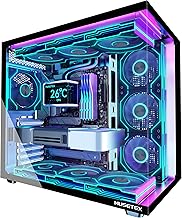
- Aesthetics: AIOs keep the motherboard visible and offer LCD blocks. Air coolers counter with ARGB heatsink covers and, in the case of the Peerless Assassin 120 Vision MAX, a 5-inch IPS display built into the tower itself.
AIO Liquid Coolers
An AIO moves heat away from the CPU with a sealed loop of coolant, dumping it into a radiator mounted at the edge of the case. The key advantage is thermal mass and surface area: a 360mm radiator has vastly more dissipation area than any heatsink, and the water buffer absorbs short bursts of heat without an immediate temperature spike. That matters most for chips like a Ryzen 9 or Core i9 under sustained all-core workloads — rendering, compiling, streaming while gaming.
The trade-offs are real, though. You are paying for a pump, tubing and a controller, all of which are wear items. Mounting is fiddlier, particularly front-mounting a radiator in a case that also holds a triple-slot GPU. And while modern AIO pumps are quiet, they are never silent. If you build for near-silence at idle, an AIO makes that goal harder, not easier.
Air Coolers
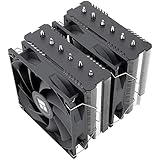
The modern dual-tower air cooler is one of the best value propositions in PC hardware. The Thermalright Phantom Spirit 120 SE uses seven heat pipes with AGHP 4.0 technology and two 120mm PWM fans to handle CPUs well into the 200W range, while the Peerless Assassin 120 SE runs six pipes and remains the default recommendation for mid-range builds. The ARGB variant adds an aluminium heatsink cover and lighting without a meaningful thermal penalty.
Size does not have to be a barrier. The Assassin X120 Refined SE is a single-tower four-pipe design that fits comfortably under tall RAM and in mid-tower cases with limited width, and the ID-COOLING SE-903-XT V2 shrinks further with a 100mm fan and direct-touch heat pipes for compact or budget systems. For builders who want display features without a liquid loop, the Peerless Assassin 120 Vision MAX pairs a twin-tower stack with a 480×854 IPS screen.
Which Should You Buy?
- For a flagship CPU under sustained load: pick a 280mm or 360mm AIO for the extra thermal ceiling.
- For a mid-range gaming build: pick the Peerless Assassin 120 SE or Phantom Spirit 120 SE — nothing at the price beats them.
- For a small or narrow case: pick the ID-COOLING SE-903-XT V2 or Assassin X120 Refined SE, or a slim 240mm AIO if clearance allows.
- For maximum reliability over five-plus years: pick air, every time.
- For a showcase build with a glass panel: pick an AIO with an LCD block, or the Peerless Assassin 120 Vision MAX if you want a screen on air.
Frequently Asked Questions
Do I need an AIO for a Ryzen 9 or Core i9?
No, but it helps. A top-tier dual-tower cooler will keep these chips stable and performant in gaming. Under long all-core workloads, a 360mm AIO will typically hold clocks a few percent higher.
Are AIOs likely to leak?
Leaks from reputable brands are rare in 2026. The more common failure is pump degradation after four to six years, which shows up as rising temperatures rather than damage.
Will a large air cooler block my RAM or GPU?
It can. Check your case’s maximum CPU cooler height and confirm RAM clearance before buying. Most Thermalright towers allow standard-height memory in at least one fan position.
Is a 240mm AIO better than a dual-tower air cooler?
Generally not. At equivalent noise levels, a good dual-tower cooler matches or beats a 240mm AIO while costing significantly less.
Final Verdict
For the large majority of gaming builds in 2026, a premium air cooler is the rational choice — the Phantom Spirit 120 SE and Peerless Assassin 120 SE deliver performance that would have required a $150 liquid loop five years ago, with no pump to fail and no coolant to lose. Reserve the AIO for genuinely high-wattage CPUs, tight chassis layouts where a tower will not physically fit, or builds where the aesthetic is part of the point. Both paths will keep your CPU cool; only one of them will still be doing it flawlessly in 2032.