
Our Top Picks
For most gamers a B550 board is the better buy, because both chipsets give the graphics card and the main M.2 slot PCIe 4.0 lanes straight from the Ryzen processor, and X570 only pulls ahead when you need many fast devices running at once. X570 is the older flagship platform with more chipset-provided PCIe 4.0 bandwidth, more connectivity and, on most boards, a small chipset fan. B550 is the mainstream chipset that trimmed those extras while keeping what games actually use.
The short answer
If you plan one graphics card, one or two NVMe drives and a handful of USB devices, B550 covers it. If you plan several PCIe 4.0 NVMe drives, capture cards, add-in networking or a second expansion card that wants real bandwidth, X570 gives you more headroom. Reviewers who compare the two consistently point to the same split: the processor provides the lanes for the GPU and primary SSD on both, while the chipset is where the platforms differ.

GIGABYTE B550 Gaming X V2 AMD AM4 ATX Motherboard, Supports Ryzen 5000/4000/3000 Series Processors, DDR4, 10+3 Power Phase, 2X M.2, PCIe 4.0, Front USB-C, GbE LAN, Q-Flash Plus, RGB Fusion
Chosen because it specifies Supports Ryzen 5000/4000/3000 Series Processors and DDR4.
View on Amazon
MSI B550 Gaming WIFI6E Motherboard, ATX - Supports AMD Ryzen 5000 Series, 5000 G-Series, 4000 G-Series and 3000 Series Processors, AM4 - DDR4 Memory Boost 4800+MHz/OC, PCIe 4.0 x16, M.2 Gen4, 1G LAN
Chosen because it specifies ATX and Supports AMD Ryzen 5000 Series.
View on Amazon
GIGABYTE B550 Eagle WIFI6 AMD AM4 ATX Motherboard, Supports Ryzen 5000/4000/3000 Processors, DDR4, 10+3 Power Phase, 2X M.2, PCIe 4.0, USB-C, WIFI6, GbE LAN, PCIe EZ-Latch, EZ-Latch, RGB Fusion
Chosen because it specifies Supports Ryzen 5000/4000/3000 Processors and DDR4.
View on Amazon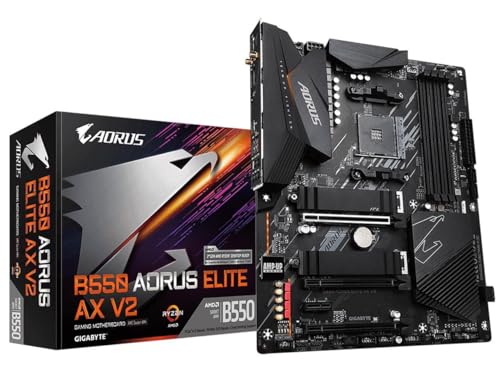
GIGABYTE B550 AORUS Elite AX V2 AMD AM4 ATX Motherboard, Supports Ryzen 5000/4000/3000 Processors, DDR4, 12+2 Power Phase, 2X M.2, PCIe 4.0, Front USB-C, WIFI6, 2.5 GbE LAN, Q-Flash Plus, RGB Fusion
Chosen because it specifies Supports Ryzen 5000/4000/3000 Processors and DDR4.
View on AmazonWhat is actually different
Both chipsets target AM4 sockets and the same family of Ryzen desktop processors, subject to each board’s BIOS support. The differences sit in how the chipset talks to the processor and what it can offer downstream.
- Chipset uplink: reviewers report that X570 connects to the processor over a PCIe 4.0 x4 link, while B550 uses a PCIe 3.0 x4 link. That uplink is shared by everything attached to the chipset.
- Chipset lanes: X570 exposes PCIe 4.0 lanes from the chipset itself. B550 chipset lanes run at PCIe 3.0. Outlets quote slightly different lane counts, so read the exact block diagram in the board manual for the model you are considering.
- Processor lanes: on both platforms, the x16 graphics slot and the primary M.2 slot are fed from the processor and can run at PCIe 4.0 when paired with a compatible Ryzen chip.
- Secondary M.2 slots: on many B550 boards the second M.2 slot is wired through the chipset and runs at PCIe 3.0, while many X570 boards offer a second PCIe 4.0 M.2 slot.
- Cooling: X570 chipsets draw more power, and a good number of boards include a small active fan on the chipset heatsink. B550 boards are typically passively cooled.
- Positioning: X570 boards tend to sit in a higher product tier, with more robust power delivery on the upper models, extra USB ports and more expansion slots.
Quick comparison table
| Feature | B550 | X570 |
|---|---|---|
| GPU slot generation (with compatible Ryzen) | PCIe 4.0 from the processor | PCIe 4.0 from the processor |
| Primary M.2 slot | PCIe 4.0 from the processor | PCIe 4.0 from the processor |
| Chipset to processor link | PCIe 3.0 x4 | PCIe 4.0 x4 |
| Chipset-attached lanes | PCIe 3.0 | PCIe 4.0 on the chipset side |
| Typical secondary M.2 speed | Often PCIe 3.0 | Often PCIe 4.0 |
| Chipset cooling | Usually passive | Often has a small fan |
| Board tier | Mainstream to upper mainstream | Upper mainstream to enthusiast |
Does X570 give you more FPS?
Not in any meaningful way on its own. A game running on a graphics card in the processor-attached x16 slot sees the same PCIe generation on either chipset. Frame rates are decided by the GPU, the processor, memory and the game, not by the chipset badge. If you move from B550 to X570 expecting a performance jump with the same parts, reviewers generally report you should not expect one.
The X570 advantage shows up in file-heavy work: copying between two fast NVMe drives, running several SSDs at once, or hanging fast peripherals off the chipset. For game loading, even the difference between PCIe 3.0 and PCIe 4.0 drives is modest in most titles, so a PCIe 3.0 secondary slot rarely limits a typical gaming rig.
Processor compatibility and BIOS
Both families launched around the Ryzen 3000 and 5000 eras, and both support later AM4 chips only after a suitable BIOS. The maker lists supported processors per board on its CPU support page, and a board can need a BIOS update before it will boot a newer Ryzen. Some boards ship with an older BIOS, so look for a BIOS flashback button or a sticker saying the board is ready for newer chips. Early B550 boards in particular were launched for Ryzen 3000 and 5000 support, and board makers published specific BIOS versions for each. Read the support page for the exact model rather than assuming a chipset name guarantees compatibility.
It is also worth remembering that AM4 is an older platform. If you are building new in 2026, AMD’s current desktop line uses AM5 with DDR5, so B550 and X570 make the most sense when you already own an AM4 processor and DDR4 memory, or when you are buying used or discounted parts. Mixing a new AM4 board with a new high-end processor is less common than upgrading an existing system.
Pick the right one
| Your situation | Better fit | Why |
|---|---|---|
| One GPU, one or two SSDs, mainstream gaming | B550 | Gets PCIe 4.0 where games need it, usually at a lower tier of cost |
| Several PCIe 4.0 NVMe drives | X570 | More PCIe 4.0 capability from the chipset side |
| Quiet, fanless chipset preferred | B550 | Lower chipset power, usually passive heatsink |
| Capture card plus extra expansion cards | X570 | More lanes and slots on many models |
| Strong power delivery for a high-core Ryzen | Either, depends on the model | Check VRM quality of the specific board, not the chipset name |
| Tight budget with an existing Ryzen | B550 | Value tier, same GPU and primary SSD speeds |
Common mistakes
- Paying for X570 for FPS. The gaming slot generation is the same on both, so the chipset name alone does not raise frame rates.
- Ignoring VRM quality. A basic X570 board can have weaker power delivery than a well-built B550 board. Read the board’s power phase description and cooling, not just the chipset.
- Skipping the BIOS check. A board that cannot boot your processor out of the box is a frustrating start. Read the maker’s CPU support list.
- Assuming every M.2 slot is the fastest. Slot speeds differ on both chipsets. Put your fastest drive in the processor-attached slot and read the manual for lane sharing with SATA ports.
- Forgetting the chipset fan. Some X570 boards have a small fan that can be audible or collect dust. It is normal, but it matters if you value a silent case.
Alternatives to consider
If you are already shopping for AM4 and want to spend less, an A520 or B450-class board can pair with some Ryzen processors, but they generally lack PCIe 4.0 on key slots, so read the specifications carefully. If you are starting from scratch, look at AM5 boards such as B650 or B850 with DDR5, which bring newer connectivity and a longer upgrade path. Neither is a direct swap for an AM4 build, because a new platform means a new processor and new memory.
Frequently Asked Questions
Is B550 good enough for gaming?
Yes. B550 gives the graphics slot and the main M.2 slot PCIe 4.0 lanes from the processor when paired with a compatible Ryzen. That is where games spend their bandwidth, so reviewers generally call it the sensible choice for gaming builds.
Is X570 worth the extra cost over B550?
Only if you will use what it adds: more PCIe 4.0 devices, more expansion slots or a particular high-end feature set. For a single GPU and one or two SSDs, the extra spend usually buys features you will not touch.
Can B550 run a PCIe 4.0 graphics card and SSD at full speed?
Yes, when the processor supports PCIe 4.0. The primary x16 slot and the main M.2 slot use processor lanes. A second M.2 slot on a B550 board often runs at PCIe 3.0 because it connects through the chipset.
Do B550 and X570 use the same processors?
Both are AM4 platforms and accept the same Ryzen families, subject to BIOS support on each model. Read the maker’s processor support list for the exact board before buying a newer chip.
Does X570 run hotter than B550?
The chipset draws more power, so many X570 boards include a small fan or a larger heatsink. B550 boards are typically cooler and usually passive. Good case airflow matters either way.
Should I buy either one for a new build in 2026?
If you already own AM4 parts, either can make sense. For a fresh build, AM5 boards with DDR5 offer a newer platform and longer upgrade path, so weigh the total cost of the processor and memory, not just the board.
FAQ
Does X570 give you more FPS?
Is B550 good enough for gaming?
Is X570 worth the extra cost over B550?
Can B550 run a PCIe 4.0 graphics card and SSD at full speed?
Do B550 and X570 use the same processors?
Does X570 run hotter than B550?
Should I buy either one for a new build in 2026?
More from Amazon
Programs that pair well with the guide above. Offers and eligibility are set by Amazon and may change.
Free shipping on eligible items, Prime Video and more. Eligible new members can start with a free trial.
Start a Prime free trialAd-free music streaming. Eligible new subscribers can start with a free trial.
Try Music Unlimited freeA Prime membership for ages 18-24 with a trial period. Eligibility is set by Amazon.
See Prime for Young AdultsAudiobooks and podcasts to listen to on the go. Eligible new members can start with a free trial.
Try Audible freeAs an Amazon Associate we earn from qualifying purchases.




