Our Top Picks
 PreSonus Revelator io44 USB-C Audio Interface for music3.03 x 5.35 x 2.3 inches0.78 poundsCheck on Amazon
The best audio interfaces under $100 are the M-Audio M-Track Duo for two XLR inputs, the Behringer UMC202HD for 24-bit/192 kHz conversion, and the M-Audio M-Track Solo if you only need one microphone. The comparison below is built from listing specifications: inputs, phantom power, sample rate and bundled software.
An audio interface replaces the weak sound card in a computer with a proper microphone preamp and clean conversion. It lets an XLR microphone work on a PC, which is how most streamers and podcasters move beyond a basic USB mic. Home office, small-space and gaming setups are covered in the buying section and the FAQ.
Quick Comparison
| Model | Key specs per listing | Best for |
|---|---|---|
| M-Audio M-Track Duo | Dual XLR, line and DI inputs; software suite for recording, streaming, podcasting | Host and guest, or mic plus guitar |
| Behringer UMC202HD | 2×2, 24-bit/192 kHz, Midas mic preamps | Highest listed sample rate |
| Synido USB-C Interface (Purple) | Dual XLR, line/Hi-Z switch, 3 monitoring modes, 24-bit/48 kHz, 48V phantom | USB-C laptops, two mics |
| PreSonus Revelator io44 | USB-C, built-in mixer, effects presets, Studio One software | Streamers who want a mixer |
| Behringer UMC22 | 2×2, 48 kHz, Midas mic preamp | Simple first interface |
| M-Audio M-Track Solo | XLR, line and DI inputs; software suite | One-mic desks |
These are compared from listing specifications and we did not use them ourselves. Some listings give a sample rate, others list only input types, so a missing figure in the table means the listing does not state it rather than that the interface lacks it. Treat the sample rates as a rough guide: for voice, streaming and podcasting, the preamp and the microphone matter more than the headline number.
M-Audio M-Track Duo
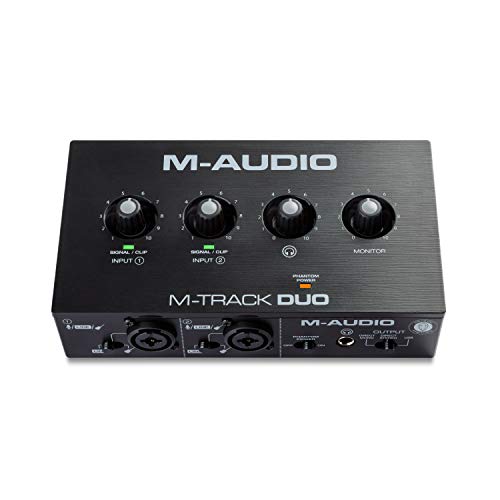
M-AUDIO M-Track Duo USB Audio Interface | Dual XLR, Line and DI Inputs, Professional Software Suite for Recording, Streaming, and Podcasting
Chosen because it specifies Dual XLR and Line and DI Inputs.
View on AmazonSpec line: USB interface with dual XLR, line and DI inputs and a software suite for recording, streaming and podcasting.
The Duo is the most flexible interface in this group because two inputs let you record a host and a guest, or a vocal and an instrument, without swapping cables. The listing names recording, streaming and podcasting as target uses, and the bundled software means you can record on day one. The trade-off is desk space: two inputs and their controls make it bigger than the single-input models. Sample rate, bit depth and phantom power are not described in the listing text, so check the maker page before pairing it with a condenser microphone that needs 48V.
- Pro: two XLR-capable inputs
- Pro: line and DI inputs for instruments
- Pro: bundled software suite
- Con: larger footprint than one-input units
- Con: phantom power and sample rate not listed
Behringer UMC202HD

Behringer UMC202HD Audiophile 2x2, 24-Bit/192 kHz USB Audio Interface with Midas Mic Preamplifiers | For Recording Microphones and Instruments
Chosen because it specifies For Recording Microphones and Instruments.
View on AmazonSpec line: 2×2 USB interface, 24-bit/192 kHz, Midas mic preamplifiers, for recording microphones and instruments.
This is the pick for anyone who wants the highest sample-rate figure the listings give. It has two inputs and two outputs, so you can monitor on headphones or powered speakers while you record. The Midas-designed preamps are the headline feature, and the listing describes the unit as audiophile grade. What the listing does not say is the connector type or the bundled software, so confirm both before buying. At this ceiling it is also one of the more expensive options.
- Pro: 24-bit/192 kHz stated
- Pro: two inputs and two outputs
- Pro: Midas mic preamps
- Con: software bundle not described
- Con: near the top of the price ceiling
Synido USB-C Audio Interface (Purple)

USB C Audio Interface for Recording Music, Streaming, Podcasting, Purple | Dual XLR, line In/hi-z switching, 3 monitoring modes, 24bit/48kHz, 48V phantom power, 2-channel, 3-color gain lights
Chosen because it specifies Streaming and Podcasting.
View on AmazonSpec line: USB-C, dual XLR, line in/Hi-Z switching, 3 monitoring modes, 24-bit/48 kHz, 48V phantom power, 2-channel, 3-colour gain lights.
The Synido gives the most detailed spec list for the money: phantom power, input switching for guitar and bass, three monitoring modes and a clear sample rate. USB-C connects directly to modern laptops, which keeps cables simple on a small desk. It is a lesser-known brand than M-Audio or Behringer, so there is less long-term software and driver support history to rely on. The listing also does not describe the bundled recording software, so you may need to use free recording software on your computer.
- Pro: 48V phantom power listed
- Pro: 3 monitoring modes and gain lights
- Pro: USB-C connection
- Con: lesser-known brand
- Con: no software bundle described
PreSonus Revelator io44
PreSonus Revelator io44 USB-C Audio Interface for music production and streaming with built-in mixer and easy-to-use effects presets plus Studio One DAW Recording Software
Picked as a relevant option in this category.
View on AmazonSpec line: USB-C audio interface for music production and streaming with a built-in mixer, easy effects presets and Studio One recording software.
The Revelator is built around streaming. The listing mentions a built-in mixer and effects presets, so you can shape a voice and balance game audio against a microphone without extra software. The bundled Studio One recording program is a useful extra for anyone who also wants to record music. It is the most feature-rich option here, but the listing does not give input counts, phantom power or sample rate, so read the maker page. Beginners may also find the mixer more than they need.
- Pro: built-in mixer for stream audio
- Pro: effects presets
- Pro: Studio One software
- Con: more complex for first-time users
- Con: input and sample-rate details not listed
Behringer UMC22
Spec line: 2×2 USB audio interface, 48 kHz, Midas mic preamplifier, for recording microphones and instruments.
The UMC22 is the straightforward starter interface. It states a 48 kHz sample rate and a Midas preamp, with two inputs and two outputs, which covers most spoken-word recording. It lacks the 192 kHz figure of its UMC202HD sibling, which you may never miss for streaming or voice work. The listing does not mention phantom power, so confirm it on the maker page before using a condenser microphone. It suits a first home studio where the goal is to get an XLR mic working without spending much.
- Pro: 2×2 with a Midas preamp
- Pro: 48 kHz stated
- Pro: simple, no-frills design
- Con: lower sample rate than the UMC202HD
- Con: phantom power not listed
M-Audio M-Track Solo
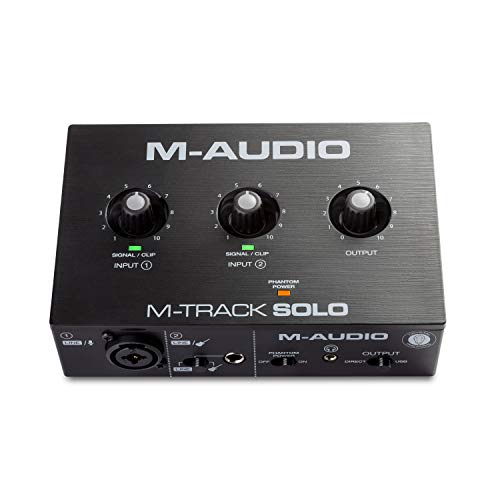
M-AUDIO M-Track Solo USB Audio Interface | XLR, Line and DI Inputs, Professional Software Suite for Recording, Streaming, and Podcasting
Chosen because it specifies XLR and Line and DI Inputs.
View on AmazonSpec line: USB interface with XLR, line and DI inputs and a software suite for recording, streaming and podcasting.
The Solo trims the Duo down to a single mic input, which is exactly what most solo streamers and voice-over artists need. It takes less desk space, uses the same software suite, and keeps the line and DI input for a guitar or other instrument. The limit is obvious: only one microphone at a time, so a second voice means buying a bigger interface. As with its sibling, the listing leaves out sample rate and phantom power details.
- Pro: smallest footprint in this group
- Pro: XLR plus line and DI inputs
- Pro: software suite included
- Con: only one microphone input
- Con: sample rate and phantom power not listed
How to Choose Under $100
Count inputs before anything else
One input is enough for a single streamer or voice-over artist. Two inputs are needed for a guest, a stereo source or a vocal plus guitar. Starting with one input is fine, but moving up later means buying a second interface.
Check phantom power if you use a condenser microphone
Condenser microphones need 48V phantom power from the interface. Dynamic microphones do not. If the listing does not mention phantom power, confirm it on the maker page.
Audio interfaces for home office
For calls and recordings from a home office, an XLR microphone and an interface give a fuller voice than a headset. Pick a USB-C unit if your laptop has few USB-A ports, and set the gain once so you do not have to adjust it for every meeting.
Audio interfaces for small spaces
On a tight desk, the single-input M-Track Solo and the compact USB-C units take the least room. Check the physical dimensions on the maker page, since listings often omit them, and plan for the cable runs to your microphone and monitors.
Audio interfaces for gaming
Gamers who stream benefit from a mixer such as the Revelator, which balances game audio and voice. If you only want a better microphone for voice chat, any of the XLR interfaces here will do the job, though you will need a separate microphone and cable.
Connector type and cables
Newer laptops often have only USB-C ports, so a USB-C interface avoids an adapter. Older desktops are the reverse. The listings here name USB-C for the Synido and the PreSonus; for the others, confirm the connector on the maker page and whether a cable is included in the box.
Direct monitoring and headphone output
Direct monitoring lets you hear your voice through headphones without a delay. The Synido lists three monitoring modes and the Behringer units list two outputs, but the other listings do not describe monitoring. If you record vocals or play instruments, this feature matters more than sample rate.
Software and drivers
The M-Audio units and the PreSonus list bundled software, which makes the first recording easy. The Behringer and Synido listings do not, so plan on free recording or streaming software and check that the maker publishes drivers for your operating system. Driver support is the most common headache with budget interfaces, and it is worth ten minutes of reading before you order.
Build quality and knobs
Interfaces at this ceiling vary in how solid their gain knobs and connectors feel. Metal or plastic construction is rarely stated in the listing, so look at the product photos and the maker page. A loose input jack is a bigger annoyance than a lower sample rate.
A simple way to decide
Match the interface to the work, not the feature list. A solo voice setup is well served by the M-Track Solo or UMC22. A two-person podcast needs the Duo, UMC202HD or Synido. A streamer who wants to balance game sound and voice should look at the Revelator. Write down the microphone you plan to use first, because it decides whether phantom power is a requirement, and that single detail removes half the shortlist in under a minute.
Frequently Asked Questions
Do I need an audio interface for a USB microphone?
No. A USB microphone has its own built-in converter. An interface is for XLR microphones and instruments.
What is phantom power?
It is a 48V supply that powers condenser microphones through the XLR cable. Dynamic microphones do not need it, and some interfaces do not provide it.
Is a 192 kHz sample rate better for streaming?
Not noticeably. Streaming platforms compress audio heavily, so 48 kHz is the usual working rate for voice and video. The preamp and microphone matter more.
Can I use one of these interfaces with a console?
Most listings describe PC and Mac use. Console support is not stated, so check the maker page before buying for that purpose.
Which interface suits a podcast with two people?
Choose a two-input model, such as the M-Track Duo, UMC202HD or Synido. You will need two XLR microphones and cables.
Last updated: November 2026
FAQ
Do I need an audio interface for a USB microphone?
What is phantom power?
Is a 192 kHz sample rate better for streaming?
Can I use one of these interfaces with a console?
Which interface suits a podcast with two people?
More from Amazon
Programs that pair well with the guide above. Offers and eligibility are set by Amazon and may change.
Free shipping on eligible items, Prime Video and more. Eligible new members can start with a free trial.
Start a Prime free trialAd-free music streaming. Eligible new subscribers can start with a free trial.
Try Music Unlimited freeA Prime membership for ages 18-24 with a trial period. Eligibility is set by Amazon.
See Prime for Young AdultsAudiobooks and podcasts to listen to on the go. Eligible new members can start with a free trial.
Try Audible freeAs an Amazon Associate we earn from qualifying purchases.