Our Top Picks
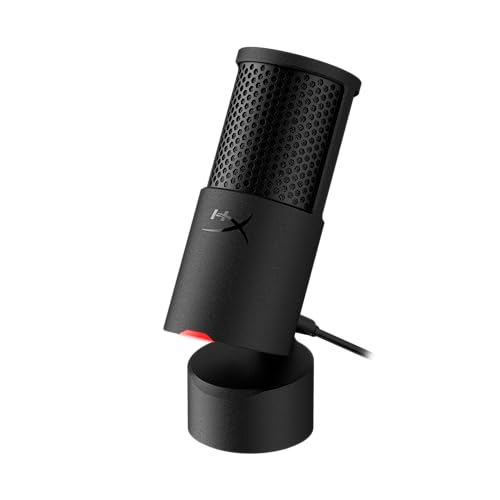 HyperX SoloCast 2 USB Condenser Gaming MicrophoneSoloCast 253 x 1.52 x 1.7 inches0.7 poundsCheck on Amazon
 TONOR Dynamic Gaming Microphone XLR/USB Mic with AI16.7''L x 5.4''W x 4.5''H1.9 poundsCheck on Amazon
 TONOR Gaming Microphone Set with Boom Arm518.4 cubic inches16 x 6 x 5.4 inches1 poundsCheck on Amazon
The best gaming microphones under $50 are the HyperX SoloCast 2 for a clean USB-C condenser, the Razer Seiren V3 Mini for the smallest footprint, and the TONOR TC310+ gaming set for a boom arm and stand in one box. The picks are compared from listing specifications: connection, pickup pattern, mute control and what is included.
A dedicated USB microphone is a large step up from a headset boom for Discord and streaming. At this ceiling you can get a mute button, gain control and often a boom arm. Home office and small-space use are covered in the buying section and the FAQ below.
Quick Comparison
| Model | Key specs per listing | Best for |
|---|---|---|
| HyperX SoloCast 2 | USB-C condenser, 24-bit/96kHz, cardioid, tap-to-mute | Simple plug-and-play voice chat |
| Razer Seiren V3 Mini | USB supercardioid condenser, tap-to-mute sensor with LED, shock absorber, ultra compact | Tight desks, OBS and Discord |
| MAONO DGM20S | USB condenser, noise reduction, RGB, tap-to-mute, gain, headphone monitoring, boom arm | Streamers who want monitoring |
| FIFINE AmpliGame A6V | USB condenser, quick mute, RGB, gain, tripod stand, pop filter, shock mount | PC and PS5 players |
| TONOR TD510 AIR S H+ | Dynamic XLR/USB, AI noise cancellation, boom arm set, RGB, tap mute, 3.5mm jack | Noisy rooms |
| TONOR TC310+ Set | USB condenser, boom arm and stand, RGB, tap mute, gain control | Complete starter kit |
We compared the microphones from listing specifications and did not use them. The group splits cleanly: five are USB condensers, which hear a lot of the room, and one is a dynamic with noise cancellation. Gain control and a mute control appear on almost every listing, so the real separators are included accessories, the pickup pattern and whether the unit has headphone monitoring.
HyperX SoloCast 2
HyperX SoloCast 2 USB Condenser Gaming Microphone | 24-bit | 96kHz | Cardioid | USB-C | Tap-to-Mute | PC Compatible
Chosen because it specifies 24-bit and 96kHz.
View on AmazonSpec line: USB-C condenser gaming microphone, 24-bit/96kHz, cardioid, tap-to-mute, PC compatible.
The SoloCast 2 is the cleanest, simplest pick. It is USB-C, listed with a 24-bit/96kHz rating and a cardioid pickup pattern, and it has a tap-to-mute control on top that is quick to hit during a match. The listing does not mention a boom arm, a pop filter or a headphone jack, so you get the microphone and little else. If you already have a stand or arm and want something compact from a gaming brand, it is a sensible choice. Bundles and accessories are where this one gives way to kits.
- Pro: 24-bit/96kHz and cardioid pickup listed
- Pro: tap-to-mute
- Pro: USB-C connection
- Con: no arm or pop filter listed
- Con: no headphone jack listed
Razer Seiren V3 Mini

Razer Seiren V3 Mini USB Microphone, Supercardioid Condenser Mic, Black | Tap-to-Mute Sensor with LED Indicator, Shock Absorber, Ultra Compact, Works with OBS, Discord, Zoom, Teams
Chosen because it specifies Supercardioid Condenser Mic and Black.
View on AmazonSpec line: USB supercardioid condenser microphone, tap-to-mute sensor with LED indicator, shock absorber, ultra compact, works with OBS, Discord, Zoom and Teams.
Razer’s Mini is the smallest microphone in this group, which matters on a desk already full of a keyboard, mouse and monitor. A supercardioid pattern is narrower than cardioid, so it favours your voice and ignores more of what is beside you. The tap-to-mute sensor has an LED so you can see its state, and the shock absorber reduces desk thumps. The listing does not mention a headphone jack, and a narrow pattern means you need to stay in front of it. It is the best fit when desk space is limited.
- Pro: ultra compact
- Pro: supercardioid pattern for focused pickup
- Pro: tap-to-mute with LED
- Con: no headphone jack listed
- Con: you must stay on-axis
MAONO DGM20S

MAONO DGM20S USB Gaming Microphone for PC, Noise Reduction Condenser Mic | RGB Lighting, Tap-to-mute, Gain Control, Headphone Monitoring and Boom Arm for Discord Gaming, Streaming, Content Creation
Chosen because it specifies Noise Reduction Condenser Mic and RGB Lighting.
View on AmazonSpec line: USB gaming microphone with noise reduction condenser, RGB lighting, tap-to-mute, gain control, headphone monitoring and boom arm.
The DGM20S packs the most features per listing: noise reduction, gain control, headphone monitoring and a boom arm. Monitoring means you hear your own voice in your headphones, which helps you avoid shouting. RGB lighting and a tap-to-mute control complete the gamer features. It is a less familiar brand than HyperX or Razer, so long-term support is less certain, and the listing does not describe the noise reduction method. For a streamer who wants most things in one box, it is a good all-rounder.
- Pro: headphone monitoring
- Pro: boom arm included
- Pro: gain control and tap-to-mute
- Con: noise reduction not explained
- Con: lesser-known brand
FIFINE AmpliGame A6V

FIFINE AmpliGame A6V USB Gaming Microphone, Condenser RGB Mic for Streaming | Quick Mute, RGB, Gain Control, Tripod Stand, Pop Filter, Shock Mount, for PC/PS5 Discord Twitch Podcasts Videos YouTube
Chosen because it specifies Condenser RGB Mic for Streaming and Quick Mute.
View on AmazonSpec line: USB gaming microphone, condenser RGB mic, quick mute, RGB, gain control, tripod stand, pop filter, shock mount, for PC and PS5.
The A6V is a good-value accessories bundle: a tripod stand, a pop filter and a shock mount all appear in the listing. It also names PC and PS5 as supported platforms, which is useful because console compatibility is often unstated. The tripod stand sits on the desk rather than clearing it like an arm would, so it takes more space than the Razer. The quick mute and gain control cover the basics. It is a sensible beginner pick for someone who wants to avoid buying extras.
- Pro: stand, pop filter and shock mount included
- Pro: PC and PS5 listed
- Pro: quick mute and gain control
- Con: tripod uses desk space
- Con: pickup pattern not listed
TONOR TD510 AIR S H+ Dynamic Microphone
TONOR Dynamic Gaming Microphone XLR/USB Mic with AI Noise Cancellation | Boom Arm Set, RGB, Tap Mute, 3.5mm Jack, Gain Control, Microfono for Content Creators, Black, TD510 AIR S H+
Chosen because it specifies Boom Arm Set and RGB.
View on AmazonSpec line: Dynamic gaming microphone with XLR and USB, AI noise cancellation, boom arm set, RGB, tap mute, 3.5mm jack, gain control.
The TD510 is the only dynamic microphone in this list, and that is its best argument. Dynamic microphones reject room noise and keyboard clatter better than condensers, so this suits an untreated room. It offers both USB and XLR, a boom arm set and a 3.5mm headphone jack. The listing mentions AI noise cancellation but not how it works or whether it can be turned off. Dynamic mics need close speaking, so it rewards a good boom position.
- Pro: dynamic capsule rejects room noise
- Pro: USB and XLR with boom arm
- Pro: 3.5mm headphone jack
- Con: AI noise cancellation unexplained
- Con: must be used close to the mouth
TONOR TC310+ Gaming Microphone Set
TONOR Gaming Microphone Set with Boom Arm, Vocal Condenser Microphone for Content Creators, USB Mic for PC with Stand, RGB, Tap Mute, Gain Control, Gaming Equipemnt, Twitch, Streaming, TC310+
Chosen because it specifies Vocal Condenser Microphone for Content Creators and USB Mic for PC with Stand.
View on AmazonSpec line: USB condenser gaming microphone set with boom arm and stand, RGB, tap mute, gain control, for Twitch and streaming.
The TC310+ is the complete, low-fuss starter. A boom arm and stand are in the set, so the microphone can be positioned near your mouth without buying more. Tap mute and gain control cover the basics, and RGB lighting adds the gamer look. As with other kits, the listing is silent on the pickup pattern and sample rate. It makes sense if you want a full setup in one purchase and have no particular need for headphone monitoring or XLR.
- Pro: boom arm and stand included
- Pro: tap mute and gain control
- Pro: made for streaming setups
- Con: pickup pattern not listed
- Con: no headphone monitoring listed
How to Choose Under $50
Pick a pattern that suits your room
Cardioid and supercardioid condensers favour the front but still hear a fair amount of the room. If you game in a noisy or untreated space, the dynamic TONOR is the safer pick. In a quiet room, a condenser captures more detail.
Look for mute, gain and monitoring
Tap-to-mute lets you silence yourself in a second. Gain control prevents clipping when you shout. Headphone monitoring lets you hear your own voice. Not every listing includes all three, so check which ones matter for you.
Gaming microphones for home office
A USB microphone also improves calls and meetings. Choose one with a clear mute control and keep RGB lighting off during meetings. The HyperX and Razer have the most discreet designs.
Gaming microphones for small spaces
On a small desk, the Razer Seiren V3 Mini is the most compact, and a boom arm kit lifts the microphone off the surface. Tripod stands take more room than arms, so consider where the legs will sit.
Check console compatibility
Only the FIFINE listing names PS5. If you play on a console, check the maker page for support before buying, since some USB microphones need a PC.
Positioning and gain
Place a USB condenser about a hand’s width from your mouth, slightly to the side, and set the gain so your normal speaking voice peaks around the middle of the meter. Setting gain too high is the most common cause of harsh, clipped voice chat, and it also lifts the keyboard and fan noise. Re-check the level when you change games, since a loud match makes people speak louder.
Noise reduction and software
Several listings advertise noise reduction. Treat it as a bonus, not a substitute for good placement, because aggressive filtering can make a voice sound thin or watery. Discord and OBS also have their own noise suppression, so you may not need two layers. Test one at a time and keep the setup that sounds most natural to the people you play with.
Cables, arms and desk fit
USB cables are often short on kit microphones, and a boom arm needs a desk edge to clamp to. Check the maximum desk thickness for the clamp on the maker page and make sure the cable will reach your computer without strain. If you play on a console, a long USB extension cable is a small extra that avoids tension on the port.
A quick match guide
Pick the HyperX for simplicity, the Razer for a tiny footprint, the MAONO for monitoring and a boom arm, the FIFINE for accessories and PS5 support, the TONOR TD510 for a noisy room and the TONOR TC310+ for a full starter kit. Whichever you choose, confirm the connection and platform support on the maker page, and keep the gain low so the microphone sounds clean from the first match.
Frequently Asked Questions
Is a USB microphone better than a headset mic?
Usually yes for voice clarity, because the microphone is larger and placed better. A headset mic is more convenient and moves with you.
Do I need a pop filter?
A pop filter reduces plosive sounds on P and B. The FIFINE includes one, and you can add a foam cover to others.
Why does my microphone pick up keyboard noise?
Condenser microphones are sensitive to desk sound. Use a boom arm, lower the gain and speak close to the microphone, or choose a dynamic model.
What does supercardioid mean?
It is a narrower pickup pattern than cardioid. It focuses on the front but picks up a little behind, so position the microphone carefully.
Can I use these for streaming on Twitch?
Yes. They connect over USB and work with common streaming software such as OBS. Check each listing for the exact platforms supported.
Last updated: November 2026
FAQ
Is a USB microphone better than a headset mic?
Do I need a pop filter?
Why does my microphone pick up keyboard noise?
What does supercardioid mean?
Can I use these for streaming on Twitch?
More from Amazon
Programs that pair well with the guide above. Offers and eligibility are set by Amazon and may change.
Free shipping on eligible items, Prime Video and more. Eligible new members can start with a free trial.
Start a Prime free trialAd-free music streaming. Eligible new subscribers can start with a free trial.
Try Music Unlimited freeA Prime membership for ages 18-24 with a trial period. Eligibility is set by Amazon.
See Prime for Young AdultsAudiobooks and podcasts to listen to on the go. Eligible new members can start with a free trial.
Try Audible freeAs an Amazon Associate we earn from qualifying purchases.