Our Top Picks
The MiYee Button Box is the strongest all-round pick here for drivers who want real hardware: its listing describes rotary encoders, momentary push buttons, a carbon fiber panel and a metal housing in a plug-and-play USB design for PC. A button box is a small USB control panel that puts brake bias, traction control, wipers and engine-start switches under your fingers instead of on the keyboard. If you want a more compact, widely listed option with lighting, the PXN CB1 is the one to compare against, and the other four listings cover bigger control counts and layout preferences.
Quick List
- PXN CB1 (first listing) – best for a compact 19-control panel with RGB backlighting
- PXN CB1 (alternate listing) – best as a second route to the same CB1 design
- MiYee Button Box – best for encoder-heavy setups with a metal housing
- 37-Control Programmable Button Box – best for the largest control count in the group
- SIM-PANEL Gen 2 (Horizontal) – best for a wide layout under a monitor or on a desk
- SIM-PANEL Gen 2 (Vertical) – best for a tall layout beside the wheel
Which One Is Right for You?
| If you… | Choose |
|---|---|
| want rotary encoders for brake bias and ABS or TC adjustments | MiYee Button Box |
| need a compact panel that also suits truck and farming sims | PXN CB1 (first listing) |
| want the most programmable controls possible | 37-Control Programmable Button Box |
| prefer the same CB1 but from the other listing | PXN CB1 (alternate listing) |
| have a wide desk or want the panel flat in front of you | SIM-PANEL Gen 2 (Horizontal) |
| mount beside a seat or wheel base and want a tall column | SIM-PANEL Gen 2 (Vertical) |
Start with the controls you actually press, not the headline number. If you adjust brake bias and traction control mid-race, encoders and rotaries matter most. If you only need start, lights and pit-limiter, a simpler layout with fewer controls is easier to learn blind. All six listings here are aimed at PC, so none of them solves a console setup.

PXN CB1 Sim Racing Button Box for PC, 19 Controls (9 Input Types) | Up to 30 Programmable Functions, RGB Backlit Simulator Control Panel for Racing, Truck & Farming Simulators
Chosen because it specifies 19 Controls (9 Input Types) and Up to 30 Programmable Functions.
View on Amazon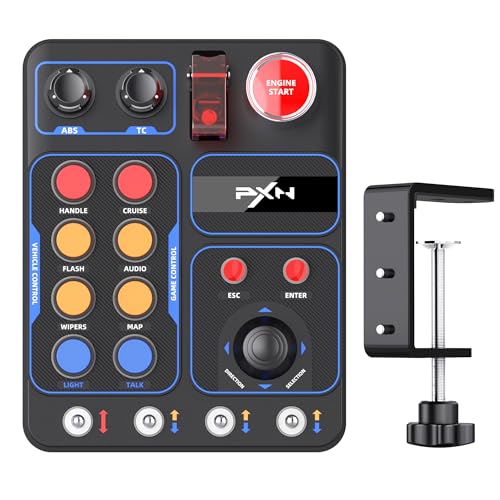
PXN CB1 PC Sim Racing Button Box PC, 19 Controls (9 Input Types) | Racing Button Box to 30 Programmable Functions, RGB Backlit Simulator Control Panel for Racing, Truck & Farming
Chosen because it specifies 19 Controls (9 Input Types) and Racing Button Box to 30 Programmable Functions.
View on Amazon
MiYee Button Box Sim Racing Programmable Button Simulation Racing Control Box with Rotary Encoders, Momentary Push Buttons, Carbon Fiber Panel, Metal Housing, for Truck Simulator PC, Plug and Play
Chosen because it specifies Momentary Push Buttons and Carbon Fiber Panel.
View on Amazon
Sim Racing Button Box for PC, 37 Programmable Controls
Chosen because it specifies 37 Programmable Controls.
View on Amazon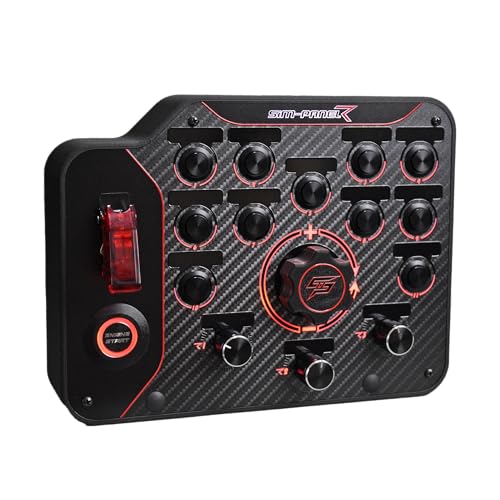
SIM-PANEL PC Sim Racing Gen 2 Button Box (Horizontal Layout)
Picked as a relevant option in this category.
View on Amazon
SIM-PANEL PC Sim Racing Gen 2 Button Box (Verticle Layout)
Picked as a relevant option in this category.
View on AmazonAll 6 Picks in Detail
1. PXN CB1 (first listing) – Best for a compact 19-control panel with RGB backlighting
As an Amazon Associate we earn from qualifying purchases at no extra cost to you.

The first PXN CB1 listing describes a sim racing button box for PC with 19 controls across 9 input types and up to 30 programmable functions, plus an RGB-backlit control panel. PXN’s published description lists two pushable encoders, six momentary buttons, tilt buttons, a covered toggle, an engine-start button, a small direction joystick and lockable toggles, which is a broad mix for a small unit. It connects over USB and is positioned for racing, truck and other simulators.
It suits drivers who want a ready-made layout that covers the usual race controls without building a custom panel. The rotary encoders handle brake bias or traction control, and the toggles map nicely to ignition and lights. The compact size also leaves room for a keyboard or shifter on a busy desk.
For truck and farming sims the broad mix of switch types is a genuine advantage, because those games have many on-off systems such as lights, hazards and differential locks. Label each control with tape or a printed overlay the first week, then remove the labels once muscle memory forms. Check the listing for any compatibility note with specific wheel bases before assuming a direct connection.
- Controls: 19 across 9 input types, per the listing
- Programmable functions: up to 30, per the listing
- Lighting: RGB backlit
- Connection: USB, PC use
- Mounting details and cable length: confirm on listing
- Software and driver needs: confirm on listing
Pros
- Good mix of encoders, buttons and toggles in one body
- Backlighting helps in dark rooms and VR
Cons
- Fewer total controls than the 37-control model
- Duplicated listings mean you should confirm exactly what each includes
Against the MiYee, it trades a metal-body build for a smaller footprint and a more varied control mix.
2. PXN CB1 (alternate listing) – Best as a second route to the same CB1 design

The second listing carries almost the same name: PXN CB1 PC sim racing button box with 19 controls, 9 input types and up to 30 programmable functions, with RGB backlighting for simulator control. The wording suggests it is the same product family sold under a separate listing, and the title does not explain what, if anything, differs. Treat it as an alternate way to buy the CB1 and compare the product pages for color, bundle contents and seller before choosing.
It suits shoppers who want the CB1 layout but need a different listing for availability or delivery reasons. Do not assume the two differ in features; the names suggest they do not.
If you are comparing the two CB1 pages, look at the seller name, what is listed as included in the box and any color options. Those details, rather than the headline specs, are where listings for the same device usually differ. Save the packing list so that warranty or return questions are easier to answer later.
- Controls: 19 across 9 input types, per the listing
- Programmable functions: up to 30
- Lighting: RGB backlit control panel
- Platform: PC
- Included accessories or mounting hardware: confirm on listing
- Differences from the first CB1 listing: confirm on listing
Pros
- Same compact layout as the other CB1 listing
- Useful fallback when one listing is unavailable
Cons
- No stated difference from the first listing
- Same control ceiling as the first CB1
It is functionally the closest alternative to the first CB1 listing, so choose between them on availability and seller details rather than features.
3. MiYee Button Box – Best for encoder-heavy setups with a metal housing
MiYee’s listing names programmable buttons, rotary encoders, momentary push buttons, a carbon fiber panel and a metal housing, with plug-and-play operation for truck simulator and racing use on PC. The product page describes a layout with backlit metal buttons, self-locking toggles, a dedicated start button and several rotary encoders with a press function. That emphasis on encoders makes it the best fit for adjusting settings rather than just triggering them.
It suits drivers who tweak brake balance, fuel mix or ABS during a stint and want to feel a detent per click. Because the listing and product page describe a metal unibody, it also appeals to people who plan to move the box between a desk and a rig.
Since the encoders are the main draw, set aside time in your sim of choice to adjust encoder sensitivity or key repeat, because some games read very fast turns poorly. A good habit is to map one encoder to brake bias, one to traction control and one to ABS, then keep the toggles for ignition and lights so your finger memory stays consistent.
- Panel: carbon fiber, per the listing
- Housing: metal, per the listing
- Inputs: rotary encoders and momentary push buttons, with toggles and a start button on the product page
- Connection: USB plug and play
- Exact control count and LED color options: confirm on listing
- Mounting method: confirm on listing
Pros
- Strong encoder count for tuning settings on the fly
- Metal housing and carbon fiber panel look and feel more premium
Cons
- Small base may limit where you can place it
- Encoders can be sensitive, so tune sensitivity in the game
It offers more encoders than the PXN CB1, while the CB1 offers a wider mix of switch types and RGB lighting.
4. 37-Control Programmable Button Box – Best for the largest control count in the group

This listing is the least descriptive by name: a sim racing button box for PC with 37 programmable controls. The 37 figure is the highest control count in this guide, which makes it attractive for drivers who run several different sims and want unique functions for each. The name gives no brand, layout or build details, so everything beyond the control count should be confirmed on the product page.
It suits users who value sheer control count over polish, such as someone mapping a truck simulator dashboard or a complex endurance car with many switches. Plan to spend time labeling it, since a high control count is only useful if you can find the right button without looking.
Because the listing gives so little detail, treat it as a value-oriented experiment rather than a known quantity. Before committing, read the product page for photos of the actual layout, ask whether it includes labels or stickers, and confirm that the software or game mapping you plan to use can read all 37 inputs. Many sims cap the number of readable buttons, so more is not always usable.
- Controls: 37 programmable, per the listing
- Platform: PC
- Control types (encoders, toggles, buttons): confirm on listing
- Lighting: confirm on listing
- Build materials and size: confirm on listing
- Mounting and cable details: confirm on listing
Pros
- Highest stated control count in the group
- Gives room for separate functions across different sims
Cons
- Very little verifiable detail in the listing name
- More controls means more learning time
Where the SIM-PANEL boxes offer a defined layout, this one offers a bigger count with fewer details to compare.
5. SIM-PANEL Gen 2 (Horizontal) – Best for a wide layout under a monitor or on a desk
SIM-PANEL’s Gen 2 horizontal model is listed as a PC sim racing button box with a wide layout. The maker’s product information describes a PC-only panel with 32 programmable inputs, customizable LED lighting, a push-button start and mounting options including a desk clamp and a VESA pattern; confirm those against the page before relying on them. The horizontal shape is designed to sit flat in front of you.
It suits drivers who want everything on one plane and who race in sims such as iRacing or Assetto Corsa Competizione, which the maker’s sticker sheet mentions. Its layout leans toward buttons rather than dials, so it is better for triggering functions than for small adjustments.
The wide shape works well under a monitor or in front of a wheel stand where your forearms rest at desk height. If you plan to use the VESA option, check that your monitor arm or stand has a compatible pattern and that the weight rating covers the box. Keep the cable routed away from your pedals to avoid accidental tugs.
- Layout: horizontal, per the listing
- Platform: PC only
- Programmable inputs: reported as 32, confirm on listing
- Lighting: customizable LEDs, confirm on listing
- Mounting: clamp and VESA pattern reported, confirm on listing
- Rotary encoders: confirm on listing
Pros
- Clear layout choice for wide desks
- Mounting options reported for desks and monitor arms
Cons
- Encoder support is unclear from the listing name
- Limited published detail on long-term durability
It is the same family as the vertical model, so choose between them purely by where the box will sit.
6. SIM-PANEL Gen 2 (Vertical) – Best for a tall layout beside the wheel

The vertical version of SIM-PANEL’s Gen 2 turns the same idea on its side. The listing spells vertical as “Verticle” in its name, and the maker describes a tall unit meant to stand next to a wheel base or seat. Reported specs match the horizontal model, including 32 programmable inputs and PC-only use, but confirm every number on the page.
It suits cockpit builders who mount accessories on an upright profile beside the seat, where reaching across a flat desk panel would be awkward. Tall layouts also stay out of the way of pedals and shifters.
Because the product is tall, the mounting surface matters. Use a sturdy bracket on a rig profile or a heavy desk clamp so the panel does not rock when you slap a button. Place it where your free hand can reach without leaning, ideally slightly below shoulder height and angled toward you, to reduce strain during long stints.
- Layout: vertical, per the listing
- Platform: PC only
- Programmable inputs: reported as 32, confirm on listing
- Lighting: customizable LEDs, confirm on listing
- Dimensions: confirm on listing
- Mounting hardware: confirm on listing
Pros
- Upright shape suits side-mounted rig setups
- Same family and feature set as the horizontal option
Cons
- Needs a mounting spot with some vertical room
- Same unclear encoder situation as the horizontal model
The only practical difference from the horizontal Gen 2 is orientation, so pick the one that matches your mount.
Specs Compared
| Product | Controls | Programmable functions | Backlighting | Housing or panel | Platform |
|---|---|---|---|---|---|
| PXN CB1 (first listing) | 19 (9 input types) | Up to 30 | RGB | Confirm on listing | PC |
| PXN CB1 (alternate listing) | 19 (9 input types) | Up to 30 | RGB | Confirm on listing | PC |
| MiYee Button Box | Confirm on listing | Confirm on listing | Confirm on listing | Metal housing, carbon fiber panel | PC |
| 37-Control Programmable Button Box | 37 | 37 programmable controls | Confirm on listing | Confirm on listing | PC |
| SIM-PANEL Gen 2 (Horizontal) | Confirm on listing | Reported 32, confirm on listing | Customizable LEDs reported | Confirm on listing | PC |
| SIM-PANEL Gen 2 (Vertical) | Confirm on listing | Reported 32, confirm on listing | Customizable LEDs reported | Confirm on listing | PC |
How We Chose These
This guide comes from research into the listings and the makers’ published descriptions, not from physical trials. We compared each product on control count, control types, whether encoders are included, lighting, housing, mounting options and platform support. Where two listings share a name, as with the PXN CB1, we treated them as the same design and told you to compare seller and bundle details. Where a listing name does not state a spec, we mark it to confirm on the product page rather than assume. We favored layouts that fit common desk and cockpit mounts and noted that all six are intended for PC use.
What to Look For
Encoders, toggles and push buttons are not interchangeable
A rotary encoder sends a pulse for every click, which makes it ideal for stepping through brake bias, ABS levels or fuel mixture one notch at a time. A momentary push button is best for one-shot actions such as the pit limiter or a radio call. A latching toggle holds its position, so it suits ignition, headlights or master-electrics switches that stay on. A box with only push buttons can still do everything, but it will need repeated presses where a dial would need one turn. List your ten most-used functions and sort them into these three groups before you compare control counts.
Control count versus usable layout
Thirty-seven controls sounds better than nineteen, but a crowded panel is harder to use without looking. As a rule of thumb, aim for between 12 and 24 controls you will actually map, and keep the most-used ones within a thumb or finger reach of the wheel. If you race with a heavy VR headset, tactile differences between knob, toggle and button matter more than the total, because you will not see the box at all.
Mounting and placement
Think about where the box will live. A desk clamp suits a desk setup, a VESA pattern suits a monitor arm, and screw mounts suit an aluminum profile rig. Vertical layouts fit beside a seat, while horizontal ones sit in front of the wheel. Measure the free space on your rig, including cable clearance, and check the listing for clamp thickness limits, which are often a few centimeters. A loose box shifts during hard presses, so a stable mount is worth more than extra buttons.
Software, mapping and compatibility
Most USB button boxes appear to Windows as a game controller, and you assign each control inside the game or through a mapping utility. Some games limit the number of buttons they can read, so check how many your favorite titles support. Console players should note that all six boxes in this guide are for PC. If you also drive trucks or fly, check the listing for support for those simulators and plan to save a separate profile for each.
Lighting and visibility
Backlit controls help in dark rooms and in VR, where you cannot see the box at all, but too much light can be distracting at night. Look for adjustable brightness or an off switch, and keep in mind that LED color options vary by listing. A good compromise is a dim, single-color setting that lets you find controls without washing out your monitor.
Build quality and long-term use. A button box sees repeated, forceful presses, so the housing and switches matter more than the headline control count. Metal housings tend to feel more solid than thin plastic, but weight can make clamping harder, and plastic shells can be fine if they are well supported. Check that toggles snap firmly into place, that covered switches have a clear lid and that the USB cable can be replaced or strain-relieved. Keep the cable plugged into a rear port of your PC where it will not be knocked loose mid-race.
Worked example: building a first setup. Suppose you race GT cars in an endurance sim. Your regular adjustments are brake bias, traction control, ABS, wipers, headlights and pit limiter. That is two or three encoders, three toggles or buttons and one push button, roughly ten controls. Any of these boxes covers that, so the deciding factors are encoder count, mounting position and lighting. In that case a box with several encoders such as the MiYee is the more efficient choice, while a box with a very large control count would leave most of its buttons unused.
Questions
Do I need a button box if I already have a keyboard?
No, but a button box keeps your hands on the wheel and gives each function a fixed physical location. That cuts down on fumbling for keys, especially in VR or during long races.
Will these work on consoles?
All six listings are described for PC. If you race on a console, check your platform’s support before buying any USB button box.
What is the difference between an encoder and a button?
An encoder rotates and sends a signal for each step, while a button sends a single press. Encoders are better for incremental settings like brake bias.
Are the two PXN CB1 listings different products?
The names are nearly identical and both describe 19 controls and up to 30 functions. Compare the product pages for seller, color and bundle details before choosing.
How do I map the controls in a game?
Connect the box over USB, open the game’s control settings and press each control when prompted to bind it. Some games offer profiles per car, which helps if you switch between disciplines.
Is a larger control count always better?
No. Extra controls are only useful if you can find them without looking. Many drivers use fewer than 20 controls regularly, so layout and tactile feel often matter more than the total.
Update History
- October 20, 2026 – Initial publication; product set drawn from current catalog listings.
- Check the product page for current specifications and availability before buying.
Sources
- Manufacturer product descriptions for PXN, MiYee and SIM-PANEL button boxes
- Retailer listing titles and specification fields
- Published user manuals and product pages for the PXN CB1