Our Top Picks
 Logitech G PRO Racing Pedals Simulator with 100kg18.94 x 14.06 x 10.94 inches2 PoundsDVD-ROMCheck on Amazon
The Logitech G RS Pedals are the best all-round load cell choice here for most sim racers, pairing a 75 kg load cell brake with adjustable spacing, a modular frame and wide platform support. A load cell measures how hard you press rather than how far the pedal travels, which matches how real brakes work and makes it easier to repeat the same braking pressure lap after lap. Drivers who want more force range or hydraulic damping should look at the MOZA SRP2, Simjack UT or SIMSONN Plus X options below.
Quick List
- Logitech G RS Pedals – best for a modular, multi-platform 75 kg brake
- MOZA SRP2 – best for a 100 kg load cell with a high-resolution angle sensor
- SIMSONN Plus X (P3-H3) – best for a three-pedal hydraulic set with haptic support
- Simjack UT (UT-P3) – best for the highest stated brake force in the group
- SIMSONN Plus X (P2-H2) – best for a two-pedal hydraulic set without a clutch
- Logitech G PRO Racing Pedals – best for swappable springs in a 100 kg brake
Which One Is Right for You?
| If you… | Choose |
|---|---|
| want a tidy, modular set from a mainstream brand | Logitech G RS Pedals |
| want a high-force brake with an added angle sensor | MOZA SRP2 |
| need three pedals with hydraulic damping | SIMSONN Plus X (P3-H3) |
| want to drive with the most brake force on paper | Simjack UT (UT-P3) |
| only need throttle and brake in a hydraulic design | SIMSONN Plus X (P2-H2) |
| want a mainstream pedal set with springs you can swap | Logitech G PRO Racing Pedals |
Brake force rating is only one part of the choice. Pedal count, mounting, platform support and the way the brake feels at the start of travel affect how quickly you improve. If you are moving up from potentiometer pedals, any of these will change how you brake, so plan to adjust the brake curve in software during your first sessions.

Logitech G RS Sim Racing Pedals (with 75 kg Load Cell Brake) | Adjustable pedal positions, modular design, robust extendable steel frame
Chosen because it specifies Adjustable pedal positions and modular design.
View on Amazon
MOZA SRP2 Pedals Set Throttle Brake Pedal Equipped With 100KG Load Cell | 15-Bit Angle Sensor, CNC Aerospace-Grade Aluminum Fully Adjustable Pedal Angle Spacing and Height for PC Racing Game
Chosen because it specifies 15-Bit Angle Sensor.
View on Amazon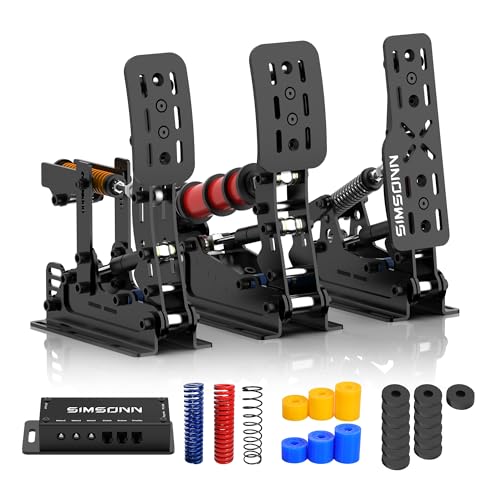
SIMSONN Plus X Racing Simulator Hydraulic Pedals Sim Racing Pedals Support Haptic Reactor (Plus X Black P3-H3)
Picked as a relevant option in this category.
View on Amazon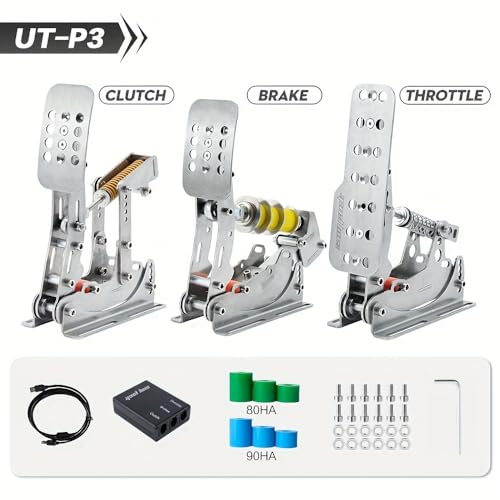
Simjack UT Pedal Sim Racing Pedals 200KG Load Cell Brake Pedal PC Racing Simulator Pedals Pressure Sensor HE Hydraulic System (UT-P3)
Picked as a relevant option in this category.
View on Amazon
SIMSONN Plus X Racing Simulator Hydraulic Pedals Sim Racing Pedals (Plus X Black P2-H2)
Picked as a relevant option in this category.
View on AmazonLogitech G PRO Racing Pedals Simulator with 100kg Load Cell Brake | Fully customizable, swappable springs & elastomers, modular design, ideal for racing simulators
Chosen because it specifies Fully customizable and swappable springs & elastomers.
View on AmazonAll 6 Picks in Detail
1. Logitech G RS Pedals – Best for a modular, multi-platform 75 kg brake
As an Amazon Associate we earn from qualifying purchases at no extra cost to you.
The Logitech G RS Pedals come with a 75 kg load cell brake, per the listing, with adjustable pedal positions, a modular design and an extendable steel frame. Logitech’s product page describes Hall-effect accelerator and clutch sensing, adjustable dampeners and spacers for tuning the brake, and an anti-tip frame with rubber feet and carpet grippers. The base box contains the accelerator, brake and a heel pedal, while a clutch module is sold separately.
It suits drivers who want a well-supported, mainstream set that works on PC and, with the right adapter, on consoles. It is also a good fit for anyone planning to upgrade gradually, since modules can be added later.
The included spacers and dampeners are the key to tuning. Start with the stock setup, drive a few laps at a track you know well, then change one element at a time so you can feel what each change does. Keep the frame braced against a wall or rig using the supplied extenders so it does not creep under hard braking, and use the carpet grippers if you drive on a rug.
- Brake: 75 kg load cell, per the listing
- Accelerator: Hall-effect sensor, per Logitech
- Clutch: optional module, per Logitech
- Frame: extendable steel, per the listing
- Adjustments: pedal positions, spacers, dampeners
- Platform: PC, with console use through an adapter or compatible base
Pros
- Modular design with room to grow
- Broad platform support compared with PC-only sets
Cons
- Lower brake force rating than some rivals
- Clutch is sold separately
It trades the higher force rating of the MOZA SRP2 for a more flexible platform story.
If you drive with a Logitech wheel base, check which adapters your wheel needs before buying.
2. MOZA SRP2 – Best for a 100 kg load cell with a high-resolution angle sensor

The MOZA SRP2 listing describes a throttle and brake pedal set with a 100 kg load cell and a 15-bit angle sensor, plus a CNC aerospace-grade aluminum build and full pedal adjustability. MOZA’s own description explains a hybrid approach where the angle sensor and the load cell can combine, so early pedal movement uses angle and heavier pressure uses force. That is a thoughtful design for drivers who want a progressive feel.
It suits users who like tuning. MOZA lists pedal angle, side-to-side and height adjustments, plus preload on the throttle and clutch. Material descriptions vary between sources, with some mentioning aluminum and others steel, so confirm on the product page.
The hybrid sensing idea is worth understanding before you buy. Because the angle sensor handles early travel and the load cell handles later pressure, the pedal can feel less dead at the start than a pure load cell. In practice that means your first touch of the brake is registered sooner, which some drivers prefer for trail braking. Check the maker’s software for a live pedal display so you can watch your inputs.
- Brake: 100 kg load cell, per the listing
- Angle sensor: 15-bit resolution, per the listing
- Pedals in the set: throttle and brake; clutch sold separately
- Adjustments: angle, spacing and height
- Construction: confirm material on the product page
- Platform: PC, with Xbox support noted by the maker
Pros
- Combines force and angle sensing for a progressive feel
- Wide adjustment range
Cons
- Two-pedal set only; a clutch costs extra
- Material wording differs between sources
Against the Logitech G RS, it offers more brake force and finer sensing, while Logitech offers a more modular frame.
Its software supports brake curve editing, so plan time for tuning.
3. SIMSONN Plus X (P3-H3) – Best for a three-pedal hydraulic set with haptic support

The SIMSONN Plus X P3-H3 is a three-pedal hydraulic set that supports a haptic reactor, according to the listing. The maker’s information describes a dual-stage brake with elastomers of several hardness levels and a hydraulic buffer for smoother throttle response and two-way resistance on the brake and clutch. Other listings of this family mention a 200 kg load cell, so confirm the exact rating for this version.
It suits drivers who want a full three-pedal setup for heel-and-toe or manual-clutch driving, and who may want to add vibration modules later for lockup and ABS cues. The haptic reactor is sold separately, so do not assume it is included.
Because the family includes several versions, double-check the model code at checkout. The suffix tells you how many pedals and how much hydraulic hardware you are getting. Plan floor space for a control box and extra cables, and keep the box where it can be reached for troubleshooting. If you add haptic modules later, leave a free port for each one.
- Pedals: three, throttle, brake and clutch (P3 version)
- Hydraulic damping: yes, per the name
- Haptic reactor: supported, sold separately
- Brake force rating: confirm on listing
- Platform: PC, per the maker
- Software: SIMSONN Manager for curves and dead zones
Pros
- Full three-pedal layout
- Haptic support for added feedback
Cons
- Haptic modules cost extra
- Specific brake rating needs confirming
It is the three-pedal counterpart to the P2-H2 below, which drops the clutch.
Check the listing to see what is included in your bundle.
4. Simjack UT (UT-P3) – Best for the highest stated brake force in the group
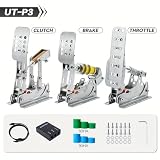
The Simjack UT lists a 200 kg load cell brake with a pressure sensor and a hydraulic system in its name. The maker’s materials describe a dual-stage brake, nine elastomers of different hardness and a stainless steel plate construction, along with software for curves and dead zones. The model code UT-P3 suggests a three-pedal version, though the listing name does not spell out which pedals are included.
It suits strong-legged drivers who want a stiff brake with a lot of travel in force terms. A 200 kg rating is more than many drivers use, but it offers headroom for stiffening the pedal over time.
The high rating pairs best with a stiff elastomer stack and a rigid mount. Light cockpit plates can flex under hundreds of newtons of force, and that flex adds noise to your braking. If your rig is a basic desk mount, a softer brake setup will feel better than chasing the biggest number. Use the maker’s software to set a linear curve first, then adjust.
- Brake: 200 kg load cell, per the listing
- Pedal count: confirm on listing (UT-P3 suggests three)
- Hydraulic element: named in the listing
- Elastomers: a set of different hardness levels, per the maker
- Platform: PC, per the maker
- Software: Simjack Control for curves and dead zones
Pros
- Very high brake force rating
- Many elastomer options for tuning feel
Cons
- Variant details are not clear in the listing name
- May be more than most drivers need
It targets a higher force ceiling than the Logitech G PRO, but demands more tuning.
Confirm exactly which pedal set you are buying.
5. SIMSONN Plus X (P2-H2) – Best for a two-pedal hydraulic set without a clutch

The P2-H2 version of the SIMSONN Plus X is the two-pedal set, with throttle and brake only. It shares the hydraulic design with the P3-H3 but drops the clutch, which saves desk space and cost for drivers who race automatic or paddle-shifted cars. The listing name does not state the load cell rating, so rely on the product page.
It suits GT and formula drivers who never use a clutch, and anyone with tight floor space who still wants a hydraulic feel on the brake.
Without a clutch, this set pairs well with paddle shifters and an automatic gearbox in GT and formula cars. Place the pedals with a slight upward angle so your heel can rest on the floor, and keep the throttle travel long enough for fine modulation. If you ever expect to drive manual road cars, the three-pedal version may be a smarter long-term purchase.
- Pedals: two, throttle and brake (P2 version)
- Hydraulic damping: yes, per the name
- Haptic reactor support: confirm on listing
- Load cell rating: confirm on listing
- Platform: PC, per the maker
- Weight: lighter than the three-pedal version, per the maker
Pros
- Compact footprint
- Same design family as the P3-H3
Cons
- No clutch, so unsuitable for manual cars
- Limited detail in the listing name
It differs from the P3-H3 only by the missing clutch, so choose based on the cars you drive.
If you may want a clutch later, check whether it can be added.
6. Logitech G PRO Racing Pedals – Best for swappable springs in a 100 kg brake

The Logitech G PRO Racing Pedals list a 100 kg load cell brake, fully customizable feel with swappable springs and elastomers, and a modular design. They are one of the more established load cell options from a mainstream brand and are designed to work with other PC racing gear. The listing name does not state the exact pedal count, so confirm that on the page.
It suits drivers who want to adjust brake feel by changing the physical parts instead of relying only on software curves. That approach lets you keep a consistent, repeatable pedal while experimenting.
The swappable-springs approach suits drivers who like to build a feel by hand. Keep a note of which spring and elastomer combination you are using, because swapping parts without records makes it hard to return to a good setup. Confirm which wheels and bases the pedals connect to, since the set was designed around a specific ecosystem.
- Brake: 100 kg load cell, per the listing
- Feel tuning: swappable springs and elastomers
- Design: modular
- Pedal count: confirm on listing
- Platform: PC, with other platforms depending on the model
- Construction: confirm on listing
Pros
- Easy physical tuning
- Established product line
Cons
- Older design compared with the newer RS set
- Pedal count needs confirming
Next to the Logitech G RS, it offers a higher brake rating but a less recent design.
Verify which wheel bases it connects to before purchase.
Specs Compared
| Product | Brake load cell | Pedals | Hydraulic | Angle or other sensor | Platform |
|---|---|---|---|---|---|
| Logitech G RS Pedals | 75 kg | Accelerator, brake, heel; clutch optional | No | Hall-effect accelerator and clutch | PC; consoles via adapter or compatible base |
| MOZA SRP2 | 100 kg | Throttle and brake | Confirm on listing | 15-bit angle sensor | PC |
| SIMSONN Plus X (P3-H3) | Confirm on listing | Three | Yes, per name | Confirm on listing | PC |
| Simjack UT (UT-P3) | 200 kg | Confirm on listing | Hydraulic named | Pressure sensor | PC |
| SIMSONN Plus X (P2-H2) | Confirm on listing | Two | Yes, per name | Confirm on listing | PC |
| Logitech G PRO Racing Pedals | 100 kg | Confirm on listing | No | Confirm on listing | PC |
How We Chose These
This guide is built from research into the listings and the makers’ published descriptions, not from physical trials. We compared load cell rating, pedal count, hydraulic or spring-based feel, sensors, adjustability and platform support, and we noted when the listing name leaves out key details such as pedal count or exact brake rating. Where two sources disagree, for example on material, we say to confirm on the product page. We grouped picks by the kind of driver they suit, from someone moving up from basic pedals to a tinkerer who wants to tune every part of the brake.
What to Look For
What a load cell actually does
A load cell is a strain sensor that converts the force you apply into an electrical signal. Unlike a potentiometer that reads how far the pedal moves, a load cell reads how hard you press. Real cars brake by pressure, so your leg learns a force instead of a distance, which helps with consistency and trail braking. The rating, such as 75 kg or 100 kg, is the maximum force the cell can measure, not the force you must apply.
How much force rating do you need?
Many drivers brake hard with 40 to 80 kg of force on a stiff setup, so a 75 kg or 100 kg cell already covers most use. A rule of thumb is to pick a rating about 25 percent above the force you plan to apply regularly, so you do not hit the maximum on every corner. A 200 kg rating offers headroom but does not mean the pedal must feel heavier; spring and elastomer choices control that.
Springs, elastomers and hydraulics
The first part of brake travel usually comes from a spring or elastomer stack, and the later part feels stiffer as the load cell takes over. Harder elastomers give a firmer pedal, while softer ones give more travel. Hydraulic dampers add smooth resistance and a more natural rise in force, but they add complexity and can need maintenance. Choose springs for simplicity, or hydraulics if you want a more car-like feel and are willing to tune.
Pedal count, mounting and rigidity
Decide whether you need a clutch. Three pedals suit manual cars and heel-and-toe driving, while two pedals are fine for most modern race cars. Pedals need a rigid base: mount them to a sturdy rig plate or a sim cockpit, because flex under hard braking changes the feel. Check the hole pattern, base plate options and adjustable angle so your foot sits comfortably.
Software, calibration and platform
Most load cell pedals connect over USB and offer software for brake curves, dead zones and calibration. Check that the software works with your operating system and that the pedals are recognized by your games. Console players should confirm the pedals work with their wheel base, since several sets here are PC-only.
Maintenance and long-term feel. Pedals with moving parts need occasional attention. Check bolts for loosening after the first few hours, because vibration works fasteners free. Clean dust from pivot points and sliding surfaces, and replace worn elastomers when the pedal starts to feel softer than it used to. Hydraulic designs may need fluid checks, so read the maker’s guidance. Re-calibrate in software after any mechanical change, since a new stack shifts your pedal’s range and your saved brake curve may no longer fit.
Foot position and pedal angle. Where your foot sits on the pedal changes the feel as much as the hardware. Aim for a pedal face that is roughly perpendicular to your shin at mid-travel, with your heel on the floor or a rest. A steeper angle gives more leverage but tires the ankle on long races, while a flatter angle is easier to hold but can make the brake feel lighter. Make small angle changes of two or three degrees at a time and drive a few consistent laps before changing again. If your pedals offer adjustable spacing, keep the throttle and brake close enough that you can move your foot between them without lifting your heel, which makes heel-and-toe input much easier to learn.
Noise, rig space and cable routing. Hydraulic and spring designs can make mechanical noise, and a hard brake stop can thump on a thin floor. Place a rubber mat or foam under the base plate to dampen vibration, and run cables along the rig so they never cross your foot path. Leave enough room behind the pedals for any control box or hydraulic components, and label each cable at both ends so you can reconnect everything after moving the rig.
Worked example: picking a brake. Suppose you weigh your braking at about 60 kg of leg force under hard braking. A 100 kg load cell gives you about 40 percent headroom, which is comfortable. You would set an elastomer stack that reaches roughly that force near the end of the pedal’s travel, then use the brake curve to match your preferred ramp. A 200 kg cell would work too but give you less resolution at your working range unless you tune it carefully.
Questions
Are load cell pedals better than potentiometer pedals?
For most drivers they are, because they measure force and help with consistent braking. Potentiometer pedals measure travel, which is harder to repeat.
Do I need a 200 kg load cell?
Probably not. Most drivers use a fraction of that force, and a 75 kg or 100 kg cell already offers plenty of range when paired with the right springs.
Are hydraulic pedals worth the extra complexity?
They can give a smoother, more realistic feel, but they also add parts to maintain. If you prefer simple setups, spring-based designs are easier.
Can I use these on a console?
Some, such as the Logitech G RS, support consoles through a compatible wheel base or adapter. Several others are PC-only, so check the listing.
Do I need a clutch pedal?
Only if you drive manual cars. Many race cars use paddles, so a two-pedal set is enough.
How do I set up a load cell brake?
Mount the pedals firmly, choose a spring or elastomer, and calibrate in the maker’s software. Then adjust the brake curve until the pedal feels consistent.
Update History
- October 20, 2026 – Initial publication; product set drawn from current catalog listings.
- Check the product page for current specifications and availability before buying.
Sources
- Manufacturer product and specification pages for Logitech G, MOZA, SIMSONN and Simjack
- Retailer listing titles and specification fields