Our Top Picks
 VIVO Extra Deep Under Desk Cable Management TrayStandard16.5 x 3 x 4.5 inches4 poundsCheck on Amazon


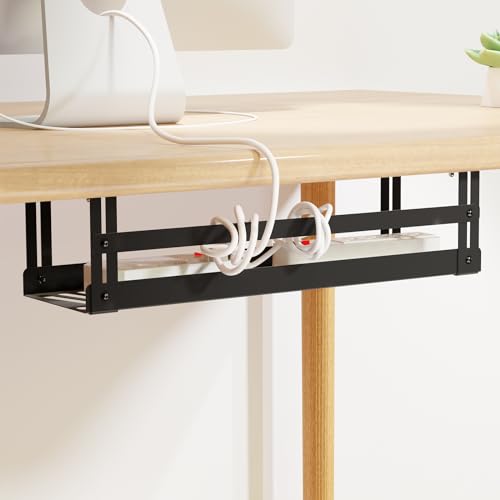

A gaming desk hides a lot of hardware underneath it: a PC, one or two monitors, a console, speakers, a headset charger, and the thick bricks that come with gaming laptops and docks. All of it funnels into one or two power strips, and without a tray those strips and bricks end up on the floor, collecting dust and turning every cable swap into a crawl under the desk. An under-desk tray lifts the bundle off the floor, out of sight, and within easy reach.
The five trays below cover the main ways of doing that job: clamp-on baskets that grip the desk edge with no drilling, screw-mount steel trays that fix permanently to the underside, and long fabric trays built to hold a row of bricks. They differ in length, load capacity, material, and airflow around warm adapters, so the right pick depends on the strip size, the desktop material, and whether the desk can be drilled.
As an Amazon Associate, we earn from qualifying purchases.
Quick Picks
- VIVO Under Desk Cable Management Trays, 2-Pack (DESK-AC06-2C) — Best permanent screw-mount pair for splitting a strip and its bricks across two trays.
- Pyle 48-Inch Under Desk Cable Management Tray — Best for wide desks, with room for a full row of adapters.
- Prince Supply Co. 4-in-1 Clamp-On Cable Management Tray — Best no-drill mesh basket, able to clamp under, beside, in front of, or on top of an edge.
- PAVSTINE Under Desk Cable Management Tray, 17-Inch — Best steel basket with a no-drill fallback: screws for full strength, adhesive mounts for a lighter load.
- KEEGH 16-Inch Under Desk Cable Management Tray — Best heavy-duty clamp pick for a heavy strip loaded with bricks.
How to Choose
Clamp-on vs screw-mount
Clamp-on trays grip the rear edge of the desktop with C-clamps, so they need no holes and can move when the layout changes. That suits rented rooms, glass or hollow-core desks that should not be drilled, and sit-stand desks that get rearranged. The clamp needs a clear, flat edge, so check the desktop thickness against the clamp range and confirm that drawers or crossbars do not block the hanging spot. Screw-mount trays fix to the underside and sit flatter and more securely, which suits a permanent setup on a solid wood or particle-board desktop. They cannot move without leaving holes, and they need a clear run of underside for the screws.
Measure the tray against the power strip
Measure the power strip itself, then add the width of the largest brick beside it and slack for plugs that exit sideways. A compact tray of 13 to 17 inches usually holds one strip and a couple of adapters. A desk with two strips, a console brick, and a laptop adapter needs a tray in the 36 to 48 inch range, or two shorter trays side by side. Depth matters too: a tray around 3 inches wide can be too tight for a wide strip with sockets in two rows, while a deeper basket around 5 to 6 inches swallows chunky bricks more easily.
Check the load capacity
Add up the weight of the strip, every brick, and the coiled spare cable before choosing. Bricks are the heavy part, and a tray loaded past its stated limit can sag, loosen its clamps, or pull screws from a soft desktop, so leave headroom instead of running at the limit. Steel generally carries more than fabric of the same size, and a screw fixing carries more than an adhesive one on the same tray.
Steel, mesh, and fabric
Solid steel trays are the strongest and most protective, and their closed sides hide plugs from view. Open mesh and wire baskets weigh less and let air move freely around warm adapters, helping bricks run cooler. Fabric trays are the longest, most forgiving option: they flex around odd-shaped bricks and fold open for quick access, but they hold less weight than steel and can sag in the middle if overloaded.
Leave airflow around adapters
Power bricks get warm in use, and a tightly packed tray traps that warmth. Prefer an open mesh or fabric design, or leave gaps between bricks in a solid tray, instead of wedging adapters shoulder to shoulder. Keep the bulkiest brick near an open end, route its cable out without sharp bends, and never stack bricks. Mount the tray toward the rear of the desk so knees stay clear, with slack for a sit-stand desk at full height.
VIVO Under Desk Cable Management Trays, 2-Pack (DESK-AC06-2C)
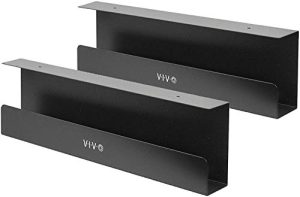
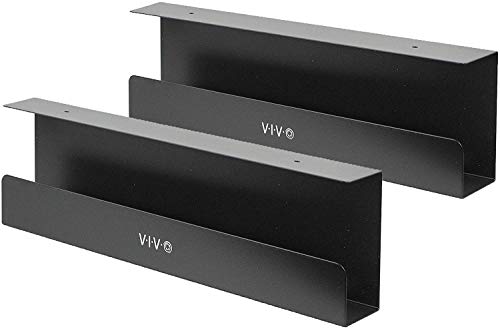
The VIVO set takes the permanent route: two steel trays that screw to the underside of the desk, sold as the DESK-AC06-2C two-pack in the maker’s DESK-AC06 series. Each tray measures about 16.5 inches long, 3 inches wide, and 4.5 inches high, with mounting holes spaced 11 inches apart, and each is listed to hold up to 11 pounds. Splitting the load across two trays is useful, because the strip can live in one tray and the heavier bricks in the other, leaving air space around the adapters.
The narrow 3 inch width is the defining trait. It tucks the trays close to the underside, clear of knees and drawer units, and the partly closed front keeps plugs from sliding out. The same narrow body is also the limit: a wide strip with sockets in two rows, or bulky bricks side by side, will not sit comfortably in it.
See the VIVO DESK-AC06-2C trays on Amazon
Specs
| Spec | Detail |
|---|---|
| Brand / model | VIVO DESK-AC06-2C |
| Pack contents | 2 trays |
| Tray size | About 16.5 x 3 x 4.5 in each |
| Material | Steel |
| Mounting | Screw-mount, holes 11 in apart |
| Load capacity | Up to 11 lb per tray |
| Colour listed | Black |
Pyle 48-Inch Under Desk Cable Management Tray
The Pyle tray is the long option in this group, stretching a full 48 inches so one tray can run along most of a gaming desk’s width. It uses a fabric design over a rigid bottom board, with fabric and metal in the construction, and offers both clamp and screw mounting so the fixing can match the desk. The maker lists a capacity of up to 20 pounds, and built-in ties keep strips and bricks from shifting inside a tray of this length.
That length changes what the tray can do. A long strip, a console brick, a laptop adapter, and spare coils can sit in a row with space between them, which is exactly what airflow around warm adapters calls for, and the breathable fabric lets warmth escape instead of building up under a solid cover. The fabric also folds open, so adding a cable means unmounting nothing. The compromises are size and firmness: a 48 inch tray needs a wide, clear underside, and fabric feels less rigid than steel under a concentrated load, so spread bricks along its length.
See the Pyle 48-inch tray on Amazon
Specs
| Spec | Detail |
|---|---|
| Brand / model | Pyle PUDCM48BK |
| Tray length | 48 in |
| Material | Fabric with metal and plastic parts |
| Mounting | Clamp or screw mount |
| Load capacity | Up to 20 lb |
| Included extras | Built-in ties and straps |
| Colour listed | Black |
Prince Supply Co. 4-in-1 Clamp-On Cable Management Tray
Prince Supply Co. builds its tray from forged carbon steel in an open metal mesh, and the 4-in-1 name refers to where it can go: clamped under the desk, on the side, in front, or on top of a shelf or desk edge. That suits setups that break the usual pattern, such as a desk against a wall where the rear edge is hard to reach, or a side return holding the console and its brick. At about 16.5 x 6.3 inches it is deeper than the slim screw-mount trays, so a wide strip plus a brick fits without a squeeze.
The clamps need no drilling and carry rubber padding to protect the desktop, while the mesh body keeps air moving around adapters and makes it easy to see which plug belongs to which device. At about 1.83 pounds the tray is light for steel, which helps the clamps hold their grip. The open mesh hides less than a solid tray, so an untidy bundle still shows through the sides. For a no-drill install on a desk that cannot be modified, it is the most adaptable pick here.
See the Prince Supply Co. 4-in-1 tray on Amazon
Specs
| Spec | Detail |
|---|---|
| Brand | Prince Supply Co. |
| Tray size | About 16.5 x 6.3 in |
| Material | Forged carbon steel, metal mesh |
| Mounting | Clamp-on, no drilling |
| Mounting positions | Under, side, front, or top of an edge |
| Clamp protection | Rubber-padded clamps |
| Item weight | About 1.83 lb |
PAVSTINE Under Desk Cable Management Tray, 17-Inch
The PAVSTINE tray is a 17 inch steel basket, sized at about 16.92 x 4.95 x 3.93 inches, offering two fixing strengths in one kit. Fitted with screws it is listed to hold up to 15 pounds; fitted with the included adhesive screw mounts it is listed for up to 6 pounds. That gives a sensible path: adhesive mounts for a light strip and a phone charger, or screws from the outset when a heavy laptop brick joins the load.
The basket is carbon steel with pre-drilled holes, and the kit is unusually complete, with bolts, nuts, adhesive screws, screws, and the small fitting tools listed in the box. The open shape leaves room for air around adapters, and the roughly 5 inch depth takes a standard strip without forcing cables into tight bends. A desk with two strips will want two of them or a longer fabric tray, and the adhesive limit should be treated as a firm ceiling, not a target.
See the PAVSTINE 17-inch tray on Amazon
Specs
| Spec | Detail |
|---|---|
| Brand / model | PAVSTINE PST-UDCableTrayBK-USA |
| Tray size | About 16.92 x 4.95 x 3.93 in |
| Material | Carbon steel |
| Mounting | Screws or adhesive screw mounts |
| Load capacity | Up to 15 lb screwed, up to 6 lb adhesive |
| Included extras | Bolts, nuts, screws, fitting tools |
| Colour listed | Black |
KEEGH 16-Inch Under Desk Cable Management Tray
The KEEGH tray is the heavy-duty clamp pick: a 16 inch metal tray, listed with an iron body and a matte black finish, that the maker lists to hold up to 22 pounds per tray. That is a high figure for a clamp-on design, aimed at a load where one strip may carry a PC, two monitors, and a console brick at once. It can be fitted with its C-clamp for a no-drill install or secured with screws, and the screw holes form a triangular pattern intended to keep it steady.
The C-clamps carry rubber pads at both ends to protect the desktop and reduce slipping, and the kit includes cable ties for tidying the bundle. Fit needs a quick check first: the maker asks for at least 2.36 inches of flat space on the underside, so desks with shallow drawers or a low crossbar should be measured before ordering. Within that space, the high load limit and choice of fixings make this the clamp tray to pick when the strip is heavy and drilling remains a backup.
See the KEEGH 16-inch tray on Amazon
Specs
| Spec | Detail |
|---|---|
| Brand / model | KEEGH KE1414 |
| Tray length | 16 in |
| Material | Iron with matte black finish |
| Mounting | C-clamp or screw-in |
| Load capacity | Up to 22 lb per tray |
| Clamp protection | Rubber pads on clamp ends |
| Fit note | Needs at least 2.36 in of flat underside space |
Products at a Glance
| Product | Mounting | Length | Material | Best for |
|---|---|---|---|---|
| VIVO DESK-AC06-2C, 2-Pack | Screw | 16.5 in each | Steel | Permanent split layout |
| Pyle 48-Inch Tray | Clamp or screw | 48 in | Fabric and metal | Wide desks, many bricks |
| Prince Supply Co. 4-in-1 | Clamp | 16.5 in | Carbon steel mesh | Flexible no-drill placement |
| PAVSTINE 17-Inch Tray | Screw or adhesive | 17 in | Carbon steel | Two fixing strengths |
| KEEGH 16-Inch Tray | Clamp or screw | 16 in | Iron | Heavy strips, no-drill first |
Frequently Asked Questions
Will a clamp-on tray fit a sit-stand gaming desk?
Usually, yes, if the rear edge is flat, within the clamp thickness range, and clear of the lifting columns, crossbar, and control box. Leave cable slack for the desk at its highest position, and coil spare length loosely inside the tray so nothing pulls tight as the desk rises. If the frame leaves no clear edge, a screw-mount tray fitted further under the desk is the better route.
How long a tray does a gaming setup need?
Measure the strip and the bricks beside it, then add room for sideways plugs and a loose coil of spare cable. One strip with a couple of adapters fits a 16 to 17 inch tray. Two strips, or a strip plus a console brick and a laptop adapter, usually calls for a 36 to 48 inch tray or two shorter trays side by side. Extra length also leaves air gaps around warm adapters.
Can a tray hold a heavy gaming laptop brick safely?
It can, if the combined weight of the strip, brick, and other adapters stays comfortably below the tray’s stated limit and the fixing matches the load. Choose screws over adhesive mounts for a heavy brick, prefer steel over fabric near the top of a limit, and place the brick near a mounting point rather than mid-span. Recheck clamp tightness after the first week, as a heavy load can settle.
How do I keep adapters cool inside a tray?
Choose an open mesh or fabric tray, or leave clear gaps between bricks in a solid steel tray, and never stack bricks. Put the largest brick near an open end and keep coiled cable away from its casing. If one adapter still runs hot, move it to a second or longer tray so the load spreads out, and keep the tray toward the rear of the desk where room air can reach it.
Conclusion
The right tray matches the desk and the load, not simply the longest or strongest on paper. For a permanent setup on a desk that can take screws, the VIVO two-pack splits a strip and its bricks across two slim steel trays. A wide desk with a full row of adapters is better served by the 48 inch Pyle fabric tray, while the Prince Supply Co. mesh basket gives a no-drill clamp option that can move to the side or front when the rear edge is out of reach. The PAVSTINE basket adds a choice between adhesive and screwed fixings at two clear load limits, and the KEEGH tray pairs a clamp install with the highest load limit in this group. Measure the strip, weigh the bricks, and leave space for air to move, and the underside stays tidy.
FAQ
Will a clamp-on tray fit a sit-stand gaming desk?
How long a tray does a gaming setup need?
Can a tray hold a heavy gaming laptop brick safely?
How do I keep adapters cool inside a tray?
More from Amazon
Programs that pair well with the guide above. Offers and eligibility are set by Amazon and may change.
Free shipping on eligible items, Prime Video and more. Eligible new members can start with a free trial.
Start a Prime free trialAd-free music streaming. Eligible new subscribers can start with a free trial.
Try Music Unlimited freeA Prime membership for ages 18-24 with a trial period. Eligibility is set by Amazon.
See Prime for Young AdultsAudiobooks and podcasts to listen to on the go. Eligible new members can start with a free trial.
Try Audible freeAs an Amazon Associate we earn from qualifying purchases.