Key takeaways
- Blender Cycles CPU: favors high core count for final renders. Use CPU rendering when the scene exceeds GPU memory, requires CPU-only features, or runs on a render farm where CPU compatibility matters.
- Blender Eevee: depends much more on the GPU. Buy a strong CPU for scene preparation and simulation, but do not spend the entire budget on Threadripper if Eevee is your main renderer.
- V-Ray CPU: scales well across many cores and is one of the strongest reasons to move from a Ryzen 9 to Threadripper.
- V-Ray GPU and Cycles GPU: prioritize GPU performance and VRAM. The CPU still affects modeling, asset preparation, simulation, and feeding the GPU, but it is not the main render engine.
- Corona Renderer and Arnold CPU: benefit from sustained multi-core throughput, large memory capacity, and reliable cooling, especially for animation and architectural scenes.
Best CPUs for 3D Rendering in 2026
The best CPU for 3D rendering in 2026 is the AMD Ryzen Threadripper 9980X for maximum Blender and V-Ray CPU throughput, while the Ryzen 9 9950X is the better-balanced choice for most artists who also model, animate, edit video, and want lower platform costs.
CPU rendering rewards core count, sustained all-core frequency, memory capacity, and cooling more than peak gaming performance. The right choice depends on whether you render occasional previews, produce final frames every day, or need a workstation that can run simulations and several creative applications simultaneously.
Quick recommendations
| Use case | Recommended CPU | Why it fits | Typical platform budget |
|---|---|---|---|
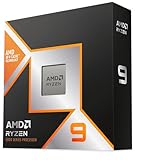
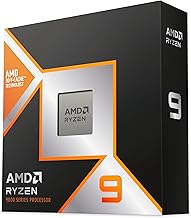
| Best overall for most creators | AMD Ryzen 9 9950X | 16 high-performance cores, strong single-core speed, sensible motherboard and cooling costs | Usually $700–$1,000 for CPU, board, and cooling |
| Fastest mainstream CPU rendering | AMD Ryzen 9 9950X3D | Excellent interactive performance and strong rendering, although its extra cache is not as valuable in every renderer | Usually $850–$1,200 for CPU, board, and cooling |
| Best high-end CPU renderer | AMD Ryzen Threadripper 9970X | 32 cores, quad-channel memory, and much higher sustained throughput than mainstream desktop CPUs | Usually $2,000–$3,000 for CPU, board, and cooling |
| Maximum CPU rendering performance | AMD Ryzen Threadripper 9980X | 64 cores for heavily parallel Blender, V-Ray, Corona, and simulation workloads | Usually $3,500–$5,000 for CPU, board, memory, and cooling |
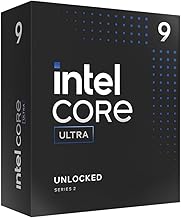
| Intel-focused workstation build | Intel Core Ultra 9 285K | Strong responsiveness and mixed workloads, with a modern desktop platform and lower core count than Threadripper | Usually $700–$1,100 for CPU, board, and cooling |
Head-to-head: what matters in rendering
Multi-core performance
Blender Cycles CPU rendering, V-Ray CPU, Corona Renderer, Arnold CPU, and similar engines can use nearly every available core. A 32-core Threadripper is therefore in a different performance class from a 16-core Ryzen 9, particularly when rendering animation sequences or large stills.
As a practical rule, if a scene takes 20 minutes per frame on a 16-core processor, a well-cooled 32-core CPU will not necessarily finish in exactly 10 minutes. Memory speed, scene complexity, thermal limits, and renderer scaling affect the result. A realistic expectation is often roughly 1.6–1.9 times the throughput when doubling cores within the same architecture and power envelope.
The 64-core Threadripper 9980X is aimed at studios and freelancers whose CPU is occupied for hours every day. For occasional rendering, its price, electricity use, workstation motherboard, and cooling requirements can outweigh the time saved.
Single-core speed and viewport responsiveness
Core count does not determine everything. Modeling operations, modifier evaluation, rigging, parts of compositing, scene loading, and some simulation steps may rely heavily on one or a few fast cores. A Ryzen 9 9950X or 9950X3D can feel more responsive than a many-core workstation CPU during these tasks.
The Ryzen 9 9950X3D is especially attractive for users who also play games, but its large cache does not automatically make CPU rendering faster. Rendering engines usually benefit more from total cores and sustained clock speed than from gaming-oriented cache. Choose it for a mixed creator-and-gaming PC, not solely because it carries the X3D name.
Power draw and sustained performance
Rendering is a long-duration load, not a short benchmark burst. A processor that briefly reaches a high boost clock may slow down after several minutes if the cooler, motherboard power delivery, or case airflow cannot remove the heat.
Mainstream 16-core systems are easier to run quietly. Threadripper systems can deliver considerably more work per hour, but the complete computer may draw several hundred watts during CPU rendering once memory, storage, cooling, and graphics hardware are included.
For example, suppose a workstation draws 550 watts while rendering for eight hours per day. The energy used is:
0.55 kW × 8 hours = 4.4 kWh per day.
At an electricity rate of $0.20 per kWh, that is about $0.88 per rendering day, or approximately $23 per month over 26 working days. A faster 64-core system may cost more per hour to operate, but if it reduces the render to three hours, it can use less total energy for the same job. Compare energy per completed frame, not just the wattage printed on the CPU specification.
Platform costs: the CPU price is only part of the decision
Ryzen 9 9950X and 9950X3D
These processors use AMD’s AM5 desktop platform and typically pair with a quality B850 or X870 motherboard, depending on expansion and connectivity needs. A 360 mm liquid cooler or a high-end dual-tower air cooler is appropriate for sustained rendering. Plan for 64 GB of DDR5 memory for ordinary scenes and 128 GB for large environments, high-resolution textures, or heavy geometry.
This is the easiest recommendation to justify financially. You receive excellent single-threaded performance, 16 full-performance cores, standard desktop storage options, and much lower platform cost than Threadripper.
Threadripper 9970X and 9980X
Threadripper requires a specialized motherboard and typically benefits from registered ECC memory, depending on the platform and board configuration. The motherboard, memory, cooler, and power supply can add well over $1,000 to the build before storage or graphics hardware is installed.
The reward is not only core count. The platform offers more memory channels and expansion lanes, which matters when using large amounts of RAM, multiple GPUs, high-speed NVMe storage, capture hardware, or professional expansion cards. For a render node, the extra cost can be sensible; for a general-purpose home PC, it often is not.
Intel Core Ultra 9 285K
The Core Ultra 9 285K is a capable choice for users who combine rendering with general productivity and prefer Intel’s current desktop ecosystem. It has fewer conventional high-performance cores than a 16-core Ryzen 9, so direct CPU-rendering value depends on the renderer and workload. Its appeal is strongest when application responsiveness, media work, and broad platform features matter as much as final-frame throughput.
Use a substantial air cooler or 280/360 mm liquid cooler for repeated all-core rendering. Avoid choosing a small cooler simply because the processor is installed in a desktop socket; sustained rendering can expose thermal limits quickly.
Blender, V-Ray, and similar workloads
- Blender Cycles CPU: favors high core count for final renders. Use CPU rendering when the scene exceeds GPU memory, requires CPU-only features, or runs on a render farm where CPU compatibility matters.
- Blender Eevee: depends much more on the GPU. Buy a strong CPU for scene preparation and simulation, but do not spend the entire budget on Threadripper if Eevee is your main renderer.
- V-Ray CPU: scales well across many cores and is one of the strongest reasons to move from a Ryzen 9 to Threadripper.
- V-Ray GPU and Cycles GPU: prioritize GPU performance and VRAM. The CPU still affects modeling, asset preparation, simulation, and feeding the GPU, but it is not the main render engine.
- Corona Renderer and Arnold CPU: benefit from sustained multi-core throughput, large memory capacity, and reliable cooling, especially for animation and architectural scenes.
Decision matrix: which CPU should you buy?
| Your situation | Best direction | Reason |
|---|---|---|
| Mostly modeling, animation, and occasional stills | Ryzen 9 9950X | Strong interactive speed without paying for a workstation platform |
| Gaming plus 3D work | Ryzen 9 9950X3D | Excellent mixed-use performance; rendering gains over the 9950X are workload-dependent |
| CPU rendering several hours each day | Threadripper 9970X | Higher throughput can repay the platform premium through shorter render queues |
| Large animation jobs or CPU render farm use | Threadripper 9980X | 64 cores maximize output when the software scales efficiently |
| GPU rendering with occasional CPU tasks | Ryzen 9 9950X or Core Ultra 9 285K | Reserve more budget for a fast GPU, sufficient VRAM, and reliable storage |
| Huge scenes, many assets, or multiple GPUs | Threadripper platform | Memory capacity and PCIe expansion can matter more than desktop CPU price |
Cooling and memory requirements
For a 16-core desktop processor, use a premium dual-tower air cooler or a 280/360 mm liquid cooler, with at least two intake fans and one rear exhaust fan. For Threadripper, use a cooler designed specifically to cover its larger heat-spreader area; an ordinary desktop cooler may leave part of the chip poorly cooled even if its advertised wattage looks sufficient.
Start with 64 GB of RAM for moderate Blender and V-Ray work. Choose 128 GB if you use 8K textures, dense scans, hair systems, fluid caches, or large architectural scenes. Workstation buyers handling complex environments should consider 256 GB or more. When a scene spills into the page file, adding CPU cores will not fix the fundamental problem.
Enable the motherboard’s memory profile only after confirming stability. A marginal memory overclock may appear fine in games but fail after a six-hour render. For professional work, stable capacity is more valuable than a small increase in memory frequency.
Bottom line
Choose the Ryzen 9 9950X for the best balance of rendering speed, responsiveness, power, and platform cost. Choose the Ryzen 9 9950X3D when gaming is equally important. Move to the Threadripper 9970X when CPU rendering is a daily business task, and choose the Threadripper 9980X when maximum multi-core throughput and large workstation expansion justify the expense. If your main renderer is GPU-based, buy the appropriate CPU tier and direct the savings toward GPU performance, VRAM, memory capacity, and cooling.