Key takeaways
- Assuming Hall effect means a lifetime guarantee.
- Buying without checking platform support.
- Ignoring deadzone settings.
- Skipping firmware updates.
- Choosing a lesser-known brand without checking warranty.
Hall effect controllers use magnetic sensors in the thumbsticks instead of mechanical potentiometers, which makes them far less likely to develop the classic stick drift that plagues many standard gamepads. They are a strong choice if you have worn out pads before, but they are not magic: build quality, software and warranty still matter, so choose a model from a maker you trust.
| Pick | Best for | Key feature |
|---|---|---|
| GameSir G7 SE Wired Controller | Xbox-style layout on a budget | Hall effect sticks and triggers in a wired pad |
| GameSir Cyclone 2 Wireless Controller | Multi-platform wireless play | Hall effect inputs with a charging dock |
| 8BitDo Ultimate 2.4g Wireless Controller | Stable wireless PC play | Dongle connection with customization options |
| GuliKit KingKong 3 Max Controller | Enthusiasts wanting high-end features | Hall effect sticks and mappable inputs |
| Flydigi Vader 4 Pro Controller | Players who want many extra buttons | Back buttons, trigger options and customization software |
1. GameSir G7 SE Wired Controller
The G7 SE offers an Xbox-style layout with Hall effect sticks at a reasonable level. It suits PC and Xbox players who want a durable wired pad and do not need wireless. Drawbacks are the plastic feel and the dependence on a cable, but for the type of buyer who is frustrated by drift, it addresses the main problem. Check compatibility for your platform before buying. Check the GameSir G7 SE.
2. GameSir Cyclone 2 Wireless Controller
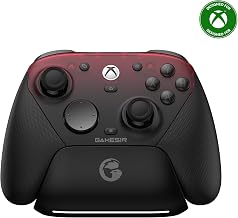
The Cyclone 2 is a multi-platform pad that connects to PC, mobile and some consoles, and uses Hall effect inputs. A charging dock makes it neat to keep ready. It suits players who move among devices and want an anti-drift design. It is a less familiar name than Xbox or Sony, so check software and firmware support, and test the connection modes you need. View the GameSir Cyclone 2.
3. 8BitDo Ultimate 2.4g Wireless Controller
8BitDo’s Ultimate controller uses a 2.4 GHz dongle and a charging dock, and offers Hall effect sticks and triggers in many versions. It suits PC players who want a stable wireless pad with customization software. Different models vary in features, so verify which variant you are buying. The layout is a hybrid that some people love and others find different. See the 8BitDo Ultimate 2.4g.
4. GuliKit KingKong 3 Max Controller
GuliKit is known among enthusiasts for Hall effect sticks and customizable pads. The KingKong 3 Max offers features like mappable inputs and a fast wireless connection. It suits players who read spec sheets and enjoy tuning, but the brand has less retail presence than the largest names, so research warranty and support. Software setup can take some time. Browse the GuliKit KingKong 3 Max.
5. Flydigi Vader 4 Pro Controller
Flydigi’s Vader controllers are popular for their extra buttons and adjustable triggers. The 4 Pro is aimed at players who want a lot of customization and an anti-drift sensor design. It is feature-rich, which also makes it more complex. Software and language support can be a hurdle for some buyers, so review the instructions before purchase. Check the Flydigi Vader 4 Pro.
What Is Stick Drift?
Stick drift happens when a controller registers movement even though you are not touching the stick, so a character wanders or the camera slowly turns. Most traditional controllers use potentiometers, which have a physical contact that wears over time, producing erratic readings. Dust, debris and heavy use accelerate that wear. In many cases the controller can be recalibrated or cleaned for a temporary fix, but the underlying wear tends to return.
Hall effect sensors measure the position of a magnet instead of rubbing against a contact. Because there is no friction in the sensing mechanism, they should last longer. They can still suffer from drift in other ways, such as a bent stick, a worn cap or poor calibration, so the term does not mean that drift is impossible. It does mean that one major cause is eliminated.
How to Choose a Hall Effect Controller
Platform compatibility
Check whether the controller works with your PC, console or handheld. Some models support multiple platforms, and others are specific.
Connection
Wired is dependable. Wireless dongles are low-latency. Bluetooth is flexible but varies by device.
Software and firmware
You may need an app to adjust deadzones and remap buttons. Check that the software supports your operating system.
Warranty and brand support
Anti-drift hardware helps, but you want to be able to return or repair a controller if something goes wrong.
What Else Wears Out?
Even with Hall effect sticks, face buttons, bumpers and rubber grips can wear. Keep the controller clean, avoid pulling hard on the sticks and store it in a case or a dock. If drift appears anyway, recalibrate in the settings and check the deadzone setting. Update firmware, since manufacturers sometimes release fixes.
Fixing Drift Before You Replace the Controller
If your current controller has started to drift, there are a few things to try before buying a new one. First, check the deadzone settings in your game or in Steam Input, since increasing the deadzone slightly can mask minor drift. Second, recalibrate the controller using the system or manufacturer’s tool. Third, clean around the base of the stick with compressed air, because dust and debris sometimes cause false inputs. Some players use isopropyl alcohol on a cotton swab around the stick base, but follow manufacturer guidance, since this can void warranties and may not solve a worn sensor.
If your controller is under warranty, a replacement is the best choice, and first-party makers often have repair or exchange programs. If it is out of warranty, a controller with Hall effect sensors can be a worthwhile upgrade, particularly if you play games that rely on precise aim or movement. If you have a favorite shell and do not want to switch, some controllers allow module swaps, and companies sell replacement sticks, but be realistic about the skill and tools involved.
It also helps to treat sticks gently. Avoid pushing them hard against the edge of the gate, and do not store a controller with heavy objects pressing on it. A small case protects the pad in a bag, and a dock keeps it from being dropped. These habits matter regardless of which sensor technology your pad uses, and they extend the life of every controller you own.
Common Mistakes
- Assuming Hall effect means a lifetime guarantee.
- Buying without checking platform support.
- Ignoring deadzone settings.
- Skipping firmware updates.
- Choosing a lesser-known brand without checking warranty.
Frequently Asked Questions
Do Hall effect sticks feel different?
They can feel smoother, but the shape and tension of the stick matter more to most players.
Can I replace my existing stick with a Hall effect module?
Some controllers offer such modules, but compatibility varies and installation can void the warranty.
Are Hall effect triggers useful?
They can provide precise, smooth input and may avoid wear.
Do these work with Steam?
Many do, but check the product page and user feedback for your model.
Conclusion
The GameSir G7 SE is a practical wired choice, the Cyclone 2 and 8BitDo Ultimate suit wireless play, and GuliKit and Flydigi are for tinkerers. Look for solid support and warranty, and remember that Hall effect reduces one common failure but does not end all wear.
As an Amazon Associate we earn from qualifying purchases.
FAQ
What Is Stick Drift?
What Else Wears Out?
Do Hall effect sticks feel different?
Can I replace my existing stick with a Hall effect module?
Are Hall effect triggers useful?
Do these work with Steam?
More from Amazon
Programs that pair well with the guide above. Offers and eligibility are set by Amazon and may change.
Free shipping on eligible items, Prime Video and more. Eligible new members can start with a free trial.
Start a Prime free trialAd-free music streaming. Eligible new subscribers can start with a free trial.
Try Music Unlimited freeA Prime membership for ages 18-24 with a trial period. Eligibility is set by Amazon.
See Prime for Young AdultsAudiobooks and podcasts to listen to on the go. Eligible new members can start with a free trial.
Try Audible freeAs an Amazon Associate we earn from qualifying purchases.