Key takeaways
- Paying for features you will not use.
- Ignoring platform compatibility.
- Assuming paddles will instantly improve your aim.
- Not setting up profiles for each game.
- Skipping the case and storage for removable parts.
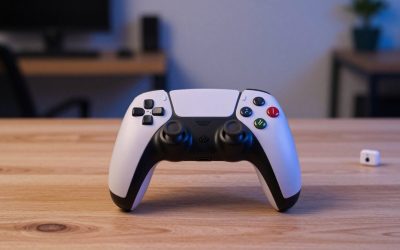
A pro controller with back paddles is worth it if you play competitive shooters, action games or anything where taking your thumb off the right stick costs you, and the best ones offer remappable paddles, trigger stops, swappable sticks and a build that survives heavy use. If you play casually, a standard pad will serve you well, and the premium cost is hard to justify.
| Pick | Best for | Key feature |
|---|---|---|
| Xbox Elite Wireless Controller Series 2 | Customization on Xbox and PC | Adjustable tension sticks, paddles and trigger locks |
| DualSense Edge Wireless Controller | PlayStation and PC players | Swappable stick modules and back buttons |
| SCUF Instinct Pro Controller | Esports-minded players | Paddles, instant triggers and custom options |
| Razer Wolverine V3 Pro | Wireless competitive play | Extra buttons and low-latency wireless |
| Nacon Revolution 5 Pro Controller | PlayStation fans wanting alternatives | Back buttons and weight customization |
| PowerA Fusion Pro 4 Wireless Controller | Value-minded players | Mappable back buttons at a lower tier |
1. Xbox Elite Wireless Controller Series 2
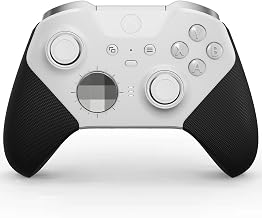
The Elite Series 2 is the controller that made paddles mainstream. It includes four back paddles, adjustable stick tension, swappable thumbsticks and hair trigger locks, plus a rechargeable battery and a carrying case. It suits players who want to dial in their feel and remap buttons for specific games. Common complaints involve price and long-term durability concerns reported by some owners, such as worn rubber on the grips. Check warranty terms. Check the Xbox Elite Series 2.
2. DualSense Edge Wireless Controller
Sony’s pro-level pad keeps the DualSense look but adds back buttons, trigger stops, profile switching and swappable stick modules. It suits PlayStation players who want an official customizable controller and works on PC as well. The trade-offs are battery life that is shorter than that of many standard controllers and a price that stands out. Replacement stick modules can be a good feature if drift appears. View the DualSense Edge.
3. SCUF Instinct Pro Controller
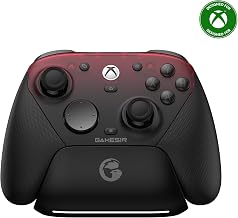
SCUF has long served competitive players with paddles and custom designs. The Instinct Pro gives you rear paddles, trigger stops and a grip texture intended for long sessions. It suits players who want an alternative to first-party pro pads and like personalization. It is expensive and designed for a specific console family, so verify platform compatibility before ordering. Wired use may be required on some models. See the SCUF Instinct Pro.
4. Razer Wolverine V3 Pro
Razer’s Wolverine V3 Pro targets competitive players with extra buttons, a fast wireless connection and a build aimed at Xbox and PC. It is a good fit for those who want a pro-style layout without the Elite price. As with any wireless pro pad, check the dongle requirement and the battery behavior. The feel of the sticks and buttons is a matter of preference, and not everyone likes the shape. Browse the Razer Wolverine V3 Pro.
5. Nacon Revolution 5 Pro Controller
Nacon’s Revolution line offers PlayStation-focused pro features such as back buttons, adjustable weights and swappable sticks, with a wired or wireless connection depending on the model. It appeals to players who want an alternative to Sony’s own premium pad. The software and button layout have a learning curve, and platform compatibility differs, so confirm that it works with your console or PC. Check the Nacon Revolution 5 Pro.
6. PowerA Fusion Pro 4 Wireless Controller
PowerA offers a more accessible way to get mappable back buttons. The Fusion Pro line focuses on straightforward customization, and it can be a good first step into paddles. Expect less refinement than premium pads, with plastic that may feel lighter and sticks that wear sooner. It is a sensible try-before-you-commit choice. View the PowerA Fusion Pro 4.
Are Back Paddles Really Useful?
Paddles let you press jump, crouch, reload or other actions without lifting your thumb from the right stick. In shooters and action games, that means you can aim and move while performing other actions. Some players adapt quickly; others find the extra buttons awkward and accidentally press them. If you play slower or turn-based games, you probably will not notice the benefit.
Trigger stops shorten the pull distance, which can speed up firing in some games. They are most helpful in shooters with semi-automatic weapons. Swappable sticks of different heights and shapes help you tailor your aim, and tension adjustments change how much force a stick requires. All these features add up, but they only matter if you will use them.
How to Choose
Platform
Pick a controller that supports your main platform. Some pro pads work on both console and PC, while others are tied to a single ecosystem.
Wired or wireless
Wired is the lowest latency and avoids battery worries. Wireless is convenient, but check battery life and whether the connection uses a dongle.
Durability and warranty
Premium pads should last, but stick wear and rubber peeling happen. Check warranty terms and replacement-part availability.
Comfort
Weight, grip texture and paddle position matter. If possible, try the pad in a store before buying.
Setting Up Paddles Without Overthinking It
The most common mistake with a new paddle controller is mapping too many actions at once. Start simple: map one or two paddles to the buttons you press most while aiming or steering, such as jump and crouch in a shooter, or a dodge and an item button in an action game. Play for a few sessions before adding more. Most players find that a small number of well-chosen mappings is more useful than a complex layout they cannot remember under pressure.
Use profiles. Pro controllers usually let you save several configurations and switch between them with a button. Keep one default profile that mirrors the standard layout, so that you can play any game without surprises, and create specific ones for games where you want custom controls. Name them clearly in the companion app so that you remember what each one does.
Take care of the extras. Swappable sticks and paddles are small and easy to lose, so keep them in the case that came with the controller. Check the tension of adjustable sticks occasionally, because screws can loosen. Clean the controller with a slightly damp cloth, avoiding liquid near buttons and ports. If the pad has a rechargeable battery, avoid leaving it fully drained for long periods.
Finally, give yourself time to adapt. Muscle memory takes a week or two to adjust to paddles, and early sessions can feel worse before they feel better. If the paddles never feel natural after a fair trial, you can still use the controller as a standard pad, and you will have learned that a lower-priced model would have been enough.
Common Mistakes
- Paying for features you will not use.
- Ignoring platform compatibility.
- Assuming paddles will instantly improve your aim.
- Not setting up profiles for each game.
- Skipping the case and storage for removable parts.
Frequently Asked Questions
Are pro controllers allowed in tournaments?
Rules vary. Check each event’s regulations before you buy.
Will paddles make me better?
They can help with efficiency, but skill still matters most.
Do they work on PC?
Some do, with software support. Check the product details.
How long do they last?
It depends on use, but moving parts such as sticks and triggers tend to wear first.
Conclusion
For most buyers, the Xbox Elite Series 2 is the benchmark, DualSense Edge is the PlayStation answer, SCUF and Razer cater to competitive players, and PowerA offers a lower-cost entry. Buy for the features you will use.
As an Amazon Associate we earn from qualifying purchases.
FAQ
Are Back Paddles Really Useful?
Are pro controllers allowed in tournaments?
Will paddles make me better?
Do they work on PC?
How long do they last?
More from Amazon
Programs that pair well with the guide above. Offers and eligibility are set by Amazon and may change.
Free shipping on eligible items, Prime Video and more. Eligible new members can start with a free trial.
Start a Prime free trialAd-free music streaming. Eligible new subscribers can start with a free trial.
Try Music Unlimited freeA Prime membership for ages 18-24 with a trial period. Eligibility is set by Amazon.
See Prime for Young AdultsAudiobooks and podcasts to listen to on the go. Eligible new members can start with a free trial.
Try Audible freeAs an Amazon Associate we earn from qualifying purchases.