Our Top Picks
 Razer BlackShark V2 X Gaming Headset: 7.1 Surround3.5 mm7.6 x 6.76 x 3.86 inches0.5 poundsCheck on Amazon
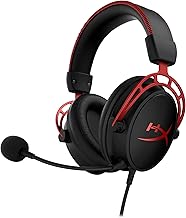
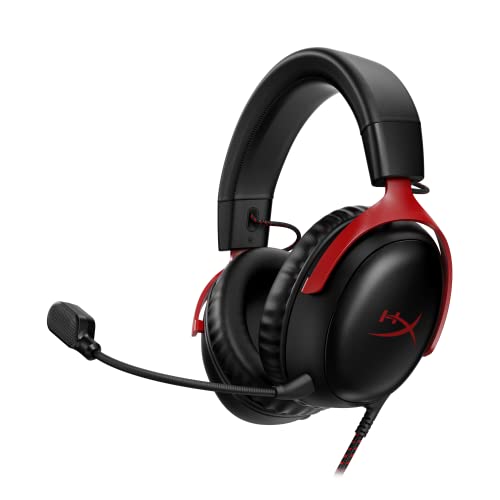 HyperX Cloud III Wired Gaming Headset for PCRegular3.41 x 6.1 x 7.48 inches0.7 poundsCheck on Amazon
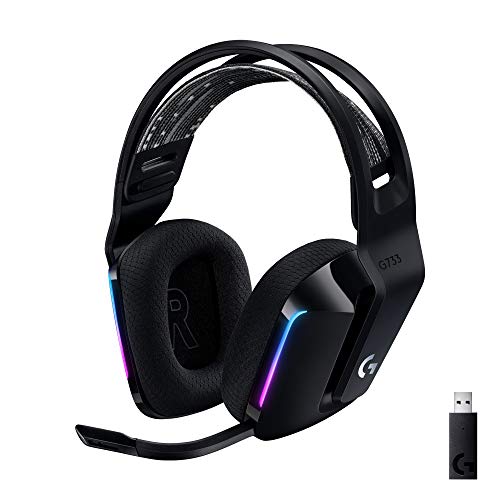 Logitech G733 Lightspeed Wireless Gaming HeadsetOne Size8.5 x 8.3 x 4.1 inches0.6 poundsCheck on Amazon
 SteelSeries Arctis Nova 5 Wireless Multi-System Gaming HeadsetOne Size7.32 x 6.87 x 3.52 inches0.6 poundsCheck on Amazon
 Razer BlackShark V3 X HyperSpeed Wireless Gaming Headset6.9 x 3.7 x 7.9 inches1.7 poundsCheck on Amazon
The best headset for CoD Valorant Tarkov is one that gives you clear stereo imaging for footsteps, a mic teammates can understand and enough comfort for long raids. Wired headsets such as the Razer BlackShark V2 X, HyperX Cloud III and Logitech G Pro X cover all three games well, while wireless models like the Logitech G733 suit couch and desk play. Here is how to choose, plus eight picks.
Picks at a Glance
All details come from maker descriptions and store listings. We did not use these headsets and we make no ranking or performance claims. Prices are shown as tiers.
| Headset | Connection (per listing) | Tier | Best for |
|---|---|---|---|
| Razer BlackShark V2 X | 3.5 mm | Low | Light, value FPS wired play |
| HyperX Cloud III Wired | USB-C, USB-A, 3.5 mm | Low to mid | Sturdy all-rounder |
| Logitech G Pro X Wired | USB and 3.5 mm | Mid | Players who want a USB DAC and spare pads |
| Logitech G733 | Lightspeed wireless | Mid | Lightweight wireless for PC |
| SteelSeries Arctis Nova 5 Wireless | 2.4 GHz or Bluetooth | Mid | App tuning and long battery |
| Razer BlackShark V3 X HyperSpeed | Wireless, three modes | Mid | Light and long-lasting wireless |
| Turtle Beach Stealth 600 | Wireless, Bluetooth | Mid | Console and PC mixed play |
| HyperX Cloud III S Wireless | 2.4 GHz and Bluetooth | Mid to high | Very long battery |
How We Chose
This is a research-based roundup. We did not use the headsets. We took products from our store, read the maker’s published details, and filtered for headsets that list a boom or detachable mic, a clear connection type and PC compatibility. We capped each brand at two picks and avoided claims about competitive results. In shooters, personal fit and preference matter, so use the picks as a short list.
What FPS Players Actually Need From a Headset
Three things matter most: clear directional sound, a reliable mic and comfort you can forget about. Surround sound labels matter far less than good stereo, a comfortable fit and a mic that sits where you need it.
Directional audio: stereo or virtual surround?
Many shooters rely on stereo cues to place footsteps, reloads and gunfire. Virtual 7.1 modes process the sound into a wider field, which some players like and others find blurry. A good approach is to try both on each game and keep what feels clear. Do not pay extra just for a surround label.
Mic quality and placement
You want a mic that picks up your voice clearly, cuts background noise and sits near your mouth. Detachable or flip-to-mute boom mics are easy to use. For Tarkov, where proximity voice chat is part of the game, a clear mic matters to others too.
Comfort and weight
Long raids and ranked sessions mean hours of wear. Look for soft cushions, a balanced headband and, if the maker lists weight, a lighter frame. If you wear glasses, check that the cups seal comfortably around the arms.
Connection and delay
Wired headsets add no delay and never run out of battery. Modern 2.4 GHz wireless is close for most players, but Bluetooth is less suited to fast games. Choose wired if you want zero compromises, wireless if you value freedom.
Best Headset for CoD: What to Look For
Call of Duty is fast, with constant footsteps, gunfire and callouts on top of party chat. A headset with a clear mic and a balanced sound is a better match than one with extreme bass. If you play on console, a wired 3.5 mm headset or a wireless model with a console-ready dongle both work, but check platform support first.
- Pick a mic with an easy mute, since match chat can be loud.
- Choose a comfortable headset for multi-hour sessions.
- Use the game’s audio options to tune the mix of effects and chat.
Valorant: Footsteps and Ability Cues
Valorant is a PC game where footsteps, reloads and ability sounds guide decisions. Directional clarity and a balanced mix matter most. A wired headset avoids any delay and is a safe default. Keep surround processing off unless you find it helps, because many players prefer plain stereo in this game.
- Favour a wired or low-delay 2.4 GHz connection.
- Look for a mic with a clear voice and a quick mute.
- Choose light, breathable cushions for long matches.
Best Headset for Tarkov: Positional Audio and Long Raids
Escape from Tarkov rewards careful listening. Footsteps, doors, gear rattle and distant shots all carry information, and proximity voice chat adds another layer. Players often want a headset with a wide, clean soundstage and a comfortable fit for long raids. Because the game is played on PC, USB connections and software tuning are available on many models.
- A closed-back design blocks room noise and helps focus on subtle sounds.
- A comfortable frame matters more here than anywhere because raids can be long.
- If you use proximity chat, a good mic matters to everyone near you.
The Picks
1. Razer BlackShark V2 X: Best Value Wired Pick
Razer BlackShark V2 X Gaming Headset: 7.1 Surround Sound - 50mm Drivers - Memory Foam Cushion - For PC, PS4, PS5, Switch - 3.5mm Audio Jack - Black
Chosen because it specifies 50mm Drivers and Memory Foam Cushion.
View on AmazonThe listing describes a wired headset with 7.1 surround sound, 50 mm drivers, a memory foam cushion and a 3.5 mm audio jack, for PC, PS4, PS5 and Switch. It is aimed at players who want large drivers and a simple plug-in design.
- Connection: 3.5 mm
- Best for: value FPS play across PC and consoles
- Skip if: you want USB tuning or wireless
Pros: large drivers, memory foam, wide platform list, simple. Cons: wired only; 7.1 is a software effect; no extra tuning options.
2. HyperX Cloud III Wired: Best Sturdy All-Rounder
HyperX Cloud III Wired Gaming Headset for PC, PS5, PS4, Xbox Series X | S | USB-C + USB-A + 3.5mm Connectivity | Memory Foam | Durable Frame | Ultra-Clear 10mm Mic
Chosen because it specifies PS5 and PS4.
View on AmazonThe listing names PC, PS5, PS4 and Xbox Series X|S support with USB-C, USB-A and 3.5 mm connections, memory foam, a durable frame and an ultra-clear 10 mm mic. It is a flexible choice for players who move between devices.
- Connection: USB-C, USB-A, 3.5 mm
- Best for: players who switch between PC and console
- Skip if: you need wireless
Pros: several connection types, durable frame, memory foam, clear mic claim. Cons: costs more than entry-level picks; wired; extras beyond the listing are unconfirmed.
3. Logitech G Pro X Wired: Best for a USB DAC and Spare Pads
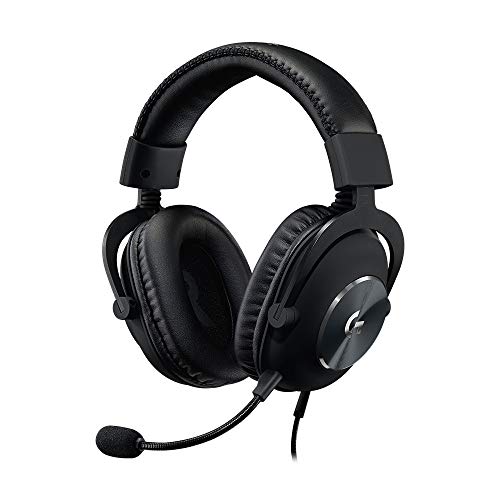
Logitech G Pro X Wired Gaming Headset With Detachable Boom Mic - Black | Wired headset has Blue VO!CE, DTS 7.1, 50 mm drivers, USB/3.5mm, spare memory foam pads, USB DAC & bag, PC, Xbox, PS5, PS4
Chosen because it specifies Black and Wired headset has Blue VO!CE.
View on AmazonA wired headset with a detachable boom mic and Blue VO!CE, DTS 7.1, 50 mm drivers, USB and 3.5 mm connections, spare memory foam pads, a USB DAC and a carry bag, for PC, Xbox, PS5 and PS4. It is built with esports use in mind.
- Connection: USB and 3.5 mm
- Best for: PC players who want voice tools and a spare set of pads
- Skip if: you want wireless or the lowest cost
Pros: detachable mic, spare pads, USB DAC, carry bag. Cons: a higher tier than entry picks; wired; Blue VO!CE features need Logitech software on PC.
4. Logitech G733 Lightspeed: Best Lightweight Wireless
Logitech G733 Lightspeed Wireless Gaming Headset - Black | Suspension Headband, Blue VO!CE Mic, PRO-G Audio, PC, PS5, PS4, Switch Compatible
Chosen because it specifies Black and Suspension Headband.
View on AmazonA wireless headset with a suspension headband, a Blue VO!CE mic and PRO-G audio, listed as compatible with PC, PS5, PS4 and Switch. It is aimed at players who want wireless freedom without a heavy frame.
- Connection: Lightspeed wireless
- Best for: PC and PlayStation players who want cable-free comfort
- Skip if: you need Xbox support; the listing does not name it
Pros: suspension headband, wireless, voice features, broad platform list. Cons: mid tier; battery life varies with use; the mic is a fixed boom design per the listing.
5. SteelSeries Arctis Nova 5 Wireless: Best for App Tuning
SteelSeries Arctis Nova 5 Wireless Multi-System Gaming Headset - Black | Neodymium Magnetic Drivers — 60 HR Battery — 2.4GHz or BT — ClearCast Gen2.X Mic — PC, PS5, PS4, Switch, Mobile
Chosen because it specifies Black and PS5.
View on AmazonThe listing names neodymium magnetic drivers, a 60-hour battery, 2.4 GHz or Bluetooth connectivity, a ClearCast Gen2.X mic and support for PC, PS5, PS4, Switch and mobile. It suits players who like to adjust sound with an app.
- Connection: 2.4 GHz or Bluetooth
- Battery: 60 hours per listing
- Best for: multi-device players who want tuning options
- Skip if: you prefer a wired headset
Pros: long listed battery, two wireless modes, wide device list, tuning. Cons: mid-tier cost; app features need a phone or PC; Bluetooth is not suited to fast play.
6. Razer BlackShark V3 X HyperSpeed: Best Light Wireless
Razer BlackShark V3 X HyperSpeed Wireless Gaming Headset for PC, Black | 70-Hour Battery, HyperClear Mic, 7.1 Surround Sound, TriForce Gen-2 Drivers, 3 Connectivity Modes, 270g Lightweight Design
Chosen because it specifies Black and 70-Hour Battery.
View on AmazonThe listing describes a wireless headset for PC with a 70-hour battery, a HyperClear mic, 7.1 surround sound, TriForce Gen-2 drivers, three connection modes and a 270 g lightweight design.
- Connection: three modes per listing
- Weight: 270 g
- Best for: PC players who want a long battery and low weight
- Skip if: you need console support; the listing names PC
Pros: long battery, light, three modes, mic noted. Cons: mid tier; listing names PC only; software surround optional.
7. Turtle Beach Stealth 600: Best for Mixed Console and PC
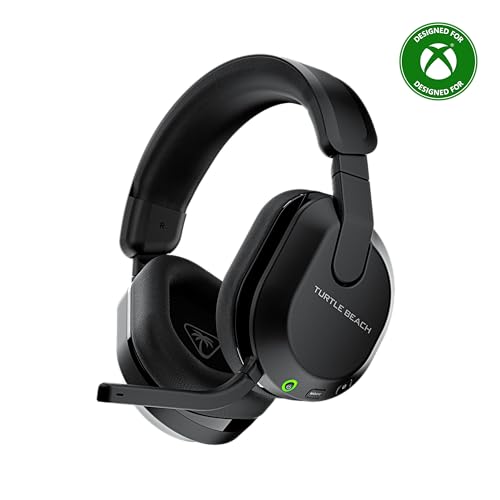
Turtle Beach Stealth 600 Wireless Gaming Headset for Xbox, PS5, PC, Mobile | Xbox Series X|S, Xbox One, PlayStation, PS4, Multiplatform, Bluetooth, 50mm Drivers, 80-Hr Battery, Flip-to-Mute Mic, Black
Chosen because it specifies PS5 and Mobile.
View on AmazonThe listing names Xbox Series X|S, Xbox One, PlayStation, PS4, PC and mobile support with Bluetooth, 50 mm drivers, an 80-hour battery and a flip-to-mute mic.
- Connection: wireless with Bluetooth
- Battery: 80 hours per listing
- Best for: players who use several platforms
- Skip if: you want a wired, delay-free link
Pros: broad platform list, long listed battery, flip-to-mute mic, 50 mm drivers. Cons: wireless at a mid tier; the right dongle or mode depends on your platform; check the maker for details.
8. HyperX Cloud III S Wireless: Best Battery Life

HyperX Cloud III S Wireless Gaming Headset | Multi-Platform Compatibility | Wireless Headphones | 2.4GHz + Bluetooth | 120-Hour Battery | Detachable Mic
Chosen because it specifies Multi-Platform Compatibility and Wireless Headphones.
View on AmazonThe listing names multi-platform compatibility with 2.4 GHz and Bluetooth, a 120-hour battery and a detachable mic. It suits players who dislike charging.
- Connection: 2.4 GHz and Bluetooth
- Battery: 120 hours per listing
- Best for: long sessions with fewer charges
- Skip if: you want the lowest cost
Pros: long listed battery, detachable mic, two wireless modes. Cons: higher tier; wireless; features beyond the listing are unconfirmed.
Also Consider
SteelSeries Arctis Nova Pro Omni

SteelSeries Arctis Nova Pro Omni Gaming Headset - Midnight Blue | 96kHz/24bit, ANC, ClearCast Pro Mic, AI Noise Rejection, Mobile App, Mix 2.4GHz+BT, OmniPlay PC+PlayStation+Xbox
Chosen because it specifies Midnight Blue and 96kHz/24bit.
View on AmazonA premium headset listing 96 kHz/24-bit audio, active noise cancelling, a ClearCast Pro mic with AI noise rejection, a mobile app and a 2.4 GHz plus Bluetooth mix, with OmniPlay support for PC, PlayStation and Xbox. A high-tier choice for players who want features first.
JBL Quantum 100M2 Wired

JBL Quantum 100M2 Wired Gaming Headset, Detachable Mic - Black | Memory Foam Ear Cushions And 3.5 Mm Jack Work With PC, PlayStation, Xbox, Nintendo Switch For Immersive PC Gaming Sessions
Chosen because it specifies Detachable Mic and Black.
View on AmazonA low-tier wired headset with a detachable mic, memory foam cushions and a 3.5 mm jack for PC, PlayStation, Xbox and Switch. A simple way to start.
Ozeino Wired Gaming Headset
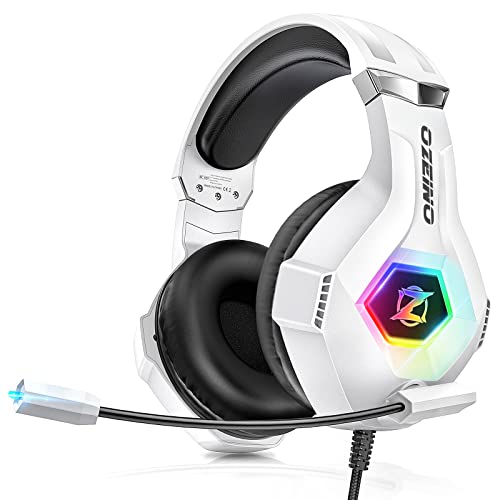
Ozeino Gaming Headset for PC, Ps4, Ps5, Xbox Headset with 7.1 Surround Sound Gaming Headphones with Noise Canceling Mic, LED Light Over Ear Headphones for Switch, Xbox Series X/S, Laptop, Mobile White
Chosen because it specifies Ps4 and Ps5.
View on AmazonA very low-tier wired headset listing 7.1 surround, a noise-cancelling mic and LED lighting for PC, PS4, PS5, Xbox, Switch and mobile. A budget backup for a second setup.
Comparison by Game
| Game | What to prioritise | Good starting picks |
|---|---|---|
| Call of Duty | Clear mic, balanced mix, comfort, console support | HyperX Cloud III, Turtle Beach Stealth 600 |
| Valorant | Wired or low-delay link, plain stereo, quick mute | Razer BlackShark V2 X, Logitech G Pro X |
| Tarkov | Soundstage, closed back, long-session comfort, clear mic | Logitech G Pro X, SteelSeries Arctis Nova 5 |
Buying Guide: What to Look For
Driver size
Many headsets use 40 mm or 50 mm drivers. Size does not decide sound quality, but larger drivers can give a roomier feel. Do not pick a headset on this alone.
Wired or wireless
If you want zero delay and zero charging, go wired. If you want freedom, choose 2.4 GHz wireless and keep Bluetooth for phones. Check the battery: 30 hours or more means weekly charging for most players.
Open-back or closed-back
Closed-back headsets block room noise and leak less sound. Open-back headsets can sound wider but leak more and let in outside noise. Most gaming headsets, including these, are closed-back.
Mic type
A boom mic sits closer to your mouth and tends to sound clearer than a hidden mic. Detachable boom mics are the most flexible.
Platform support
Always confirm that your device is named. A wireless dongle that works on PC may not work on Xbox. Wired 3.5 mm headsets plug into a controller on most consoles.
Comfort
Weight, headband design and cushion material decide whether you can wear a headset for hours. If you can, choose a store with an easy return policy and try the fit.
Setting Up Your Headset for Shooters
- Set the headset as default in your operating system or console sound settings.
- Use stereo first. Turn off virtual surround and play a few matches, then switch it on and compare.
- Adjust the mic level. Record yourself and check that you are clear without clipping.
- Balance chat and game volume so you hear callouts and footsteps together.
- Set in-game audio options. Many games offer a headphone mode or dynamic range setting, which can reduce loud explosions and bring out quieter sounds.
Console vs PC: What Changes for These Games
These three games do not all live on the same platform. Call of Duty runs on consoles and PC, Valorant is PC only, and Tarkov is PC only. That shapes which headset makes sense.
| Platform | Easiest connection | Watch out for |
|---|---|---|
| PC | USB or 3.5 mm; 2.4 GHz dongle | Software tuning options vary by brand |
| PlayStation | 3.5 mm into the controller, or a dongle listed for PlayStation | Some PC-only dongles do not work |
| Xbox | 3.5 mm into the controller, or an Xbox-listed dongle | Many wireless headsets list PlayStation but not Xbox |
| Switch and mobile | 3.5 mm or Bluetooth | 2.4 GHz dongles often do not work on phones |
If you split time between a console and a PC, choose a headset that names both in its listing and keep the 3.5 mm cable as a backup. The HyperX Cloud III, Logitech G Pro X and Turtle Beach Stealth 600 listings name several platforms, but always confirm your exact device before you buy.
Voice Chat: Being Heard in Fast Games
Your mic matters as much as your ears. Teammates make faster decisions when callouts are clear, and a muddy mic can cost you a round.
- Place the mic well. Keep it a couple of finger widths from the corner of your mouth, off to the side to avoid breath noise.
- Use the mute switch. A flip-to-mute or inline mute lets you cut the mic during loud moments.
- Lower the gain. A mic level that is too high clips and sounds harsh. Set it so normal speech sits in the middle of the meter.
- Cut room noise. Close windows and turn off fans when you can; no mic can fully remove a noisy room.
- Watch proximity chat in Tarkov. Nearby players hear you, so a clean mic and quick mute help in tense moments.
Sound Signature: What You Actually Hear
Headsets differ in how they shape sound, and FPS play benefits from some choices over others. These are general principles, not claims about any one model.
Balanced sound
A balanced profile keeps footsteps, reloads and voices easy to separate. It is the safest choice for mixed games and is why many players start here.
Bass-heavy sound
Extra bass makes explosions feel punchy but can mask quieter mid-range sounds such as footsteps. If your headset has a software equaliser, try lowering the bass and boosting the mid-range slightly.
Bright sound
A treble boost can make small details pop but gets tiring over long sessions. If high sounds sting after an hour, reduce the treble or choose a headset with a smoother profile.
Soundstage
Soundstage is how wide the headset feels. Open-back designs are often wider, but most gaming headsets are closed-back. Good positioning of sounds in a closed-back headset depends on tuning and your game’s audio settings.
Game Audio Settings That Help Any Headset
- Call of Duty: look for a headphone audio mix or a dynamic range setting, and adjust the balance between effects, dialogue and music. Lower music and turn effects up if you want footsteps to stand out.
- Valorant: try the game’s headphone or stereo options and compare them with virtual surround. Check the in-game volume sliders for voice chat so team calls are clear.
- Escape from Tarkov: use the game’s audio settings to balance effects, and look for the option to reduce overall dynamic range if loud shots make quiet footsteps hard to hear.
These options change from update to update, so check the current menus rather than relying on old guides.
Common Mistakes When Choosing an FPS Headset
- Pursuing surround labels. A 7.1 label does not mean better positioning than clean stereo.
- Buying the wrong connection. A dongle that works on PC may not work on your console.
- Ignoring comfort. A headset you cannot wear for two hours will hurt your play more than any sound difference.
- Forgetting the mic. A headset with great sound and a weak mic is a poor team headset.
- Overspending on features. RGB lighting and extra modes do not improve how you hear footsteps.
- Using Bluetooth for competitive play. Bluetooth adds delay and is better for phone use than for shooters.
Fit and Care for Long Sessions
A headset worn for hours needs a good fit and some care. Adjust the headband so the cups sit flat on your head and the pads fully cover your ears without pressing hard. If you wear glasses, a thin frame arm makes a better seal than a thick one. Wipe cushions with a slightly damp cloth, rest the headset on a stand and replace worn cushions rather than the whole headset when a model-specific set is available.
Frequently Asked Questions
What is the best headset for CoD, Valorant and Tarkov?
There is no single best. Wired headsets like the Razer BlackShark V2 X, HyperX Cloud III and Logitech G Pro X work for all three, and wireless options suit couch or desk play.
What is the best headset for CoD?
Look for a clear mic, a balanced mix and console or PC support. The HyperX Cloud III and Turtle Beach Stealth 600 listings both name several platforms.
What is the best headset for Tarkov?
Choose a closed-back headset with a comfortable fit and a clear mic. USB models like the Logitech G Pro X add software tuning on PC.
Is 7.1 surround good for competitive shooters?
It depends on the player. Many people prefer clean stereo, so try both and keep the one that makes footsteps easier to place.
Do I need a wired headset for Valorant?
No, but wired avoids delay and charging. A 2.4 GHz wireless headset is a good alternative, while Bluetooth is a poor fit for fast play.
Should I use a mic on the headset or a separate one?
A headset boom mic is convenient and clear enough for most. A separate microphone sounds better but adds cost and desk clutter.
How much should I spend?
Low-tier headsets are enough for many players. Spend more only for wireless freedom, long battery or features you will actually use.
Which One Should You Buy?
For one dependable wired pick, start with the Razer BlackShark V2 X or HyperX Cloud III. If you play mostly on PC and want a USB DAC and spare pads, the Logitech G Pro X fits. For wireless, the Logitech G733 and SteelSeries Arctis Nova 5 are strong options, and the HyperX Cloud III S suits players who hate charging. Keep the fit in mind, because comfort and a clear mic matter more than any label.
If you are still undecided, shortlist two headsets that name your platform, compare their connection types and mic designs, and pick the one with the easier return policy. Try it for a few matches in each of your main games, adjust the mic level and the game audio settings once, and give your ears a day or two to adapt before judging the sound. A headset that feels comfortable and lets teammates hear you clearly will serve you well across Call of Duty, Valorant and Tarkov alike.
Sources
- Razer product pages
- HyperX product pages
- Logitech G product pages
- SteelSeries product pages
- Turtle Beach product pages
Last updated: November 2026
FAQ
Directional audio: stereo or virtual surround?
What is the best headset for CoD, Valorant and Tarkov?
What is the best headset for CoD?
What is the best headset for Tarkov?
Is 7.1 surround good for competitive shooters?
Do I need a wired headset for Valorant?
Should I use a mic on the headset or a separate one?
How much should I spend?
More from Amazon
Programs that pair well with the guide above. Offers and eligibility are set by Amazon and may change.
Free shipping on eligible items, Prime Video and more. Eligible new members can start with a free trial.
Start a Prime free trialAd-free music streaming. Eligible new subscribers can start with a free trial.
Try Music Unlimited freeA Prime membership for ages 18-24 with a trial period. Eligibility is set by Amazon.
See Prime for Young AdultsAudiobooks and podcasts to listen to on the go. Eligible new members can start with a free trial.
Try Audible freeAs an Amazon Associate we earn from qualifying purchases.