Our Top Picks
 Philips 32 Inch Computer Monitor FHD 100Hz VA32 inch 100Hz10.27 x 28.11 x 20.19 inches19.1 poundsCheck on Amazon
 ViewSonic VA3209M 32 Inch 1080p IPS Computer Monitor32-Inch9.1 x 28.1 x 20.5 inches16.1 poundsCheck on Amazon
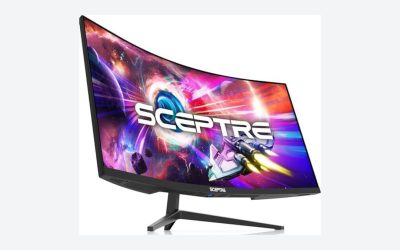
 Sceptre New 32-inch 2K QHD 2560 x 144032 inches8.32 x 28.16 x 19.49 inches10.08 PoundsCheck on Amazon
The best large computer monitor depends on one thing before brand or price: what resolution you put on a 32-inch screen. Six of these seven listings are 32 inches and one, the Dell S3225QS, is 31.5 inches, and they split into four at 1080p, one at 1440p, one at 4K and one that does not state its resolution. If the screen is mostly for movies and browsing across a room, a 1080p model such as the Philips or ViewSonic is enough. If you sit at a desk and read text, the Sceptre 1440p or the Dell 4K will look much sharper, because 1080p stretched across 32 inches is about 69 pixels per inch.
Pick by what you do
Philips 32 Inch Computer Monitor FHD 100Hz VA, 32E1N1100L | 1920×1080 LED Monitor, 1ms MPRT, HDMI 1.4, VGA, VESA, Adaptive Sync, Flicker-Free, 4yr Advance Replacement Warranty
One of the home product options compared in this guide.
View on Amazon
Samsung 32" Flat Computer Monitor | 75Hz Refresh Rate, Borderless Display, AMD FreeSync, Game Mode, Advanced Eye Care, HDMI and DisplayPort, LS32B304NWNXGO, 2024
One of the home product options compared in this guide.
View on AmazonViewSonic VA3209M 32 Inch 1080p IPS Computer Monitor, Full HD, HDMI VGA, PC | Frameless Design, Dual Speakers, Home Office, Desktop, Laptop, Work, Study, Daily Tasks, Wide Viewing Comfort, Built-In Sound
One of the home product options compared in this guide.
View on Amazon
LG 32MR50C-B Curved Monitor 32-Inch FHD 100Hz AMD FreeSync OnScreen Control Dynamic Action Sync Black Stabilizer Tilt Stand (HDMI) - Black
One of the home product options compared in this guide.
View on Amazon
Samsung 32" S3 (S39GD) Series FHD 100Hz Curved Monitor | Game Mode, Eye Saver Mode, Multiple Connectivity with HDMI Port, Built-In Speakers, LS32D39CGANXZA
One of the home product options compared in this guide.
View on AmazonSceptre New 32-inch 2K QHD 2560 x 1440 Prime Gaming Monitor up to 210Hz USB Type-C DisplayPort HDMI sRGB 115% 1ms Build-in Speakers, Machine Black 2026 ((E325B-QW200D Series)
One of the home product options compared in this guide.
View on Amazon
Dell 32 Monitor S3225QS, 4K UHD VA, 120Hz, FreeSync Premium, Eye Comfort | 3840x2160, 31.5in, 3000:1 Contrast, 300 cd/m2 Brightness, 4ms, 99% sRGB, Anti-Glare, HDMI, DisplayPort
One of the home product options compared in this guide.
View on Amazon- Dell S3225QS: sharpest text and photos at 4K
- Sceptre E325B 2K: 1440p with a high refresh rate and USB-C
- ViewSonic VA3209M: IPS 1080p with speakers
- Philips 32E1N1100L: VESA, 4-year replacement warranty claim
- LG 32MR50C-B: curved 1080p, 100Hz
- Samsung S39GD: curved 1080p with built-in speakers
- Samsung LS32B304NWNXGO: flat, 75Hz, HDMI and DisplayPort
Seven large monitors compared
| Model | Size and resolution | Refresh, panel, shape | Best for |
|---|---|---|---|
| Dell S3225QS | 31.5in, 3840×2160 | 120Hz, VA | Sharp text and photos |
| Sceptre E325B-QW200D | 32in, 2560×1440 | Up to 210Hz | Games on a large screen |
| ViewSonic VA3209M | 32in, 1080p | IPS, speakers | Shared family screen |
| Philips 32E1N1100L | 32in, 1920×1080 | 100Hz, VA | Budget and VESA |
| LG 32MR50C-B | 32in, FHD | 100Hz, curved | Movies on a curve |
| Samsung S39GD | 32in, FHD | 100Hz, curved, speakers | Curved with sound |
| Samsung LS32B304NWNXGO | 32in, check listing | 75Hz, flat | Basic large screen |
All seven monitors, one by one
Dell 32 Monitor S3225QS, 4K UHD VA
The S3225QS is the only 4K screen in this group and the premium pick: a 31.5-inch 3840×2160 VA panel at 120Hz with FreeSync Premium, an eye comfort feature, 3000:1 contrast, 300 cd/m2 brightness, 4ms response, 99% sRGB, an anti-glare coating, HDMI and DisplayPort. At about 140 pixels per inch, text and photos look far finer than on any 1080p screen here. VA panels usually give deeper blacks than IPS but narrower viewing angles, so sit centered. The title does not mention a stand with height adjustment, speakers or USB-C, so check the listing for those. Driving 4K at 120Hz also needs a graphics card with enough power and the right cable. It sits in the premium price tier of this group, so weigh it against how much you use the extra sharpness.
Pros
- 4K resolution at about 140 pixels per inch
- 120Hz with FreeSync Premium and 99% sRGB named
Cons
- Stand and speaker details are not in the title
- Needs a capable graphics card to use 4K at 120Hz
Who it’s for: People who edit photos, read a lot of text, or want sharp games on a large screen.
Who should skip it: Buyers who only need a cheap screen for video across the room.
Sceptre 32-inch 2K QHD Prime Gaming Monitor, Up to 210Hz
The E325B-QW200D series is a 32-inch 2560×1440 monitor with a refresh rate listed as up to 210Hz, a 1ms figure, USB Type-C, DisplayPort, HDMI, built-in speakers and an sRGB 115% claim. It is the middle step between 1080p and 4K, at roughly 92 pixels per inch, which looks much cleaner than 1080p at this size and is easier to run than 4K. The words up to 210Hz mean you should check which input carries the top rate. The USB-C input may allow a laptop to connect with one cable, though the title does not say whether it carries power or video, so check the listing. The sRGB figure above 100% is a gamut claim and not an accuracy measure. Speakers named in the title are a convenience, not a substitute for desktop speakers.
Pros
- 1440p resolution with a very high refresh rate
- USB Type-C, DisplayPort and HDMI inputs named
Cons
- Top refresh rate may depend on the input
- USB-C power and video support not specified
Who it’s for: Gamers and mixed-use buyers who want more sharpness than 1080p without buying a 4K screen.
Who should skip it: Anyone who wants a proven color-accurate panel for print work.
ViewSonic VA3209M 32 Inch 1080p IPS Monitor
The VA3209M lists a 32-inch Full HD IPS panel with HDMI and VGA inputs, a frameless design and dual speakers with built-in sound, aimed at home office, study and daily tasks. IPS means wide viewing angles, a plus when two people watch the same screen from a couch or a desk. It is a 1080p panel, so text on a close desk will look soft. The VGA input is a clue to its intended use: it can connect to older computers and workplace equipment. The title does not give refresh rate, brightness or DisplayPort, so check the listing. It suits family rooms and shared study spaces well, especially when the screen is watched by more than one person at a time.
Pros
- IPS panel with wide viewing angles
- VGA and HDMI inputs plus speakers
Cons
- Refresh rate and brightness are not in the title
- 1080p is soft on a 32-inch screen at close range
Who it’s for: Families and students who want a big, simple screen with sound.
Who should skip it: Gamers or anyone sitting close who wants crisp text.
Philips 32 Inch Computer Monitor 32E1N1100L
The Philips 32E1N1100L is a 32-inch 1920×1080 VA panel at 100Hz with a 1ms MPRT claim, HDMI 1.4, VGA, VESA mounting, Adaptive Sync, flicker-free tech and a 4-year Advance Replacement warranty. MPRT is a blur-reduction measure and not the same as gray-to-gray response, so it reads better than it behaves. HDMI 1.4 limits the refresh rate at some resolutions, but 1080p at 100Hz is within its reach, though you should confirm. The VESA pattern lets you free desk space with an arm, which matters with a 70cm-wide screen. The warranty is a seller or maker term, so read what it covers and who honors it. The 100Hz figure is a gentle step up for scrolling and casual games, but not a competitive-gaming spec.
Pros
- VESA mounting and a 4-year warranty claim named
- 100Hz with Adaptive Sync at an entry price tier
Cons
- Only HDMI 1.4 and VGA are named, no DisplayPort
- 1ms MPRT is a blur claim, not a response time
Who it’s for: Buyers who want a large, simple, mountable screen and a long warranty.
Who should skip it: Anyone who needs DisplayPort or higher than 1080p.
LG 32MR50C-B 32-Inch Curved Monitor
The LG 32MR50C-B is a curved 32-inch FHD monitor at 100Hz with AMD FreeSync, OnScreen Control, Dynamic Action Sync, a Black Stabilizer and a tilt stand, with HDMI listed. The curve wraps the sides toward your eyes, which suits movies and games on a large screen. The Black Stabilizer brightens dark scenes in shooters. OnScreen Control lets you manage settings from Windows rather than the on-screen menu, and this is a convenience on a monitor that large. The tilt stand cannot raise or turn the screen, so you may need a mount; the title does not mention VESA, so check the listing. The curvature value is not given in the title. It sits in the entry price tier and works best as a living-room or bedroom screen.
Pros
- Curved screen with 100Hz and FreeSync
- Software controls and a Black Stabilizer for dark scenes
Cons
- Tilt-only stand and no VESA mention in the title
- Only HDMI named, curve rating not stated
Who it’s for: Movie and game players who like a curve and a big picture.
Who should skip it: Desk workers who want straight edges and a height-adjustable stand.
Samsung 32 S3 (S39GD) Curved Monitor
This Samsung S3 listing is a 32-inch FHD curved monitor at 100Hz with a Game Mode, an Eye Saver Mode, an HDMI port and built-in speakers. The model number given in the title is LS32D39CGANXZA. Because the title says multiple connectivity with an HDMI port, check the listing for a second input before assuming there is one. Eye Saver Mode usually lowers blue light and flicker, which helps with long reading or evening sessions. Built-in speakers are a plus in a bedroom or dorm. As with the LG curved screen, 1080p across 32 inches is a soft image, so sit back a little. Do not count on strong audio from the speakers, since built-in drivers on monitors are small.
Pros
- Curved panel with built-in speakers
- Game Mode and Eye Saver Mode named
Cons
- Only one HDMI port is clearly named
- Soft image at 1080p on 32 inches
Who it’s for: Dorm and bedroom buyers who want a curved screen with sound.
Who should skip it: Anyone who plans to connect several devices or needs sharp text.
Samsung 32-Inch Flat Computer Monitor LS32B304NWNXGO
The LS32B304NWNXGO is a flat Samsung 32-inch monitor with a 75Hz refresh rate, a borderless design, AMD FreeSync, a Game Mode, advanced eye care, and both HDMI and DisplayPort. The resolution is not stated in the title, so check the listing; at this size and price it is commonly 1080p, but do not assume. Having DisplayPort as well as HDMI gives you a second digital input, which the cheaper listings here lack. At 75Hz the motion is only a small step up from 60Hz, so it is a basic large screen. The title includes the year 2024 as a model label. Treat it as a no-frills option for web, office work and video, and compare it against the ViewSonic if viewing angles matter.
Pros
- HDMI and DisplayPort both named
- Flat panel with FreeSync and borderless edges
Cons
- Resolution is not stated in the title
- 75Hz is the lowest refresh rate on this list
Who it’s for: Shoppers who want a plain large screen with two digital inputs.
Who should skip it: Players who want a higher refresh rate or sharper detail.
How we picked these
We read seven Amazon listings and compared size, resolution, refresh rate, panel type, inputs, curve and stand details as each title states them. Basis: published specifications, manufacturer documentation and buyer reviews. Nobody on the team used or measured these units. The pixel-density figures below come from simple arithmetic on the stated resolution and screen size. Where a title is silent, such as the resolution on the Samsung LS32B304NWNXGO, we say check the listing. Seller figures like 1ms MPRT are treated as claims, and we note the model year printed in some titles as a sales label. We cover only these seven listings and give no ratings or prices.
Choosing a large monitor: the parts that matter
Resolution versus size
A bigger screen spreads the same pixels over more area. Pixel density, in pixels per inch, shows what that does to text. The figures below are calculated from the stated resolution and diagonal.
| Screen | Resolution | Pixels per inch | What it means |
|---|---|---|---|
| 32 in | 1920×1080 | About 69 | Visible pixels at desk distance, fine across a room |
| 32 in | 2560×1440 | About 92 | Clean text, a good balance |
| 31.5 in | 3840×2160 | About 140 | Very fine text and photo detail |
Desk depth and viewing distance
A 32-inch 16:9 screen is about 70cm wide, so it takes up most of a standard 120 to 140cm desk. Sit roughly 70 to 90cm back for a 1440p or 4K model and a little further for a 1080p one. If your desk is shallow, a flat panel on a VESA arm, as on the Philips listing, can free up room, while a curved panel adds some depth at the edges. Measure the space before you order.
Panel type: VA versus IPS
The Philips and Dell S3225QS titles say VA, and the ViewSonic says IPS. VA panels give deeper blacks and higher contrast, good for movies in a dark room, but their colors shift more at an angle. IPS panels hold color across a wider angle and often look more even for shared viewing. Other titles here do not name a panel type, so check the listing and buyer photos.
Curved or flat
On a large screen, a gentle curve can make the edges feel closer to your eyes, which helps for movies and games. For layout, spreadsheets and straight-line work, many people prefer flat. The LG and Samsung S39GD listings are curved, and the curve rating is not always given. A curve also complicates wall mounting.
Ports, refresh rate and eye comfort
HDMI 1.4, named on the Philips listing, caps bandwidth, so higher resolutions or refresh rates need HDMI 2.0 or newer or DisplayPort. Refresh rate only helps if your graphics card can supply the frames; 75Hz to 100Hz is a modest lift over 60Hz, and 120Hz and above suits fast games. Eye-care features like flicker-free backlights or low-blue modes are named on several titles. They are worth having for long days but are no substitute for taking breaks.
Brightness, coating and room light
Brightness is given in cd/m2 on only one title here: the Dell S3225QS lists 300 and an anti-glare coating. Around 300 is typical for indoor use, while a sunny room needs more headroom. A matte anti-glare surface tames reflections from a window or lamp, and a glossy one makes colors look richer in a dark room. If your desk faces a window, check buyer photos for glare before you order.
A worked example: a 140cm desk
Say your desk is 140cm wide and 70cm deep, and you use it for work and evening games. A 32-inch screen takes about 70cm of the width, leaving room for speakers and a keyboard. With only 70cm of depth, sitting 70 to 90cm back is hard, so a VESA arm that pushes the screen toward the wall is useful. In that case, favor a flat 1440p or 4K screen with a mount pattern, and skip a tilt-only curved stand. On a 100cm-deep desk, any listing here fits comfortably.
Mounting and cable checks
Only the Philips title names VESA, so confirm the mount pattern on the others before buying an arm. Weigh the arm limit against the monitor, and check that the cable you plan to use is long enough to reach the port. A short DisplayPort or HDMI lead can force you to move the PC.
Quick checklist before you order
- Measure the desk width, depth and the stand footprint.
- Write down the resolution on the product page, not just a label such as 2K.
- Match the cable to your graphics card ports.
- Look for VESA and the mount pattern if you want an arm.
- Read the return window and the warranty terms.
- Check buyer photos for glare, backlight bleed and stand wobble.
Mistakes buyers make with big monitors
Buying 1080p at 32 inches for close work. Text will look soft, and you may find yourself pushing the screen back.
Forgetting the graphics card. A 4K screen at 120Hz needs a card and a cable that can drive it. Check both before you order.
Trusting a response-time claim. A 1ms figure can mean MPRT, which is a blur measure. Buyer feedback on ghosting says more.
Skipping the measurements. A 70cm-wide screen needs a stable desk and enough depth. Measure the space and the stand footprint.
Assuming every input is equal. HDMI 1.4, HDMI 2.0 and DisplayPort differ in what they carry. If the listing names only one port, make sure your computer has a match.
Skipping the return policy. A big screen is costly to ship back. Check the window and the condition rules, and look at the panel for dead pixels and uneven backlight when you open the box.
Verdict
For sharp work and play, the Dell S3225QS is the strongest listing here on the information given, and the Sceptre 2K is the lower-cost step with a high refresh rate and USB-C. For a shared family screen, the ViewSonic IPS and the Philips with its long replacement-warranty claim are sensible, while the LG and Samsung curved models are for movies and casual games. The Samsung LS32B304NWNXGO is a basic option once you confirm its resolution. Whichever you choose, measure the desk first, because a screen this wide changes how the whole workspace fits together.
Questions buyers ask
Is a 32-inch monitor too big for a desk?
It depends on the desk. A 32-inch 16:9 screen is about 70cm wide, which fits a 120cm desk but fills it. Sit about 70 to 90cm back, and consider a VESA arm to free surface space, as the Philips listing mentions VESA mounting.
Is 1080p fine on a 32-inch monitor?
For movies and casual browsing from a distance, yes. For close text work it looks soft, at about 69 pixels per inch. If you sit at a desk all day, the 1440p Sceptre or the 4K Dell will look clearer, though they cost more and ask more of your graphics card.
Is curved or flat the better choice?
Curved suits movies and games on a large screen, because the sides wrap toward you. Flat is better for straight lines in spreadsheets, design and layout, and it mounts more easily. The LG 32MR50C-B and Samsung S39GD are curved, the Samsung LS32B304NWNXGO says flat, and the others do not state a shape, so check.
Do large monitors need 4K?
No. 4K gives the finest detail at 32 inches, but 1440p is a good middle ground and is easier to run. Pick based on how close you sit, what you do and the graphics card you have. For simple video and browsing, 1080p is enough.
Which input gives the best refresh rate?
Use the one the listing names for the top rate, usually DisplayPort or a recent HDMI port. Older HDMI 1.4 ports, named on the Philips title, can limit high resolutions or rates. If the Sceptre says up to 210Hz, check which input reaches it.
Related guides
- Motherboard Fan Headers And Rgb Headers Explained
- Monitors For Photo And Video Editing
- Motherboards For Ryzen 7 5800X3D