Our Top Picks
 ASUS TUF Gaming B550-PLUS WiFi II AMD AM4B550-Plus|M.2x2|D4|WiFi610.75 x 2.75 x 13.5 Inches1.27 PoundsCheck on Amazon
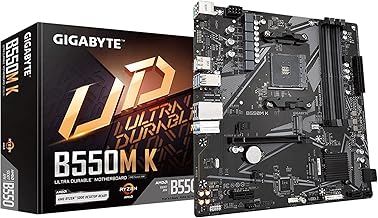
 GIGABYTE B550M K AMD AM4 Micro-ATX MotherboardmATX10.43 x 10.43 x 2.12 inches1.7 PoundsCheck on Amazon
The safest board for a Ryzen 7 5800X3D upgrade is a B550 ATX model that can update its BIOS without a CPU installed, because this chip is a drop-in AM4 part that older firmware may not recognize. The 5800X3D has a locked multiplier, so there is little reason to pay extra for overclocking-grade power delivery; spend on BIOS-flash features, M.2 slots and the connectivity you will actually use. Below are ten AM4 boards taken from the listings we track, from a compact micro-ATX model to a premium X570 board. Every listing states Ryzen 5000 support, but a seller claim does not guarantee that the unit arriving at your door carries a recent BIOS, so the pre-swap check sits right after the picks.
Quick picks for a 5800X3D drop-in upgrade

Asus ROG Strix B550-F Gaming WiFi II AMD AM4 (3rd Gen Ryzen) ATX DDR4 Gaming Motherboard (PCIe 4.0, WiFi 6E, 2.5Gb LAN, BIOS Flashback, HDMI 2.1, Addressable RGB Header and Aura Sync)
One of the home product options compared in this guide.
View on Amazon
GIGABYTE B550 Eagle WIFI6 AMD AM4 ATX Motherboard, Supports Ryzen 5000/4000/3000 Processors, DDR4, 10+3 Power Phase, 2X M.2, PCIe 4.0, USB-C, WIFI6, GbE LAN, PCIe EZ-Latch, EZ-Latch, RGB Fusion
One of the home product options compared in this guide.
View on AmazonASUS TUF Gaming B550-PLUS WiFi II AMD AM4 (3rd Gen Ryzen™) ATX DDR4 Gaming Motherboard (PCIe 4.0, WiFi 6, 2.5Gb LAN, BIOS Flashback, USB 3.2 Gen 2, Addressable RGB Header and Aura Sync)
One of the home product options compared in this guide.
View on Amazon
GIGABYTE B550 Gaming X V2 AMD AM4 ATX Motherboard, Supports Ryzen 5000/4000/3000 Series Processors, DDR4, 10+3 Power Phase, 2X M.2, PCIe 4.0, Front USB-C, GbE LAN, Q-Flash Plus, RGB Fusion
One of the home product options compared in this guide.
View on Amazon
GIGABYTE B550 AORUS Elite AX V2 AMD AM4 ATX Motherboard, Supports Ryzen 5000/4000/3000 Processors, DDR4, 12+2 Power Phase, 2X M.2, PCIe 4.0, Front USB-C, WIFI6, 2.5 GbE LAN, Q-Flash Plus, RGB Fusion
One of the home product options compared in this guide.
View on AmazonGIGABYTE B550M K AMD AM4 Micro-ATX Motherboard, Supports Ryzen 5000/4000/3000 Series Processors, DDR4, 3+3 Power Phase, 2X M.2, PCIe 4.0, USB 3.2 Gen 1, GbE LAN, Q-Flash
One of the home product options compared in this guide.
View on Amazon
ASRock B550 Rock WiFi ATX Motherboard, AM4 Socket for Ryzen 3000-5000 CPUs, DDR4 4733+ (OC), PCIe 4.0, Triple M.2, 2.5G LAN, Wi-Fi 6E
One of the home product options compared in this guide.
View on Amazon
ASUS Prime B550-PLUS AC-HES AMD AM4 (3rd Gen Ryzen) ATX DDR4 Motherboard (Dual M.2, PCIe4.0, WIFI5, 1Gb Ethernet, SATA 6 Gbps, USB 3.2 Gen 2 Type-C, Front USB 3.2 Gen 1 Type-C and CEC Tier II Ready)
One of the home product options compared in this guide.
View on Amazon
Asus Prime X570-Pro AM4 Zen 3 Ryzen 5000 & 3rd Gen Ryzen ATX Motherboard with PCIe Gen4, Dual M.2 HDMI, SATA 6GB/s USB 3.2 Gen 2 ATX Motherboard
One of the home product options compared in this guide.
View on Amazon
GIGABYTE B550M AORUS Elite AX (rev 1.3) AMD AM4 mATX Motherboard, Supports Ryzen 5000/4000/3000 Processors, DDR4, 5+3 Power Phase, 2X M.2, PCIe 4.0, USB 3.2, WIFI6E, GbE LAN, Q-Flash Plus, RGB Fusion
One of the home product options compared in this guide.
View on Amazon- GIGABYTE B550 AORUS Elite AX V2 – best overall for a no-fuss ATX upgrade
- ASUS TUF Gaming B550-PLUS WiFi II – best for BIOS Flashback plus 2.5Gb LAN
- ASUS ROG Strix B550-F Gaming WiFi II – best for a feature-rich ATX build with Wi-Fi 6E
- GIGABYTE B550 Gaming X V2 – best low-cost ATX option with Q-Flash Plus
- GIGABYTE B550 Eagle WIFI6 – best value ATX board with built-in Wi-Fi 6
- ASRock B550 Rock WiFi – best for storage-heavy builds (triple M.2 per the title)
- GIGABYTE B550M AORUS Elite AX (rev 1.3) – best compact board with Wi-Fi 6E
- ASUS Prime B550-PLUS AC-HES – best plain, wired-first ATX build
- GIGABYTE B550M K – best for tight budgets in a small case
- ASUS Prime X570-Pro – best if you want the X570 chipset
Side-by-side: ten AM4 boards for the 5800X3D
| Model | Chipset / socket | Form factor | Key point from the title | Best for |
|---|---|---|---|---|
| GIGABYTE B550 AORUS Elite AX V2 | B550 / AM4 | ATX | 12+2 power phase, Wi-Fi 6, 2.5GbE | All-round upgrade |
| ASUS TUF Gaming B550-PLUS WiFi II | B550 / AM4 | ATX | BIOS Flashback, Wi-Fi 6, 2.5Gb LAN | Safe BIOS updates |
| ASUS ROG Strix B550-F Gaming WiFi II | B550 / AM4 | ATX | BIOS Flashback, Wi-Fi 6E, HDMI 2.1 | Feature-rich builds |
| GIGABYTE B550 Gaming X V2 | B550 / AM4 | ATX | 10+3 power phase, Q-Flash Plus | Budget ATX |
| GIGABYTE B550 Eagle WIFI6 | B550 / AM4 | ATX | 10+3 power phase, Wi-Fi 6 | Value with Wi-Fi |
| ASRock B550 Rock WiFi | B550 / AM4 | ATX | Triple M.2, Wi-Fi 6E, 2.5G LAN | Storage-heavy builds |
| GIGABYTE B550M AORUS Elite AX (rev 1.3) | B550 / AM4 | mATX | 5+3 power phase, Wi-Fi 6E | Compact cases |
| ASUS Prime B550-PLUS AC-HES | B550 / AM4 | ATX | Dual M.2, Wi-Fi 5, 1Gb Ethernet | Wired setups |
| GIGABYTE B550M K | B550 / AM4 | Micro-ATX | 3+3 power phase, Q-Flash | Tight budgets |
| ASUS Prime X570-Pro | X570 / AM4 | ATX | Dual M.2, Zen 3 support stated | X570 fans |
The ten boards, one by one
GIGABYTE B550 AORUS Elite AX V2
This is the most fully specified ATX board of the ten for a 5800X3D swap. The listing names a 12+2 power phase design, two M.2 slots, PCIe 4.0, front USB-C, Wi-Fi 6, 2.5 GbE and Q-Flash Plus, which is the Gigabyte feature meant for updating firmware from a USB drive without a CPU fitted. That last item is the one that matters here: if the unit shows up with a BIOS that predates the chip, you can fix it on the spot.
The title says V2, so confirm the revision you receive against the manufacturer’s CPU support page, because support lists are published per revision.
Pros
- Flash-without-CPU feature stated in the title
- Wi-Fi 6 and 2.5 GbE both listed
- Heaviest power-phase count among the ATX boards here
Cons
- Costs more than the plain B550 ATX options
- The 5800X3D cannot be overclocked, so the extra phases mostly add headroom you will not use
Who it’s for: Upgraders who want one board that handles BIOS recovery, wireless and fast wired networking without add-in cards.
Who should skip it: Budget builders who only need the CPU swap and already have a wired connection.
ASUS TUF Gaming B550-PLUS WiFi II
ASUS lists BIOS Flashback in the title, and for a CPU upgrade that is the headline feature. Flashback lets you write a firmware file from a USB stick using a dedicated header and button, with no processor installed. The rest of the listing reads as a sensible mid-tier ATX board: AM4, DDR4, PCIe 4.0, Wi-Fi 6, 2.5Gb LAN, USB 3.2 Gen 2 and an addressable RGB header.
Where it differs from the Gigabyte picks is the lack of a stated power-phase count, so judge it on features rather than a phase number. For a locked-multiplier chip that is a reasonable trade.
Pros
- BIOS Flashback named in the listing
- 2.5Gb LAN and Wi-Fi 6 stated
- USB 3.2 Gen 2 listed
Cons
- Wi-Fi 6 rather than 6E
- No power-phase detail in the title to compare against rivals
Who it’s for: Anyone who wants the recovery safety net and a balanced feature set without paying for the top-end ROG tier.
Who should skip it: Buyers who want Wi-Fi 6E or a stated high phase count for later upgrades.
ASUS ROG Strix B550-F Gaming WiFi II
The ROG Strix B550-F sits at the premium end of the B550 ATX group. Its listing stacks PCIe 4.0, Wi-Fi 6E, 2.5Gb LAN, BIOS Flashback, HDMI 2.1 and addressable RGB with Aura Sync. HDMI 2.1 on a motherboard only helps if your CPU has integrated graphics, which the 5800X3D does not, so that port is a bonus for a future chip swap rather than something you will use today.
Treat it as a board that stays useful for a second CPU on the same socket. If the 5800X3D is your final AM4 chip, some of the cost buys features you may never touch.
Pros
- Wi-Fi 6E and 2.5Gb LAN listed
- BIOS Flashback stated
- Strong connectivity headroom for later builds
Cons
- Pricier tier than most B550 boards here
- HDMI 2.1 output is unused with a CPU that lacks integrated graphics
Who it’s for: Builders who want a polished ATX board and plan to keep it through more than one AM4 CPU.
Who should skip it: Anyone watching the budget; the 5800X3D does not unlock anything extra on this board.
GIGABYTE B550 Gaming X V2
Here is the low-cost ATX route that still keeps the useful part. The title lists a 10+3 power phase design, two M.2 slots, PCIe 4.0, front USB-C, GbE LAN and Q-Flash Plus. There is no Wi-Fi mentioned, so plan on Ethernet or a separate adapter.
For a wired desktop that just needs to host a 5800X3D, this is the shortest path from old board to new CPU. The price you pay is in the extras: no wireless, no 2.5G networking in the listing and a plainer feature list than the AORUS. The flashing routine is the same as on the pricier Gigabyte boards: find your revision, read the CPU list, update, then swap the processor.
Pros
- Q-Flash Plus named in the title
- 10+3 power phase stated
- Two M.2 slots
Cons
- No Wi-Fi in the listing
- Only GbE LAN
Who it’s for: Wired-desktop owners who want ATX size and a BIOS safety net at a modest tier.
Who should skip it: Anyone without an Ethernet drop near the PC.
GIGABYTE B550 Eagle WIFI6
The Eagle adds Wi-Fi 6 to the same 10+3 power phase base seen on the Gaming X V2, along with two M.2 slots, PCIe 4.0, USB-C and PCIe EZ-Latch, a tool-free release for the graphics card slot. One oddity: the title repeats EZ-Latch twice, which looks like seller keyword stuffing rather than a second feature.
Unlike its sibling, this title does not mention Q-Flash Plus, so do not assume it can update without a CPU. Check the listing details before ordering if you cannot borrow another AM4 processor. Its appeal is Wi-Fi plus a high stated phase count at a lower tier than the AORUS, which is a fair deal once the BIOS question is settled.
Pros
- Wi-Fi 6 included
- 10+3 power phase stated
- Tool-free GPU slot latch
Cons
- No flash-without-CPU feature named in the title
- GbE LAN only
Who it’s for: Wireless users who want value and can verify the BIOS situation before the swap.
Who should skip it: Buyers with no spare CPU and no way to confirm the BIOS on arrival.
ASRock B550 Rock WiFi
This listing promises triple M.2, PCIe 4.0, 2.5G LAN and Wi-Fi 6E on an ATX AM4 board, with DDR4 rated to 4733+ (OC). The model name is unusual, so verify the exact board name and revision in the full listing and on ASRock’s own CPU support page before trusting the title.
Three M.2 slots make it the storage pick of the group for people building a game library on NVMe drives. The title does not mention a BIOS flash feature, so the same advice applies: confirm the shipped BIOS or have a spare supported CPU on hand. The 4733+ (OC) figure is a vendor ceiling for memory overclocking, not a speed to expect from a typical kit, and chasing it is rarely worth the stability trouble.
Pros
- Triple M.2 per the title
- Wi-Fi 6E and 2.5G LAN stated
- Mid-tier cost
Cons
- Unusual model name needs verification
- No flash-without-CPU feature named
Who it’s for: NVMe-heavy builders who want wireless and fast Ethernet in one ATX board.
Who should skip it: Anyone who needs the clearest possible BIOS-recovery story.
GIGABYTE B550M AORUS Elite AX (rev 1.3)
Compact does not have to mean stripped down. This mATX board lists a 5+3 power phase layout, two M.2 slots, PCIe 4.0, USB 3.2, Wi-Fi 6E, GbE LAN, Q-Flash Plus and RGB Fusion. The explicit rev 1.3 tag is useful: it tells you which revision’s support list to check.
The board is the answer for small cases where an ATX board will not fit. The cost is expansion: fewer slots than the ATX models, and a lower stated phase count than the 10+ designs. Check cooler height and graphics card clearance against your case before ordering, since small layouts leave less room around the socket and the PCIe slot.
Pros
- Q-Flash Plus named
- Wi-Fi 6E included
- Revision stated in the title
Cons
- Fewer expansion slots than ATX
- 5+3 phases is a lighter design than the ATX Gigabyte options
Who it’s for: Small-form-factor gamers who want wireless and a BIOS safety net.
Who should skip it: Builders who plan multiple add-in cards.
ASUS Prime B550-PLUS AC-HES
The Prime keeps things plain: AM4, DDR4, dual M.2, PCIe 4.0, Wi-Fi 5, 1Gb Ethernet, USB 3.2 Gen 2 Type-C and a front USB 3.2 Gen 1 Type-C header. The “CEC Tier II Ready” note refers to an energy-regulation standard, not a gaming feature, so it will not affect your 5800X3D.
There is no BIOS Flashback in this title, which is notable given that the TUF and ROG listings call it out. If the BIOS on arrival is old, you would need a separate supported CPU to update. Dual M.2 and the front Type-C header cover the basics of a gaming build, so what you give up is wireless speed and the recovery button, not core capability.
Pros
- Dual M.2 and USB-C front header
- Straightforward feature set
- Mid-range tier
Cons
- Wi-Fi 5 only
- No Flashback mentioned in the title
Who it’s for: Wired builders who want a no-frills ASUS ATX board.
Who should skip it: People who need Wi-Fi 6/6E or Flashback.
GIGABYTE B550M K
The leanest board in this group: AM4, Micro-ATX, DDR4, two M.2 slots and PCIe 4.0. The title advertises a 3+3 power phase configuration and plain Q-Flash. The Plus version is the one Gigabyte markets for updating without a CPU, so check the listing before assuming this board can do that.
For a 5800X3D build, a minimal power stage is worth weighing, since this is a 105 W class processor. Confirm the chip is on the board’s CPU support list and look for any minimum-BIOS note. Plan the update before ordering the CPU, and keep the old processor installed until the new firmware is flashed.
Pros
- Lowest-cost tier of the ten
- Compact footprint
- Two M.2 slots
Cons
- Lightest power-phase design here
- No Wi-Fi in the title, Q-Flash only
Who it’s for: Small-case builders on a tight budget with a spare CPU for BIOS updates.
Who should skip it: Buyers who want wireless or a robust power stage.
ASUS Prime X570-Pro
The only X570 board in the list, and the oldest-looking listing. The title names Zen 3 Ryzen 5000 and 3rd Gen Ryzen support, PCIe Gen4, dual M.2, HDMI, SATA 6Gb/s and USB 3.2 Gen 2. X570 offers more chipset-side PCIe resources than B550, so it suits builds that fill expansion slots.
For a 5800X3D alone that extra capability is mostly idle. The title says Zen 3 support, but as with every board here, confirm the BIOS revision that adds the 5800X3D. Age is the other consideration: if you buy this board new, expect the factory BIOS to predate the chip and plan an update path.
Pros
- X570 chipset with extra expansion headroom
- Zen 3 support stated
- Dual M.2
Cons
- Premium tier for features the CPU cannot use
- No Wi-Fi or Flashback in the title
Who it’s for: Builders who want X570 for many add-in cards or drives.
Who should skip it: Anyone only doing a CPU swap; B550 is enough.
How these ten were chosen
The editorial team shortlisted AM4 boards from current listings and compared what each title states: chipset, form factor, DDR4 support, M.2 count, networking and BIOS-update features. We then ranked them by how well they suit a 5800X3D drop-in upgrade. We leaned on published specifications, manufacturer documentation and buyer reviews, and we treat every title as a seller claim. Nobody on the team used or measured these units. Where a title did not mention something, we wrote “check the listing” instead of guessing, and we flagged titles with odd or repeated wording. Prices are not quoted because they move daily.
Before you buy: the 5800X3D upgrade check
Start with the board you already own
Many people reading this do not need a new board at all. The table maps common starting points to a sensible action.
| Board you have | Likely action | Why |
|---|---|---|
| B550 or X570 | Update BIOS, swap CPU | Already PCIe 4.0 capable; only firmware may be needed |
| B450 or X470 | Update BIOS first, then swap | Support exists on many boards, but only in newer BIOS releases |
| A520 | Check the vendor list | Entry boards vary a lot; some limit CPU support |
| B350 or X370 | Check the vendor list | Older chipset, support depends on the specific model |
| A320 or no support listed | Replace the board | Small BIOS chips can lack room for newer CPUs |
BIOS first: the chicken-and-egg problem
A new CPU cannot boot a board whose firmware does not know it, and the board cannot be updated without booting. Boards with a flash-without-CPU feature, such as BIOS Flashback or Q-Flash Plus, solve this. If your board lacks it, update the BIOS while your old CPU is still installed.
- Open the board maker’s CPU support page for your exact model and revision, and find the BIOS release that lists the Ryzen 7 5800X3D.
- Note the BIOS version your board runs now.
- Download that release, or a newer one, and extract it to a FAT32 USB drive.
- Use a stable power source and never interrupt the flash. A power cut mid-update can leave the board unbootable.
- After the flash, reset BIOS settings and re-enable your memory profile.
- Only then power down, discharge static by touching the case, and swap the CPU.
No overclocking, so spend elsewhere
The 5800X3D ships with a locked multiplier. That removes the main reason to buy an expensive VRM. Memory tuning still works, but the large L3 cache is designed to lessen the penalty of slower RAM, so a sensible mid-range DDR4 kit is a good fit. Stay on DDR4: AM4 boards cannot take DDR5 modules, and the two are not interchangeable.
Cooling, power and case fit
The chip is a 105 W class part and ships without a cooler in the box. Existing AM4 coolers generally carry over, but confirm your mounting kit. Check the form factor, too: ATX needs a full-size case, while Micro-ATX fits both. Look at the M.2 layout, too, since a second NVMe drive in some boards shares lanes with SATA ports.
Connectivity and slots
Pick wireless only if you need it; a wired port costs less. If you run two NVMe drives and a capture card, count the slots on the listing rather than assuming. Triple M.2 helps, but not every drive slot runs at PCIe 4.0 speed, so check the manual. PCIe 4.0 also depends on the processor: the 5800X3D supports it, but some Ryzen 5000 G-series chips do not, so the label on the box is not a promise about every CPU. Slots fed by the chipset may share lanes with SATA ports, and the manual’s lane table is worth a minute of your time.
Memory slots
With two DDR4 modules, use the slots the manual recommends, usually the second and fourth from the CPU. Four modules put more load on the memory controller and often run at lower speeds, so two larger sticks are a better plan than four small ones.
Mistakes that cost 5800X3D buyers time
First, assuming “Ryzen 5000 supported” means this specific chip works out of the box. The 5800X3D arrived later than the first 5000-series chips, so boards need a more recent BIOS. Second, replacing a perfectly good B550 board for nothing. Third, paying for an overclocking VRM that a locked CPU cannot use. Fourth, buying a DDR5 kit, or a board for a different socket. Fifth, ignoring the board revision: support lists are published per revision, so a V2 and an older version of the same name can differ. Sixth, flashing in a hurry on an unstable power supply or from a drive that is not FAT32. If you are planning a full new build, compare the Core Ultra 7 270K Plus vs Ryzen 7 9800X3D verdict instead, and for a wider look at the platform see our guide to AMD Ryzen motherboards.
Verdict
For most 5800X3D upgraders, a B550 ATX board with BIOS Flashback or Q-Flash Plus is the right buy: the GIGABYTE B550 AORUS Elite AX V2 for a full feature set, the ASUS TUF Gaming B550-PLUS WiFi II for a balanced pick, and the GIGABYTE B550 Gaming X V2 for a wired budget build. Small-case builders should look at the B550M AORUS Elite AX. If your current B550 or X570 board is fine, skip the purchase and just update its BIOS before the CPU arrives. Whichever board you pick, read the support page for your exact revision before you order.
Questions about boards for the 5800X3D
Is a new motherboard needed for the Ryzen 7 5800X3D?
Not always. Many B450, X470, B550 and X570 boards can run it after a BIOS update that lists the chip. Check the board maker’s CPU support page for your exact model and revision, then update the BIOS before swapping the processor. A new board only makes sense if yours is not supported or lacks the features you want.
Can the Ryzen 7 5800X3D be overclocked?
No, the multiplier is locked, so a classic CPU overclock is not available. You can still tune memory in the BIOS. That means you do not need to pay extra for a board marketed on overclocking power delivery. Spend the savings on BIOS recovery features or storage.
Is B550 better than B450 for the 5800X3D?
B550 adds PCIe 4.0 for the graphics slot and an M.2 slot on most boards, and many have BIOS Flashback or Q-Flash Plus. A B450 board can still run the chip with a recent BIOS. Choose B550 if you want PCIe 4.0 storage or are buying new.
Does the 5800X3D work with DDR5 on an AM4 board?
No. AM4 boards use DDR4 memory only, and DDR4 and DDR5 modules are physically different and not interchangeable. If you want DDR5, you need an AM5 platform and a different processor.
What is BIOS Flashback and why does it matter?
BIOS Flashback, or Q-Flash Plus on Gigabyte boards, updates the firmware from a USB drive without a CPU or memory installed. It matters because a new CPU on an old BIOS may refuse to boot. Without this feature you need an older compatible CPU to update.
Related guides
- Motherboard Fan Headers And Rgb Headers Explained
- Power Supply For Rtx 5080 Builds
- How To Read Motherboard Model Names