
Our Top Picks
For most gaming desktops and laptops, choose an M.2 2280 NVMe SSD; choose a 2.5-inch SATA SSD only when you have no free M.2 slot, and a shorter M.2 size such as 2230 or 2242 only when your device specifically calls for it. The form factor is the physical shape, and it must match what your motherboard, laptop or handheld can hold before speed matters at all.
Form Factor vs Interface: Two Separate Choices
Buyers often mix up shape and connection type. The form factor is the size and connector, such as M.2 or 2.5-inch. The interface is how data travels, such as SATA or PCIe with NVMe. An M.2 drive can use either interface, which is why two drives that look similar can behave very differently. Always confirm both.

Patriot Burst Elite 120GB SATA 3 2.5 Inch SSD | Form factor: 2.5 Inch; Interface: SATA 3.
Chosen because it specifies Form factor: 2.5 Inch and Interface: SATA 3..
View on Amazon
Patriot P210 128GB SATA 3 2.5 Inch SSD | Form factor: 2.5 Inch; Interface: SATA 3.
Chosen because it specifies Form factor: 2.5 Inch and Interface: SATA 3..
View on Amazon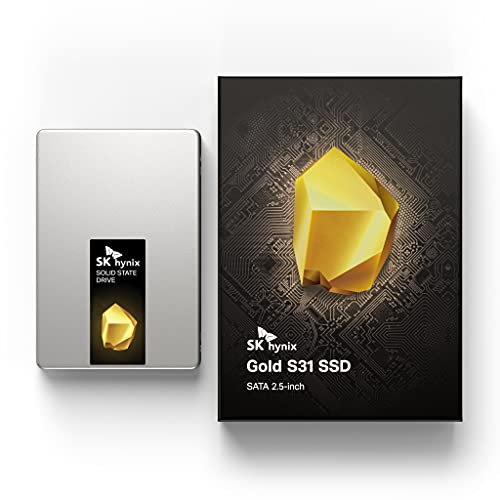
SK Hynix Gold S31 500GB SATA Gen3 2.5 inch Internal SSD | 500GB | Up to 560MB/S | Solid State Drive | Compact 2.5' SSD Form Factor Internal Solid State Drive | SATA
Chosen because it specifies 500GB and Up to 560MB/S.
View on Amazon| Form factor | Size | Typical interface | Where it fits |
|---|---|---|---|
| M.2 2280 | 22 mm by 80 mm | PCIe NVMe (some SATA) | Most desktop boards and many laptops |
| M.2 2230 | 22 mm by 30 mm | PCIe NVMe | Compact devices and handhelds that specify it |
| M.2 2242 | 22 mm by 42 mm | PCIe NVMe or SATA | Small laptops, some compact systems |
| M.2 22110 | 22 mm by 110 mm | PCIe NVMe | Boards with a long slot, often enterprise-style drives |
| 2.5-inch SATA | Drive bay sized | SATA, rated at 6 Gbit/s | Older PCs, extra bays, laptops with a 2.5-inch bay |
| U.2 / U.3 | 2.5-inch with a special connector | PCIe NVMe | Workstations and servers; rare in gaming PCs |
| PCIe add-in card | Expansion card | PCIe NVMe | Desktops needing extra drives |
Step 1: Read the Device Specification
Start with the manual or the maker’s spec page for your motherboard, laptop, or handheld. Look for lines like “M.2 slot supports 2242/2260/2280” and “supports PCIe 4.0 x4 and SATA.” Laptops are the most restrictive: some hold only 2230 or 2242 drives, and some use a single-sided drive requirement because of limited clearance. If the spec is unclear, the maker’s support page or the service manual is a better guide than a shop listing.
Step 2: Understand M.2 Naming and Keys
The four-digit or five-digit code is width then length in millimeters. All common sizes are 22 mm wide, so the length is the only variable. Slots are keyed to prevent wrong installs. M-key drives are used for PCIe NVMe, while B-key and B+M-key drives are used for SATA and some other cards, according to the M.2 specification summaries. A B+M drive can fit a slot that has either notch, but fitting physically does not guarantee it will work: a slot that only supports PCIe will not recognize an M.2 SATA drive, and the reverse. Read the manual for which interface each slot supports.
Step 3: Match the Slot Length
Desktop boards usually place a standoff for 2280 and may offer additional holes for shorter sizes. A shorter drive can be mounted in a longer slot if you move the standoff to the matching hole, though some boards only support specific lengths. A longer drive will not fit a shorter mounting. In laptops, the screw position is fixed, so buy the exact length the maker lists. Some 2230 drives ship with a bracket that lets a handheld or laptop hold a larger length, but follow the device maker’s guidance on what is supported.
Step 4: Consider the Interface for Your Use
- PCIe NVMe: fastest class and the default for new builds. Generations from 3.0 to 5.0 exist, and drives work in slower slots at the slot speed.
- SATA: rated at 6 Gbit/s; adequate for bulk game storage, and the only choice in some older machines.
- Heat: faster NVMe drives may throttle without cooling, so check whether the slot has a heatsink and whether it fits the drive’s height.
- Single or double sided: thin laptops often need single-sided drives; the maker’s spec page or the drive’s datasheet shows which it is.
Step 5: Pick by Device Type
| Your device | Likely form factor | Notes |
|---|---|---|
| Modern gaming desktop | M.2 2280 NVMe | Check slot generation and heatsink space |
| Older desktop | 2.5-inch SATA or M.2 if present | Some boards have M.2 slots limited to SATA |
| Gaming laptop | M.2 2280, sometimes 2242 | Read the service manual; count slots and heat plate |
| Ultraportable or handheld PC | M.2 2230 often, sometimes 2242 | Choose from the maker’s supported list |
| Console storage expansion | Maker-specific | Console makers publish their own requirements |
| Workstation or server | U.2, U.3, 22110 | Rare for gaming, aimed at endurance |
Decision Table: Pick This If
| Pick | If |
|---|---|
| M.2 2280 NVMe | Your slot accepts it and you want the best mix of speed and choice |
| M.2 2230 or 2242 | Your device lists that length as the maximum |
| 2.5-inch SATA SSD | You have a free SATA port and bay but no M.2 slot |
| PCIe adapter with 2280 drive | A desktop has spare PCIe lanes but no M.2 slot |
| External enclosure with any drive | No internal space remains and you accept a USB speed ceiling |
Common Mistakes
- Buying by speed rating without checking the length the device supports.
- Choosing an M.2 SATA drive for a PCIe-only slot.
- Putting a tall heatsink drive into a laptop where it will not close.
- Ignoring lane sharing noted in the motherboard manual.
- Assuming a 2230 drive is slower; size does not set speed, the controller and interface do.
- Forgetting a standoff screw for the shorter length.
Checking Fit Before You Buy
A short checklist prevents most returns. Write down the exact motherboard or laptop model, then open the maker’s specification page and note the supported lengths, interfaces, and PCIe generation for each slot. Note whether the slot sits under a heatsink or heat plate and how much height is available. For laptops, look at the service manual for the number of drive slots and whether the second slot is populated. Then compare those notes with the drive’s datasheet, which lists form factor, interface, thickness, and whether it is single or double sided. If any line is unclear, the maker’s support team can confirm what is supported.
Upgrading a Handheld or Laptop
Compact devices are where form factor matters most. Some handheld PCs use a short drive and limited clearance, and swapping the drive may involve opening the case, which can affect warranty. Follow the device maker’s guide for disassembly, disconnect the battery if the guide says so, and handle the drive by its edges. Clone or restore from a backup afterward, and keep the original drive until the new one boots properly.
Frequently Asked Questions
Is M.2 2280 the standard size?
It is the most common length for desktops and many laptops, which means the widest drive choice. Other lengths exist, and some compact devices only accept shorter ones.
Can I put a 2242 drive in a 2280 slot?
Often yes, if the board has a mounting point for 2242 or the standoff can be moved. Some boards support only certain lengths, so read the manual.
Are M.2 SSDs always NVMe?
No. M.2 is only the shape. A drive may use PCIe NVMe or SATA, and the slot must support that interface.
Which is better, M.2 or 2.5-inch SATA?
M.2 NVMe is faster and cable-free, while 2.5-inch SATA is the fallback when no slot is available. For game loading, many reviewers note the gap is modest compared with the jump from a hard drive.
Do I need a heatsink?
Many boards include one, and some drives ship with a heatsink. Follow the drive maker’s thermal guidance and make sure the combined height fits your slot.
FAQ
Is M.2 2280 the standard size?
Can I put a 2242 drive in a 2280 slot?
Are M.2 SSDs always NVMe?
Which is better, M.2 or 2.5-inch SATA?
Do I need a heatsink?
More from Amazon
Programs that pair well with the guide above. Offers and eligibility are set by Amazon and may change.
Free shipping on eligible items, Prime Video and more. Eligible new members can start with a free trial.
Start a Prime free trialAd-free music streaming. Eligible new subscribers can start with a free trial.
Try Music Unlimited freeA Prime membership for ages 18-24 with a trial period. Eligibility is set by Amazon.
See Prime for Young AdultsAudiobooks and podcasts to listen to on the go. Eligible new members can start with a free trial.
Try Audible freeAs an Amazon Associate we earn from qualifying purchases.



