
Our Top Picks
Power the PC down, unplug it, pull each filter out, brush or blow the loose dust off outside the case, rinse sticky filters in lukewarm water if the maker allows it, let them dry completely, then click them back in. That is the whole job for most gaming PCs, and it takes about ten minutes per case once you know where each filter sits.
The Short Version
- Shut down Windows, switch off the power supply, and unplug the power cable.
- Move the PC somewhere you can make a mess, ideally outdoors or near a window.
- Remove the filters (front, top, bottom and sometimes side) using the method in the case manual.
- Dry-clean with a soft brush, microfiber cloth or compressed air; wash only if the dust is greasy or caked.
- Dry fully before refitting. A damp filter pushes moisture into the airflow path.
- Check the magnetic strips or clips, refit, and plug the PC back in.
Why Filters Matter
Fans pull room air through the case, and anything suspended in that air ends up on heatsinks, fan blades and the GPU shroud. A filter catches the bulk of it before it gets inside. Reviewers and cooling vendors point out that a filter you clean regularly costs very little airflow, while one left to clog starts to starve the fans and forces them to spin faster and louder. SunbeamTech, for example, says a coarse-mesh magnetic filter kept clean every four to eight weeks reduces airflow by only a small single-digit percentage.
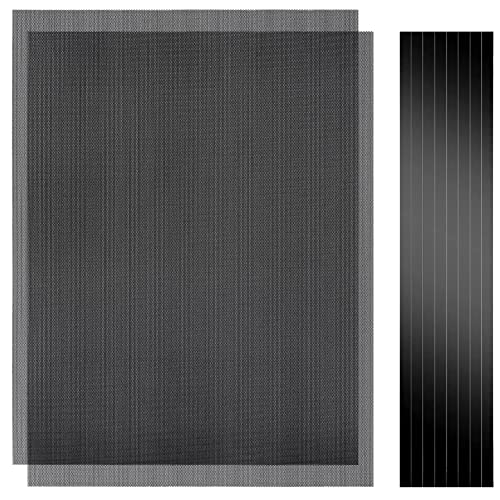
Cut-to-Fit Magnetic PC Dust Filter Mesh, 400x300mm PVC DIY Cover, 2 Pack | 1.0mm hole, Customizable dustproof cooling guard for gaming PC chassis, power supplies, electronics, home air vents.
Chosen because it specifies 400x300mm PVC DIY Cover and 2 Pack.
View on Amazon
Mevlshcey 1 Pcs 1000 x 300mm DIY PC Case Dust Filter with 4 Magnetic Strip | 0.5mm PVC Fan Dust Filter Mesh Grill, Magnetic PC Case Mesh Cover for Computer Chassis Speaker and More
Chosen because it specifies 0.5mm PVC Fan Dust Filter Mesh Grill.
View on Amazon
Woanger 1 Pcs 1000x300mm DIY PC Case Dust Mesh Filter | PVC Dustproof Mesh with 4 Pcs Magnetic Strips, 0.5 mm Holes, Cut to Size for PC Chassis Fan Grills and Speaker Equipment
Chosen because it specifies PVC Dustproof Mesh with 4 Pcs Magnetic Strips and 0.5 mm Holes.
View on Amazon
Woanger 2 Pcs 300×400mm DIY PC Case Dust Filter Nylon 80 Mesh PC Fan Mesh Filter Floor Vent Cover Dustproof Cover with Magnetic Strip for Computer Chassis Speaker and More(Black)
Picked as a relevant option in this category.
View on AmazonHow Often to Clean
There is no single schedule. NZXT suggests looking at filters every month or two and doing a full internal clean every few months, with shorter gaps for homes with pets, carpet or a lot of dust. Some retailers’ guides suggest every two to four weeks, and others say every three to six months for typical homes. The sensible reading is that environment decides: look at the filter, and clean it when the mesh is visibly furred over.
| Home situation | Reasonable check interval | Why |
|---|---|---|
| Clean, no pets, hard floors | Every 6 to 8 weeks | Slow dust build-up, so a glance is usually enough |
| Carpet, open windows, desk near a wall vent | Every 3 to 4 weeks | More fibre and particles in the air |
| Pets that shed | Every 2 to 3 weeks | Hair and dander mat onto fine mesh quickly |
| Workshop, construction nearby, smoking indoors | Every 1 to 2 weeks, plus a wash | Fine or sticky residue does not brush off |
These intervals are rules of thumb drawn from the range of advice published by case and cooling brands, not measured limits. The real signal is a visible layer on the mesh or fans that suddenly ramp up for no reason.
What You Need
- A soft paintbrush or a clean makeup brush
- A microfiber cloth
- Compressed air or a hand blower (optional)
- Lukewarm water and, only for greasy residue, a drop of mild dish soap
- A towel and somewhere to let parts air-dry
- A small screwdriver if your case uses screwed-in filter frames
Step by Step by Filter Type
Magnetic mesh filters (top and side)
These simply lift off. Brush the loose dust away, wipe with microfiber, and if you use compressed air, blow from the inside face so the dust is pushed back the way it came rather than deeper into the weave. Look along the magnetic edge afterward, because grit trapped there stops the filter sitting flush and leaves gaps that let dust bypass it.
Slide-out front or bottom trays
Many cases have a bottom PSU filter that slides out the back or front. Pull it straight out, tap it clean, and wipe it down. Because it sits under the power supply intake, it tends to collect more fluff than any other filter, so it benefits from the most frequent cleaning.
Clip-in or foam front filters
Front panels on some cases need to come off before the filter is accessible. Check your case manual rather than forcing the panel, as the plastic clips can snap. Foam filters hold dust deep in the pores, so a rinse is often more effective than brushing. Squeeze gently rather than wringing, which can tear the foam.
Fan-mounted filters
If a filter is attached directly to a radiator or fan, remove the fan or radiator only if the manual explains how. Otherwise clean in place with a brush and short bursts of air, holding the fan blades still so they do not spin freely from the air stream.
Washing: When and How
Dry cleaning is enough for ordinary household dust. Wash if the mesh is sticky, greasy or caked with pet dander. Guides from retailers and PC builders agree on a few points: use lukewarm water instead of hot, avoid harsh chemicals and strong detergents, and make sure the filter is entirely dry before it goes back in. Some guides suggest leaving filters to dry for several hours; the exact time varies by room and filter material, so lean on the cautious side. Metal and nylon mesh dry faster than foam. If your manual says the filter must not be washed, follow the manual.
Compressed Air, Vacuum or Brush?
| Tool | Best for | Watch out for |
|---|---|---|
| Soft brush | Light dust on any mesh | Bristles that are stiff enough to bend thin mesh |
| Microfiber cloth | Final wipe and frame edges | Lint on foam |
| Compressed air | Fine mesh and corners | Use outside the case; hold fan blades still when near fans |
| Rinse in lukewarm water | Sticky or caked filters | Must dry completely before refitting |
| Household vacuum | Floor around the PC, filters held at a distance | Guides warn against using a vacuum inside the case because of static |
Cleaning the Filter Is Not Cleaning the PC
If the filters were very dirty, dust has probably already reached the inside. NZXT recommends cleaning filters first and then doing the internal clean. After the filters are done, use short bursts of air on the heatsink fins, fans and GPU shroud with the PC off and unplugged, holding fan blades still. Never open the power supply. If the unit is dusty internally or makes odd noises, contact the manufacturer or a technician.
Common Mistakes
- Cleaning with the PC plugged in. Unplug it first. The power supply can hold standby power even when the PC looks off.
- Refitting damp filters. Moisture can reach components and encourages grime to stick.
- Blowing dust into the case. Always take the filter out and clean it outside.
- Forgetting the bottom filter. It is the one most often missed and often the dirtiest.
- Using harsh cleaners. Solvents can damage plastic frames and coatings.
- Leaving the filter off to boost airflow. A clean filter costs little airflow, whereas a PC with none collects dust steadily on every component.
- Forcing clips. Check the manual, as the removal method differs between cases.
Symptom, Cause and Fix
| Symptom | Likely cause | What to do |
|---|---|---|
| Fans louder than before | Clogged intake filter | Clean the front or bottom filter first |
| Temperatures creeping up over months | Dust on filters and heatsinks | Clean filters, then lightly clean heatsinks |
| Dust still visible inside right after cleaning | Filter not sitting flush, or unfiltered intake | Check magnets and clips; look for unfiltered gaps |
| Musty smell from the case | Filter refitted damp | Remove, dry fully, refit |
| Filter cannot be removed | Hidden clip or screw | Read the case manual before forcing it |
Quick Decision Guide
| If your filter is… | Do this |
|---|---|
| Lightly dusty | Brush or wipe, no water |
| Packed with pet hair | Pick hair off by hand, then brush; rinse if sticky |
| Greasy (kitchen nearby) | Lukewarm water with a drop of mild soap, rinse well, dry fully |
| Foam | Rinse and gently squeeze, dry fully |
| Not removable | Brush in place and use short bursts of air |
Frequently Asked Questions
How often should I clean PC dust filters?
Brands give ranges from every few weeks to every few months, and the right interval depends on your home. Look at the filter every month or two and clean it whenever the mesh looks furred over. Pets and carpet shorten the gap.
Can I wash PC dust filters with water?
Most mesh and foam filters can be rinsed in lukewarm water, and guides advise against hot water and strong chemicals. Let the filter dry completely before putting it back, and follow your case manual if it says otherwise.
Is it safe to use compressed air?
Yes, on filters removed from the case and used outside. Hold the filter and blow from the inside face outward. Near fans, hold the blades still so they do not spin freely.
Do I need to turn the PC off to clean filters?
Yes, shut it down and unplug it. Even if a filter can be removed from the outside, it is safer to cut the power before you reach near fans and cables.
Will removing the filters improve temperatures?
It may slightly improve airflow, but it also lets dust build up on fans and heatsinks, which eventually hurts cooling and noise. A clean filter is generally considered the better trade.
What if my case has no dust filters?
Some makers sell aftermarket magnetic or adhesive filters sized to fans or vents. Check the fan size and the mounting method listed by the filter maker before buying, and clean the interior more often until they are fitted.
FAQ
How often should I clean PC dust filters?
Can I wash PC dust filters with water?
Is it safe to use compressed air?
Do I need to turn the PC off to clean filters?
Will removing the filters improve temperatures?
What if my case has no dust filters?
More from Amazon
Programs that pair well with the guide above. Offers and eligibility are set by Amazon and may change.
Free shipping on eligible items, Prime Video and more. Eligible new members can start with a free trial.
Start a Prime free trialAd-free music streaming. Eligible new subscribers can start with a free trial.
Try Music Unlimited freeA Prime membership for ages 18-24 with a trial period. Eligibility is set by Amazon.
See Prime for Young AdultsAudiobooks and podcasts to listen to on the go. Eligible new members can start with a free trial.
Try Audible freeAs an Amazon Associate we earn from qualifying purchases.



