Key takeaways
- PCIe Gen3: Reaches around 3,500 MB/s, plenty fast for gaming; drives like the Silicon Power and WD Green sit here at value prices.
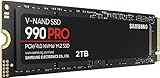
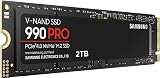
- PCIe Gen4: Roughly doubles that to about 7,000 MB/s; the Samsung 990 PRO, Crucial P310, and WD_Black SN7100 are strong Gen4 choices.
- PCIe Gen5: Pushes past 14,000 MB/s on drives like the Samsung 9100 PRO, though real-world game load gains over Gen4 are modest today.
What's inside
- Watch: How Much Storage for a Gaming PC in 2026? — Video Review
- How Much Capacity You Actually Need
- SSD Beats Hard Drive, Every Time
- Understanding SSD Generations and Speed
- Do Faster Drives Really Load Games Quicker?
- How to Split Your Storage
- Tips
- Related Guides
- Frequently Asked Questions
- Conclusion
- Related Articles
- Related Guides
Modern games have quietly become storage monsters. A single blockbuster title can now demand well over 100 gigabytes, and installing a handful of them alongside Windows fills a small drive almost overnight. Run out of space and you are stuck in a tedious cycle of uninstalling favorites to make room for new releases. Plan your storage well, though, and you can keep a healthy library installed, load levels fast, and leave headroom for the ever-growing size of future games.
- Watch: How Much Storage for a Gaming PC in 2026? — Video Review
- How Much Capacity You Actually Need
- SSD Beats Hard Drive, Every Time
- Understanding SSD Generations and Speed
- Do Faster Drives Really Load Games Quicker?
- How to Split Your Storage
- Tips
- Related Guides
- Frequently Asked Questions
- Conclusion
- Related Articles
- Related Guides
This 2026 guide explains how much storage a gaming PC actually needs, why the type of drive matters as much as the capacity, and how to split your storage sensibly. You will learn the difference between the SSD generations, how to read the speed numbers, and how to future-proof without overspending. The drives recommended below are fast NVMe SSDs at the 2TB sweet spot, spanning value and flagship tiers, so they make ideal reference points as you plan your build.
As an Amazon Associate we earn from qualifying purchases at no extra cost to you. Product prices and availability are accurate as of the date shown and are subject to change.


⚡ Save on Your Next PC — Amazon Prime
Prime members get fast free shipping on the systems above, plus early access to Prime Day & Black Friday PC deals. New members get a 30-day free trial.
Watch: How Much Storage for a Gaming PC in 2026? — Video Review
How Much Capacity You Actually Need
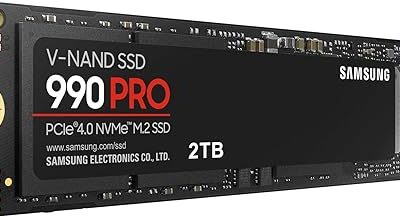
For a dedicated gaming PC in 2026, 1TB is the practical minimum and 2TB is the comfortable sweet spot. Windows and your applications eat a chunk before any games install, and with modern titles routinely passing 100GB, a 1TB drive holds only a handful at once. A 2TB drive like the Samsung 990 PRO or WD_Black SN7100 lets you keep a real library installed without constant housekeeping. If you record gameplay, keep many large games, or want years of headroom, 4TB is worth considering, but 2TB satisfies the majority of builders.
SSD Beats Hard Drive, Every Time
Do not put your games or operating system on a mechanical hard drive in 2026. An SSD loads levels dramatically faster, cuts stutter caused by texture streaming, and makes the whole system feel snappier. NVMe SSDs, which slot directly into the motherboard’s M.2 connector, are the standard for gaming because they far outrun older SATA drives. A hard drive still has a niche as cheap bulk storage for media or backups, but your active game library belongs on solid-state storage without exception.
Understanding SSD Generations and Speed
- PCIe Gen3: Reaches around 3,500 MB/s, plenty fast for gaming; drives like the Silicon Power and WD Green sit here at value prices.
- PCIe Gen4: Roughly doubles that to about 7,000 MB/s; the Samsung 990 PRO, Crucial P310, and WD_Black SN7100 are strong Gen4 choices.
- PCIe Gen5: Pushes past 14,000 MB/s on drives like the Samsung 9100 PRO, though real-world game load gains over Gen4 are modest today.
Do Faster Drives Really Load Games Quicker?
Up to a point. Moving from a hard drive to any SSD is a night-and-day improvement. Moving from Gen3 to Gen4 gives a smaller but real benefit, and technologies like DirectStorage can take better advantage of fast NVMe drives. Jumping from Gen4 to Gen5, however, currently yields only marginal gains in actual game load times while costing more and running hotter. For most gamers a quality Gen4 drive is the smart target; save the Gen5 premium for workloads like heavy content creation that genuinely use the extra bandwidth.
How to Split Your Storage
A clean approach is a single large, fast NVMe SSD that holds Windows, your applications, and your games together, which keeps everything responsive and simple. If your budget stretches, a two-drive setup works well: a fast Gen4 drive for the operating system and the games you play most, plus a larger, cheaper SSD for the rest of your library. Reserve mechanical hard drives, if you use them at all, purely for archives, video captures, and backups where speed does not matter and cost per terabyte does.
Tips
- Buy at least 2TB if you can; the cost per game installed is low and you avoid constant uninstalling.
- Never leave an SSD completely full; keep roughly 10 to 15 percent free for sustained performance.
- Check your motherboard has a free M.2 slot of the right generation before buying an NVMe drive.
- A quality Gen4 SSD is the value sweet spot; skip Gen5 unless you do heavy content creation.
Frequently Asked Questions
Is 1TB enough for a gaming PC in 2026?
It is the minimum, not the sweet spot. With big games passing 100GB, 1TB fills fast after Windows and apps. 2TB is the comfortable choice that lets you keep a real library installed without constant cleanup.
Do I need a Gen5 SSD for gaming?
No. Gen5 drives are blazing fast on paper but offer only marginal real-world game load improvements over Gen4 while costing more and running hotter. A good Gen4 NVMe SSD is the smart pick for gamers.
Should I still use a hard drive at all?
Only for bulk storage like backups, media archives, or recorded footage where speed does not matter. Your operating system and active games belong on an SSD; a hard drive is far too slow for them today.
Does a faster SSD reduce in-game stutter?
An SSD greatly reduces stutter from texture streaming compared to a hard drive. Between SSD generations the difference is smaller, though features like DirectStorage let modern games use fast NVMe drives more effectively.
Conclusion
Storage planning for a gaming PC comes down to two decisions: enough capacity and the right type of drive. Target 2TB as the sweet spot so your library has room to grow, and put everything on a fast NVMe SSD rather than a mechanical hard drive. A quality Gen4 drive hits the ideal balance of speed and value for nearly every gamer, with Gen5 reserved for demanding creative work. Use the recommended SSDs above as references, leave a little free space for performance, and your PC will load fast and stay uncluttered for years.