Key takeaways
- Excellent ergonomic sculpt that reduces wrist strain over long sessions
- MagSpeed wheel and thumb scroll make navigating long documents effortless
- Quiet Clicks cut noise dramatically without a mushy feel
- Darkfield tracking on glass plus powerful Options+ customization and Flow
What's inside
The Logitech MX Master 3S is the productivity mouse that many professionals treat as the default, and this Bluetooth-only version keeps the same sculpted body, 8,000 DPI Darkfield sensor that tracks on glass, and the MagSpeed electromagnetic scroll wheel that switches between ratcheted and free-spin flywheel modes. The headline refinement over the older Master 3 is the switch to Quiet Clicks, which cut the audible noise of every press by around 90 percent.
This mouse is for people who spend their day in documents, spreadsheets, code, and creative apps and want ergonomic comfort plus deep customization. If you juggle multiple computers, scroll through long files constantly, and value a near-silent, precise pointer, it is aimed squarely at you. Gamers who need low latency and light weight, or anyone who insists on a USB receiver in the box, should note the caveats below.
As an Amazon Associate we earn from qualifying purchases.




⚡ Save on Your Next PC — Amazon Prime
Prime members get fast free shipping on the systems above, plus early access to Prime Day & Black Friday PC deals. New members get a 30-day free trial.
Watch: Logitech MX Master 3S Review — Video Review
Design & Build
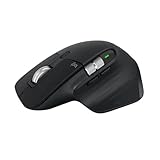
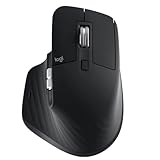
The Master 3S has a tall, right-handed sculpted shape that supports the palm and encourages a relaxed wrist, with a dedicated thumb wheel for horizontal scrolling and a gesture button beneath the thumb rest. Build quality is excellent, with soft-touch materials and satisfying, well-damped buttons. The standout is the MagSpeed wheel: it ratchets for precise control and spins freely to fly through long pages, shifting modes automatically or on command. USB-C charging tops it up fast, and a full charge lasts around 70 days.
Performance
As a work tool it is superb. The Darkfield sensor tracks reliably on almost any surface including glass, the Quiet Clicks are genuinely quiet without feeling mushy, and Logitech Options+ software unlocks per-application button and gesture profiles, plus Flow, which lets one mouse control multiple computers and copy content between them. Multi-device pairing across three machines is seamless.
The limitations are about scope. This is not a gaming mouse; at roughly 141 grams it is heavy and its wireless is tuned for reliability rather than the lowest possible latency. This particular listing is the Bluetooth-only variant, so there is no Logi Bolt USB receiver included, which matters if you use a machine without dependable Bluetooth. Left-handed users are also out of luck given the right-handed sculpt.
Pros & Cons
- Excellent ergonomic sculpt that reduces wrist strain over long sessions
- MagSpeed wheel and thumb scroll make navigating long documents effortless
- Quiet Clicks cut noise dramatically without a mushy feel
- Darkfield tracking on glass plus powerful Options+ customization and Flow
- Heavy and not suited to gaming or fast-twitch aiming
- Bluetooth-only listing includes no USB receiver
- Right-handed shape excludes left-handed users
Alternatives to Consider
If you want the newest generation, the Logitech MX Master 4 adds haptic feedback while keeping the same core strengths. Prefer a smaller, more travel-friendly option and the MX Anywhere 3S delivers much of the scrolling and tracking magic in a compact body. And if you are building a full desk setup, the MX Keys S Combo bundles a matching performance keyboard with a Master-series mouse.
Frequently Asked Questions
Can I use the MX Master 3S for gaming?
You can play casual and slower-paced games, but it is not designed for competitive gaming. At around 141 grams with productivity-tuned wireless, it lacks the low weight and minimal latency that fast shooters demand.
Does this version come with a USB receiver?
This is the Bluetooth-only listing, so it does not include a Logi Bolt receiver. If your computer has reliable Bluetooth that is fine; if not, choose the variant that bundles the receiver.
What makes the scroll wheel special?
The MagSpeed electromagnetic wheel ratchets for line-by-line precision and then spins freely like a flywheel to race through long pages, switching modes automatically based on how fast you flick it or on a button press.
What is new versus the older MX Master 3?
The 3S upgrades the sensor to 8,000 DPI and, most noticeably, adds Quiet Clicks that reduce click noise by roughly 90 percent, making it far more pleasant in shared or quiet spaces.
Verdict
The Logitech MX Master 3S earns its reputation as a productivity powerhouse in 2026. The ergonomic shape, best-in-class scrolling, quiet clicks, and deep software make it a joy for long workdays across multiple machines. Just go in knowing it is a work mouse, not a gaming one, and confirm whether you need the USB-receiver variant before buying.