Key takeaways
- CPU cores: Editing and exporting scale with cores; a modern 8-core-plus chip like a Ryzen 7 or high-core Intel i7 dramatically cuts render times over older quad-cores.
- RAM: 16GB is a workable minimum for 1080p, but 32GB is the real target for 4K timelines and running your editor alongside other apps.
- Storage speed and size: An NVMe SSD of 1TB or more keeps footage and cache files fast; slow drives cause choppy playback no matter how strong the CPU.
- GPU acceleration: A discrete GPU speeds up effects, playback, and hardware encoding in Premiere, DaVinci Resolve, and similar software, especially for 4K.
- Form factor: Mini PCs save desk space and power, while towers offer more expandability for extra drives, RAM, and a bigger GPU down the line.
What's inside
Video editing punishes a computer differently than gaming does. Timelines with 4K footage, effects, and color grading lean on CPU core count, fast storage, and plenty of RAM, while the GPU accelerates rendering and playback. In 2026 you have more choices than ever, from compact mini PCs with modern AMD Ryzen chips to full towers with high-core-count Intel processors and discrete graphics.
This roundup looks at desktops across the price spectrum for editors, weighing CPU cores, RAM capacity, SSD speed and size, and GPU acceleration. Whether you edit YouTube videos as a hobby or cut client work professionally, the goal is a system that scrubs the timeline smoothly and exports without leaving you waiting, and we cover both mini PCs and towers to suit different desks and budgets.
As an Amazon Associate we earn from qualifying purchases at no extra cost to you.




⚡ Save on Your Next PC — Amazon Prime
Prime members get fast free shipping on the systems above, plus early access to Prime Day & Black Friday PC deals. New members get a 30-day free trial.
Watch: Best PC for Video Editing — Video Review
How to Choose
- CPU cores: Editing and exporting scale with cores; a modern 8-core-plus chip like a Ryzen 7 or high-core Intel i7 dramatically cuts render times over older quad-cores.
- RAM: 16GB is a workable minimum for 1080p, but 32GB is the real target for 4K timelines and running your editor alongside other apps.
- Storage speed and size: An NVMe SSD of 1TB or more keeps footage and cache files fast; slow drives cause choppy playback no matter how strong the CPU.
- GPU acceleration: A discrete GPU speeds up effects, playback, and hardware encoding in Premiere, DaVinci Resolve, and similar software, especially for 4K.
- Form factor: Mini PCs save desk space and power, while towers offer more expandability for extra drives, RAM, and a bigger GPU down the line.
The Best Picks Reviewed
Dell Pro Tower Desktop, Intel 20-Core i7-14700, 16GB RAM, 1TB SSD
With a 20-core i7-14700, this Dell tower is a rendering powerhouse that chews through exports and multi-layer timelines. It ships with a fast 1TB SSD, and the tower form factor means you can add RAM and a discrete GPU as your projects grow more demanding.
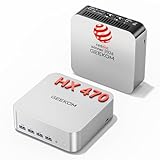
GEEKOM A9 Max Mini PC, AMD Ryzen AI 9 HX 470, 32GB RAM, 2TB SSD
This compact GEEKOM punches far above its size with a Ryzen AI 9 HX chip, a full 32GB of RAM, and a spacious 2TB SSD, ideal specs for 4K editing on a tidy desk. For creators who value low power draw and portability, it delivers desktop-class editing without the bulk.
Getorli Mini PC, AMD Ryzen 7 6800H, 32GB LPDDR5, 1TB NVMe SSD
The Getorli mini pairs an 8-core Ryzen 7 6800H with 32GB of fast LPDDR5 and a 1TB NVMe SSD, a genuinely capable 1080p and light 4K editing setup at a value price. It is a smart pick for hobbyist editors who want strong multi-core performance in a small box.
WIWB Gaming PC Desktop, Core i9-14900HX, RTX 5060 Ti 8GB, 1TB NVMe
If you want GPU acceleration for effects-heavy work, this WIWB tower brings an RTX 5060 Ti alongside a high-core i9 CPU. The discrete graphics speed up playback and hardware encoding in Resolve and Premiere, making it the best pick for editors who also game.
Dell OptiPlex 3050 Desktop, 32GB DDR4, 512GB M.2 NVMe SSD
The most affordable option here, this refurbished OptiPlex with 32GB of RAM is a budget entry into 1080p editing. It lacks a discrete GPU, but the generous memory keeps your editor responsive, and it is an easy way to start learning without a big outlay.
Frequently Asked Questions
Is CPU or GPU more important for video editing?
Both matter, but the CPU usually leads. Core count drives export and timeline performance, while a discrete GPU accelerates effects, playback, and hardware encoding. For 4K and effects-heavy work, you want a strong CPU paired with a capable GPU.
How much RAM do I need for 4K editing?
32GB is the practical target for smooth 4K editing, especially with multiple apps open. 16GB can work for lighter projects, but you will hit limits faster as timelines grow complex.
Can a mini PC really handle editing?
Yes. Modern mini PCs with Ryzen 7 or Ryzen AI chips and 32GB of RAM handle 1080p editing easily and can manage 4K projects. Their main limits are less expandability and weaker discrete graphics than a tower.
Do I need an NVMe SSD?
Strongly recommended. NVMe drives keep footage, cache, and scratch files fast, preventing the choppy playback that slow storage causes. A 1TB or larger NVMe SSD is ideal for editing.
Final Thoughts
For raw render speed the 20-core Dell Pro Tower is hard to beat, while the GEEKOM A9 Max and Getorli minis deliver 32GB editing power in a compact, efficient package. If GPU acceleration and gaming both matter, the WIWB tower with an RTX 5060 Ti is the versatile choice. Match core count and RAM to your resolution, keep your storage on NVMe, and your timeline will stay smooth.