
Key takeaways
- Pro: Crisp, satisfying Razer Green clicky switches with reliable actuation.
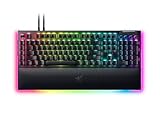
- Pro: Premium build with per-key Chroma RGB and underglow.
- Pro: Dedicated media roller and included wrist rest.
- Pro: Deep Synapse customization for macros and lighting.
What's inside
The Razer BlackWidow V4 has become one of the most recognizable mechanical gaming keyboards on the market, and for good reason. It blends Razer’s signature switch feel with a premium build, per-key RGB, and a feature set aimed squarely at gamers who want tactile feedback and reliability. In this 2026 review, we look at whether the BlackWidow V4 still earns its place on a serious gaming desk.
We focus on the standard BlackWidow V4 with Razer Green clicky switches as the main model, while noting how the wider V4 family, from the budget-friendly V4 X to the flagship V4 Pro, changes the equation. If you’re weighing a full-size mechanical board with a satisfying click, here’s what you need to know.
As an Amazon Associate we earn from qualifying purchases at no extra cost to you.




⚡ Save on Your Next PC — Amazon Prime
Prime members get fast free shipping on the systems above, plus early access to Prime Day & Black Friday PC deals. New members get a 30-day free trial.
Watch: Razer BlackWidow V4 Review — Video Review
Design & Build
The BlackWidow V4 feels every bit the premium board. A durable frame, doubleshot ABS keycaps, and a clean full-size layout give it a solid, planted presence on the desk, and the underglow plus per-key Chroma RGB make it a centerpiece in a lit setup. The Green switches are Razer’s classic clicky option, delivering a crisp, audible actuation that clicky-switch fans love, while the V4 X trims the underglow and media controls to hit a lower price.
Ergonomically, the included wrist rest and dedicated media roller add genuine day-to-day convenience. The board is on the larger side thanks to the full layout and extra keys, so desk space is a consideration, but the trade-off is a comprehensive control surface with programmable macro support baked in.
Performance
In gaming, the BlackWidow V4’s Green switches shine for players who want unmistakable tactile and audible feedback on every press. Actuation is consistent, the switches are rated for a long lifespan, and Razer’s Synapse software allows deep remapping, macros, and lighting control. For fast-paced titles the response is immediate, and the stabilized larger keys stay rattle-free during intense play.
The clicky nature is the main caveat: Green switches are loud, which is fantastic for the tactile crowd but less ideal for shared spaces or voice chat. If you want the same build with quieter or smoother feel, the V4 family offers Yellow linear switches (on the V4 X and V4 Pro) and Orange tactile options, letting you keep the design while changing the typing character entirely.
Pros & Cons
- Pro: Crisp, satisfying Razer Green clicky switches with reliable actuation.
- Pro: Premium build with per-key Chroma RGB and underglow.
- Pro: Dedicated media roller and included wrist rest.
- Pro: Deep Synapse customization for macros and lighting.
- Con: Green switches are loud for shared or streaming spaces.
- Con: Full-size footprint takes up significant desk room.
- Con: Synapse software is required for full functionality.
Alternatives to Consider
If the standard V4’s clicky Green switches aren’t your style, the family has you covered. The Razer BlackWidow V4 X with Yellow linear switches offers a quieter, smoother feel at a lower price, making it a great value pick. The BlackWidow V4 Pro is the flagship with a command dial and extra macro keys for power users, while the compact BlackWidow V4 75% delivers Orange tactile switches in a smaller, hot-swappable-friendly layout for those short on desk space.
Frequently Asked Questions
Are Razer Green switches good for gaming?
Yes. Green switches are clicky and tactile with consistent actuation, which many gamers love for the clear feedback. They are loud, though, so consider Yellow or Orange switches for quieter play.
Is the BlackWidow V4 too loud for streaming?
The Green switch version is quite audible and may pick up on a microphone. If you stream, the Yellow linear switches on the V4 X or V4 Pro are far quieter alternatives.
Do I need Razer Synapse software?
You can type without it, but Synapse is required to unlock full macro programming, per-key lighting customization, and remapping. It runs in the background once configured.
Which BlackWidow V4 model is best for small desks?
The BlackWidow V4 75% trims the layout considerably while keeping the premium feel and Orange tactile switches, making it the best fit for limited desk space.
Verdict
The Razer BlackWidow V4 remains a top-tier full-size mechanical keyboard in 2026, delivering premium build quality, gorgeous Chroma lighting, and the crisp clicky feedback that Green-switch fans crave. Its main limitations, loudness and a large footprint, are matters of preference and desk space rather than flaws. With the broader V4 lineup offering quieter linear and tactile switches plus compact layouts, there’s a version for nearly everyone. If you want a satisfying, well-built mechanical board with deep customization, the BlackWidow V4 is an easy recommendation.









