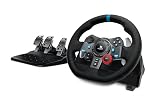
Our Top Picks
 Logitech G PRO Racing Pedals Simulator with 100kg18.94 x 14.06 x 10.94 inches2 poundsDVD-ROMCheck on Amazon
Yes, upgrading sim racing pedals is often the most worthwhile change you can make to a wheel setup, but only if your current pedals use potentiometers and you brake hard in sims where braking points matter. A load cell measures how hard you press rather than how far the pedal travels, and that makes braking easier to repeat lap after lap. If you mostly play casual arcade racers, or your pedals slide around on a bare floor, the upgrade pays off far less. Below you will find how the sensors differ, what the ratings on the box mean, a way to set the brake force, and four pedal sets worth comparing.
Quick Verdict
| Your situation | Our verdict |
|---|---|
| Stock pedals from an entry-level wheel (potentiometer), you race realistic sims weekly | Worth upgrading. The brake pedal is where you gain the most. |
| You play arcade racers or casual rally and rarely trail brake | Probably not worth it yet. Spend on a rigid mount before sensors. |
| Pedals sit loose on carpet or a hard floor | Fix mounting first. A load cell loads the floor with far more force than a travel-based pedal. |
| Racing wheel already has a good base, pedals are the weak link | A standalone set with a USB connection is the simplest route on PC. |
| You want to tune brake feel (soft, firm, progressive) | Choose a set with swappable springs, elastomers, or hydraulic damping. |
| Console player (PlayStation or Xbox) | Check compatibility with your wheel base before buying; not all sets work on consoles. |
What Changes When You Upgrade
Position sensing versus force sensing
Entry-level pedals, including the standard ones that ship with common wheel bundles, usually read a potentiometer. A potentiometer is a variable resistor that reports pedal position: push the pedal 30 percent of the way down and the sim sees 30 percent brake. A load cell measures force. A small metal element deforms by a tiny amount under pressure, a strain gauge converts that into an electrical signal, and the pedal barely moves. Pressing with a given force produces the same brake input every time.

Logitech G RS Sim Racing Pedals (with 75 kg Load Cell Brake)
Picked as a relevant option in this category.
View on Amazon
MOZA SRP2 Pedals Set Throttle Brake Pedal Equipped With 100KG Load Cell
Picked as a relevant option in this category.
View on Amazon
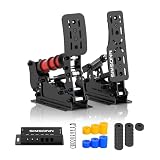
SIMSONN PRO X Ultra Sim Racing Pedals PC Racing Simulator Load Cell HE Hydraulic Pedals Support Haptic Reactor (PRO X Ultra P3-H3)
Picked as a relevant option in this category.
View on AmazonLogitech G PRO Racing Pedals Simulator with 100kg Load Cell Brake
Picked as a relevant option in this category.
View on AmazonThe practical reason this matters is repeatability. People tend to repeat a level of muscle effort more reliably than a precise limb position, especially under stress at the end of a long race. That is the explanation offered by most sim racing guides, and it matches how real brake pedals work. A word of caution: much of the published lap-time claims come from gear sellers, and precise figures like “half a second per lap” are not backed by a verifiable study. Expect consistency, not magic speed.
Hall effect sensors: the middle step
Many upgraded pedals use Hall effect sensors for the throttle and clutch. These are contactless: a magnet moves near a sensor, so nothing rubs and wears. Logitech’s G RS Pedals and G PRO Racing Pedals both use a Hall effect accelerator, and the brake gets a load cell. This is a sensible split, because throttle precision depends on travel, while braking benefits from force sensing. Potentiometers can wear out over time, and a worn one can cause jittery inputs; replacement sensor kits exist for popular Logitech pedals if you want to prolong an old set.
What the kilogram rating means
A “75 kg” or “100 kg” load cell rating is the sensor’s maximum measurable force, not the force you must apply. Even a strong driver rarely presses past 40 to 60 kg in normal use, so the extra rating mainly gives headroom and signal resolution. How the pedal feels is set by the springs, elastomers, or hydraulics and by the travel, not by the rating alone. A mushy, long-travel load cell pedal can be harder to use than a firm, short one. Treat the number as one spec among several.
Feel tuning and software
Brake feel is adjustable on the sets below, but in different ways. The MOZA SRP2 combines a 15-bit angle sensor with the 100 kg load cell and blends them: the angle sensor handles early travel and the load cell the later part, according to MOZA’s support page. The Logitech RS set lets you change brake force in G HUB on PC, saved to the pedals’ memory, with a factory default of 30 percent according to Logitech’s setup guide. The SIMSONN PRO X Ultra lists an adjustable hydraulic resistance rod with eight levels plus 60HA, 70HA, and 80HA elastomers.
| Pedal set | Brake sensor | Notable verified details |
|---|---|---|
| Logitech G RS Pedals | 75 kg load cell | Hall effect accelerator and clutch, adjustable positions, steel frame, USB on PC |
| MOZA SRP2 | 100 kg load cell plus 15-bit angle sensor | 25 standard brake feels, optional kit for 1,000+, steel frame per MOZA, USB direct to PC |
| SIMSONN PRO X Ultra P3-H3 | Load cell on all three pedals (per listing) | Brake, throttle, clutch included, no baseplate, 1-8 level hydraulic rod |
| Logitech G PRO Racing Pedals | 100 kg load cell | Hall effect sensors, swappable springs, modular pedals |
Everything in this table comes from manufacturer pages and retailer listing fields. Weights, dimensions, and platform support depend on the exact model and bundle, so confirm on the listing.
How to Decide
- Check what you have now. If your pedals are potentiometer-based and you notice you brake at slightly different points on the same corner, a load cell is the right fix. If the pedals already have a load cell, a bigger rating alone is rarely worth it.
- Confirm the connection. On PC, a set with its own USB cable works with any wheel. On console, the set usually plugs into a compatible wheel base instead.
- Decide how many pedals you need. Some sets include only the throttle and brake. Check whether a clutch is included or sold separately if you drive manual cars or classic rally.
- Plan the mounting. A brake load of 100 kgf is roughly 980 newtons, or about 220 pounds-force at the very top of the range. You will not press that hard, but hard braking can still push a loose pedal plate across a floor. Rule of thumb: bolt the plate to a rig, or brace it against a wall, before you rely on it.
- Set the brake force. Rule of thumb: pick a maximum-braking effort you can hold comfortably for a whole race. For a 75 kg or 100 kg sensor, that usually lands in the low tens of kilograms, so start near the lower part of the range and increase it over a few sessions. Logitech’s own default of 30 percent on a 75 kg cell works out to 22.5 kg.
- Test your own setup on a few familiar corners. Run the same three braking zones in your usual sim and watch whether your braking points tighten. If they do, the upgrade is working.
Worked example. Suppose your stock pedals feel inconsistent and your wheel sits on a desk. A 75 kg set with a Hall effect throttle gives you force sensing at the brake without paying for a 100 kg rating you may not use. Adding a rigid plate or a cockpit comes next. If you later want to tune brake stiffness in fine steps, move to a set with more adjustment, such as hydraulic damping or multiple elastomer grades.
Products That Fit
Logitech G RS Pedals – for an affordable step into load cells
As an Amazon Associate we earn from qualifying purchases at no extra cost to you.
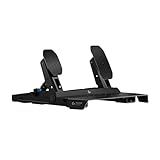
This is the practical pick for a first load cell. A 75 kg brake covers normal use, the Hall effect accelerator avoids a worn potentiometer, and Logitech’s G HUB lets you set brake force on PC. It connects directly to a Logitech PRO or RS50 wheel base on console, uses a separate adapter for G-Series wheels, and plugs in by USB on PC, where Logitech says it also works with other brands of wheel.
- 75 kg load cell brake
- Hall effect accelerator and clutch sensors
- Adjustable pedal positions on a steel frame with anti-tip design
- Roughly 10.8 pounds
Caveat: the 75 kg ceiling is lower than the 100 kg sets below, and the listing marks the clutch with an asterisk, so confirm whether a clutch pedal is included or sold separately.
MOZA SRP2 – for tuning brake feel on PC

The SRP2 suits someone who wants lots of adjustment. Its brake combines a 100 kg load cell with an angle sensor, and the standard elastomer and spring set offers 25 feel configurations, with an optional performance kit adding more. It connects to a PC by USB and works with wheels from other brands, according to MOZA.
- 100 kg load cell with angle and force sensor fusion
- 25 standard brake feels; 1,000+ with the optional kit
- Steel and aluminum construction per the listing
- Throttle and brake set; clutch sold separately per reviews
Caveat: sources disagree on Xbox support, so check MOZA’s current documentation before buying if you play on console. Settings use MOZA’s Pit House software.
SIMSONN PRO X Ultra P3-H3 – for a three-pedal hydraulic feel

This listing describes a full three-pedal set with brake, throttle, and clutch, and no baseplate included. The brake uses an adjustable hydraulic resistance rod (levels 1 to 8) plus 60HA, 70HA, and 80HA elastomers with spacers. It suits rig owners who already have a mounting plate or cockpit and want a firm, adjustable brake.
- Load cell sensing for throttle, clutch, and brake (per listing)
- Six-chip controller with a 16-bit ADC and three-channel sampling
- Hydraulic rod, three elastomer hardnesses, ten spacers
- About 19.2 pounds; confirm dimensions and PC support on the listing
Caveat: no baseplate means you must mount it to something sturdy, and the heavier build is overkill for a desk setup.
Logitech G PRO Racing Pedals – for a firmer 100 kg brake with modular parts

This older Logitech model is the step up from the RS set if you want a 100 kg load cell. It uses Hall effect sensors, swappable springs, and removable pedal modules. Logitech lists PlayStation and Xbox use when it is connected to the matching PRO wheel, and a buyer answer on a retailer page says it works standalone on PC with the included USB cable.
- 100 kg load cell brake
- Contactless Hall effect sensors
- Swappable springs and modular pedals
- Connects by USB; console use depends on the wheel pairing
Caveat: it is an older design and the standalone PC claim comes from a buyer answer rather than Logitech, so confirm before you buy.
Common Mistakes
- Buying a higher kilogram rating thinking it will feel firmer; spring or elastomer choice decides that.
- Skipping the mount, then blaming the pedals when the plate walks away under braking.
- Setting brake force too high at first, which leads to fatigue and worse consistency.
- Assuming a pedal set works with any console wheel without checking compatibility.
- Judging the upgrade after one session instead of comparing braking points across several.
- Ignoring a cheap fix for old potentiometer pedals when the real problem is a worn sensor.
Questions
Are load cell pedals really better than potentiometer pedals?
For braking, yes in the sense of repeatability, because they measure force instead of travel. They do not make you faster by themselves, and most claims of exact lap-time gains come from sellers. They make a good driver more consistent.
Do I need a 100 kg load cell?
Not usually. Typical drivers rarely press past 40 to 60 kg, so a 75 kg cell covers most people. Higher ratings add headroom and feel options, but spring and elastomer setup shape the experience more.
Can I use these pedals with any wheel?
On PC, standalone sets with a USB connection generally work with other brands of wheel; Logitech and MOZA both state this. On consoles, the pedals often have to connect through a compatible wheel base, so check the platform list first.
Is a Hall effect pedal better than a potentiometer?
Hall effect sensors are contactless, so they avoid the wear and jitter a potentiometer can develop. They still measure position unless paired with a load cell, so they improve durability more than brake feel.
Do I need a cockpit for load cell pedals?
You need a firm mounting surface rather than a full cockpit. A rigid plate, a stand, or a wall brace works if it stops the pedals from sliding or tipping under heavy braking.
Update History
- October 14, 2026 – Initial publication.
- Check the product page for current specifications and availability before buying.
Sources
- Logitech G RS Pedals setup guide and product specifications (brake force setting, connectivity)
- Logitech G PRO Racing Pedals product page and retailer compatibility fields
- MOZA Racing SRP2 support page and spec sheet
- Sim racing guides explaining load cell and potentiometer sensing (Asetek SimSports, FATBLACKCAT, Simracinggearguide)
- Potentiometer replacement kit listings for Logitech G-Series pedals (AXC Sim, 3DRap)
- Retailer listing fields for the four pedal sets above