Our Top Picks
 Kisnt MF17 Wired QMK/VIA Mechanical Numpad for Excel4.4 x 3.39 x 1.37 inches0.49 PoundsCheck on Amazon
QMK, short for Quantum Mechanical Keyboard, is open-source keyboard firmware: the software that runs inside a keyboard and decides what happens when you press a key. It lets you remap keys, create layers, build macros and set up advanced behavior like tap versus hold, all stored on the keyboard itself. It matters for gaming PCs mainly if you own, or are shopping for, a customizable mechanical keyboard.
What QMK Is
Every keyboard has a small microcontroller that scans the switches and sends key codes to your PC. Firmware is the program on that chip. QMK is a widely used open-source firmware project for keyboards built around certain microcontrollers, maintained by a community and published openly. Many enthusiast keyboards from various makers are supported by it, and its documentation describes features such as layers, macros, tap dance, mouse keys and RGB lighting control.

Keychron K0 Max Wireless Low-Profile Number Pad, QMK/VIA Programmable, Hot-Swappable Banana Switch, RGB Backlit, 2.4GHz & Bluetooth 5.3, 1000Hz Polling Rate, with Knob, for Windows/Mac
Chosen because it specifies QMK/VIA Programmable and Hot-Swappable Banana Switch.
View on Amazon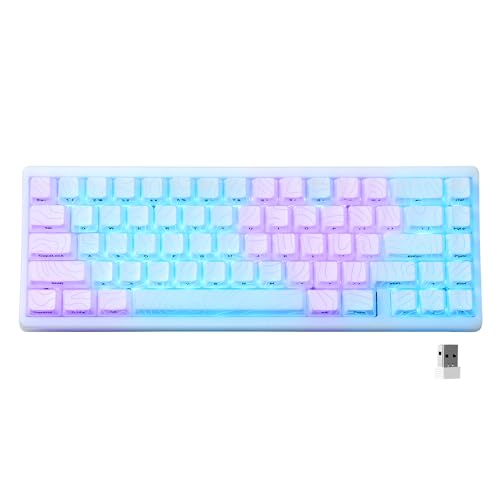
HITIME x XVX M67 Wireless 60% Percent Keyboard, QMK/VIA Topographic Gaming Keyboard, Tri-Mode Thocky Creamy Mechanical Key Board, Hot Swappable Gasket Mount RGB IMD Tech for Win/Mac(JadeStone)
Chosen because it specifies QMK/VIA Topographic Gaming Keyboard and Tri-Mode Thocky Creamy Mechanical Key Board.
View on AmazonKisnt MF17 Wired QMK/VIA Mechanical Numpad for Excel Financial Data Entry | QMK/VIA Programmable, Wired 17 Keys Hot Swappable, Custom RGB with PBT Keycaps for Laptops PC Compact Keyboards (Retro Beige)
Chosen because it specifies QMK/VIA Programmable and Wired 17 Keys Hot Swappable.
View on Amazon
LEMOKEY X4 75% QMK Wired Mechanical Gaming Keyboard, Tactile Brown Switch | South-facing red backlight, side-printed double-shot PBT keycaps, 1000 Hz polling rate, gasket mount, NKRO, Windows/Linux
Chosen because it specifies Tactile Brown Switch and South-facing red backlight.
View on AmazonQMK is firmware, not a Windows program. Settings live on the keyboard, so they follow it between computers without any driver running in the background. That is useful for gamers who play on multiple machines or at events.
How It Works
- A keymap defines what each physical key does, including on additional layers.
- That keymap is compiled into a firmware file for your specific keyboard.
- The file is flashed to the keyboard’s microcontroller, often by putting the board in a bootloader mode.
- From then on, the keyboard applies those rules itself, before the PC sees any key presses.
Many people never compile anything. Tools such as QMK Configurator, a browser-based keymap editor, and QMK Toolbox, a flashing utility, handle the steps visually. Other keyboards use a related tool called VIA or Vial, which lets you remap keys live without reflashing, provided the firmware has that support enabled.
Why It Matters for Gaming PCs
- Layers. Compact 60 percent and 65 percent keyboards remove the function row and numpad. A layer lets you reach those keys by holding a modifier key.
- Remapping. You can move keys, swap Caps Lock for Control or Escape, or adjust the layout to suit a particular game.
- Macros. Short sequences can be bound to a key. Check the rules of any online game before using them, since some games and tournaments restrict macros.
- Tap and hold. A key can act as one thing when tapped and another when held, which helps small layouts.
- On-board storage. No background software means fewer startup tasks and fewer conflicts.
- Polling and latency. Firmware design affects scan and report behavior, though practical differences depend on the keyboard. Be cautious about marketing claims and look for independent measurements.
How to Check Whether Your Keyboard Uses QMK
- Check the product page or manual. Makers that use QMK often say so, or list compatibility with QMK Configurator, VIA or Vial.
- Search the keyboard’s model in the QMK Configurator’s keyboard list in a browser. If it is listed, it is supported.
- Check for a reset button or a bootloader method in the manual. Entering it is how firmware is flashed.
- Look for a community support page. Active communities usually document keymaps and flashing steps.
If you only game and type with the stock layout, you do not need to do anything. The keyboard already runs whatever firmware the maker supplied.
Basic Setup Outline
- Confirm your exact model and revision. Flashing the wrong firmware can leave the keyboard unresponsive.
- Back up the stock firmware or configuration if the maker offers it.
- Open QMK Configurator or the maker’s recommended tool, pick your keyboard and edit the keymap.
- Compile or download the firmware file.
- Put the keyboard into its bootloader mode as described in the manual.
- Flash the file with the recommended tool, then test every key.
Flashing custom firmware may void the warranty with some makers. Follow the maker’s instructions and never unplug the keyboard in the middle of a flash.
Quick-Reference Table
| Term | What it is | Why you might care |
|---|---|---|
| QMK | Open-source keyboard firmware | Deep customization, stored on the keyboard |
| QMK Configurator | Browser tool to build keymaps | Edit keys without writing code |
| QMK Toolbox | Flashing utility for Windows and other systems | Load firmware onto the keyboard |
| VIA / Vial | Live remapping software for compatible firmware | Change keys without reflashing |
| Layer | Alternate set of key functions | Fit more keys on small layouts |
| Bootloader | Special mode for flashing | Required before installing firmware |
| Macro | Saved key sequence | Shortcuts for work and some games |
Practical Gaming Examples
On a 60 percent keyboard, a common layer setup puts the arrow keys and the function row under a held modifier, so the main layer stays clean for gameplay. Some players place a rarely used key such as Caps Lock under a different action, for example Escape on tap and Control on hold. Others keep a separate layer for a particular game, switched with a layer key, so that the movement cluster stays comfortable in a shooter while a strategy game gets its own control group shortcuts. Lighting can be set to a plain static color to reduce distraction. None of this requires knowing how to code when you use a visual editor, and the result is saved on the keyboard itself. Keep a note of your layout so you can restore it after a reset or firmware update, and test each key in a typing tool before relying on it in a match.
Common Misconceptions
- “QMK is a program I install on Windows.” It runs on the keyboard. Tools only help you load it.
- “All mechanical keyboards support QMK.” Support depends on the microcontroller and the maker. Many popular gaming keyboards use proprietary firmware instead.
- “QMK makes a keyboard faster.” It offers control, but any latency differences depend on the hardware and configuration.
- “It is only for programmers.” Visual tools make basic remapping approachable for non-programmers.
- “It is risk free.” Flashing the wrong file can leave a keyboard unresponsive until it is recovered, which usually requires bootloader access.
When to Care and When to Ignore It
Care about QMK if you use a compact layout, want custom layers, play on several PCs, or like tuning your keyboard. Ignore it if you use a full-size keyboard and are happy with its default behavior, or if your keyboard’s own software already covers what you need. For competitive play, check tournament rules about macros or remapped keys.
Frequently Asked Questions
Is QMK free?
Yes. QMK is open source, and the firmware and tools are available without a license fee. The keyboard hardware that supports it varies in how it is sold.
Can QMK get me banned in games?
Simple remapping is generally handled as ordinary keyboard behavior, but macros that automate actions may violate a game’s rules. Read the rules of the specific game or tournament.
What is the difference between QMK and VIA?
QMK is the firmware. VIA is a configuration tool that talks to compatible QMK firmware so you can change keys live, without compiling or flashing each time.
Can I go back to stock firmware?
Often yes, if the maker provides the original firmware file or flashing guide. Look for it before you flash anything, and keep it in a safe place.
Does QMK work on wireless keyboards?
Support exists on some wireless boards, but it depends on the hardware and the maker’s firmware. Check the product documentation or community notes for your model.