Our Top Picks
To choose a motherboard for a given CPU generation, match the processor’s socket first, then the chipset tier, then the BIOS version the board shipped with. A processor only fits a board with the same socket, so the socket decides everything else: AM5 for Ryzen 7000, 8000 and 9000, LGA1851 for Core Ultra 200S, and LGA1700 for 12th, 13th and 14th generation Core.
Step 1: find the socket
| Processor family | Socket | Board chipsets | Memory |
|---|---|---|---|
| AMD Ryzen 7000, 8000, 9000 | AM5 | A620, B650, B650E, X670, X670E, B840, B850, X870, X870E | DDR5 only |
| Intel Core Ultra 200S | LGA1851 | Z890, B860, H810 | DDR5 only |
| Intel 12th to 14th gen Core | LGA1700 | H610, B660, Z690, B760, Z790, H770 | DDR4 or DDR5, set by the board |
| AMD Ryzen 5000 and older | AM4 | B450, B550, X570 and others | DDR4 |
Sockets are not interchangeable. LGA1700 and LGA1851 share cooler mounting holes, according to buyers’ guides, so an LGA1700 cooler often fits, but the processor itself will not. Moving from a 14th generation Core chip to Core Ultra 200S means a new board.

for PRO Z790-P DDR4 Motherboard Support Core 13th Generation CPU Board for MSI ,Boards
Picked as a relevant option in this category.
View on Amazon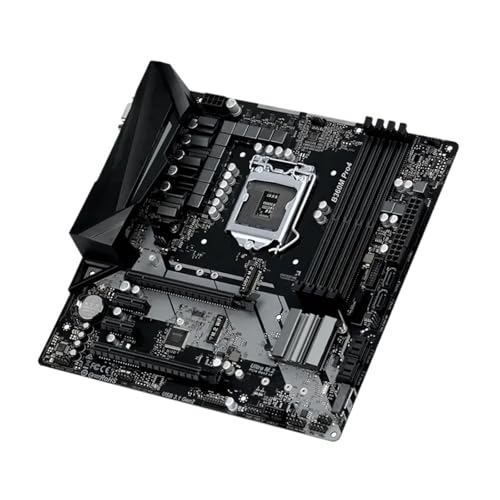
for B360M PRO4 Motherboard Support 8th Generation CPU LGA 1151 DDR4 Board for Asrock ,Boards
Picked as a relevant option in this category.
View on Amazon
for Z390I Motherboard Support 8th 9th Generation CPU Board for Gigabyte ,Boards
Picked as a relevant option in this category.
View on Amazon
for Stock H47H5-AM2 H470 Chip 1200 Supports The Tenth Generation CPU Motherboard for Acer ,Boards
Picked as a relevant option in this category.
View on AmazonStep 2: confirm the chipset supports the generation
AM5
Board makers such as Gigabyte and ASRock released BIOS updates (AGESA versions) that allow older 600-series boards, including A620, B650 and X670, to run Ryzen 9000 processors. The catch is that a board built before that may need the update before it will start with a newer chip. Newer 800-series boards generally ship ready for Ryzen 9000. BIOS Flashback, offered on many boards, lets you update without a processor installed; without it, you may need a Ryzen 7000 chip to boot and update.
LGA1851
Core Ultra 200S works on the 800-series boards, namely Z890, B860 and H810. Reports on the newer Core Ultra 200S Plus refresh say it needs a BIOS dated March 2026 or later. B860 suits buyers who do not overclock the CPU; Z890 is for overclockers and people who want the most connectivity.
LGA1700
12th, 13th and 14th generation processors use LGA1700. An early Z690 or B660 board may need a newer BIOS for 14th generation chips. Reports recommend the 0x12F microcode BIOS update on any LGA1700 board for 13th and 14th generation processors. Choose DDR4 or DDR5 by board model; they are not interchangeable.
Step 3: check the CPU support list
Every board maker publishes a CPU support list on the product page, with the minimum BIOS version per processor. Find your exact processor and compare the BIOS number with the one the board ships with. If the minimum is newer, you need a Flashback feature, a compatible older processor to flash it, or a retailer who offers a BIOS update. BIOS updates can fail if power is lost, so follow the maker’s manual.
Step 4: choose the chipset tier
| Tier | Fits | Typical trade-off |
|---|---|---|
| Entry (A620, H610, H810) | Budget builds | Fewer ports, limited tuning |
| Mainstream (B650, B850, B760, B860) | Most gaming builds | Good balance of features |
| Enthusiast (X670E, X870E, Z790, Z890) | Overclockers, heavy I/O users | More lanes and ports, higher cost |
On Intel, CPU overclocking needs a Z-series board and a K-series chip. On AMD, B-series boards allow overclocking of Ryzen processors, so the X tier is mostly about extra lanes and USB4.
Step 5: check the remaining parts
- Memory: DDR5 on AM5 and LGA1851; DDR4 or DDR5 on LGA1700.
- Form factor: ATX, micro-ATX or mini-ITX matched to the case.
- Power delivery: high-core-count chips need stronger voltage regulators.
- Cooler mounting: check bracket support for the socket.
Common mistakes
- Buying a board by chipset name alone, ignoring the socket.
- Skipping the BIOS minimum and getting a board that will not boot the new chip.
- Buying DDR5 memory for a DDR4 LGA1700 board.
- Assuming an older cooler bracket fits.
- Paying for overclocking tiers when the processor is locked.
Worked examples
You own a Ryzen 7000 chip and want to move to Ryzen 9000
The socket is the same, AM5, so your existing board may accept the new chip after a BIOS update. Check the board maker’s CPU support list for the minimum BIOS that names the Ryzen 9000 model, update while your current chip is installed, then swap. The 600-series boards need this step; 800-series boards generally ship with support in place.
You own a 13th or 14th generation Core chip and want Core Ultra
The socket changes from LGA1700 to LGA1851, so a new 800-series board is required, along with DDR5 memory. LGA1700 coolers may fit, according to buyers’ guides, but confirm the cooler maker’s bracket list.
You are building new and want the longest upgrade path
Buyers’ guides generally point to AM5 for platform longevity, because AMD has used the socket across several processor generations. Intel’s LGA1851 is the current socket for Core Ultra 200S, while LGA1700 is a previous generation. No maker can promise future support, so read the roadmap statements as intentions, not guarantees.
Boxes, stickers and BIOS versions
Some boards carry a sticker saying they are ready for a newer processor generation. Others do not. A board stocked for a long time may have an older BIOS than a freshly produced one, even with the same model name. If a seller cannot confirm the BIOS, choose a model with BIOS Flashback, which exists to solve this exact situation. Look on the rear I/O panel for a Flashback button and a dedicated USB port, and read the manual’s procedure for the file name and format required.
Decision table
| If you have or want | Look at |
|---|---|
| Ryzen 9000 | AM5 board, B850 or X870 tier for new builds |
| Ryzen 7000 existing board | BIOS update, then confirm support list |
| Core Ultra 200S | Z890, B860 or H810 board |
| 14th gen Core | LGA1700 board such as B760 or Z790 with latest BIOS |
| Ryzen 5000 | AM4 board, B550 or X570, with DDR4 |
Frequently Asked Questions
Will a B650 board run Ryzen 9000?
Yes, after a BIOS update. Makers released updates for 600-series boards, so a board with an older BIOS may need flashing first.
Can I use a 14th gen CPU on a Z690 board?
Generally yes with an updated BIOS, since both use LGA1700. Check the board’s CPU support list.
Do Core Ultra 200S processors fit LGA1700 boards?
No. They need the LGA1851 socket and an 800-series board.
What is BIOS Flashback?
A feature that lets some boards update the BIOS from a USB drive without a processor installed. Follow the board manual exactly.
Which chipset for a locked processor?
A mainstream chipset such as B650, B850, B760 or B860 is usually enough, as higher tiers add features you may not use.
FAQ
Will a B650 board run Ryzen 9000?
Can I use a 14th gen CPU on a Z690 board?
Do Core Ultra 200S processors fit LGA1700 boards?
What is BIOS Flashback?
Which chipset for a locked processor?
More from Amazon
Programs that pair well with the guide above. Offers and eligibility are set by Amazon and may change.
Free shipping on eligible items, Prime Video and more. Eligible new members can start with a free trial.
Start a Prime free trialAd-free music streaming. Eligible new subscribers can start with a free trial.
Try Music Unlimited freeA Prime membership for ages 18-24 with a trial period. Eligibility is set by Amazon.
See Prime for Young AdultsAudiobooks and podcasts to listen to on the go. Eligible new members can start with a free trial.
Try Audible freeAs an Amazon Associate we earn from qualifying purchases.