Our Top Picks
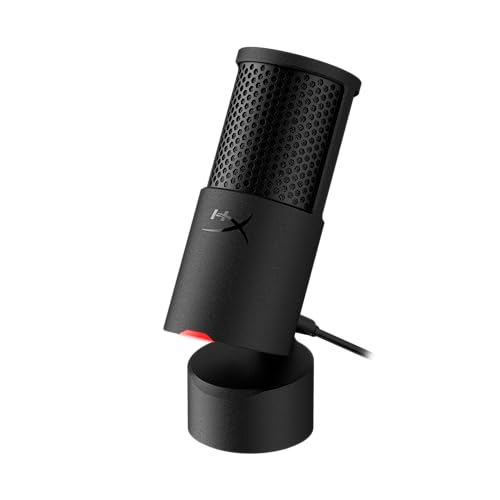
 Logitech Creators Blue Yeti USB Microphone for PC1 Count (Pack of 1)4.92 x 4.72 x 11.61 inches3.51 poundsCheck on Amazon
The best condenser microphones under $100 are the Sennheiser Profile for a USB-C desktop mic with its own stand, the Logitech Blue Yeti for four pickup patterns, and the AKG P120 if you already own an audio interface. All picks are compared from listing specifications: connection type, pickup pattern, controls and what is included.
A condenser microphone captures more detail than a dynamic one, but it also picks up more room noise, so the connection and the room matter as much as the model. Home office, small-space and gaming setups are covered in the buying section and the FAQ below.
Quick Comparison
| Model | Key specs per listing | Best for |
|---|---|---|
| Sennheiser Profile | USB cardioid condenser, table stand, USB-C, mute, headphone jack, gain/mix/volume | Plug-and-play desk setups |
| Logitech Blue Yeti | USB, 4 pickup patterns, Blue VO!CE effects, plug and play | Streaming, podcasts, interviews |
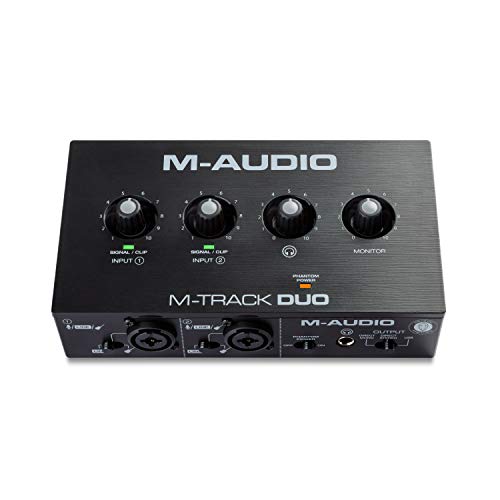
| AKG P120 | 2/3-inch diaphragm condenser, XLR connector | Vocals and instruments through an interface |
| MAONO A04 Gen2 | XLR/USB, 192kHz/24-bit, cardioid, metal body, software | Flexible home studio |
| Mackie EM-91C | Large-diaphragm condenser (EM-Series) | XLR starter studio |
| FIFINE T669 | USB studio condenser kit, adjustable boom arm stand, shock mount | Desk-clearing boom setup |
The microphones were compared from listing specifications, not used by us. The first thing the table shows is that three of the six use USB while two need an XLR interface, and the MAONO offers both. That split decides your total spend: an XLR microphone needs a separate interface, which this price ceiling does not include. If you do not already own one, a USB model is the simpler route.
Sennheiser Profile USB Microphone

SENNHEISER Professional Profile - USB Cardioid Condenser Microphone & Table Stand, 1.2 m USB-C Cable - Mute Button, Built-in Headphone Jack, Gain, Mix & Volume Control, for PC & Mac,Black
Chosen because it specifies USB Cardioid Condenser Microphone & Table Stand and 1.2 m USB-C Cable.
View on AmazonSpec line: USB cardioid condenser microphone with table stand, 1.2 m USB-C cable, mute button, built-in headphone jack, gain, mix and volume control, for PC and Mac.
The Profile is the most complete desktop package here. Everything you need is in the box and on the body: a stand, a cable, a mute button, a headphone jack and controls for gain, mix and volume. The mix control lets you balance your own voice against computer audio in your headphones, which is useful for streamers and call takers. The cardioid pattern targets sound from the front, so it handles a quiet room best. The listing does not give a sample rate, so check the maker page if you need it for recording work.
- Pro: stand and USB-C cable included
- Pro: mute, gain, mix and volume controls
- Pro: built-in headphone jack
- Con: sample rate not listed
- Con: one pickup pattern only
Logitech Blue Yeti
Logitech Creators Blue Yeti USB Microphone for PC, Mac, Gaming, Recording, Streaming, Podcasting, Studio and Computer Condenser Mic with Blue VO!CE effects, 4 Pickup Patterns, Plug and Play - Blackout
Chosen because it specifies Mac and Gaming.
View on AmazonSpec line: USB condenser microphone for PC and Mac with Blue VO!CE effects, 4 pickup patterns, plug and play.
The Yeti is the standard answer for streamers and podcasters, mostly because of its four pickup patterns: cardioid for one speaker, bidirectional for a two-person interview, omnidirectional for a table of people and stereo for ambience. Blue VO!CE effects add software voice shaping through Logitech’s app. It is a large microphone for a small desk, and the listing does not mention a shock mount or boom arm, so you may need extras to cut desk vibration. For a one-microphone home setup that does many jobs, it is a sensible all-rounder.
- Pro: four pickup patterns
- Pro: plug and play over USB
- Pro: Blue VO!CE voice effects
- Con: large footprint on a desk
- Con: shock mount not mentioned
AKG Pro Audio P120

AKG Pro Audio P120 - Affordable 2/3-Inch Diaphragm Condenser Microphone for Clear Vocals & Instruments. Studio Recording or Live. XLR Connector. Black
Picked as a relevant option in this category.
View on AmazonSpec line: 2/3-inch diaphragm condenser microphone for vocals and instruments, XLR connector, for studio recording or live use.
The P120 is a classic studio-style microphone rather than a desktop gadget. It has a large 2/3-inch diaphragm, an XLR connector and a design aimed at vocals and instruments. That makes it the natural pick if you already own an audio interface with phantom power, or plan to buy one. It will not connect straight to a computer, and the listing does not mention a stand or shock mount. If you want a plug-and-play setup, choose one of the USB models. If you want to build a studio gradually, this is a solid starting point.
- Pro: large diaphragm for vocals and instruments
- Pro: XLR output for interface use
- Pro: from a well-known studio brand
- Con: needs an interface with phantom power
- Con: stand and cable not listed
MAONO A04 Gen2 XLR/USB Condenser Kit

MAONO A04 Gen2 XLR/USB Condenser Microphone Kit for PC Podcast Recording | 192kHz/24Bit Cardioid Metal Mic with Software, Plug & Play for Content Creation, Streaming, Gaming, Home Studio, YouTube
Chosen because it specifies 192kHz/24Bit Cardioid Metal Mic with Software and Plug & Play for Content Creation.
View on AmazonSpec line: XLR/USB condenser microphone kit, 192kHz/24-bit, cardioid, metal body, with software, for podcasts, recording, streaming and gaming.
The A04 Gen2’s main appeal is flexibility: it connects by USB today and by XLR later, so you can start simple and add an interface when you want to. The listing quotes a 192kHz/24-bit rating and describes a cardioid metal microphone sold as a kit with software. It is a lesser-known brand than Sennheiser or Logitech, so long-term support is less certain, and the listing does not describe exactly which accessories come in the box. For a creator who expects to upgrade their setup, it is a smart way to avoid buying twice.
- Pro: both USB and XLR connections
- Pro: 192kHz/24-bit listed
- Pro: metal body and included software
- Con: lesser-known brand
- Con: kit contents not detailed
Mackie EM-91C

Mackie EM-Series, Large-Diaphragm Condenser Microphone (EM-91C)
Chosen because it specifies Large-Diaphragm Condenser Microphone (EM-91C).
View on AmazonSpec line: EM-Series large-diaphragm condenser microphone.
The EM-91C is a straightforward XLR condenser, and the listing offers very little detail beyond the series name and the large diaphragm. That makes it a candidate for someone who already knows what they want from an XLR mic and has an interface ready. Pattern, frequency response and included accessories are not in the listing text, so read the maker page before buying. It sits at the lower end of the price ceiling, which leaves room in your budget for an interface, but you need to add one.
- Pro: large-diaphragm XLR design
- Pro: leaves budget for an interface
- Pro: established audio brand
- Con: pattern and accessories not listed
- Con: needs an interface
FIFINE T669 USB Condenser Kit
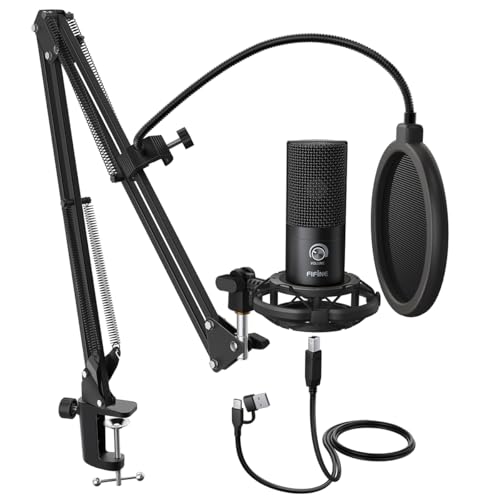
FIFINE T669 Studio Condenser USB Microphone for Recording Podcasting | Computer Microphone Kit for Voice Overs, Adjustable Boom Arm Stand, Shock Mount for Vocal, Instruments, Gaming, Streaming
Chosen because it specifies Computer Microphone Kit for Voice Overs and Adjustable Boom Arm Stand.
View on AmazonSpec line: Studio condenser USB microphone kit for recording and podcasting, adjustable boom arm stand and shock mount, for vocals, instruments, gaming and streaming.
The T669 is a kit, which is its main strength: the listing includes a boom arm stand and a shock mount, so you do not have to buy those separately. A boom arm lifts the microphone off the desk, frees space and keeps it close to your mouth, which helps both a small desk and a noisy room. It is a USB microphone, so it connects without an interface. The listing does not name a pickup pattern or sample rate, so confirm both on the maker page. Choose it if you want a complete starter setup in a single purchase.
- Pro: boom arm stand and shock mount included
- Pro: USB, no interface needed
- Pro: listed for streaming, gaming and podcasts
- Con: pickup pattern and sample rate not listed
- Con: boom arm needs a clamp-friendly desk edge
How to Choose Under $100
Decide between USB and XLR
USB microphones connect straight to a computer and cost nothing extra to run. XLR microphones need an interface, which adds to the total and takes up desk space, but allows upgrades. If you have no interface, pick USB.
Match the pickup pattern to the room
Cardioid pickup favours the front and rejects the sides and back, which is best for one voice in a noisy room. Multi-pattern microphones such as the Yeti add bidirectional and omnidirectional modes for interviews and groups.
Condenser microphones for home office
For calls and meetings, a USB condenser with a mute button and headphone jack, like the Profile, is the simplest. Condensers hear keyboard clicks and fans, so keep the microphone close to your mouth and the gain low.
Condenser microphones for small spaces
Small rooms reflect sound, and condensers pick that up. Put the microphone on a boom arm or stand, close to your mouth, and use soft furnishings behind you. The FIFINE boom arm clears the desk surface entirely, and the Profile comes with its own compact stand.
Condenser microphones for gaming
Gamers who stream or chat benefit from a mute button and headphone monitoring. A condenser also hears the clack of a mechanical keyboard, so consider a dynamic microphone if your room is loud.
Software, effects and monitoring
Some microphones in this group add voice effects or mixing controls: the Yeti through Blue VO!CE, the Profile through its mix knob and the MAONO through bundled software. Effects are easy to overuse, so start with a clean, unprocessed voice and add processing only when you hear a specific problem. Headphone monitoring with no delay is more useful than any effect, because it lets you hear plosives and room noise while you record.
Stands, arms and desk vibration
A condenser picks up desk bumps and keyboard thumps through the stand. A boom arm with a shock mount fixes most of that. The FIFINE kit includes both; the AKG, Mackie and others in this group do not list them, so budget a small amount for a stand and pop filter if you choose one of those.
How to place the microphone
Position a condenser two to three fists from your mouth, slightly off to the side, and point it at your mouth rather than at the keyboard. Keep it away from fans and speakers. Small placement changes improve clarity more than the difference between most microphones at this ceiling.
Check compatibility
Most USB microphones in this group are listed for PC and Mac. Console and phone support is rarely stated, so look at the maker page if you plan to use the microphone with anything else.
Frequently Asked Questions
Do condenser microphones need phantom power?
XLR condensers do, and it comes from an interface or mixer. USB condensers are powered by the computer and do not need it.
Is a condenser or dynamic microphone better for streaming?
Condensers capture more detail in a quiet room. Dynamic microphones reject background noise better, so they suit untreated or noisy rooms.
Can I use an XLR microphone without an interface?
Not directly with a computer. You need an audio interface or a mixer, unless the microphone, like the MAONO, also has a USB output.
What is a cardioid pickup pattern?
It is a heart-shaped pattern that picks up sound mainly from the front. It reduces noise from the sides and rear.
Do I need a pop filter?
A pop filter reduces harsh plosive sounds on letters such as P and B. Most listings here do not mention one, so budget for it if you record close to the microphone.
Last updated: November 2026
FAQ
Do condenser microphones need phantom power?
Is a condenser or dynamic microphone better for streaming?
Can I use an XLR microphone without an interface?
What is a cardioid pickup pattern?
Do I need a pop filter?
More from Amazon
Programs that pair well with the guide above. Offers and eligibility are set by Amazon and may change.
Free shipping on eligible items, Prime Video and more. Eligible new members can start with a free trial.
Start a Prime free trialAd-free music streaming. Eligible new subscribers can start with a free trial.
Try Music Unlimited freeA Prime membership for ages 18-24 with a trial period. Eligibility is set by Amazon.
See Prime for Young AdultsAudiobooks and podcasts to listen to on the go. Eligible new members can start with a free trial.
Try Audible freeAs an Amazon Associate we earn from qualifying purchases.