Key takeaways
- Large gesture surfaces on the ProtoArc and Amazon Basics models for comfortable multi-touch navigation.
- Wrist-friendly ergonomics that reduce the gripping strain of a mouse.
- Flexible connectivity, from multi-device Bluetooth to reliable wired options.
- Rechargeable wireless models eliminate disposable batteries.
A trackpad for PC brings the fluid, gesture-driven navigation of a laptop to your desktop, and once you get used to swiping between virtual desktops or pinching to zoom with a flick of the fingers, a traditional mouse can start to feel one-dimensional. Trackpads are also a favorite for anyone dealing with wrist strain, since they keep your hand flat and reduce the gripping motion a mouse demands.
We compared the leading Windows trackpads, plus Apple’s Magic Trackpad for cross-platform users, judging surface size, gesture accuracy, connectivity, and comfort. Here is how they stack up and which one deserves a spot on your desk.
Our top picks




As an Amazon Associate we earn from qualifying purchases at no extra cost to you. Ratings are shown as listed on Amazon.
🎮 Get More From Your Setup — Free
Prime Gaming gives you free PC games every month, in-game loot, and a free Twitch channel sub — plus fast free shipping on all the gear above. New members get a 30-day free trial.
Watch: Trackpad For Pc: Review & Buyer’s Guide — Video Review
Design & Build
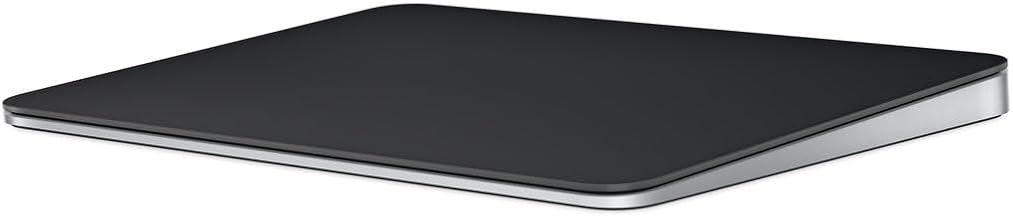
Surface area matters enormously with trackpads, and the ProtoArc T1 Plus and T1 Wired both offer a generous 6.4-inch pad that gives your gestures room to breathe. The Amazon Basics Multi-Touch Trackpad matches that size in a clean black finish, while Apple’s Magic Trackpad remains the gold standard for glass-smooth glide and precise haptics, now in a sharp black option. The ProtoArc aluminum wired model and the Homiguar 3-in-1 both feel well made, with the aluminum builds giving a premium, stable feel that stays planted during use.
Performance
Gesture tracking is where these separate. The ProtoArc T1 Plus impresses with reliable multi-gesture recognition and the convenience of switching between three Bluetooth devices without a receiver. The wired ProtoArc models deliver rock-steady, lag-free input that is ideal for precision work, since there is no battery or pairing to think about. Apple’s Magic Trackpad still sets the bar for buttery gesture fluidity, though its Windows support relies on third-party drivers. The Homiguar’s 3-in-1 connectivity makes it the flexible choice for people juggling multiple machines.
Pros & Cons
- Large gesture surfaces on the ProtoArc and Amazon Basics models for comfortable multi-touch navigation.
- Wrist-friendly ergonomics that reduce the gripping strain of a mouse.
- Flexible connectivity, from multi-device Bluetooth to reliable wired options.
- Rechargeable wireless models eliminate disposable batteries.
- Apple Magic Trackpad needs third-party software for full Windows gesture support.
- Precision cursor work like detailed photo editing can still favor a traditional mouse.
Alternatives to Consider
If you do a lot of pixel-precise work, pairing a trackpad with a conventional mouse gives you the best of both worlds. Gamers will still want a dedicated gaming mouse for competitive play. But for gesture-heavy productivity and daily navigation, a large Windows trackpad like the ProtoArc T1 Plus is a genuinely refreshing change, and the wired T1 is the pick for anyone who never wants to think about charging.
Frequently Asked Questions
Do PC trackpads support Windows gestures?
The dedicated Windows models here support multi-finger gestures like scrolling, zooming, and switching desktops. The Apple Magic Trackpad requires third-party drivers to unlock full gesture support on Windows.
Wired or wireless: which is better?
Wireless keeps your desk tidy and lets you reposition freely, while wired options like the ProtoArc T1 offer zero-latency, no-charging reliability. Choose based on whether flexibility or consistency matters more to you.
Can I use a trackpad for gaming?
Trackpads are excellent for strategy and casual games but are not ideal for fast-paced competitive titles, where a gaming mouse offers better precision and speed.
Are trackpads better for wrist pain?
Many users find them gentler because your hand stays flat and relaxed, reducing the repetitive gripping motion a mouse requires. Individual results vary, so a trial period helps.
Verdict
The ProtoArc T1 Plus is our top pick for Windows users thanks to its large surface, accurate gestures, and handy three-device switching. If you want the smoothest glide and use a Mac, Apple’s Magic Trackpad remains unmatched, while the wired ProtoArc T1 is the reliable, no-fuss choice for precision desktop work.