Our Top Picks
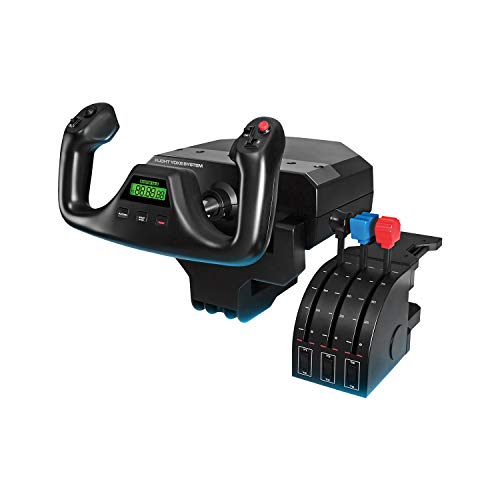 Logitech G PRO Flight Yoke System Professional Simulation18.9 x 15.8 x 9.1 inches6.17 poundsCheck on Amazon
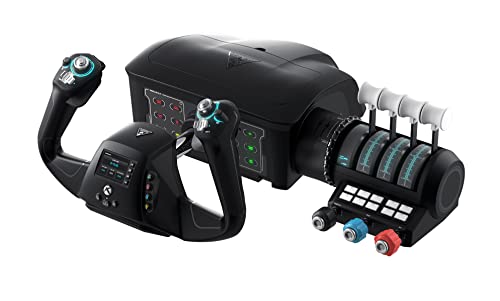 Turtle Beach VelocityOne Flight Universal Control System19.01 x 7.2 x 19.5 inches10 poundsCheck on Amazon
 Honeycomb Alpha Flight Controls Yoke & Switch PanelAlpha19 x 13.1 x 10.3 inches10.8 poundsCheck on Amazon
Microsoft Flight Simulator rewards a yoke more than almost any other sim does. Hand-flying a Cessna 172 on a keyboard or a gamepad works for a few minutes, but the moment you try a smooth crosswind landing or a long cross-country in a Boeing, you start hunting for something with a real pull-push shaft and a wheel that rotates. This guide is written for the pilot who has decided that a yoke, not a joystick, is the right tool, and who now has to pick between very different designs: compact desk yokes, full panel-style systems, and airliner-flavored bundles.
The decision is rarely just “which yoke”. It is also about which console or PC you fly on, whether you want a throttle and trim wheel in the box, and whether rudder pedals come along or get added later. Below, eight options are compared using only what the product listings state, so you can match the hardware to your desk, your platform, and the kind of flying you actually do in 2026.
Quick Picks
Logitech G PRO Flight Yoke System Professional Simulation - Black | Professional simulation, 3 modes, 75 programmable controls, configurable knobs, USB connection
One of the home product options compared in this guide.
View on Amazon
Thrustmaster TCA SKY YOKE – Flight Yoke and Throttle for PS5 and PC | Flight simulation controller for beginners, first PS5 yoke, 7 axes, built-in trim wheel, rudder control
One of the home product options compared in this guide.
View on Amazon
Logitech G Pro Flight Yoke System + Pro Flight Rudder Pedals Bundle
One of the home product options compared in this guide.
View on AmazonTurtle Beach VelocityOne Flight Universal Control System - Xbox Series X & Xbox Series S, Xbox One & Windows 10 & 11 PCs with Yoke Handle, Throttle Quadrant, Trim Wheel & Rudder Controls
One of the home product options compared in this guide.
View on Amazon
Honeycomb Alpha LITE | Compact yoke for flight simulation, 180 rotation, programmable buttons, sturdy steel shaft
One of the home product options compared in this guide.
View on AmazonHoneycomb Alpha Flight Controls Yoke & Switch Panel | Compatible w/PC & mac, flight simulator yoke w/ 180° rotation, steel shaft, ignition switch
One of the home product options compared in this guide.
View on Amazon
Thrustmaster TCA Yoke & Quadrant Boeing Edition Flight Pack - XBOX & PC | 787 Dreamliner replica, pendular motion, throttle unit with autopilot, metal build, 35 action buttons, 2 extra axes, for MSFS
One of the home product options compared in this guide.
View on Amazon
Thrustmaster TCA SKY YOKE – Yoke & Throttle – XBOX & PC | Flight simulation controller for beginners, Push-Pull yoke, built-in trim wheel, rudder control
One of the home product options compared in this guide.
View on Amazon| Product | Best for | Key feature from the listing |
|---|---|---|
| Logitech G PRO Flight Yoke System | PC pilots wanting a stand-alone pro-style yoke | 3 modes, 75 programmable controls, USB |
| Thrustmaster TCA Sky Yoke (PS5 and PC) | Beginners on PlayStation 5 or PC | 7 axes, built-in trim wheel, rudder control |
| Logitech G Pro Yoke + Rudder Pedals Bundle | Pilots who want pedals from day one | Yoke system plus Pro Flight Rudder Pedals |
| Turtle Beach VelocityOne Flight | Xbox or Windows pilots wanting an all-in-one setup | Yoke handle, throttle quadrant, trim wheel, rudder controls |
| Honeycomb Alpha Lite | Small desks and tight budgets in this category | Compact yoke, 180 rotation, steel shaft |
| Honeycomb Alpha Yoke and Switch Panel | PC or Mac pilots who like switches within reach | Ignition switch, 180-degree rotation, steel shaft |
| Thrustmaster TCA Yoke and Quadrant Boeing Edition | Airliner fans flying MSFS on Xbox or PC | 787 Dreamliner replica, throttle unit with autopilot |
| Thrustmaster TCA Sky Yoke (Xbox and PC) | Newcomers on Xbox or PC | Push-pull yoke, built-in trim wheel, rudder control |
How to Choose
Match the platform first
Compatibility is the one filter that cannot be fixed later. The listings name their platforms explicitly: some are PS5 and PC, some are Xbox and PC, one is PC and Mac, and others simply say USB. If you fly on a console, read the platform line before anything else, because a yoke built for one console family will not necessarily work on the other. PC pilots have the widest choice.
Decide how much cockpit you want
A yoke alone is only one piece. Throttle quadrants, trim wheels, switch panels and rudder controls are what turn a single lever into a flight deck. Count what each listing includes, then count what you would need to buy separately. A yoke that looks cheaper can end up costing more once a throttle and pedals are added.
Check the mechanical details a buyer can verify
Look for the build language in the title: steel shaft, metal build, rotation range, number of axes, number of programmable buttons. A longer rotation range and a metal shaft usually point to a sturdier feel, while axis count tells you how many functions, such as mixture or propeller, can sit on dedicated controls instead of keyboard shortcuts.
What to ignore, and where budget models cut corners
Ignore button counts as a standalone measure; a huge number is only useful if you will bind each one. Cheaper units tend to economize on desk-clamp stability, included throttle hardware, and pedals. If your desk is thin or wobbly, factor in a way to secure the yoke, because even a good shaft feels vague on a sliding base.
The 8 Best Options
Logitech G PRO Flight Yoke System
This is the choice for a PC pilot who wants a professional-style yoke without committing to a full bundle. The listing highlights three modes, 75 programmable controls and a simple USB connection, which makes it easy to map to MSFS functions.
- Strength: a very large number of programmable controls for custom bindings.
- Strength: configurable knobs and multiple modes suit different aircraft setups.
- Trade-off: the listing shows no rudder pedals, so yaw control needs a separate purchase.
Skip it if you fly on a console or want everything in one box.
Thrustmaster TCA Sky Yoke (PS5 and PC)
Aimed squarely at newcomers, this one is described as a first PS5 yoke. It pairs the yoke with a throttle and lists seven axes, a built-in trim wheel and rudder control, so a beginner can learn the core flight workflow with one purchase.
- Strength: yoke and throttle come together, which avoids a second shopping trip.
- Strength: trim wheel and rudder control are built in.
- Trade-off: it is framed as a beginner controller, so advanced users may outgrow it.
Skip it if you fly on Xbox, since another listing covers that platform.
Logitech G Pro Yoke + Rudder Pedals Bundle
For pilots who already know pedals matter, this bundle pairs the Logitech yoke system with Pro Flight Rudder Pedals. Taxiing, crosswind correction and coordinated turns all benefit from having feet on real pedals instead of a twist handle or a keyboard.
- Strength: yoke and pedals arrive as a matched set.
- Strength: removes the need to hunt for compatible pedals later.
- Trade-off: the listing gives few details beyond the two components, so check what is not included, such as a throttle.
Skip it if desk or floor space under the desk is limited.
Turtle Beach VelocityOne Flight
This universal control system covers Xbox Series X and S, Xbox One and Windows 10 and 11 PCs. The listing mentions a yoke handle, throttle quadrant, trim wheel and rudder controls, so it reads like a compact cockpit rather than a single accessory.
- Strength: yoke, throttle quadrant, trim wheel and rudder controls in one system.
- Strength: works across Xbox consoles and Windows PCs.
- Trade-off: an all-in-one unit takes up more desk area than a lone yoke.
Skip it if you only have room for something small.
Honeycomb Alpha Lite
The Lite is the compact entry in the Honeycomb range. The listing mentions a compact yoke, 180 rotation, programmable buttons and a sturdy steel shaft, which is the combination a pilot with a small desk is usually after.
- Strength: compact footprint suits tight setups.
- Strength: steel shaft and programmable buttons are named in the title.
- Trade-off: no switch panel or throttle is listed, so you build the rest of the cockpit yourself.
Skip it if you want integrated switches.
Honeycomb Alpha Yoke and Switch Panel
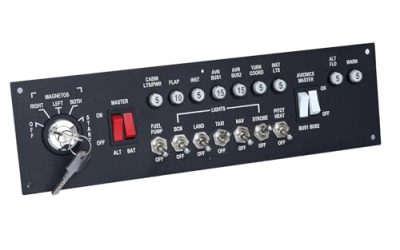
This version adds a switch panel with an ignition switch to the same family of flight controls, and it is listed as compatible with PC and Mac. That makes it a strong match for GA-style flying where magnetos, lights and fuel pumps are part of the routine.
- Strength: switch panel puts aircraft systems under your fingertips.
- Strength: 180-degree rotation and a steel shaft are both in the listing.
- Trade-off: no throttle quadrant is mentioned, so a separate throttle is likely needed.
Skip it if you are on a console.
Thrustmaster TCA Yoke and Quadrant Boeing Edition
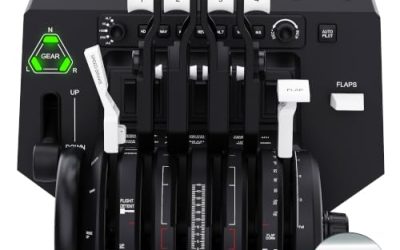
Modeled on the 787 Dreamliner, this pack is the clear pick for airliner fans. The listing describes pendular motion, a metal build, a throttle unit with autopilot, 35 action buttons and two extra axes, and it specifically names MSFS.
- Strength: metal build and Boeing-style layout suit airliner flying.
- Strength: throttle with autopilot controls is part of the pack.
- Trade-off: the styling is airliner-oriented, so light-aircraft pilots may want something more generic.
Skip it if you mostly fly small general-aviation planes.
Thrustmaster TCA Sky Yoke (Xbox and PC)
The Xbox-and-PC sibling of the beginner Sky Yoke, this one lists a push-pull yoke, built-in trim wheel and rudder control alongside a throttle. It gives Xbox pilots a straightforward starting point.
- Strength: yoke and throttle included, with a built-in trim wheel.
- Strength: aimed at beginners, so the learning curve is gentle.
- Trade-off: it is not marketed as an advanced system.
Skip it if you fly on PlayStation 5, where the other Sky Yoke listing fits better.
Which One Fits Your Situation
You are on Xbox and want a full cockpit feel
The Turtle Beach VelocityOne Flight brings a yoke handle, throttle quadrant, trim wheel and rudder controls in one system, so it is the most complete Xbox-friendly listing here. If airliners are your thing, the Thrustmaster Boeing Edition is the alternative.
You fly on a small PC desk
Start with the Honeycomb Alpha Lite. Its compact design and steel shaft fit a crowded workspace, and you can add a throttle or pedals as the budget allows.
You want maximum controls on PC
Choose the Logitech G PRO Flight Yoke System for its 75 programmable controls, or step up to the Logitech bundle if rudder pedals are on your list anyway.
Common Mistakes
- Buying before checking whether the listing names your console or operating system.
- Assuming a yoke includes a throttle quadrant or rudder pedals when the listing never mentions them.
- Choosing an airliner replica for a Cessna-style flying habit, or the reverse.
- Ignoring desk thickness and clamp stability, which affects how the shaft feels in use.
- Counting programmable buttons instead of the axes and rotation range that matter for smooth control.
Related guides
- Gaming Headset Noise Isolation Vs Active Noise Cancellation
- Does Gaming Headset Noise Cancellation Work On Microphone
- How Much Does It Cost To Run A Gaming Pc Per Month
Frequently Asked Questions
Do I need rudder pedals with a yoke?
Not strictly, since some systems include rudder control on the yoke or throttle. Pedals do make taxiing and crosswind corrections more natural, and the Logitech bundle is the one listing here that includes them as a separate item.
Is a yoke better than a joystick for Microsoft Flight Simulator?
For light aircraft and airliners, many pilots prefer a yoke because its layout mirrors the real cockpit. Fighter-style flying fits a joystick better, so the answer depends on the aircraft you spend time in.
Can I use a PS5 yoke on Xbox?
You should not assume so. The listings name specific platforms, so choose the version that matches your console, such as the Xbox and PC Sky Yoke instead of the PS5 and PC one.
What is the benefit of a steel shaft?
Two listings mention a steel shaft, which suggests a sturdier build than plastic. It is one of the more concrete durability details you can compare when the rest of the specs look alike.
FAQ
Do I need rudder pedals with a yoke?
Is a yoke better than a joystick for Microsoft Flight Simulator?
Can I use a PS5 yoke on Xbox?
What is the benefit of a steel shaft?
More from Amazon
Programs that pair well with the guide above. Offers and eligibility are set by Amazon and may change.
Free shipping on eligible items, Prime Video and more. Eligible new members can start with a free trial.
Start a Prime free trialAd-free music streaming. Eligible new subscribers can start with a free trial.
Try Music Unlimited freeA Prime membership for ages 18-24 with a trial period. Eligibility is set by Amazon.
See Prime for Young AdultsAudiobooks and podcasts to listen to on the go. Eligible new members can start with a free trial.
Try Audible freeAs an Amazon Associate we earn from qualifying purchases.