Our Top Picks
 Thrustmaster T-Flight Hotas X USB Flight Sim Stick10.43 x 10 x 9.47 inches4.32 PoundsCheck on Amazon
 Thrustmaster T-Flight Full Kit HOTAS with Rudder Pedalsregular18.7 x 14.21 x 12.68 inches12.37 poundsCheck on Amazon
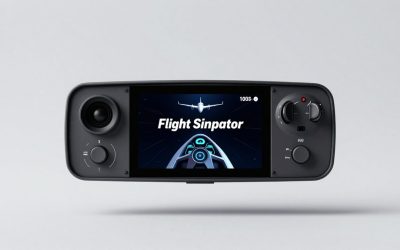
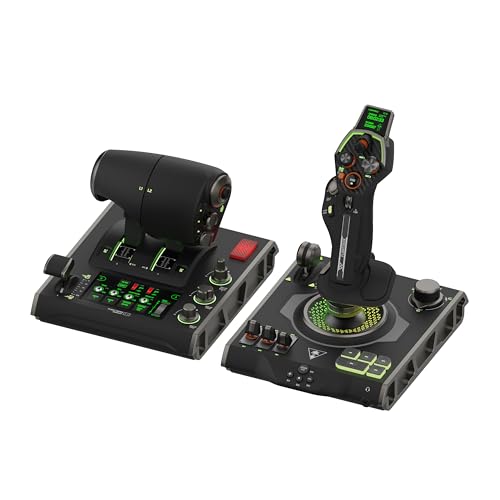 Turtle Beach VelocityOne Flightdeck Universal HOTAS Simulation System6.93 x 20.63 x 10.04 inches9.41 PoundsCheck on Amazon
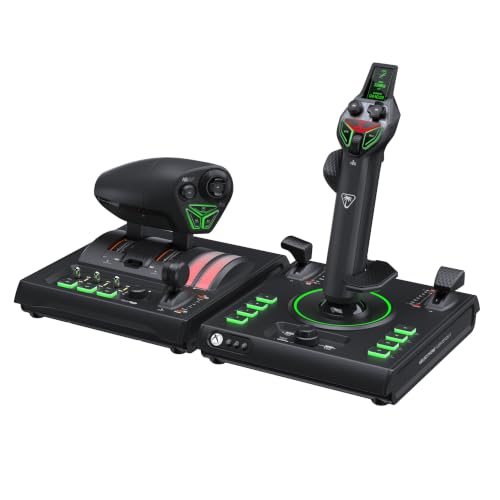 Turtle Beach VelocityOne H.O.T.A.S. Flight Sim Controls XBOXOne Size7.48 x 8.19 x 9.92 inches3.09 PoundsCheck on Amazon
The Logitech G X56 H.O.T.A.S. is the most capable controller in this group for serious PC flight and space sims, thanks to its twin throttles, adjustable stick springs and very large programmable control count. HOTAS stands for hands on throttle and stick, a two-piece setup that puts a joystick in one hand and a throttle in the other so you can fly without reaching for the keyboard. Newcomers on a tighter learning curve should look at the Thrustmaster T-Flight options, while Turtle Beach’s VelocityOne sets suit pilots who want Hall-effect sensing and a display on the stick.
Quick List
- Logitech G X56 – best for twin throttles and deep customization
- Thrustmaster T-Flight Hotas X – best for a simple first PC flight setup
- Thrustmaster T-Flight Full Kit – best for adding rudder pedals out of the box
- Thrustmaster T-Flight Hotas One MSFS 2024 Collector Edition – best for Microsoft Flight Simulator fans
- Turtle Beach VelocityOne Flightdeck – best for a premium PC-only HOTAS with a trim wheel and display
- Turtle Beach VelocityOne H.O.T.A.S. – best for a newer Hall-effect pair with dual throttle
Which One Is Right for You?
| If you… | Choose |
|---|---|
| want the deepest control set for space and combat sims | Logitech G X56 |
| are new to HOTAS and want a straightforward setup | Thrustmaster T-Flight Hotas X |
| want pedals included so you can use rudder control | Thrustmaster T-Flight Full Kit |
| mainly fly Microsoft Flight Simulator | Thrustmaster T-Flight Hotas One MSFS 2024 Collector Edition |
| want a premium stick with a trim wheel and on-stick display | Turtle Beach VelocityOne Flightdeck |
| want a newer pair with two throttle levers and Hall-effect sensing | Turtle Beach VelocityOne H.O.T.A.S. |
The right choice depends on whether you want to learn the basics cheaply or fly deeply configured sims. Entry-level sets reward quick starts and light desk space, while the larger systems add axes, buttons and adjustment that you may not use in your first month. Think about the sims you fly, whether you need rudder control, and how much desk and cable space you can spare.
Thrustmaster T-Flight Hotas X USB Flight Sim Stick & Throttle - PC | Detachable design, adjustable resistance, 12 programmable buttons, 5 axes, dual rudder control, preset memory, ergonomic
Chosen because it specifies Detachable design and adjustable resistance.
View on AmazonThrustmaster T-Flight Full Kit HOTAS with Rudder Pedals - XBOX & PC | Hall-Effect joystick, 5 axes, 14 mappable buttons, detachable throttle, hat switch, adjustable resistance, for flight sims
Chosen because it specifies XBOX & PC and Hall-Effect joystick.
View on Amazon
Logitech G X56 H.O.T.A.S Throttle and Joystick Flight Simulator Game Controller, 4 Spring Options, +189 Programmable Controls, RGB Lighting, 2x USB, PC - Black
Chosen because it specifies 4 Spring Options and +189 Programmable Controls.
View on Amazon
Thrustmaster T-Flight Hotas One MSFS 2024 Collector Edition - XBOX & PC | Detachable design, Officially licensed, 5 axes, 14 buttons, rapid trigger, hat switch, detachable throttle, dual rudder
Chosen because it specifies XBOX & PC and Detachable design.
View on AmazonTurtle Beach VelocityOne Flightdeck Universal HOTAS Simulation System - PC | Windows 10 & 11 PCs, Joystick & Throttle for Air & Space Combat Simulation, Touch Display, 139 Mappable Controls, Black
Chosen because it specifies Windows 10 & 11 PCs and Joystick & Throttle for Air & Space Combat Simulation.
View on AmazonTurtle Beach VelocityOne H.O.T.A.S. Flight Sim Controls XBOX, PC | XBOX Series X|S, XBOX One, Flightstick II & Dual Throttle, 15 Hall-Effect Axes, 73 Programmable Inputs, Display, RGB, Black
Chosen because it specifies XBOX Series X and XBOX One.
View on AmazonAll 6 Picks in Detail
1. Logitech G X56 – Best for twin throttles and deep customization
As an Amazon Associate we earn from qualifying purchases at no extra cost to you.

The Logitech G X56 H.O.T.A.S. is a PC flight controller made of a joystick and a separate twin throttle. Its listing highlights four spring options and more than 189 programmable controls, plus RGB lighting. The product line comes from Logitech G’s flight-sim range, and the X56 is widely used by players of space and combat sims who need many buttons, hats and mini sticks on both hands.
It suits pilots who want to bind a lot of functions without touching the keyboard, such as power distribution in a space sim or radio and weapons commands in a combat title. Its adjustable stick tension helps if you want a heavier or lighter feel.
Desk fit deserves thought here. The stick and throttle are substantial units, so plan on a sturdy desk or a mounting plate, and leave room to move your elbows. Many pilots keep the throttle on the left and bring the stick in at a slight angle to reduce wrist strain during long sessions. Spring changes are tool-light, so experiment with the four included springs over a few flights before settling on one.
- Controls: more than 189 programmable, per the listing
- Stick springs: four options, per the listing
- Throttle: twin, with independent levers
- Sensors: Hall-effect on the main stick axes, per Logitech’s description
- Connection: two USB cables, PC
- Lighting: RGB, per the listing
Pros
- Huge control count for demanding sims
- Adjustable stick tension and separate throttles
Cons
- Large and complex for casual players
- Needs two USB connections and desk space
It offers more buttons and axes than the Thrustmaster T-Flight Hotas X, which is better if you want a smaller, lower-effort setup.
Because the X56 exposes so many controls, plan to learn its software and profiles. Start with a handful of axes and buttons mapped to the functions you use every flight, then add more as you go. Check the listing for driver and software notes before you buy.
2. Thrustmaster T-Flight Hotas X – Best for a simple first PC flight setup

The T-Flight Hotas X is a long-running entry point into HOTAS flying. The listing describes a USB flight stick and throttle for PC with a detachable design, adjustable resistance, 12 programmable buttons and five axes. That keeps the learning curve gentle while still giving you proper throttle and stick separation for sims.
It suits newcomers who want to try flying with a joystick without committing to a large rig. The detachable throttle lets you place the units on a desk or use them closer together on a small surface.
Beginners often underestimate how much a detachable layout helps. You can start with both units joined for stability on a small desk, then separate them later as you get comfortable and want the throttle closer to your left hand. A small non-slip mat under the base also keeps the unit from sliding during aggressive maneuvers.
- Platform: PC, per the listing
- Buttons: 12 programmable
- Axes: five, per the listing
- Design: detachable throttle and stick
- Stick resistance: adjustable
- Sensor type: confirm on listing
Pros
- Easy to set up and learn
- Detachable layout saves space
Cons
- Fewer buttons for complex sims
- A single throttle lever limits multi-engine control
Compared with the T-Flight Full Kit, it leaves out rudder pedals, which makes it simpler but less complete.
If your first aim is to try flight sims and see whether you enjoy them, this is a sensible starting point. Check the listing to confirm the version and platform before you order.
3. Thrustmaster T-Flight Full Kit – Best for adding rudder pedals out of the box

The Full Kit bundles the T-Flight stick and throttle with rudder pedals, and the listing names Xbox and PC support. It describes a Hall-effect joystick, five axes, 14 mappable buttons and a detachable throttle. Rudder pedals matter because they control yaw, which is awkward to manage with a twist stick alone.
It suits beginners who already know they want rudder control, and it avoids the need to buy pedals separately. It is also useful for flying general aviation aircraft, where coordinated turns are part of the experience.
Pedals add a new learning step, so give yourself a few flights to find the right foot position. Place them where your heels can rest without strain, and use the sim’s control settings to adjust the dead zone so small foot movements do not cause unwanted yaw. If you fly mostly with the autopilot engaged, pedals matter less, but for takeoffs and landings they make a clear difference.
- Platforms: Xbox and PC, per the listing
- Included pedals: rudder pedals, per the listing
- Stick sensor: Hall-effect joystick, per the listing
- Axes: five
- Buttons: 14 mappable
- Throttle: detachable
Pros
- Rudder pedals included in one purchase
- Hall-effect stick sensing, per the listing
Cons
- Takes more floor space than a stick and throttle alone
- Same basic throttle as the other T-Flight sets
It is the natural step up from the Hotas X if you want pedals included, while the Hotas X remains the lighter choice.
Check which version you are ordering, since T-Flight sets come in several platform variants.
4. Thrustmaster T-Flight Hotas One MSFS 2024 Collector Edition – Best for Microsoft Flight Simulator fans

This edition is the T-Flight Hotas One with an official Microsoft Flight Simulator 2024 branding. The listing mentions a detachable design, official licensing, five axes, 14 buttons and a rapid trigger, and says it works with Xbox and PC. It shares its core hardware with the regular Hotas One, so you are mostly paying for the styling and any included extras.
It suits MSFS fans who want a branded controller that is simple to set up. It also suits console pilots who may later move to PC.
One practical point is the lack of throttle detent gates described in some reviews of the regular model, so do not expect an afterburner click or reverse stop. For airliners and general aviation that is fine, but combat pilots may want a throttle with more tactile stops. The integrated rudder lever on the throttle is a useful way to add yaw without buying pedals.
- Platforms: Xbox and PC, per the listing
- Axes: five
- Buttons: 14
- Design: detachable stick and throttle
- Licensing: officially licensed collector edition
- Included extras or bonus content: confirm on listing
Pros
- Easy entry for MSFS players
- Works across Xbox and PC, per the listing
Cons
- Core controls match the regular model
- Branding may not matter to every pilot
It is the most MSFS-focused T-Flight option, while the Full Kit is the one that comes with pedals.
If you fly other sims too, confirm that the controls map cleanly there before committing to this edition.
5. Turtle Beach VelocityOne Flightdeck – Best for a premium PC-only HOTAS with a trim wheel and display

The VelocityOne Flightdeck is Turtle Beach’s PC HOTAS for Windows 10 and 11. The listing describes a joystick and throttle for air and space combat, and Turtle Beach’s product information describes Hall-effect sensors, a trim wheel on the stick and a full-color display for adjustments. It is built for pilots who want an all-in-one system with detailed customization.
It suits users who want a step up from entry-level sets and appreciate on-device feedback and a dedicated trim wheel. It also suits desk setups where you want the stick and throttle to look and feel like a coordinated product.
Spend a little time with the companion software, since the display and trim wheel are most useful when set up for your aircraft. A good first step is to assign the trim wheel to pitch trim, then use the display to fine-tune lighting and haptic feedback. Because the stick and throttle are separate USB devices, route cables so they do not cross your pedals.
- Platform: Windows PC, per the listing
- Sensors: Hall-effect on main axes, per Turtle Beach
- Trim wheel: on the stick, per Turtle Beach
- Display: full-color screen for adjustments, per Turtle Beach
- Connection: two USB devices
- Exact button count: confirm on listing
Pros
- Trim wheel and display add practical flight features
- Hall-effect sensing reduces wear
Cons
- PC-only listing
- Does not include force feedback
Compared with the Logitech G X56, it leans toward a polished, display-driven experience rather than the largest possible control count.
Confirm the throttle layout and software requirements on the page before buying.
6. Turtle Beach VelocityOne H.O.T.A.S. – Best for a newer Hall-effect pair with dual throttle
This listing pairs the VelocityOne Flightstick II with the Dual Throttle for Xbox and PC. The listing mentions Hall-effect sensing and 15 axes in the bundle, and Turtle Beach’s launch information describes the stick as having 16-bit Hall-effect sensors and the throttle as having dual levers with a lock. It is the newest pairing here, so independent long-term feedback is limited.
It suits pilots who want console and PC compatibility with dual-throttle control, and who prefer a more modern stick design with an ambidextrous shape.
Because this set is new, take a careful look at the listing for what is in the box and which platform version it is. The maker’s description of 15 axes across the bundle suggests plenty of room for engine and pitch controls, and the throttle’s swappable detents and adjustable tension let you tune its feel. Use the companion app to set dead zones and lighting.
- Platforms: Xbox and PC, per the listing
- Stick: Flightstick II with Hall-effect sensors
- Throttle: Dual Throttle with two levers
- Axes: 15 in the bundle, per Turtle Beach
- Programmable inputs: confirm on listing
- Software: Turtle Beach companion app, per the maker
Pros
- Dual-lever throttle with lock for single or twin engines
- Works across Xbox and PC, per the listing
Cons
- Newer product with less independent history
- Likely a higher commitment than entry-level options
It is the closest alternative to the Flightdeck, with a newer stick and a dual-lever throttle.
Check that you are ordering the correct platform version before purchase.
Specs Compared
| Product | Platform | Axes | Buttons or controls | Sensor type | Throttle |
|---|---|---|---|---|---|
| Logitech G X56 | PC | Confirm on listing | 189+ programmable | Hall-effect stick axes | Twin |
| Thrustmaster T-Flight Hotas X | PC | 5 | 12 programmable | Confirm on listing | Detachable single |
| Thrustmaster T-Flight Full Kit | Xbox and PC | 5 | 14 mappable | Hall-effect joystick | Detachable, with rudder pedals |
| Thrustmaster T-Flight Hotas One MSFS 2024 Collector Edition | Xbox and PC | 5 | 14 | Confirm on listing | Detachable single |
| Turtle Beach VelocityOne Flightdeck | PC | Confirm on listing | Confirm on listing | Hall-effect | Throttle unit |
| Turtle Beach VelocityOne H.O.T.A.S. | Xbox and PC | 15 in bundle | Confirm on listing | Hall-effect | Dual lever |
How We Chose These
This guide is based on desk research of listing titles, manufacturer pages and published specifications, not on physical trials. We compared platform support, axes, button counts, sensor type, throttle design and whether pedals are included. We looked at who each set suits, from a first-time pilot to someone running a large space or combat sim profile. Where a listing does not state a value, such as exact sensor type or button count, we marked it to confirm on the product page. We also noted where newer products have limited independent history so you can weigh that when choosing.
What to Look For
Platform and compatibility
Start with the platform you use. Several listings here support Xbox and PC, while others are for PC only. Even on PC, check which simulators you fly, since a few older sims need profiles or a mapping tool. Look for support for Windows 10 and 11 in the listing, and check whether the stick and throttle connect over one or two USB cables, because a crowded desk may need a hub or extra ports.
Axes, buttons and hats
Axes control analog movements such as pitch, roll, yaw and throttle. Five axes cover the basics, while more axes let you add mixture, propeller pitch or independent engines. Buttons and hat switches cover everything else, from landing gear to cockpit views. A simple rule of thumb: count the controls you need for your favorite aircraft and add 30 percent for growth. A starter set with 12 to 14 buttons is fine for general aviation, while combat and space sims quickly use more than 30.
Sensors and feel
Hall-effect sensors read position through magnets without physical contact, which reduces wear and drift compared with potentiometers. Look for them if you plan long-term use. Stick feel also depends on spring tension and the dead zone around the center. Adjustable springs, as on the Logitech and Thrustmaster sets, let you tailor resistance, while very light springs make fine corrections easier at the cost of stability in turbulence.
Throttle design
A single lever is enough for light aircraft and many beginner jets. A twin throttle lets you control two engines independently or combine them with a lock. Detents, friction adjustment and tension controls help you hold a setting without creeping. If you fly airliners or helicopters, think about whether you also need a collective, rudder pedals or a separate trim control.
Desk space and mounting
HOTAS sets can feel unstable on a lightweight desk. Weighted bases help, and many pilots mount the throttle to the left side of the desk and the stick to the right. Some units can be clamped or screwed to a plate or rig, which makes the setup much more stable. Measure your available space, including room for pedals under the desk.
Software, profiles and updates. Every HOTAS relies on software to map controls to actions, whether through the game’s own binding screen or the maker’s utility. Look for the ability to save multiple profiles, one for each aircraft or sim, so you do not have to rebind the stick each time. Keep firmware current if the maker offers updates, and keep a written list of your bindings so you can restore them after a reinstall. If you use head tracking or VR, remember that you will not see the buttons, so choose controls with clearly different shapes and positions.
Upgrade path. Think about where you want to be in a year. Starter sets are fine for learning, but many pilots later add rudder pedals, a separate throttle quadrant or a mounting stand. Check whether the set you choose can connect to extra accessories from the same brand, and whether its stick and throttle can be used separately if you decide to replace one half. Staying within a brand often keeps software and profiles simpler.
Comfort over long sessions. Flight sims can run for hours, so wrist and shoulder position matter. Set your chair height so your forearm rests lightly on the desk when holding the stick, and keep the throttle at a similar height so both shoulders stay level. Take short breaks and avoid gripping the stick tightly; a light touch is more accurate and less tiring.
Worked example: choosing for a first month. Imagine you are new to flight sims and want to try both Microsoft Flight Simulator and a space game. You need at least five axes and about 14 buttons for starters. The T-Flight options cover that and keep the cost of entry modest. If you quickly find yourself wishing you had more switches and a second throttle lever, move up to the X56 or a VelocityOne set and use your T-Flight as a backup.
Questions
What does HOTAS mean?
It stands for hands on throttle and stick, a layout borrowed from real fighter cockpits where the pilot controls the aircraft without taking their hands off the primary controls. In sims it means a joystick and a separate throttle.
Do I need rudder pedals?
Not at first. A twist stick or throttle rudder control can work for casual flying, but pedals give smoother yaw control and are common in realistic setups.
Are Hall-effect sensors worth it?
They are a good choice for durability, since they use magnets instead of contact parts that wear. They do not automatically make a stick feel better, so check the spring and layout as well.
Will these work with Microsoft Flight Simulator?
Most of the sets here are commonly used with it, and one listing is a branded edition. Always confirm the platform version and check the default profile after you connect.
Can I use a HOTAS on a console?
Some listings here mention Xbox support, while others are PC only. Check the platform in the listing title before you buy.
How much desk space do I need?
Allow room for two units side by side plus cable slack, and more if you plan to add pedals. A weighted base or clamp reduces movement.
Update History
- October 20, 2026 – Initial publication; product set drawn from current catalog listings.
- Check the product page for current specifications and availability before buying.
Sources
- Manufacturer product and specification pages for Logitech G, Thrustmaster and Turtle Beach
- Retailer listing titles and specification fields