
Shopping for a gaming laptop under $1,500 in 2026 means navigating a market that has never been more crowded — or more confusing. NVIDIA’s RTX 50-series has trickled down into mid-range machines, but the badge on the lid tells you surprisingly little: an RTX 5060 in a well-cooled 16-inch chassis can comfortably outrun the same GPU crammed into a thin 15-inch shell running at a lower power limit. Add in mismatched CPU pairings, 512GB SSDs that fill up after four modern installs, and panels that advertise 165Hz while quietly skimping on color coverage, and it’s easy to overspend on the wrong machine.
This guide cuts through that noise. We’ve focused on laptops that genuinely land under $1,500 at typical street prices — not “under $1,500 during a two-hour flash sale” — and evaluated them on the things that actually determine your frame rates and your ownership experience: sustained GPU power, thermal headroom, panel quality, memory and storage configuration, and upgradeability. Below you’ll find our current picks, a practical buying checklist, hands-on impressions of each machine, and answers to the questions we get asked most often.
Our top picks
 ASUS ROG Strix G16
- Unleash power with Windows 11 Home, an Intel…
- Multitask seamlessly with 16GB of DDR5-5600MHz memory and…
- Immerse yourself in stunning visuals with the smooth…
 msi Katana 15 15.6” 165Hz QHD Gaming
- Supercharged Process: The 13th Gen
- Simplistic Design: Enjoy the latest generation of Windows…
- Beyond Fast: The NVIDIA GeForce RTX 4070 GPU…
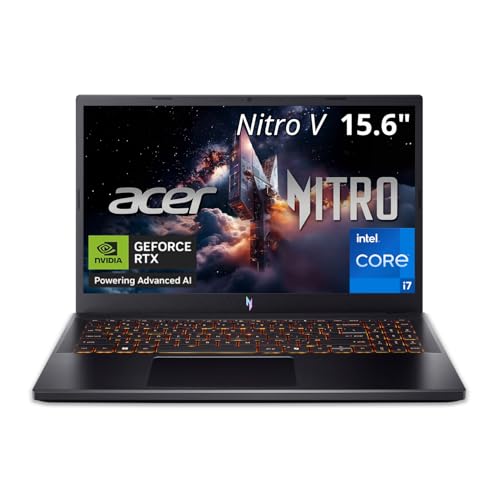
 acer Nitro V 15.6” FHD IPS 165Hz
RTX 5050 includes 8GB of dedicated GDDR7 VRAM
Thunderbolt 4 port supports fast data and display output
165Hz refresh rate suits fast-paced gaming
16GB of DDR4 memory trails newer DDR5 laptops
At 4.66 pounds, it adds some heft to a bag
| Product | Key specs | |
|---|---|---|
| ASUS ROG Strix G16 | Unleash power with Windows 11 Home, an Intel… Multitask seamlessly with 16GB of DDR5-5600MHz memory and… Immerse yourself in stunning visuals with the smooth… | Check price |
| msi Katana 15 15.6” 165Hz QHD Gaming | Supercharged Process: The 13th Gen Simplistic Design: Enjoy the latest generation of Windows… Beyond Fast: The NVIDIA GeForce RTX 4070 GPU… | Check price |
| acer Nitro V 15.6” FHD IPS 165Hz | Check price | |
 Alienware 16 Aurora Gaming Laptop Alienware 16 Aurora Gaming Laptop | Brilliant display: Go deeper into games with a… Game changing graphics: Step into the future of… Innovative cooling: A newly designed Cryo-Chamber structure focuses… | Check price |
 GIGABYTE GIGABYTE | GIGABYTE GiMATE as Your Smart AI Mate Intel Core i7-13620H Processor NVIDIA GeForce RTX 5060 Laptop GPU | Check price |
 Lenovo LOQ 15.6" IPS FHD 144Hz AMD Lenovo LOQ 15.6" IPS FHD 144Hz AMD | Performance That Dominates: Equipped with an AMD Ryzen… Stunning Visuals: The 15.6" Full HD IPS LCD… Smart Connectivity: Wi-Fi 6 and Bluetooth 5.3 deliver… | Check price |
 ASUS V16 Gaming Laptop ASUS V16 Gaming Laptop | Check price | |
 Acer Nitro V 15in Gaming Laptop ANV15-52-73D8 Acer Nitro V 15in Gaming Laptop ANV15-52-73D8 | Check price |
As an Amazon Associate we earn from qualifying purchases at no extra cost to you.
⚡ Save on Your Next PC — Amazon Prime
Prime members get fast free shipping on the systems above, plus early access to Prime Day & Black Friday PC deals. New members get a 30-day free trial.
Watch: Best Gaming Laptop Under $1500 — Video Review
How to Choose Gaming Laptop Under $1500
- GPU power limit, not just GPU name: An RTX 5060 can be configured anywhere from roughly 75W to 115W depending on chassis and cooling. Larger 16-inch laptops almost always run their GPUs harder, which can mean a 15–25% real-world performance gap between two machines with identical spec sheets. Check the total graphics power (TGP) before you buy.
- Match the CPU to your actual games: Modern HX-class chips like the i7-14650HX are excellent for simulation, strategy, and competitive shooters that lean on single-thread speed. But for most GPU-bound AAA titles at 1440p, a Ryzen 7 250 or i5-13420H won’t bottleneck you meaningfully — so don’t pay a premium for CPU headroom you’ll never use.
- Prioritize 16GB RAM and 1TB storage: 16GB of DDR5 is the sensible floor in 2026, and dual-channel matters — some budget configs ship a single stick, costing you real frames. A 512GB SSD is workable only if the laptop has a free M.2 slot; otherwise, budget for the 1TB model or plan an upgrade within a year.
- Resolution should match the GPU: A 1080p or 1200p 165Hz panel is the sweet spot for RTX 5050 and 5060 machines — you’ll hit high refresh rates natively without leaning entirely on upscaling. QHD panels are worth it only if you’re pairing them with something in the RTX 4070 class or above.
- Don’t ignore cooling and chassis size: Thin-and-light gaming laptops throttle. If you game for more than an hour at a stretch, a slightly thicker 15- or 16-inch machine with dual fans and generous vapor chamber or heatpipe coverage will deliver more consistent performance — and stay quieter doing it.
The Best Picks Reviewed
ASUS ROG Strix G16 (2025)
The Strix G16 is the most complete package in this price bracket, pairing a properly power-hungry RTX 5060 with a 14650HX that never gets in the way, plus a 16:10 165Hz panel that’s genuinely pleasant for work as well as play. Wi-Fi 7, a 1TB Gen 4 SSD, and ASUS’s well-proven cooling design make this the pick we’d hand to someone who just wants the safest high-performance choice.
MSI Katana 15
The Katana 15 is the outlier here — it’s the only machine on the list with an RTX 4070, and at QHD that extra silicon translates into a tangible advantage in demanding titles compared with the 5050 and 5060 crowd. The i7-13620H is a generation behind and the chassis runs warm under sustained load, but if raw GPU throughput per dollar is your priority, this is the value play.
Acer Nitro V 15
The Nitro V is the budget entry point, and it’s honest about what it is: an RTX 5050 with 8GB of fast GDDR7, a competent i5-13420H, and a sharp 165Hz IPS panel that punches above its price. The 512GB SSD is the obvious compromise, so factor in a drive upgrade — the chassis makes it straightforward — and you have a genuinely strong 1080p machine for well under the cap.
Alienware 16 Aurora
Alienware’s Aurora line brings the brand’s build quality and thermal engineering down to a sane price, and the 16-inch chassis gives the RTX 5050 more sustained headroom than you’d expect from the GPU tier. It’s the choice for buyers who value a premium chassis, keyboard, and support experience over squeezing out the last few frames per second.
Gigabyte Gaming A16
Gigabyte’s A16 is the quiet overachiever: an RTX 5060 and 1TB SSD in a 16-inch WUXGA chassis, usually at a noticeably lower price than comparably specced rivals. The i7-13620H is the one dated component, but for a GPU-bound gaming machine at 1200p it’s more than adequate, and the extra vertical screen space is a real quality-of-life win.
Frequently Asked Questions
Is an RTX 5060 enough for 1440p gaming in 2026?
Yes, with realistic expectations. At 1440p you’ll comfortably hit 60fps or better in most modern titles with high settings and DLSS quality mode enabled, and considerably more in competitive esports games. For maxed-out ray tracing at native resolution, you’d need to step up a tier — but that’s well outside this budget.
Should I buy a laptop with a 512GB SSD to save money?
Only if the machine has a second, empty M.2 slot — which the Acer Nitro V and Lenovo LOQ both do. A single modern AAA install can consume 100–150GB, so 512GB fills up fast. A 1TB or 2TB NVMe drive is inexpensive and takes about ten minutes to install, making it one of the best value upgrades you can make.
Is 16GB of RAM still enough for gaming?
For gaming alone in 2026, 16GB remains sufficient for the vast majority of titles. If you stream, run a browser with dozens of tabs, or do content creation alongside gaming, 32GB is worth considering — and every laptop here uses standard SO-DIMM modules, so upgrading later is inexpensive and simple.
Do I need an HX-series CPU for gaming?
Not usually. HX chips are desktop-derived and excel in CPU-heavy simulation games, streaming, and productivity work, but in typical GPU-bound gaming they offer limited real-world benefit over H-series parts. If your budget is tight, spending on a better GPU or more storage will improve your gaming experience more than a CPU upgrade.
Final Thoughts
For most buyers, the ASUS ROG Strix G16 is the machine to beat — it combines a well-fed RTX 5060, a genuinely modern CPU, 1TB of storage, and cooling that holds up over long sessions, all without pushing past the $1,500 mark. If you want the most raw GPU performance per dollar and can live with a slightly older platform, the MSI Katana 15 and its RTX 4070 is the smart contrarian pick. And for anyone shopping the lower end of the budget, the Acer Nitro V delivers a legitimately good 1080p experience with enough headroom left over for an SSD upgrade down the line.









