Key takeaways
- 4K up to 120Hz on HDMI 2.1 panels for showcase visuals.
- VRR and FreeSync for tear-free, smooth gameplay.
- Curved and flat options to suit any preference.
- Built-in speakers on several models for a simple setup.
What's inside
The Xbox Series X was built to output 4K at up to 120Hz, but you only unlock that potential with a monitor that can keep up. The right display combines a sharp panel, low input lag, and HDMI 2.1 or VRR support to deliver the crisp, smooth image the console is capable of. Choosing well means the difference between a muddy, laggy experience and console gaming that genuinely rivals a high-end PC.
This review looks at the best monitors for the Xbox Series X, spanning true 4K panels and fast QHD options that pair beautifully with the console. We reference popular models from Samsung, LG, and CRUA to help you balance resolution, refresh rate, and price for the setup that fits your room and your budget.
As an Amazon Associate we earn from qualifying purchases at no extra cost to you. Product prices and availability are accurate as of the date shown and are subject to change.




🎮 Get More From Your Setup — Free
Prime Gaming gives you free PC games every month, in-game loot, and a free Twitch channel sub — plus fast free shipping on all the gear above. New members get a 30-day free trial.
Watch: 4k Monitor For Xbox Series X: Review & Buyer’s Guide — Video Review
Design & Build
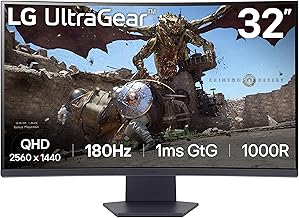
Console-friendly monitors come in flat and curved forms, and the choice is largely personal. The curved Samsung Odyssey G55C and LG UltraGear 32GS60QC wrap the image for immersion, while the flat CRUA 27-inch 4K panel suits those who prefer a traditional look and vertical pivot for versatility. Stands range from basic tilt on budget units to full height and pivot adjustment on the premium models. Build quality is dependable across these picks, with slim bezels that keep the focus on the screen and sturdy bases that won’t wobble when you’re leaning into a match.
Performance
The key spec for Series X owners is how the monitor handles the console’s output. True 4K panels like the CRUA 27-inch UHD and the Amzfast 32-inch 4K deliver the sharpest image at up to 120Hz with HDMI 2.1 and VRR, which is what you want for showcase titles. QHD monitors such as the LG 32GS60QC and Samsung G55C step down in resolution but push high refresh rates at 165Hz to 180Hz, offering buttery motion that many players prefer for fast games. All support FreeSync or VRR to eliminate tearing, and low input lag keeps controls feeling responsive.
Pros & Cons
- 4K up to 120Hz on HDMI 2.1 panels for showcase visuals.
- VRR and FreeSync for tear-free, smooth gameplay.
- Curved and flat options to suit any preference.
- Built-in speakers on several models for a simple setup.
- True 4K 120Hz panels cost more than QHD alternatives.
- HDR is entry-level on most monitors versus a premium TV.
- Built-in speakers are basic, so a soundbar or headset is better.
Alternatives to Consider
If you sit further back and want the biggest picture, a 4K gaming TV with HDMI 2.1 may suit your living room better than a desk monitor. Players who prioritize competitive speed over resolution can save money with a fast QHD panel like the LG 32GS60QC and still enjoy excellent Series X performance. And if desk space is tight, the compact Samsung 32-inch G55C balances size and immersion nicely.
Frequently Asked Questions
Do I need HDMI 2.1 for the Xbox Series X?
For 4K at 120Hz you’ll want HDMI 2.1 or a panel with VRR support. At 4K 60Hz or QHD 120Hz, HDMI 2.0 monitors still deliver a great experience.
Is 4K or high refresh rate better for console gaming?
It depends on the games you play. Choose true 4K for sharp, cinematic single-player titles, or a fast QHD panel for the smoothest motion in competitive shooters and racers.
Does the Series X support variable refresh rate?
Yes. The Series X supports VRR, and pairing it with a FreeSync or VRR monitor eliminates screen tearing for a noticeably smoother image.
Are monitor speakers good enough for console gaming?
Built-in speakers work in a pinch, but they’re small and thin-sounding. A headset or soundbar dramatically improves immersion and positional audio.
Verdict
The best monitor for your Xbox Series X depends on whether you value resolution or speed. For pristine 4K visuals, the CRUA 27-inch UHD and Amzfast 32-inch panels shine with HDMI 2.1, while the LG 32GS60QC and Samsung G55C deliver high-refresh QHD gaming at friendlier prices. Match the panel to your favorite genres and your Series X will look and feel its best.