Key takeaways
- Ignoring Bezel Overlap: When calculating your width, remember that the bezels of the side monitors should overlap behind the center monitor to create a seamless picture. This reduces the total physical width by about 0.5 to 1 inch per side.
- Forgetting the “Swing Radius” of Side Arms: When adjusting or folding your side screens inward to save space when not in use, the arms swing outward before they swing inward. Ensure you don’t place the rig flush against a drywall corner where the metal arms could scrape the paint.
- Underestimating Stand Depth: Many racers focus entirely on width and forget that triple monitor stands require deep support legs (often 30 to 35 inches deep) to prevent the heavy cantilevered side screens from tipping forward.
- Mounting Screens Too Far Away: To get the correct mathematical field of view, your eyes should be positioned close to the center screen (usually 20 to 30 inches away). If your stand forces the monitors too far back, you lose the benefit of the triple-screen perspective.
Building a dedicated sim racing cockpit is the ultimate way to immerse yourself in the virtual driver’s seat. However, before you invest in high-end direct-drive wheelbases and premium pedals, you must tackle the physical reality of your gaming space. The single most common question home editors and interior designers encounter from racing enthusiasts is: how wide is a triple monitor sim rig?
Because triple-screen setups require angled side displays to wrap around your peripheral vision, their physical footprint is much wider than a standard office desk. Balancing your field of view (FOV) with your available floor space requires careful calculation. This comprehensive size guide breaks down the exact dimensions, spatial requirements, and practical tips you need to plan your layout.
Our top picks
 Marada Sim Racing Triple Monitor Stand with
- Ultimate Triple-Screen Immersive Experience: Crafted for professional sim…
- Effortless Mobility and Universal Compatibility: Equipped with 360°…
- A-Frame Stability: The wide, low-profile A-shaped base design…
 Dardoo Sim Racing Triple Monitor Stand with
- 【Versatile Triple Monitor Stand】Triple monitor stand for racing…
- 【Adjustable Height and Angle】The monitor mount is adjustable…
- 【Wide Compatibility】This display stand is compatible with VESA…
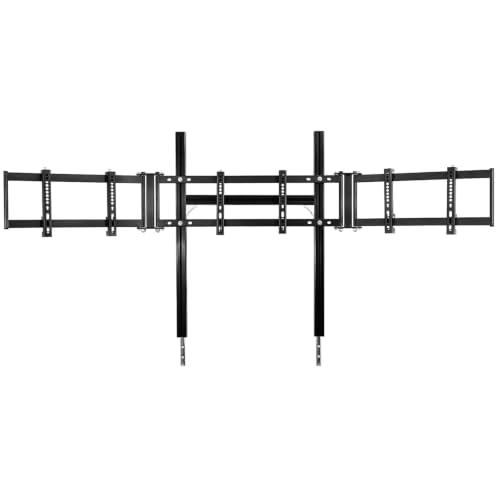 Marada Aluminum Profile 8040 Cockpit Triple Monitor
- Scope of application: only suitable for Marada aluminum…
- Compatible TV Sizes: Single-screen (24–65 inches) or triple-screen…
- Fast Setup: Standardized Kit allow the triple screen…
| Product | Key specs | |
|---|---|---|
| Marada Sim Racing Triple Monitor Stand with | Ultimate Triple-Screen Immersive Experience: Crafted for professional sim… Effortless Mobility and Universal Compatibility: Equipped with 360°… A-Frame Stability: The wide, low-profile A-shaped base design… | Check price |
| Dardoo Sim Racing Triple Monitor Stand with | 【Versatile Triple Monitor Stand】Triple monitor stand for racing… 【Adjustable Height and Angle】The monitor mount is adjustable… 【Wide Compatibility】This display stand is compatible with VESA… | Check price |
| Marada Aluminum Profile 8040 Cockpit Triple Monitor | Scope of application: only suitable for Marada aluminum… Compatible TV Sizes: Single-screen (24–65 inches) or triple-screen… Fast Setup: Standardized Kit allow the triple screen… | Check price |
 Triple Monitor Alignment Tool Sim Racing Angle Triple Monitor Alignment Tool Sim Racing Angle | Helps set side monitor angles for triple display… Includes 55 60 65 and 70 degree options… Works with racing simulator cockpits gaming setups and… | Check price |
As an Amazon Associate we earn from qualifying purchases at no extra cost to you.
The Short Answer
A triple monitor sim rig typically ranges from 44 inches to over 85 inches (112 cm to 216 cm) wide. The exact width depends primarily on two factors: the diagonal size of your screens and the angle at which you position the side monitors.
For a standard setup utilizing three 27-inch monitors angled at a typical 45-degree angle, the overall physical width of the display array is approximately 50 to 55 inches (127 to 140 cm). If you step up to three 32-inch monitors, the width expands to roughly 58 to 65 inches (147 to 165 cm). The cockpit frame itself underneath the screens is much narrower—usually only 26 to 30 inches wide—but the monitors will overhang the sides significantly, defining the true footprint of the rig.
Standard Sizes
To help you visualize how different monitor sizes translate to real-world floor space, we have compiled the standard dimensions for the most popular triple-screen configurations. These calculations assume a standard bezel-to-bezel alignment with side monitor angles set between 45 and 60 degrees.
| Monitor Size (Diagonal) | Side Screen Angle | Total Width (Inches) | Total Width (Metric) | Est. Stand Depth (Inches) |
|---|---|---|---|---|
| 3x 24-Inch Displays | 50° – 60° | 44″ – 48″ | 112 – 122 cm | 24″ – 28″ |
| 3x 27-Inch Displays | 45° – 60° | 50″ – 55″ | 127 – 140 cm | 26″ – 32″ |
| 3x 32-Inch Displays | 45° – 60° | 58″ – 65″ | 147 – 165 cm | 28″ – 35″ |
| 3x 43-Inch Displays | 40° – 50° | 78″ – 86″ | 198 – 218 cm | 35″ – 42″ |
When shopping for mounting hardware, you will find two primary styles of stands. Classic steel tube designs, such as the Marada Sim Racing Triple Monitor Stand with Wheels (priced around $128) or the Dardoo Sim Racing Triple Monitor Stand (priced around $129.99), offer adjustable arms designed to accommodate 24-to-32-inch displays. These units provide a highly flexible footprint and can be adjusted easily.
For maximum structural rigidity, heavy-duty aluminum extrusion stands are the gold standard. Heavy aluminum profile options like the Marada Aluminum Profile 8040 Cockpit Triple Monitor Stand (priced around $115.24) provide an incredibly stable base that prevents screen wobble caused by high-torque direct-drive wheelbases, though they feature a slightly bulkier, squared-off footprint.
How to Measure Your Space
Don’t rely on guesswork when placing a massive triple-screen array in your home. Follow these steps to ensure a flawless fit before purchasing your displays and mounts:
- Determine Your Target Side-Monitor Angle: The angle of your side monitors dictates both your virtual field of view and the physical width of the rig. Steeper angles (e.g., 60 degrees) pull the edges inward, making the rig narrower but deeper. Shallower angles (e.g., 45 degrees) widen the footprint. Using a specialized tool like a Triple Monitor Alignment Tool Sim Racing Angle Guide (available for about $28.99) helps you set and maintain these angles perfectly during assembly.
- Calculate the True Monitor Span: To calculate the exact width, measure the physical horizontal width of one monitor (not the diagonal screen size). Multiply that width by the cosine of your side-monitor angle, multiply that result by two, and add the width of the center monitor.
- Measure the Stand’s Outer Footprint: Remember that monitor stand legs often flare outward or slide underneath your chassis. Ensure your floor space can accommodate the footprint of the stand’s base, which is typically 30 to 40 inches deep.
- Plan for Elbow and Access Clearance: You cannot place a 55-inch wide rig in a 55-inch wide alcove. You need at least 6 to 12 inches of open clearance on at least one side of the rig to climb in and out of the bucket seat comfortably without knocking your screens out of alignment.
- Account for Cable and Power Brick Clearance: Three gaming monitors require three sets of power and display cables. High-performance screens can draw 50W to 100W each (150W to 300W total), requiring chunky power adapters. Leave 3 to 4 inches of clearance behind the center monitor mount for cable routing and power strip placement.
By Room or Use Case
Where you plan to install your racing simulator dictates the ideal size of your rig. As we look ahead to the advanced display technologies of 2026, finding the right spatial balance is more critical than ever.
The Dedicated Sim Cave or Spare Bedroom
If you have a dedicated room or a large basement, you have the freedom to prioritize immersion over space-saving. In this scenario, a triple 32-inch setup mounted on a heavy-duty aluminum profile stand is highly recommended. With a total physical width of roughly 62 inches, this setup fills your peripheral vision beautifully. Pair it with a freestanding stand placed directly behind your wheelbase to isolate your screens from any physical vibrations generated by your steering rack.
The Shared Home Office or Multi-Purpose Room
When your racing rig has to share space with a home office desk or guest bed, versatility is key. A triple 27-inch setup is the sweet spot here, keeping your total width around 52 inches. To keep the room multi-functional, opt for a stand equipped with lockable caster wheels, such as the Marada steel tube stand. This allows you to roll the entire display array against a wall or into a corner when it is not in use.
The Tight Corner or Closet Setup
If you are squeezing your simulator into a small apartment corner or a walk-in closet, space is at an absolute premium. A triple 24-inch setup is your best option, keeping your width under 48 inches. To minimize the footprint even further, set your side monitors to an aggressive 60-degree angle. This creates a compact, wrap-around cockpit cockpit that minimizes horizontal space while maximizing your vertical field of view.
Common Sizing Mistakes
Avoid these common pitfalls when designing and placing your triple monitor setup:
- Ignoring Bezel Overlap: When calculating your width, remember that the bezels of the side monitors should overlap behind the center monitor to create a seamless picture. This reduces the total physical width by about 0.5 to 1 inch per side.
- Forgetting the “Swing Radius” of Side Arms: When adjusting or folding your side screens inward to save space when not in use, the arms swing outward before they swing inward. Ensure you don’t place the rig flush against a drywall corner where the metal arms could scrape the paint.
- Underestimating Stand Depth: Many racers focus entirely on width and forget that triple monitor stands require deep support legs (often 30 to 35 inches deep) to prevent the heavy cantilevered side screens from tipping forward.
- Mounting Screens Too Far Away: To get the correct mathematical field of view, your eyes should be positioned close to the center screen (usually 20 to 30 inches away). If your stand forces the monitors too far back, you lose the benefit of the triple-screen perspective.
FAQ
Can I use a triple monitor stand on a standard wooden desk?
While you can find desk-clamp triple mounts, they are generally not recommended for large sim racing monitors. Three 27-inch or 32-inch monitors, plus the steel mounting arms, can easily weigh 40 to 60 pounds. This concentrated weight can bow or crack standard particleboard desks. A freestanding floor stand is much safer and completely isolates your screens from steering wheel vibrations.
How much does a complete triple monitor stand setup weigh?
A heavy-duty steel or aluminum profile stand weighs between 30 and 50 pounds on its own. When you add three 32-inch gaming monitors (weighing roughly 12 to 15 pounds each), the total display assembly weighs 66 to 95 pounds. Combined with a steel cockpit chassis, direct-drive motor, and a driver, the entire rig can apply 250 to 400 pounds of localized pressure to your floor.
What is the ideal angle for a triple monitor sim rig?
The most common and optically accurate angles are between 45 and 60 degrees. A 45-degree angle provides a wider, shallower screen array, while a 60-degree angle curves the screens tightly around your head for maximum peripheral immersion. Setting the correct angle depends on your distance from the center screen; your eyes should ideally be equidistant from all three panels.
Do I need an integrated or a freestanding triple monitor mount?
An integrated mount attaches directly to your cockpit frame, saving floor space and keeping the monitors perfectly aligned with your seat if you move the rig. However, direct-drive wheelbases can transfer intense vibrations into the screens, causing distracting wobble. A freestanding mount sits on the floor completely independent of your seat and wheel, offering superior vibration isolation and easier depth adjustment.