Key takeaways
- Switch mechanism: Mechanical boards use discrete switches — linear Reds on the hot-swappable Redragon, tactile Blues on the K580 — each with a defined actuation point. Membrane boards rely on a single rubber dome sheet that compresses uniformly.
- Durability: Mechanical switches are typically rated for 50–100 million presses and can be individually replaced. Membrane domes soften over roughly 5–10 million presses, and a worn dome usually means replacing the whole keyboard.
- Noise: Membrane is inherently quieter. Blue switches on the K580 are the loudest option here; Red linears sit in the middle; the GEODMAER 65% is the quietest board on this list.
- Feel and consistency: Mechanical keys feel identical from centre to edge. Membrane keys get mushier the further you press from the dome’s centre — noticeable on wide keys like space and shift.
- Anti-ghosting and rollover: True mechanical boards commonly offer full N-key rollover. Good membrane boards cap out lower — the MageGee 80% specifies 19-key rollover, which is plenty for gaming but not unlimited.
- Serviceability: Hot-swap sockets let you change switch type without soldering. Membrane offers no equivalent upgrade path; keycaps are often non-standard too.
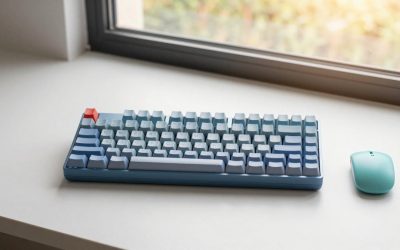
Choosing between a mechanical and a membrane keyboard used to be a question of budget. In 2026 it isn’t. Hot-swappable sockets, factory-lubed linears and double-shot PBT keycaps have all trickled down into the sub-$40 bracket, while membrane boards have answered back with 19-key rollover, volume knobs and per-key RGB that would have been flagship features five years ago. The gap has narrowed — but it hasn’t closed, and the two technologies still fail and succeed in very different ways.
The short version: a mechanical keyboard uses an individual spring-loaded switch under every keycap, so each key actuates independently and can be replaced, lubed or swapped. A membrane keyboard presses a rubber dome onto a printed circuit sheet, which is quieter, cheaper and lighter, but softer and less consistent. Below we compare the most popular options in each camp, then break down which one actually belongs on your desk.
Our top picks
 Redragon Mechanical Gaming Keyboard Wired
- Brilliant Color Illumination- With 11 unique backlights, choose…
- Support Macro Editing: The K671 Mechanical Gaming Keyboard…
- Hot-swappable Linear Red Switch- Our K671 gaming keyboard…
 GEODMAER 65% Gaming Keyboard
- 【65% Compact Design】GEODMAER Wired gaming keyboard compact mini…
- 【Wired Connection】Gaming Keybaord connects via a detachable Type-C…
- 【Strong Working Life】Wired gaming keyboard has more than…
 SteelSeries USB Apex 5 Hybrid Mechanical Gaming
- Hybrid blue mechanical gaming switches
- OLED smart display
- Aircraft-grade aluminum alloy frame
| Product | Key specs | |
|---|---|---|
| Redragon Mechanical Gaming Keyboard Wired | Brilliant Color Illumination- With 11 unique backlights, choose… Support Macro Editing: The K671 Mechanical Gaming Keyboard… Hot-swappable Linear Red Switch- Our K671 gaming keyboard… | Check price |
| GEODMAER 65% Gaming Keyboard | 【65% Compact Design】GEODMAER Wired gaming keyboard compact mini… 【Wired Connection】Gaming Keybaord connects via a detachable Type-C… 【Strong Working Life】Wired gaming keyboard has more than… | Check price |
| SteelSeries USB Apex 5 Hybrid Mechanical Gaming | Hybrid blue mechanical gaming switches OLED smart display Aircraft-grade aluminum alloy frame | Check price |
 Redragon K521 Upgrade Rainbow LED Gaming Keyboard Redragon K521 Upgrade Rainbow LED Gaming Keyboard | 【Dreamy Rainbow Gaming Keyboard】K521 Gaming Keyboard Adopts a… 【One Touch Opens & Visual Feast】The K521 Red… 【Mechanical Feeling & Fast Tapping】The PC Keyboard Keys… | Check price |
 MageGee 80% Gaming Keyboard MageGee 80% Gaming Keyboard | Compact 80% Gaming Keyboard:Save desktop space without sacrificing… Dynamic RGB Backlit Gaming Experience:Enhance your gaming setup… Convenient Volume Control Knob & Multimedia Keys:Adjust volume… | Check price |
 Redragon K580 Wired RGB Mechanical Gaming Keyboard Redragon K580 Wired RGB Mechanical Gaming Keyboard | Record Combos On the Fly, No Software Required… Swap Switches Without Soldering, Hype Clicky Feedback -… Built to Outlast Daily Gaming - Rated for… | Check price |
 AULA F75 Pro Wireless Mechanical Keyboard AULA F75 Pro Wireless Mechanical Keyboard | Tri-mode Connection Keyboard: AULA F75 Pro wireless mechanical… Hot-swap Custom Keyboard: This custom mechanical keyboard with… Advanced Structure and PCB Single Key Slotting: This… | Check price |
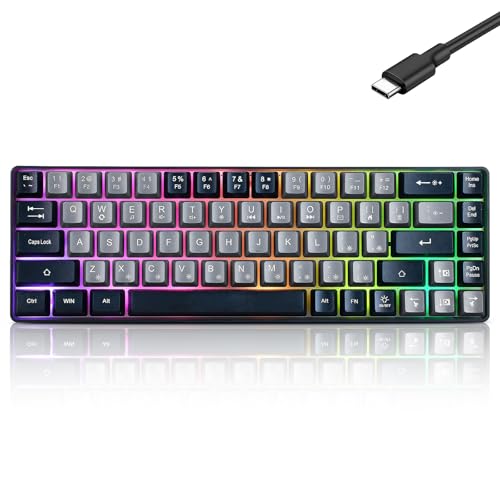 Guiheng Wired Portable 60% Mechanical Gaming Keyboard Guiheng Wired Portable 60% Mechanical Gaming Keyboard | This wired gaming keyboard featured with dust-proof, conflict-free,rainbow… Professional Mechanical feeling Keys, 68 keys compact gaming… all 68 keys are no conflict, allow multiple… | Check price |
As an Amazon Associate we earn from qualifying purchases at no extra cost to you.
⚡ Save on Your Next PC — Amazon Prime
Prime members get fast free shipping on the systems above, plus early access to Prime Day & Black Friday PC deals. New members get a 30-day free trial.
Watch: Mechanical vs Membrane Keyboard: 2026 Guide — Video Review
Quick Verdict
Buy mechanical if you game competitively, type for a living, or want a board that lasts through several PC builds — the Redragon hot-swappable wired board is the best value entry point, the Redragon K580 is the pick for MMO and MOBA players who need macros, and the SteelSeries Apex 5 is the premium hybrid. Buy membrane if you need quiet operation, a small footprint or a low price: the GEODMAER 65% is the compact choice, while the Redragon K521 and MageGee 80% deliver “mechanical feel” without mechanical cost.
Key Differences
- Switch mechanism: Mechanical boards use discrete switches — linear Reds on the hot-swappable Redragon, tactile Blues on the K580 — each with a defined actuation point. Membrane boards rely on a single rubber dome sheet that compresses uniformly.
- Durability: Mechanical switches are typically rated for 50–100 million presses and can be individually replaced. Membrane domes soften over roughly 5–10 million presses, and a worn dome usually means replacing the whole keyboard.
- Noise: Membrane is inherently quieter. Blue switches on the K580 are the loudest option here; Red linears sit in the middle; the GEODMAER 65% is the quietest board on this list.
- Feel and consistency: Mechanical keys feel identical from centre to edge. Membrane keys get mushier the further you press from the dome’s centre — noticeable on wide keys like space and shift.
- Anti-ghosting and rollover: True mechanical boards commonly offer full N-key rollover. Good membrane boards cap out lower — the MageGee 80% specifies 19-key rollover, which is plenty for gaming but not unlimited.
- Serviceability: Hot-swap sockets let you change switch type without soldering. Membrane offers no equivalent upgrade path; keycaps are often non-standard too.
Mechanical Keyboards: Precision, Longevity and Upgrades
The core advantage is repeatability. A mechanical switch actuates at a fixed depth every single time, which is why competitive players tolerate the noise and the weight. The Redragon hot-swappable board demonstrates how far the budget end has come: Red linears for fast repeat presses, genuine anti-ghosting, 11 backlit modes and double-shot PBT keycaps that won’t develop a greasy shine after a year of use. The hot-swap sockets are the real story — you can move to tactiles or silent switches later without touching a soldering iron.
Further up, the Redragon K580 targets MMO and MOBA players with five onboard keybinding buttons, a media wheel and clicky Blue switches. The SteelSeries Apex 5 takes a different route with a hybrid blue switch, an aircraft-grade aluminium frame and an OLED smart display for tracking Discord messages and in-game info. It is the most expensive option here, and the one that feels most like a piece of hardware rather than an accessory.
Membrane Keyboards: Quiet, Compact and Affordable
Membrane’s advantages are practical rather than tactile. These boards are lighter, quieter and cheaper, and they handle spills better thanks to their sealed sheet construction. The GEODMAER 65% is a good example: 68 keys, no-conflict anti-ghosting, a wired connection and a footprint small enough to leave room for wide low-DPI mouse sweeps. For shared spaces, dorms or late-night sessions with someone asleep nearby, it’s the sensible choice.
The category has also learned to borrow. The Redragon K521 offers 104 keys, one-touch rainbow backlighting, dedicated multimedia keys and console compatibility, while the MageGee 80% adds a volume knob and 19-key rollover in a compact layout. Both are marketed on “mechanical feel” rather than mechanical switches — be clear about that distinction before buying. They’re stiffer and crisper than an office keyboard, but they do not replicate a real switch.
Which Should You Buy?
- For competitive FPS: Pick mechanical with linear Red switches — the hot-swappable Redragon board gives you the fastest key resets for the least money.
- For MMO, MOBA and macro-heavy games: Pick the Redragon K580 for its onboard keybinding buttons and media wheel.
- For a premium do-everything desk setup: Pick the SteelSeries Apex 5 — hybrid switches, aluminium frame and OLED display.
- For quiet or shared spaces: Pick membrane, and pick the GEODMAER 65% if desk space is tight.
- For the tightest budget or a console setup: Pick the Redragon K521, or the MageGee 80% if you want a volume knob.
Frequently Asked Questions
Are mechanical keyboards actually faster?
Marginally. The measurable gain comes from consistent actuation and reliable rollover during complex inputs, not raw millisecond speed. Most players notice accuracy improvements before they notice speed.
Does “mechanical feel” mean mechanical?
No. Boards like the Redragon K521 and MageGee 80% use membrane or hybrid dome mechanisms tuned to feel firmer. They’re good value, but they don’t offer switch replacement or mechanical longevity.
Is a 65% layout too small for gaming?
Not for most genres. Compact boards like the GEODMAER drop the numpad and function row, freeing mouse space. If you rely on the numpad for macros or spreadsheets, choose full-size instead.
Are hot-swappable keyboards worth it?
Yes, if you’re new to mechanical. They let you try different switch types for the price of a switch set rather than a new keyboard, which makes them the lowest-risk entry point.
Final Verdict
Mechanical wins on feel, consistency, rollover and lifespan, and in 2026 it costs barely more than membrane at the entry level — the hot-swappable Redragon is the default recommendation for most gamers, with the K580 for macro users and the Apex 5 for enthusiasts. Membrane still earns its place when silence, portability or price is the deciding factor, and the GEODMAER 65% handles that role well. Decide which of those constraints applies to you, and the choice makes itself.