
Our Top Picks
For a gaming PC with a current high-power graphics card, an ATX 3.x power supply is the better choice because it is built to ride out short power spikes and usually ships with a native 12V-2×6 graphics cable; for a mid-range card that uses ordinary 8-pin PCIe plugs, a good ATX 2.4 unit still works well.
What Changed Between ATX 2.4 and ATX 3.0
ATX12V 2.x supplies deliver power on 12V, 5V and 3.3V outputs, a 24-pin motherboard connector, an 8-pin CPU connector, and 6-pin or 8-pin PCIe plugs for graphics cards. ATX 3.0, released in February 2022, was written to meet the demands of newer graphics cards. As summarised in public ATX references, it adds the 16-pin 12VHPWR connector, which can deliver up to 600W to a graphics card in the H+ class, plus sideband signals that let the card and supply negotiate power capability. It also imposes stricter handling of spikes: the supply must manage twice its nominal output for 100 microseconds.

Skytech Gaming King 95 Gaming PC, Ryzen 7 9800X3D, RTX 5080 | | 64GB DDR5 RAM 6000, 4TB Gen4 NVMe M.2 SSD, Windows 11, 850W GOLD ATX 3 PSU, 360 ARGB AIO , Wi-Fi 5, Desktop
Chosen because it specifies Ryzen 7 9800X3D and RTX 5080.
View on Amazon
ADD2PSU Power Supply Connector 4 in 1 Molex 4Pin/SATA/ATX 6Pin/4Pin Dual PSU Multiple Power Supply Adapter, Synchronous Power Board, Add 2PSU with Power LED
Chosen because it specifies Synchronous Power Board and Add 2PSU with Power LED.
View on Amazon
Thsion Individually 8 Pin (6+2 Split) PCIe Cables (Single Connector) Type 4 Gen 4 Only Compatibility with Corsair PSUs – Black
Chosen because it specifies Black.
View on Amazon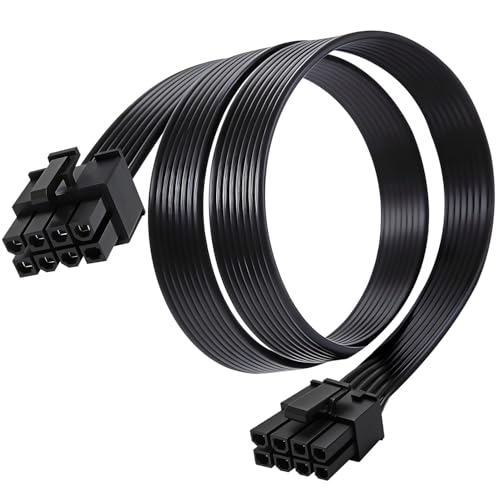
8 Pin GPU Cable for Corsair Type 4 PSU, 25.5 Inch PCIe Power Cable | Low-profile flat design improves cable management and helps create a cleaner PC build with better internal organization.
Chosen because it specifies 25.5 Inch PCIe Power Cable.
View on AmazonATX 3.1 followed. It replaced 12VHPWR with the 12V-2×6 connector and shortened the required hold-up time (how long the supply keeps output stable after losing wall power) from 17 milliseconds to 12 milliseconds, according to the same reference.
Side-by-Side Comparison
| Feature | ATX 2.4 (ATX12V 2.x) | ATX 3.0 / 3.1 |
|---|---|---|
| Graphics power | 6-pin and 8-pin PCIe, each rated for far less than a modern flagship needs | 16-pin 12VHPWR (3.0) or 12V-2×6 (3.1), up to 600W |
| Power spike handling | Not defined for modern GPU excursions | Twice nominal output for 100 microseconds |
| Sideband signalling | None for GPU power negotiation | Data lines for the card to learn the cable’s capability |
| Hold-up time | 17 ms | 17 ms in 3.0; 12 ms in 3.1 |
| Typical native GPU cable | Multiple 8-pin cables | Single 12VHPWR or 12V-2×6 cable included |
| Best for | Mid-range and older builds | Current high-end GPUs and new builds |
Why Spike Handling Matters for Gaming
Graphics cards can pull far above their rated power for fractions of a millisecond when a scene changes sharply. A supply that cannot absorb that surge may trip its overcurrent protection and shut the PC off mid-game. Reviewers have attributed random shutdowns on high-end systems to this behaviour, and the ATX 3.0 spike requirement was written to prevent it. A 2.4 supply that has generous headroom often copes without trouble, but the newer standard is a more reliable guarantee.
Cables and Connectors
An ATX 3.x unit normally includes a single cable ending in 12VHPWR or 12V-2×6 on the graphics-card side. Nvidia lists a native Gen 5 cable rated 450W or more as an option for the RTX 5080 and one rated 300W or more for the RTX 5070 and 5070 Ti, as alternatives to the supplied multi-8-pin adapter. An ATX 2.4 unit needs that adapter and enough free 8-pin plugs. The adapter works, but it adds bulk and more connection points.
Whichever route you take, seat the connector fully until it clicks, avoid sharp bends right at the plug, and follow the graphics card and supply makers’ guidance. If you notice melted plastic or discolouration, stop using the system and contact the maker.
Can You Use an ATX 3.0 Supply in an Older Build?
Yes. ATX 3.x supplies keep the same 24-pin, CPU and PCIe 8-pin connectors, so they work in older motherboards and cases that follow ATX dimensions. Likewise, an ATX 2.4 supply can power a current graphics card through the adapter, provided the wattage and plugs are sufficient. The question is mostly about margin and convenience, not compatibility.
Pick Table
| Pick this if | Choose |
|---|---|
| You are building around an RTX 5080 or higher | ATX 3.1 supply with native cable |
| You have an RTX 5070 class card and a decent 2.4 unit already | Keep the 2.4 supply if wattage and plugs suffice |
| You want fewer cables and a cleaner build | ATX 3.x with native GPU cable |
| You plan to upgrade the GPU within a couple of years | ATX 3.x to avoid replacing the supply later |
| Your supply is old and out of warranty | Replace with a current model regardless of standard |
Common Mistakes
- Assuming the label guarantees quality. Compliance claims should be backed by a maker specification and independent reviews.
- Confusing ATX 3.0 and 3.1 cables. Both connectors look similar; the maker states which is included. Use the cable supplied for your unit.
- Reusing cables from another supply. Modular outputs differ between makers and models, and the wrong cable can damage components.
- Buying on the standard alone. Wattage still needs to match the hardware.
- Bending the cable tightly at the connector. Leave slack and route it with a gentle curve.
Alternatives and Related Options
- ATX 2.4 with an extra-large wattage margin: A workable stopgap for midrange cards.
- ATX12VO: Intel’s 12V-only design, which moves conversion to the motherboard; it is mainly seen in pre-built systems, not typical retail gaming builds.
- SFX-L or SFX supplies: Small form-factor versions exist in both generations.
What the Spike Requirement Looks Like in Practice
The twice-nominal-for-100-microseconds figure is a minimum design target, not a promise of how any specific unit behaves in every case. Makers publish their own claims, and independent reviewers sometimes measure whether units hold stable output during such events. If a unit’s page lists ATX 3.1 compliance, that tells you the maker designed to the newer rules; reading a reputable review adds confirmation about build quality, protections and noise.
Does Hold-Up Time Matter to Gamers?
Hold-up time is how long the supply keeps its outputs in regulation after the wall power briefly drops. A shorter required time in ATX 3.1 (12 ms instead of 17 ms) means the standard allows less stored energy in the capacitors. For a home gaming PC this rarely changes day-to-day behaviour, and a surge protector or UPS is a more practical way to deal with unstable mains power. It is a spec detail rather than a buying driver.
Wattage Still Comes First
The standard does not change how much power your parts need. Nvidia lists 650W for the RTX 5070, 750W for the RTX 5070 Ti and 850W for the RTX 5080 as recommended system power, based on a high-end processor. Choose the wattage tier first, then choose the standard and cable type that best suit your build.
Frequently Asked Questions
Do I need ATX 3.0 for an RTX 50-series card?
Not strictly. Nvidia lists adapters for multiple 8-pin cables, so an ATX 2.4 unit with enough connectors can work. An ATX 3.x supply is simpler and handles power spikes more robustly.
What is the difference between 12VHPWR and 12V-2×6?
12V-2×6 is the revised connector introduced with ATX 3.1, replacing 12VHPWR. It is intended to be a safer, more tolerant design while remaining compatible in shape. Use the cable your supply maker provides.
Is ATX 3.1 backwards compatible?
The motherboard, CPU and drive connectors stay the same, so the supply works in standard ATX builds. The graphics-card cable is the part that differs from older units.
Can an ATX 2.4 supply cause shutdowns with a new GPU?
It can if the supply has too little headroom for transient spikes. Choosing a higher wattage or an ATX 3.x model is the usual fix. If shutdowns persist, contact the supply maker.
Is it worth replacing a working 2.4 supply?
If you are upgrading to a high-end card, probably. If you are keeping a mid-range card and the supply is in good condition, there is little urgency.
FAQ
Can You Use an ATX 3.0 Supply in an Older Build?
Does Hold-Up Time Matter to Gamers?
Do I need ATX 3.0 for an RTX 50-series card?
What is the difference between 12VHPWR and 12V-2×6?
Is ATX 3.1 backwards compatible?
Can an ATX 2.4 supply cause shutdowns with a new GPU?
Is it worth replacing a working 2.4 supply?
More from Amazon
Programs that pair well with the guide above. Offers and eligibility are set by Amazon and may change.
Free shipping on eligible items, Prime Video and more. Eligible new members can start with a free trial.
Start a Prime free trialAd-free music streaming. Eligible new subscribers can start with a free trial.
Try Music Unlimited freeA Prime membership for ages 18-24 with a trial period. Eligibility is set by Amazon.
See Prime for Young AdultsAudiobooks and podcasts to listen to on the go. Eligible new members can start with a free trial.
Try Audible freeAs an Amazon Associate we earn from qualifying purchases.



