
Our Top Picks
For gaming, Gold is the better value pick for most builders, and Platinum only makes sense when the price gap is small or the PC runs long hours under heavy load. The rated difference between the two is about two to three percentage points of efficiency, which in a typical gaming PC works out to roughly ten watts at the wall under load. Frame rates are identical. What you are really buying with Platinum is slightly less waste heat and, often, a stronger platform from a maker that is aiming at the premium end.
Gold vs Platinum numbers
The 80 PLUS program certifies power supplies by how efficiently they convert wall power to DC at set loads. On 115V mains the minimums are as follows.
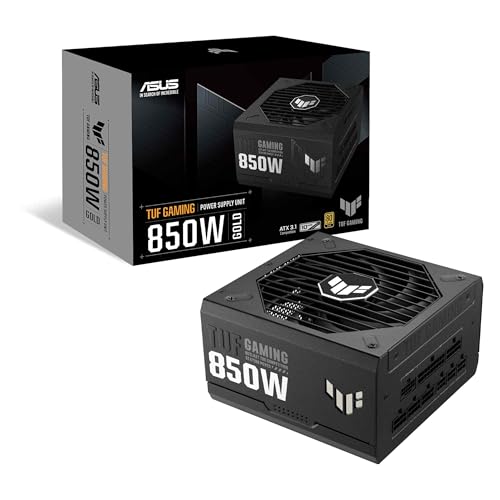
ASUS TUF Gaming 850W Gold Power Supply | 80 Plus Gold, Fully Modular, ATX 3.1, PCIe 5.1, 12V-2x6 Cable, Military-Grade Components, 10-Year Warranty
Chosen because it specifies 80 Plus Gold and Fully Modular.
View on Amazon
NZXT C850 Gold Core - 850W ATX 3.1 Power Supply, 80+ Gold | 850W ATX 3.1 PSU, 80 PLUS Gold and Cybenetics Platinum, fully modular. Quiet, efficient power for gaming builds.
Chosen because it specifies 850W ATX 3.1 Power Supply and 80+ Gold.
View on Amazon
be quiet! Pure Power 12 750W Gaming PSU, 80 Plus Gold, ATX 3.1, 12V-Rail | PCIe 5.1 GPU Support Power Supply, Silent 120mm Fan, LLC Technology, Advanced Stability, Voltage Regulation, 10 Year Warranty
Chosen because it specifies 80 Plus Gold and ATX 3.1.
View on Amazon
Apevia Galaxy 850W 80+ Gold ATX 3.1 Fully Modular Gaming PSU, PCIe 5.1 600W 12VHPWR, Japanese Caps, Silent 135mm FDB Fan, Stable +12V Rail, PSU for RTX 5060/5070/5080/40 Series
Chosen because it specifies PCIe 5.1 600W 12VHPWR and Japanese Caps.
View on Amazon| Load | Gold minimum | Platinum minimum | Gap |
|---|---|---|---|
| 20% | 87% | 90% | 3 points |
| 50% | 90% | 92% | 2 points |
| 100% | 87% | 89% | 2 points |
These are floors that a unit must meet, not guarantees of where a specific model sits. Real units often beat their tier. Also note that the test conditions are room temperature, so a PSU running warm inside a closed case may land lower than its certificate suggests.
What two points of efficiency mean in practice
Take a PC that draws 500W of DC power during a demanding game. At the Gold floor of 90 percent at half load, the wall draw is about 556W. At the Platinum floor of 92 percent, it is about 543W. The gap is around 13W. That is an illustration from the minimum thresholds, not a measurement of any model.
Spread over three hours of gaming a day, 13W comes to about 14 kWh per year. For a typical user, that is a small amount of electricity. The waste heat reduction is also modest. It does not change how hot the GPU or CPU run in any meaningful way, since the PSU’s heat is a tiny part of what the case airflow must handle.
Where Platinum can still make sense
- Long daily uptime. Streaming rigs, workstations, or PCs that stay on and busy for most of the day collect the saving across many more hours.
- Warm or high-electricity-cost locations. Both factors boost the value of every saved watt.
- Quiet builds. Higher-efficiency units are often (not always) built with better fans and thermal design. Look for a separate noise rating or detailed review.
- Premium features. Platinum models are often found in lines that include fully modular cables, longer warranties and stronger protections. These traits come from the product tier, not from the badge itself.
Where Gold is the smarter spend
- Typical gaming hours. A couple of hours of play a day will not repay a premium over many years.
- Tight budgets. The money saved over Platinum can move up a GPU tier, which affects frame rates far more than efficiency does.
- Wide selection. Gold is the most heavily contested tier, with many strong platforms that independent reviewers rate highly.
Decision table
| Situation | Pick | Reason |
|---|---|---|
| Standard gaming PC, a few hours a day | Gold | Efficiency gap is too small to matter |
| Gold and Platinum models cost nearly the same | Platinum | Free efficiency gain |
| PC runs most of the day under load | Platinum | More hours to accumulate savings |
| Budget build where GPU is the priority | Gold | Spend on performance first |
| Very quiet build wanted | Either; check noise reviews | Fan design matters more than tier |
| Small case with limited ventilation | Platinum is a mild plus | Slightly less heat inside the case |
What else to compare before the tier
The 80 PLUS badge says nothing about ripple, voltage regulation, hold-up time or transient handling. These matter for modern graphics cards that can briefly spike well above their average power. Independent labs and reviewers publish such measurements for individual models, and they are a better guide to reliability than the tier. Also compare warranty length, the protections the maker lists, connector availability (including the 12V-2×6 plug for current high-end GPUs) and the PSU depth against your case.
Consider certification verification too. The 80 PLUS program warns that some brands misstate certification, so confirm that the exact model appears in the official certification database. Alternative programs, such as Cybenetics, grade both efficiency and noise with their own scales.
Sizing still comes first
A Platinum unit that is far too large for the PC will run at a low fraction of its capacity, which can reduce its real efficiency. For example, a 1000W unit powering a PC that peaks near 400W will spend a lot of time at light load. Follow the GPU maker’s recommended PSU wattage, add a little headroom for upgrades, and avoid going far beyond that.
Common mistakes
- Assuming Platinum is always better built. A badge is not a quality seal. Read reviews.
- Chasing payback. The efficiency saving rarely covers the premium by itself in light use.
- Oversizing wattage. It adds cost and can lower efficiency at light loads.
- Reusing old modular cables. Cables from other supplies can have different pin layouts and damage components.
- Ignoring connector safety. For 12V-2×6 GPU cables, seat the plug fully and follow the GPU and PSU maker guidance. Stop using a cable that shows heat damage.
- Opening the PSU. Do not open a power supply casing. Capacitors can hold charge after unplugging.
Bottom line
Gold covers the needs of nearly every gaming PC. Platinum is a refinement that earns its place for heavy-use machines or when pricing is close. In both cases, the platform behind the badge decides whether the supply is a good purchase.
Warranty and platform notes
Premium lines that carry a Platinum badge frequently come with longer warranties, but this varies by brand and region, so read the maker’s terms for the exact model. A ten-year warranty on a Gold unit from a respected platform can be a better sign than a shorter warranty on a Platinum one. Also look at the independent review of the specific model: reviewers who use lab equipment publish measured efficiency curves, ripple figures and noise results, and these often show Gold units matching or beating Platinum units from weaker platforms. When in doubt, compare measured data instead of the tier label.
Frequently Asked Questions
Is a Platinum PSU worth it for gaming?
Usually only when it costs about the same as a Gold model or when the PC runs for long hours at high load. For typical use the energy savings are small.
How much more efficient is Platinum than Gold?
The minimum requirement is two to three percentage points higher on 115V mains, depending on the load point. Individual models can exceed the minimum, so check test reports.
Will Platinum make my PC faster?
No. A PSU supplies power; it does not change performance. Any unit with enough wattage and clean power delivers the same frame rates.
Is Platinum quieter than Gold?
Not by definition. Noise depends on fan and thermal design. Some Platinum units run fanless at light loads, but so do some Gold units. Look for a noise rating from independent reviewers.
Do Platinum PSUs last longer?
The badge does not measure lifespan. Longer warranties and better components are found on many Platinum models, but those come from the product line, so read the warranty terms for the exact unit.
Should I choose a higher wattage Gold or a lower wattage Platinum?
Pick the wattage that suits the PC first. Make sure the unit meets the GPU maker’s recommendation, then choose the tier.
FAQ
Is a Platinum PSU worth it for gaming?
How much more efficient is Platinum than Gold?
Will Platinum make my PC faster?
Is Platinum quieter than Gold?
Do Platinum PSUs last longer?
Should I choose a higher wattage Gold or a lower wattage Platinum?
More from Amazon
Programs that pair well with the guide above. Offers and eligibility are set by Amazon and may change.
Free shipping on eligible items, Prime Video and more. Eligible new members can start with a free trial.
Start a Prime free trialAd-free music streaming. Eligible new subscribers can start with a free trial.
Try Music Unlimited freeA Prime membership for ages 18-24 with a trial period. Eligibility is set by Amazon.
See Prime for Young AdultsAudiobooks and podcasts to listen to on the go. Eligible new members can start with a free trial.
Try Audible freeAs an Amazon Associate we earn from qualifying purchases.



