
Our Top Picks
DDR4-3600 is the better pick for a gaming PC when the kit has tight timings and the platform can run it in sync with the memory controller, but the gap over DDR4-3200 is small in most games, so a good DDR4-3200 kit is rarely a mistake. The real answer depends on the timings printed on the kit, the processor you pair it with, and what the two kits cost relative to each other in your market.
Short answer and quick comparison
Both numbers are transfer rates in MT/s. DDR4-3200 is a speed that the memory standard body JEDEC defines, so any DDR4 board and supported processor can run it. DDR4-3600 is above that official ladder, so it runs through an XMP profile on Intel boards or a DOCP/XMP-style profile on AMD boards, and the maker of the processor treats it as a overclock rather than a guaranteed setting.

Silicon Power Value Gaming DDR4 RAM 32GB (2x16GB) 3200MHz (PC4 25600) 288-pin CL16 1.35V UDIMM Desktop Memory Module with Heatsink Grey SU032GXLZU320BDAJ7
Picked as a relevant option in this category.
View on Amazon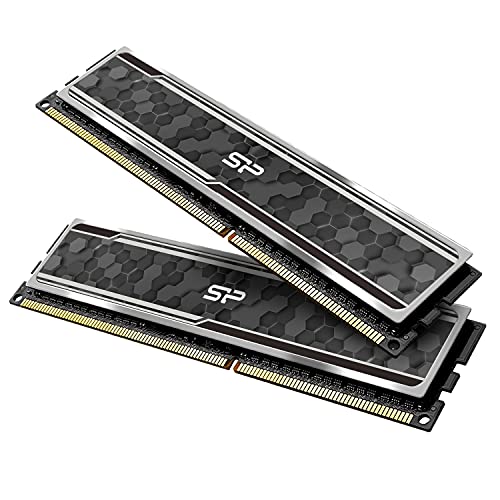
Silicon Power Value Gaming DDR4 RAM 32GB (2x16GB) 3200MHz (PC4 25600) 288-pin CL16 1.35V UDIMM Desktop Memory Module with Heatsink Grey SP032GXLZU320BDAJ7
Picked as a relevant option in this category.
View on AmazonSilicon Power Value Gaming DDR4 RAM 16GB (2x8GB) 3200MHz (PC4 25600) 288-pin CL16 1.35V UDIMM Desktop Memory Module with Heatsink Grey SU016GXLZU320BDAJ5
Picked as a relevant option in this category.
View on Amazon
SP Silicon Power 32GB (2x16GB) XPOWER RGB Turbine Gaming DDR4 3200MHz (PC4 25600) 288-pin CL16 1.35V UDIMM Desktop Memory Module SP032GXLZU320BDB
Picked as a relevant option in this category.
View on Amazon| Point | DDR4-3200 | DDR4-3600 |
|---|---|---|
| Official standing | Top official DDR4 speed in the JEDEC list | Profile-based, outside the official list |
| Typical timings on retail kits | CL16 is the common mainstream rating; CL14 exists in enthusiast kits | CL16 to CL18 is the usual range |
| Real latency (formula below) | CL16 works out to 10 ns | CL18 works out to 10 ns; CL16 works out to about 8.9 ns |
| Best fit | Budget and mid-range builds, plug-and-play stability | AMD Ryzen 3000 and 5000 builds and Intel boards that handle it easily |
| Main risk | Very little | Needs a stable profile; some CPUs and boards will not hold it |
Why the label speed is only half the story
Memory speed and memory timings pull in opposite directions. The first-word latency in nanoseconds can be worked out with a simple formula: multiply the CAS latency (the CL number) by 2000, then divide by the transfer rate. That gives these values:
- DDR4-3200 CL16: 16 x 2000 / 3200 = 10 ns
- DDR4-3200 CL14: 14 x 2000 / 3200 = 8.75 ns
- DDR4-3600 CL18: 18 x 2000 / 3600 = 10 ns
- DDR4-3600 CL16: 16 x 2000 / 3600 = about 8.9 ns
So a loose DDR4-3600 CL18 kit has the same first-word latency as a standard DDR4-3200 CL16 kit, and it only wins on raw bandwidth. A DDR4-3600 CL16 kit is better on both counts. This is why reviewers who compare memory generally tell readers to read the full spec line, not just the headline speed.
Why AMD Ryzen buyers care about 3600
On Ryzen 3000 and 5000 processors, the Infinity Fabric clock (FCLK) that links the CPU chiplets to the memory controller can run in a 1:1 ratio with the memory clock. DDR4-3600 has a real memory clock of 1800 MHz, and many Ryzen chips can hold an FCLK of 1800 MHz. AMD’s own guidance and most reviewers have for years described DDR4-3600 as the practical sweet spot for those chips, because pushing memory faster usually forces the fabric into a slower, higher-latency ratio. DDR4-3200 runs the fabric at 1600 MHz, which is well within what every chip can do, and costs only a small amount of latency by comparison.
For that reason, a Ryzen gamer shopping between the two usually gets a small, measurable benefit from a tuned 3600 kit, particularly when comparing CL16 against CL16. Exactly how large the benefit is varies by game and graphics card, and published results from reviewers show it as a modest single-digit percentage difference in many titles, with some games showing almost nothing.
Intel platforms
On Intel systems that accept DDR4, the picture is different by generation. Older 10th and 11th generation chips have a Gear mode setting that changes how the memory controller clock relates to the memory clock; Gear 1 keeps them 1:1 and has lower latency but sets a ceiling on how fast the memory can run, while Gear 2 allows higher speeds at the cost of latency. On 12th and 13th generation Core processors that use DDR4 boards, DDR4-3600 is generally easy to reach in Gear 1 on a board with a decent memory layout. Check the motherboard maker’s memory support list for the exact kit and speed combination, because the boards vary.
Does the difference show up in games?
Memory speed matters most when the graphics card is not the limit, meaning low resolutions, high refresh rate targets, and strong GPUs. At 1440p or 4K with a mid-range card, the graphics card is the bottleneck, and the gap between 3200 and 3600 is mostly lost in the noise. The 1 percent low frame rates (the slowest frames) are where memory tuning tends to show first, since stutter is often tied to how quickly the CPU can fetch data.
- High refresh esports play at 1080p with a fast GPU: the most likely place to see a difference.
- 1440p high settings with a mid-range GPU: the difference is usually small.
- 4K gaming: the difference is generally not worth chasing.
- Processors with large cache (such as the Ryzen X3D parts): these tend to depend less on memory speed because more data stays in cache.
Decision table: pick this if
| Your situation | Pick | Reason |
|---|---|---|
| Ryzen 3000 or 5000 build, you can choose freely | DDR4-3600 CL16 | Matches the usual 1:1 fabric sweet spot |
| Tight budget and the 3600 kit costs noticeably more | DDR4-3200 CL16 | Cost difference rarely matches the frame-rate gain |
| Older Intel board with limited memory support | DDR4-3200 | Lower chance of boot or stability trouble |
| You want to tune timings manually | Either, with CL14 or CL16 chips | Good chips respond to tuning at both speeds |
| GPU-limited play at 4K | Whichever is cheaper | The graphics card sets the frame rate |
Common mistakes
- Not enabling the profile. A DDR4-3600 kit installed and left alone usually runs at a lower default speed such as 2133 or 2666 MT/s until XMP or the AMD equivalent is switched on in the BIOS.
- Buying single-stick kits. One module means single-channel operation, which cuts bandwidth far more than the 3200 versus 3600 gap. Use two matched modules.
- Chasing the MT/s number and ignoring CL. As shown above, CL18 at 3600 is not faster in latency than CL16 at 3200.
- Mixing kits. Combining different brands or speeds can force the lower speed or cause instability. Buy one kit of the total capacity you want.
- Forgetting the board’s memory list. The motherboard maker publishes a qualified vendor list; check your exact board for the kit.
Alternatives to consider
If you are on a platform that supports DDR5, the better comparison is not 3200 versus 3600 at all, because a DDR5 platform starts at a higher base speed and has its own sweet spots. If you are staying on DDR4, spending the savings from a mid-priced kit on a better graphics card usually helps frame rates more than a memory step. A 32 GB capacity of two matched 16 GB modules is another upgrade many reviewers point to for modern games that use plenty of memory, ahead of a small speed bump.
Frequently Asked Questions
Is DDR4-3600 worth it over DDR4-3200 for gaming?
It is worth it if the price difference is small and the timings are as tight as the 3200 kit. Reviewers generally find a small gain, mostly at lower resolutions with a strong graphics card. If the 3600 kit is much more expensive or has loose timings, DDR4-3200 CL16 is the safer value.
Will DDR4-3600 work on any motherboard?
Most DDR4 boards list support for it, but it runs as an overclock profile and not as a guaranteed official speed. Check the motherboard maker’s memory support list and update the BIOS if the kit will not hold its rated speed.
Can I run DDR4-3600 at 3200 if it is unstable?
Yes. Memory sold as DDR4-3600 can be set to a lower speed in the BIOS, and doing so is a common fix for a crash or boot problem. You can also try a slightly higher memory voltage within the range the kit maker lists, but stay inside the label values.
Is lower CL always better?
Lower CL at the same speed is better. Across speeds, work out the real latency with the formula above, since a higher speed with a higher CL can match a lower speed with a lower CL.
Do I need XMP for DDR4-3200?
Often yes. Although 3200 is in the official list, many boards still default to a lower speed until the profile is switched on, so open the BIOS and check what speed the memory is actually running.
Is 16 GB or 32 GB more important than 3200 versus 3600?
Capacity matters more once a game runs out of memory, since that causes stutter that no speed bump fixes. If your games and background programs use more than 16 GB, a 32 GB kit at 3200 beats a 16 GB kit at 3600.
FAQ
Does the difference show up in games?
Is DDR4-3600 worth it over DDR4-3200 for gaming?
Will DDR4-3600 work on any motherboard?
Can I run DDR4-3600 at 3200 if it is unstable?
Is lower CL always better?
Do I need XMP for DDR4-3200?
Is 16 GB or 32 GB more important than 3200 versus 3600?
More from Amazon
Programs that pair well with the guide above. Offers and eligibility are set by Amazon and may change.
Free shipping on eligible items, Prime Video and more. Eligible new members can start with a free trial.
Start a Prime free trialAd-free music streaming. Eligible new subscribers can start with a free trial.
Try Music Unlimited freeA Prime membership for ages 18-24 with a trial period. Eligibility is set by Amazon.
See Prime for Young AdultsAudiobooks and podcasts to listen to on the go. Eligible new members can start with a free trial.
Try Audible freeAs an Amazon Associate we earn from qualifying purchases.



