Key takeaways
- Strong Prime Day discounts make upgrades across every category more affordable.
- Options for every use, from budget office VA panels to premium 4K IPS.
- Adaptive sync and 100Hz+ on the gaming picks deliver smooth, tear-free motion.
- Ergonomic flexibility on the Dell S2725QS with height, swivel, and pivot adjustment.
What's inside
Prime Day is one of the best windows of the year to upgrade your display, and monitors are reliably among the deepest discounts. But a low price only counts if the panel actually suits your needs — a bargain 60Hz office screen is no help to a competitive gamer, and a pricey high-refresh panel is wasted on someone who mostly writes documents. Knowing what to look for turns a good sale into a genuinely smart purchase.
To help you shop the deals with confidence, we’ve gathered a cross-section of monitors that frequently see strong Prime Day pricing, spanning budget office panels, mainstream gaming displays, and 4K productivity screens. Here’s how they compare and which represents real value.
As an Amazon Associate we earn from qualifying purchases at no extra cost to you. Product prices and availability are accurate as of the date shown and are subject to change.


🎮 Get More From Your Setup — Free
Prime Gaming gives you free PC games every month, in-game loot, and a free Twitch channel sub — plus fast free shipping on all the gear above. New members get a 30-day free trial.
Watch: Prime Day Monitor Deals: Review & Buyer’s Guide — Video Review
Design & Build
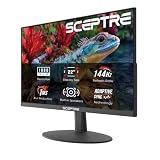
These panels cover a broad spread of sizes and styles. The budget office picks — the Philips 221V8LB and 241V8LB — are clean, no-nonsense FHD VA displays with slim bezels and flicker-free backlighting, ideal for work and study on a tight budget. The Sceptre 27-inch Prime gaming monitor and Samsung Essential S3 curved panel bring a more gaming-oriented aesthetic with frameless designs and, in the Samsung’s case, an 1800R curve for immersion. Stepping up, the Dell S2725QS is the premium option, a 4K IPS panel with USB-C, height adjustment, swivel, and pivot — the kind of ergonomic flexibility the cheaper models lack. Build quality tracks price here, but even the budget Philips units feel solid for the money.
Performance
Match the panel to the task and every one of these makes sense. For gaming value, the Sceptre 27-inch Prime at 100Hz with 1ms response and 100% sRGB is a lot of monitor for the money, and its built-in speakers and FreeSync add convenience. The Samsung Essential S3 curved 100Hz panel is a comfortable pick for mixed gaming and media. The Dell S2725QS is the standout for productivity and creative work — its 4K IPS panel with 120Hz, 99% sRGB, and USB-C connectivity handles detailed work and casual gaming beautifully. The Philips 221V8LB and 241V8LB, at 100Hz FHD, are perfectly capable everyday screens that punch above their bargain pricing for office use and light gaming.
Pros & Cons
- Strong Prime Day discounts make upgrades across every category more affordable.
- Options for every use, from budget office VA panels to premium 4K IPS.
- Adaptive sync and 100Hz+ on the gaming picks deliver smooth, tear-free motion.
- Ergonomic flexibility on the Dell S2725QS with height, swivel, and pivot adjustment.
- Budget panels are basic — 100Hz FHD VA is fine for work but not for serious gaming.
- Deal availability varies, so the best price may sell out quickly during the event.
- Curved VA gaming panels trade a little response speed for immersion.
Alternatives to Consider
If competitive gaming is your priority, look beyond these mainstream picks toward a dedicated high-refresh 144Hz or 240Hz panel, which also frequently discounts during Prime Day. Creative professionals may want a factory-calibrated wide-gamut display rather than a general-purpose 4K screen. But for value-focused shoppers upgrading an aging monitor, the balanced picks here cover office, media, and casual gaming exceptionally well when the deals hit.
Frequently Asked Questions
Are Prime Day monitor deals actually worth it?
Often yes — monitors see some of the deepest discounts of the year during Prime Day. The key is to decide what specs you need beforehand so you buy the right panel rather than just the cheapest one available.
What refresh rate should I look for?
For office and general use, 100Hz is smooth and plentiful. For gaming, 144Hz or higher is ideal, though a 100Hz panel like the Sceptre still feels far better than a basic 60Hz screen for casual play.
Is 4K worth it for a gaming monitor?
4K looks stunning for productivity and media, and the Dell S2725QS at 120Hz handles casual gaming well. But driving 4K at high frame rates in demanding games needs a powerful GPU, so competitive players often prefer faster 1440p or 1080p panels.
Do these monitors have built-in speakers?
Several do, including the Sceptre Prime models. Built-in speakers are convenient for casual use, though they rarely match dedicated desktop speakers or a headset for gaming and media.
Verdict
The best Prime Day monitor deal is the one that matches how you use your PC. For versatile 4K productivity and light gaming, the Dell S2725QS is the standout when discounted. Gamers on a budget should target the Sceptre 27-inch Prime, while the Philips 241V8LB is an unbeatable everyday office pick. Decide your needs first, then let the deals come to you.