Key takeaways
- Latency: Wired and 2.4GHz dongle wireless are effectively tied at around 1ms; Bluetooth adds noticeable lag and is best for productivity, not shooters.
- Power: Wired boards never need charging; wireless models like the TECKNET 4000mAh can run weeks per charge but eventually need topping up.
- Clutter: Wireless clears the desk and travels easily; wired adds a cable but never drops a connection.
- Cost: Wired keyboards are cheaper at a given feature level; wireless commands a modest premium for the battery and radio.
- Flexibility: Tri-mode boards like the Redragon S107KS switch between wired, 2.4G, and Bluetooth, covering every scenario.
- Reliability: A cable is immune to interference; crowded 2.4GHz environments can rarely cause hiccups on budget wireless.
The wired-versus-wireless keyboard debate used to be simple: cables meant zero lag, wireless meant compromise. In 2026 that gap has all but vanished, and choosing between a wired board and a modern 2.4GHz wireless one comes down to your priorities rather than raw performance. The right pick depends on how you value latency, desk clutter, and battery life.
This comparison weighs both sides using real options, from wired boards with metal-panel builds to tri-mode wireless combos like the Redragon S107KS and TECKNET’s 4000mAh rechargeable keyboard. Whether you’re a competitive shooter player or a clean-desk minimalist, here’s how to decide.
Our top picks
 CHONCHOW USB Wireless Gaming Keyboard and Mouse
- 2.4Ghz Wireless Connection----Both the LED wireless gaming mouse…
- Rainbow LED Backlit Keyboard----The rainbow LED gaming keyboard…
- Rechargeable & Long Battery Life----The gaming keyboard is…
 Redragon S101M-KS Gaming Keyboard and Mouse Wireless
- 【Wireless Gaming Keyboard and Mouse Combo】Get rid of…
- 【RGB Gaming Keyboard and Mouse】Turely RGB Backlight with…
- 【4800 DPI Adjustable Gaming Mouse】There are 5 DPI…
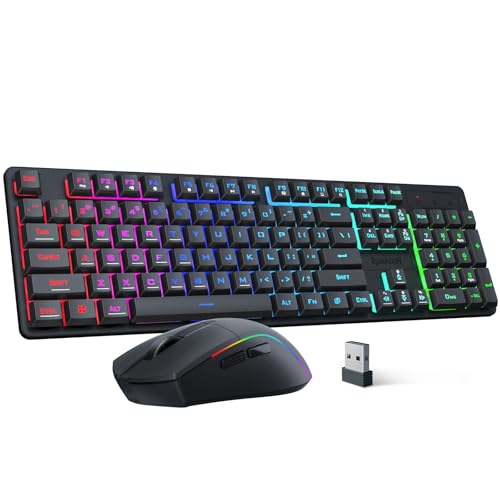 Redragon S107KS Wireless Gaming Keyboard and Mouse
- 【Tri-Mode Wireless Gaming Keyboard and Mouse】The S107KS supports…
- 【DPI Adjustable Gaming Mouse】This wireless gaming mouse supports…
- 【Professional Customised Software Support】S107KS gaming keyboard and mouse…
| Product | Key specs | |
|---|---|---|
| CHONCHOW USB Wireless Gaming Keyboard and Mouse | 2.4Ghz Wireless Connection----Both the LED wireless gaming mouse… Rainbow LED Backlit Keyboard----The rainbow LED gaming keyboard… Rechargeable & Long Battery Life----The gaming keyboard is… | Check price |
| Redragon S101M-KS Gaming Keyboard and Mouse Wireless | 【Wireless Gaming Keyboard and Mouse Combo】Get rid of… 【RGB Gaming Keyboard and Mouse】Turely RGB Backlight with… 【4800 DPI Adjustable Gaming Mouse】There are 5 DPI… | Check price |
| Redragon S107KS Wireless Gaming Keyboard and Mouse | 【Tri-Mode Wireless Gaming Keyboard and Mouse】The S107KS supports… 【DPI Adjustable Gaming Mouse】This wireless gaming mouse supports… 【Professional Customised Software Support】S107KS gaming keyboard and mouse… | Check price |
 Redragon Wireless Gaming Keyboard and Mouse Combo | 【Tri-Mode Connection & Wide Compatibility】Support Bluetooth 5.0, 2.4G… 【Long-Lasting Rechargeable Battery & Power Saving】Built-in 4000mAh keyboard… 【16.8M RGB Lighting 】Boast 16.8 million RGB colors,… | Check price |
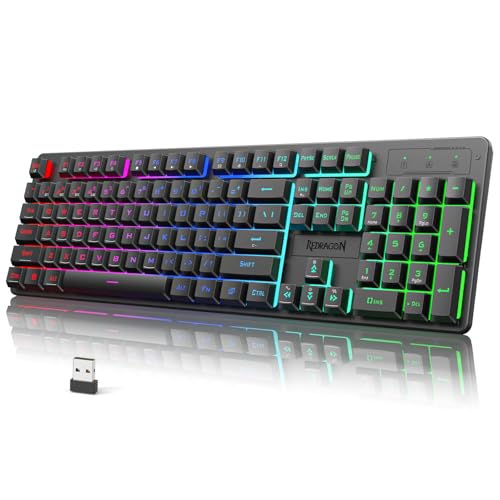 Redragon K521KS Wireless Gaming Keyboard | 【Tri-Mode Connection & 4000 mAh Battery】The K521KS red… 【Fully Programmable Software】The programmable software can edit the… 【RGB Backlit Gaming Keyboard】The K521KS PC Gaming Keyboard… | Check price |
 TECKNET Wireless Gaming Keyboard | 【Switch Between Wired & 2.4G Wireless】Simply plug the… 【4000mAh Rechargeable Battery for Extended Play】Equipped with a… 【15-Zone Rainbow Backlit Keyboard】With 11 backlight modes and… | Check price |
 TECKNET Wired Gaming Keyboard | 【Ergonomic Design, Enhanced Typing Experience】Improve your typing experience… 【15-Zone Rainbow Backlit Keyboard】Customize your PC gaming keyboard… 【Whisper Quiet Design】Experience near-silent operation with our whisper-quiet… | Check price |
As an Amazon Associate we earn from qualifying purchases at no extra cost to you.
⚡ Save on Your Next PC — Amazon Prime
Prime members get fast free shipping on the systems above, plus early access to Prime Day & Black Friday PC deals. New members get a 30-day free trial.
Watch: Wireless vs Wired Keyboard for Gaming — Video Review
Quick Verdict
For most gamers in 2026, a modern 2.4GHz wireless keyboard is the better daily driver. Dedicated dongle wireless like the Redragon S101M-KS or S521KS delivers latency indistinguishable from a cable while removing desk clutter. Pure wired boards still make sense for tournament players who want zero battery worries and the lowest possible cost, such as the TECKNET Wired Gaming Keyboard with its metal panel. Bluetooth-only remains the one mode to avoid for competitive play.
Key Differences
- Latency: Wired and 2.4GHz dongle wireless are effectively tied at around 1ms; Bluetooth adds noticeable lag and is best for productivity, not shooters.
- Power: Wired boards never need charging; wireless models like the TECKNET 4000mAh can run weeks per charge but eventually need topping up.
- Clutter: Wireless clears the desk and travels easily; wired adds a cable but never drops a connection.
- Cost: Wired keyboards are cheaper at a given feature level; wireless commands a modest premium for the battery and radio.
- Flexibility: Tri-mode boards like the Redragon S107KS switch between wired, 2.4G, and Bluetooth, covering every scenario.
- Reliability: A cable is immune to interference; crowded 2.4GHz environments can rarely cause hiccups on budget wireless.
Wireless Keyboards
Modern wireless gaming keyboards have solved the latency problem through dedicated 2.4GHz dongles that poll as fast as a wired connection. A tri-mode board like the Redragon S107KS or the K521KS gives you 2.4G for gaming, Bluetooth for a tablet or laptop, and a USB-C cable as a fallback, all in one device. The TECKNET 4000mAh model shows how far battery tech has come, running for weeks between charges.
The trade-offs are real but small: you pay a bit more, you eventually recharge, and the very cheapest wireless boards can suffer interference in radio-crowded rooms. For the freedom of a cable-free desk and the ability to reposition your keyboard freely, most players find that worthwhile, especially with RGB combos like the Redragon S101M-KS bundling a mouse.
Wired Keyboards
Wired keyboards remain the choice for players who want absolute simplicity and the lowest cost. There is no battery to manage, no dongle to lose, and no interference to worry about. A board like the TECKNET Wired Gaming Keyboard with its metal-panel design delivers rock-solid response and durability at a price that’s hard to match wirelessly.
The obvious downside is the cable, which adds desk clutter and limits how far you can move the board. Competitive players often accept that because a wired connection guarantees consistent 1ms input with zero chance of a battery dying mid-match. If you never move your keyboard and value cost and reliability above all, wired is still an excellent pick.
Which Should You Buy?
- Buy wireless (2.4GHz) if you want a clean desk and the freedom to reposition without sacrificing gaming latency.
- Buy wired if you prioritize the lowest cost, zero maintenance, and guaranteed consistency for tournaments.
- Buy a tri-mode board if you switch between a gaming PC, a work laptop, and mobile devices.
- Avoid Bluetooth-only for competitive shooters, since its latency lags behind dongle wireless and wired.
- Check battery capacity on wireless models, as a 4000mAh cell means far fewer charges than a small one.
Frequently Asked Questions
Is wireless gaming keyboard latency really as good as wired?
With a dedicated 2.4GHz dongle, yes, latency is around 1ms and indistinguishable from a cable in practice. Bluetooth is the exception and adds noticeable lag.
How long does a wireless gaming keyboard battery last?
It varies widely, but a large cell like the TECKNET 4000mAh can run for weeks of daily use, while smaller batteries may need weekly charging, especially with RGB lighting on.
Can I use a wireless keyboard while it charges?
Most tri-mode boards let you plug in the USB-C cable and keep typing in wired mode while the battery refills, so you never lose usable time.
Does RGB lighting drain wireless battery fast?
Yes, backlighting is the biggest power draw. Dimming or turning off RGB dramatically extends runtime between charges on any wireless board.
Final Verdict
The wired-versus-wireless question no longer has a performance answer, only a lifestyle one. A modern 2.4GHz wireless board like the Redragon S107KS or TECKNET’s 4000mAh model gives you cable-free freedom with gaming-grade latency, while a wired keyboard offers unbeatable simplicity and value. Tri-mode designs let you have both. Decide whether desk freedom or zero-maintenance reliability matters more to you, skip Bluetooth-only for competitive play, and either path will serve you well.
FAQ
Is wireless gaming keyboard latency really as good as wired?
How long does a wireless gaming keyboard battery last?
Can I use a wireless keyboard while it charges?
Does RGB lighting drain wireless battery fast?
More from Amazon
Programs that pair well with the guide above. Offers and eligibility are set by Amazon and may change.
Free shipping on eligible items, Prime Video and more. Eligible new members can start with a free trial.
Start a Prime free trialAd-free music streaming. Eligible new subscribers can start with a free trial.
Try Music Unlimited freeA Prime membership for ages 18-24 with a trial period. Eligibility is set by Amazon.
See Prime for Young AdultsAudiobooks and podcasts to listen to on the go. Eligible new members can start with a free trial.
Try Audible freeAs an Amazon Associate we earn from qualifying purchases.