Key takeaways
- Feed the bulky 24-pin ATX cable through the grommet nearest the connector and press it flat.
- Run the CPU EPS power up behind the tray to the top-left cutout so it emerges right at the socket.
- Bring PCIe power to the GPU through the grommet closest to the card, avoiding a taut stretch.
- Keep SATA data and power runs grouped and flat along the back panel edges.
Good cable management is not just about vanity, though a clean build does look fantastic through a tempered glass side panel. Tidy cables improve airflow by keeping the paths clear for your intake and exhaust fans, make future upgrades vastly easier because you can actually reach components, and reduce the dust traps that clumps of loose wire create. A well-managed PC runs a few degrees cooler and stays that way.
The good news is that cable management is a skill anyone can learn in an afternoon with cheap tools: some Velcro straps, a bag of zip ties, sleeves for loose runs, and a bit of patience. This guide walks through routing your power, data, and fan cables cleanly, using the space behind your motherboard tray to hide the mess, so your build breathes better and looks the part.
Our top picks
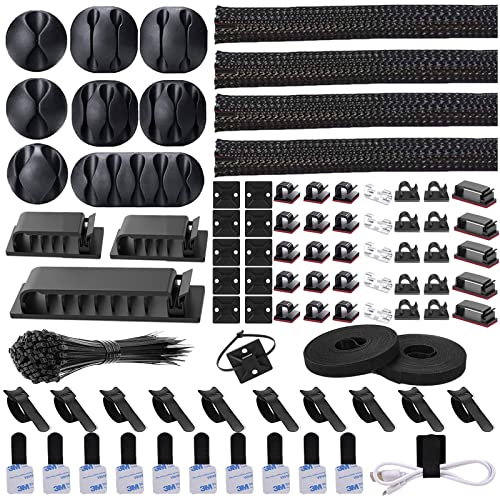 N NOROCME 192 PCS Cable Management Kit
- Cable Management Kit: 4pcs Cable Sleeves( 20 in…
- 6 kinds of Cable Clips:46pcs wire Clips is…
- Premium Material: Made of highly sturdy and quality…
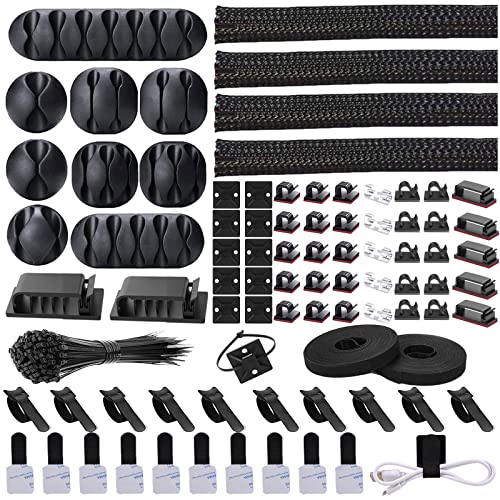 Cord Management Organizer Kit 4 Cable Sleeve
- Cable Management Organizer Kit: This comprehensive kit includes…
- Safety Material: Made of highly sturdy and quality…
- 3 kinds of Black Cable Clips:36pcs wire Clips…
 311Pcs Cable Management Organizer Kit 4 Cable
- Cable Management Kit:4pcs Cable Sleeves( 20 in L…
- 6 kinds of Cable Clips:65pcs wire Clips is…
- Premium Material:The sleeve is made from PET material,…
| Product | Key specs | |
|---|---|---|
| N NOROCME 192 PCS Cable Management Kit | Cable Management Kit: 4pcs Cable Sleeves( 20 in… 6 kinds of Cable Clips:46pcs wire Clips is… Premium Material: Made of highly sturdy and quality… | Check price |
| Cord Management Organizer Kit 4 Cable Sleeve | Cable Management Organizer Kit: This comprehensive kit includes… Safety Material: Made of highly sturdy and quality… 3 kinds of Black Cable Clips:36pcs wire Clips… | Check price |
| 311Pcs Cable Management Organizer Kit 4 Cable | Cable Management Kit:4pcs Cable Sleeves( 20 in L… 6 kinds of Cable Clips:65pcs wire Clips is… Premium Material:The sleeve is made from PET material,… | Check price |
 Alex Tech 10ft | Size: Diameter: 1/2"| Length: 10 Feet | Color:… Operating temp (degree F.):-103 to 257|Melt temp: 446 Our cord protector keeps cat from chewing cables | Check price |
 Sirlyr Black 24-PCS PSU Cable Combs Kit | 【Premium Cable Management Kit】✔️ Includes 24 PCS of… 【Durable & Flexible PP Material】✔️ Made of reinforced… 【Clean PC Builds, Better Airflow】✔️ Eliminates tangled cables,… | Check price |
 80PCS Hook and Loop Cable Ties | Flexible Cord Management: With more and more appliances… Strong Back-Glue: Hook and loop cable clips is… Easy Adjustment: The hook and loop cable clips… | Check price |
 Cable Management Under Desk | 【NO DRILL & INSTANT CLAMP INSTALLATION】 Say goodbye… 【LARGE CAPACITY CABLE MANAGEMENT TRAY】 The 25.3-inch wire… 【PREMIUM METAL WIRE ORGANIZER】 Constructed from high-quality metal,… | Check price |
As an Amazon Associate we earn from qualifying purchases at no extra cost to you.
⚡ Save on Your Next PC — Amazon Prime
Prime members get fast free shipping on the systems above, plus early access to Prime Day & Black Friday PC deals. New members get a 30-day free trial.
Watch: How to Cable Manage Your Gaming PC — Video Review
Plan Before You Plug
The golden rule is to route as much as possible behind the motherboard tray, the hidden channel on the back of your case. Before connecting anything, identify your case’s rubber grommets and cable pass-through holes. Map the shortest clean path from the power supply to each destination: the 24-pin motherboard connector, the CPU EPS cable up top, PCIe power to the GPU, and SATA or storage power.
Route the Big Cables First
- Feed the bulky 24-pin ATX cable through the grommet nearest the connector and press it flat.
- Run the CPU EPS power up behind the tray to the top-left cutout so it emerges right at the socket.
- Bring PCIe power to the GPU through the grommet closest to the card, avoiding a taut stretch.
- Keep SATA data and power runs grouped and flat along the back panel edges.
Bundle and Secure
This is where a cable management kit earns its keep. Use reusable Velcro straps for anything you might change later and zip ties for permanent bundles, snipping the tails flush. Split-loom sleeving tidies loose groups of thin wires into one clean run, and adhesive-backed cable clips let you anchor runs to the case where there are no tie points. Combs on modular PSU cables keep the visible front-of-case wires perfectly parallel.
Manage the Back Panel
The back of the tray will hold most of your slack, so keep it flat enough that the side panel still closes without bulging. Pull excess cable length through and coil it neatly against the panel, strapping the coils down. Most cases include tie-down loops for exactly this. A back panel that shuts easily means you routed it right.
Tips
- Leave a little slack at each connector so nothing is under tension that could work loose over time.
- Do not fully tighten straps until everything is connected and tested, so you can make adjustments.
- Keep cables away from fan blades; a stray wire clicking against a spinning fan is a common noise culprit.
- A desk-mounted cable tray and clips keep external peripheral cords tidy too, extending the clean look beyond the case.
Frequently Asked Questions
Does cable management actually improve temperatures?
Yes, modestly. Clearing loose cables from the airflow path lets intake and exhaust fans move air freely, which can lower component temps by a few degrees and reduces dust accumulation that would otherwise insulate parts.
Do I need a modular power supply for clean cables?
It helps a lot because you only connect the cables you actually use, eliminating a bundle of unused wires. You can still manage a non-modular PSU well by routing the extra cables neatly behind the tray.
Velcro straps or zip ties?
Use both. Velcro is reusable and ideal for anything you may change, like GPU power before an upgrade. Zip ties are cheap and permanent for bundles you will not touch. Cut zip tie tails flush for a clean finish.
What if my case has no room behind the tray?
Older or budget cases have tight rear clearance. Prioritize routing the thinnest cables back there, keep bundles flat rather than stacked, and use the case’s designated channels. If the side panel bulges, redistribute slack to different points.
Conclusion
Cable management rewards a little patience with better airflow, easier upgrades, and a build you are proud to show off. Plan your routes, run the big cables through grommets first, bundle everything with Velcro and sleeves behind the tray, and tame the slack so the panel closes clean. A tidy interior is the finishing touch that turns a pile of parts into a real build.
FAQ
Does cable management actually improve temperatures?
Do I need a modular power supply for clean cables?
Velcro straps or zip ties?
What if my case has no room behind the tray?
More from Amazon
Programs that pair well with the guide above. Offers and eligibility are set by Amazon and may change.
Free shipping on eligible items, Prime Video and more. Eligible new members can start with a free trial.
Start a Prime free trialAd-free music streaming. Eligible new subscribers can start with a free trial.
Try Music Unlimited freeA Prime membership for ages 18-24 with a trial period. Eligibility is set by Amazon.
See Prime for Young AdultsAudiobooks and podcasts to listen to on the go. Eligible new members can start with a free trial.
Try Audible freeAs an Amazon Associate we earn from qualifying purchases.