Key takeaways
- GPU: the biggest driver of gaming performance; an RTX 5060 Ti or RTX 5070 defines the frame rates you will see.
- CPU: handles game logic, physics, and feeding the GPU; a Ryzen 7 or Core Ultra 7 is a strong gaming choice.
- RAM: 16 GB DDR5 is the practical minimum, 32 GB the comfortable target for newer titles.
- Storage: an NVMe SSD for fast loads; 1 TB is a sensible starting capacity.
- PSU and case: a quality power supply sized with headroom, in a case with good airflow.
Building your own gaming PC is one of the most rewarding projects in the hobby. You choose exactly the parts you want, you understand how the machine works, and you can upgrade it piece by piece for years. It can feel intimidating the first time, but a modern build is mostly a matter of matching compatible parts and connecting them in the right order, no soldering, no deep electronics knowledge required.
This beginner’s guide walks through the whole journey: choosing compatible components, the assembly sequence, installing the operating system, and deciding when a prebuilt makes more sense than a DIY build. By the end you will understand the logic behind each step and feel confident either building your own rig or judging whether a prebuilt like the KOTIN RTX 5070 or Alienware Aurora is the smarter buy for you.
Our top picks
 KOTIN Prebuilt Gaming PC RTX 5070 12GB
Built-in 11.3 inch smart display shows live temps and usage
850W 80+ Gold PSU leaves headroom for upgrades
Arrives fully assembled with Windows 11 Home installed
Monitor must connect to the graphics card, not motherboard ports
360mm liquid cooler takes up significant case space
 Alienware Aurora Gaming Desktop
RTX 5070 GPU is built on NVIDIA's Blackwell architecture
Command Center lets you customize lighting and power modes
Includes 1 year of Dell onsite service
At nearly 34 pounds, this tower is heavy to move
1TB storage may fill quickly with modern game libraries
 KOTIN Gaming PC Desktop
- High-FPS Gaming PC Performance: AMD Ryzen 7 8700F…
- 16GB DDR5 + 1TB Gen4 NVMe SSD: 16GB…
- Cool, Clean Gaming Tower Build: A CPU air…
| Product | Key specs | |
|---|---|---|
| KOTIN Prebuilt Gaming PC RTX 5070 12GB | Check price | |
| Alienware Aurora Gaming Desktop | Check price | |
| KOTIN Gaming PC Desktop | High-FPS Gaming PC Performance: AMD Ryzen 7 8700F… 16GB DDR5 + 1TB Gen4 NVMe SSD: 16GB… Cool, Clean Gaming Tower Build: A CPU air… | Check price |
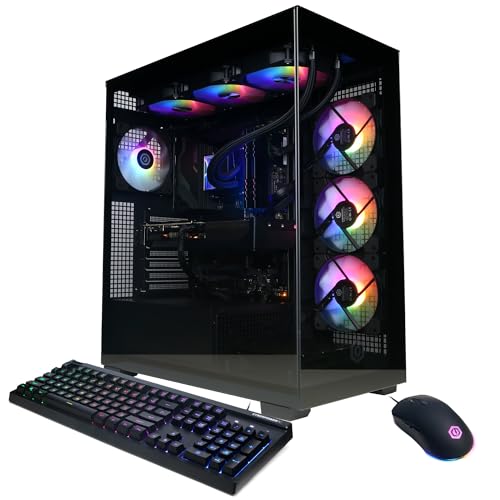 CyberPowerPC Gamer Xtreme VR Gaming PC | System: Intel Core i9-14900KF 3.2GHz 24 Cores |… Graphics: NVIDIA GeForce RTX 5070 12GB Graphics |… Connectivity: 2 x USB-C 3.2 | 4 x… | Check price |
| KOTIN Gaming PC Desktop | Ryzen 7 9800X3D + RTX 5070 Gaming Pc:… Smart Display: The built-in 11.3-inch display can show… Equipped with 32GB (16x2) DDR5 memory and a… | Check price |
 YAWYORE Gaming PC | Check price | |
 suevery Prebuilt Desktop Computer Gaming PC Black | This SUEVERY pre-built gaming PC is equipped with… Memory and Storage: This pre built desktop computer… Lighting Effects and Expansion: Equipped with a customizable… | Check price |
 ZOTAC MEK Gaming PC Desktop | Effortless Gaming: MEK from ZOTAC comes with all… Heart of the MEK: the ZOTAC GAMING GeForce… Powerful Processor: the AMD Ryzen 5 9600X AM5… | Check price |
As an Amazon Associate we earn from qualifying purchases at no extra cost to you.
⚡ Save on Your Next PC — Amazon Prime
Prime members get fast free shipping on the systems above, plus early access to Prime Day & Black Friday PC deals. New members get a 30-day free trial.
Watch: How to Build a Gaming PC (2026 Beginner’s Guide) — Video Review
Plan Compatible Components First
A build lives or dies on compatibility, so plan before you buy. The CPU and motherboard must share a socket; the motherboard and RAM must agree on DDR5; the case must fit the motherboard size and the GPU length; and the power supply must deliver enough wattage for the whole system. If you would rather skip this stage entirely, prebuilt systems like the KOTIN Ryzen 7 9800X3D with RTX 5070 or the CyberPowerPC Gamer Xtreme have already been spec-matched and tested, which is a legitimate path for a first machine.
Understand What Each Part Does
- GPU: the biggest driver of gaming performance; an RTX 5060 Ti or RTX 5070 defines the frame rates you will see.
- CPU: handles game logic, physics, and feeding the GPU; a Ryzen 7 or Core Ultra 7 is a strong gaming choice.
- RAM: 16 GB DDR5 is the practical minimum, 32 GB the comfortable target for newer titles.
- Storage: an NVMe SSD for fast loads; 1 TB is a sensible starting capacity.
- PSU and case: a quality power supply sized with headroom, in a case with good airflow.
The Assembly Sequence
Assemble in an order that keeps components accessible. Install the CPU into the motherboard socket first, then the RAM and the M.2 SSD, since these are easiest to fit with the board outside the case. Mount the CPU cooler, then secure the motherboard on its standoffs inside the case. Install the power supply, drop the graphics card into the top PCIe slot, and finally connect the power cables, front-panel headers, and storage. Working outside-in like this avoids reaching around parts you have already installed.
Install the Operating System and Drivers
Hardware is only half the job. Create a bootable USB installer for your operating system on another computer, plug it in, and boot from it to install. Once you reach the desktop, update the system, then install the latest graphics driver from the GPU maker and the chipset driver from your motherboard vendor. These drivers unlock full performance and stability, so do not skip them. This is one area where prebuilts save time, since machines like the ZOTAC MEK or KOTIN desktops arrive with Windows and drivers already configured.
DIY Build Versus Prebuilt
Both paths are valid; the right one depends on your goals. Building yourself teaches you the machine, often saves money on the same specs, and makes future upgrades painless. A prebuilt such as the Alienware Aurora RTX 5070, KOTIN RTX 5070, or YAWYORE RTX 5060 trades some of that value for convenience, a single warranty, and zero assembly risk, which is appealing if you want to play tonight rather than tinker. If you are unsure of your patience or your parts-matching confidence, a tested prebuilt is a perfectly respectable first step, and you can always build your second PC.
Tips
- Read the motherboard manual before you start; it maps every header and slot you will connect.
- Build on a hard, non-carpeted surface and touch a metal part of the case to discharge static before handling components.
- Do a test boot outside the case with just CPU, one RAM stick, and GPU to confirm parts work before full assembly.
- Route cables behind the motherboard tray as you go, so the finished build stays tidy and airflow stays clean.
Frequently Asked Questions
Is building a PC hard for a beginner?
Not as hard as it looks. The parts only fit where they belong, and there is no soldering. The trickiest part is planning compatible components; the physical assembly is mostly connecting clearly labeled cables in a logical order.
How much can I save by building instead of buying prebuilt?
It varies with market pricing, but a DIY build often matches a prebuilt’s specs for less, and you gain full control over every part. Prebuilts like the KOTIN or CyberPowerPC systems close that gap by bundling assembly, testing, and a single warranty.
What is the most important part for gaming?
The graphics card. It has the largest effect on frame rates, so most builders decide their GPU tier first, an RTX 5060 Ti or RTX 5070, for example, then choose a CPU and the rest of the system to support it.
Do I need to install drivers after building?
Yes. After installing the operating system, add the latest GPU driver and your motherboard’s chipset driver. They unlock full performance and stability, and skipping them is a common cause of poor frame rates on a brand-new build.
Conclusion
Building a gaming PC is a sequence of manageable steps: match compatible parts, understand what each does, assemble from the outside in, and finish with the operating system and drivers. Take it slowly and it is genuinely enjoyable. And if the DIY route is not for you right now, a tested prebuilt is a smart way to start gaming today while you learn, with the option to build your own next time.