Key takeaways
- Buy the GPU tier that matches your monitor’s resolution and refresh rate, no more.
- Aim for 12GB to 16GB of VRAM for comfortable 1440p and 4K gaming.
- Value DLSS or FSR support to keep higher resolutions and ray tracing playable.
- Check card length, power connectors, and PSU wattage before ordering.
What's inside
The graphics card is the single most important part of a gaming PC. It determines your frame rate, the resolutions and settings you can run, and how well your build ages over the next few years. It is also usually the most expensive component, so choosing well means getting the most performance for your money instead of overpaying for capability you cannot use.
This guide walks you through how to pick a GPU in 2026: matching it to your monitor, understanding VRAM and card tiers, weighing features like ray tracing and upscaling, and making sure the card fits your system. By the end you will know exactly which graphics card suits your resolution, budget, and goals.
As an Amazon Associate we earn from qualifying purchases at no extra cost to you. Product prices and availability are accurate as of the date shown and are subject to change.





⚡ Save on Your Next PC — Amazon Prime
Prime members get fast free shipping on the systems above, plus early access to Prime Day & Black Friday PC deals. New members get a 30-day free trial.
Watch: How to Choose a Graphics Card (2026 Guide) — Video Review
Match the GPU to Your Monitor
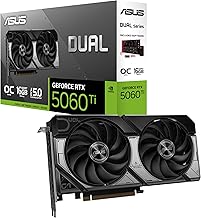
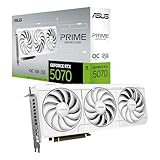
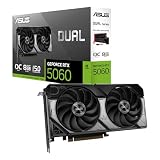
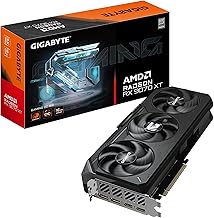
The right graphics card starts with your monitor’s resolution and refresh rate. For high-refresh 1080p and entry 1440p gaming, a card like the ASUS Dual RTX 5060 or the XFX Radeon RX 9060 XT delivers plenty of frames. For high-refresh 1440p, a mid-range card such as the ASUS RTX 5070 or the GIGABYTE RX 9070 XT is the sweet spot, while 4K gaming really wants a high-end card like the ASUS TUF RTX 5080. Buying more GPU than your monitor can display just wastes money.
Understanding VRAM
Video memory (VRAM) holds textures and game data, and modern titles at high settings increasingly demand more of it. For 1080p, 8GB is workable but tight in the newest games; for 1440p and 4K with high textures, 12GB to 16GB gives you comfortable headroom, which is why cards like the RTX 5070 Ti and the RX 9070 XT ship with 16GB. Running out of VRAM causes stutter and forced texture downgrades, so it is worth prioritizing enough of it for the resolution you play at.
GPU Tiers and Where the Value Is
Graphics cards ladder from entry to flagship, and the best value usually sits in the upper-mid range. Entry cards handle 1080p esports; mid-range cards like the RTX 5070 or RX 9070 XT hit the sweet spot for 1440p high-refresh gaming at a sane price; flagship cards like the RTX 5080 target 4K and maximum settings at a steep premium. Decide which tier matches your goals before shopping, so you do not get pulled toward a halo card you do not need.
Ray Tracing and Upscaling Features
Modern GPUs offer more than raw power. Ray tracing adds realistic lighting but is demanding, and upscaling technologies, NVIDIA DLSS and AMD FSR, boost frame rates by rendering at a lower resolution and intelligently scaling up. These features can make higher resolutions and ray tracing playable on mid-range cards, so weigh how much you value them. NVIDIA’s cards traditionally lead in ray tracing and DLSS, while AMD often offers strong raw performance per dollar.
Fit, Power, and Compatibility
Before you buy, make sure the card physically fits and your system can power it. Check the card’s length against your case clearance, confirm your power supply has enough wattage and the right connectors, and ensure your case has room for triple-fan designs. Compact builds may need a smaller SFF-ready card like the ASUS Prime RTX 5070 White. Overlooking these details is a common way a great GPU ends up not fitting the build it was meant for.
Tips
- Buy the GPU tier that matches your monitor’s resolution and refresh rate, no more.
- Aim for 12GB to 16GB of VRAM for comfortable 1440p and 4K gaming.
- Value DLSS or FSR support to keep higher resolutions and ray tracing playable.
- Check card length, power connectors, and PSU wattage before ordering.
Frequently Asked Questions
How much VRAM do I need in 2026?
For 1080p, 8GB works but is tight; for 1440p and 4K with high textures, aim for 12GB to 16GB to avoid stutter and forced quality downgrades in demanding games.
Should I choose NVIDIA or AMD?
NVIDIA typically leads in ray tracing and DLSS upscaling, while AMD often gives more raw performance per dollar. Pick based on which features you value and the price at your target tier.
What GPU is best for 1440p gaming?
A mid-range card like the ASUS RTX 5070 or the GIGABYTE RX 9070 XT hits the sweet spot, delivering high frame rates at 1440p without the steep price of a 4K-focused flagship.
Do I need to check my power supply before buying?
Yes. Confirm your PSU has enough wattage and the correct connectors for the card, and check that it physically fits your case. Overlooking this is a common and avoidable mistake.
Conclusion
Choosing a graphics card in 2026 comes down to matching it to your monitor, securing enough VRAM for your resolution, and buying the tier that fits your goals rather than the flashiest card available. Weigh upscaling and ray tracing features, confirm it fits and your PSU can power it, and you will land a GPU that delivers the frames you want at a price that makes sense.